
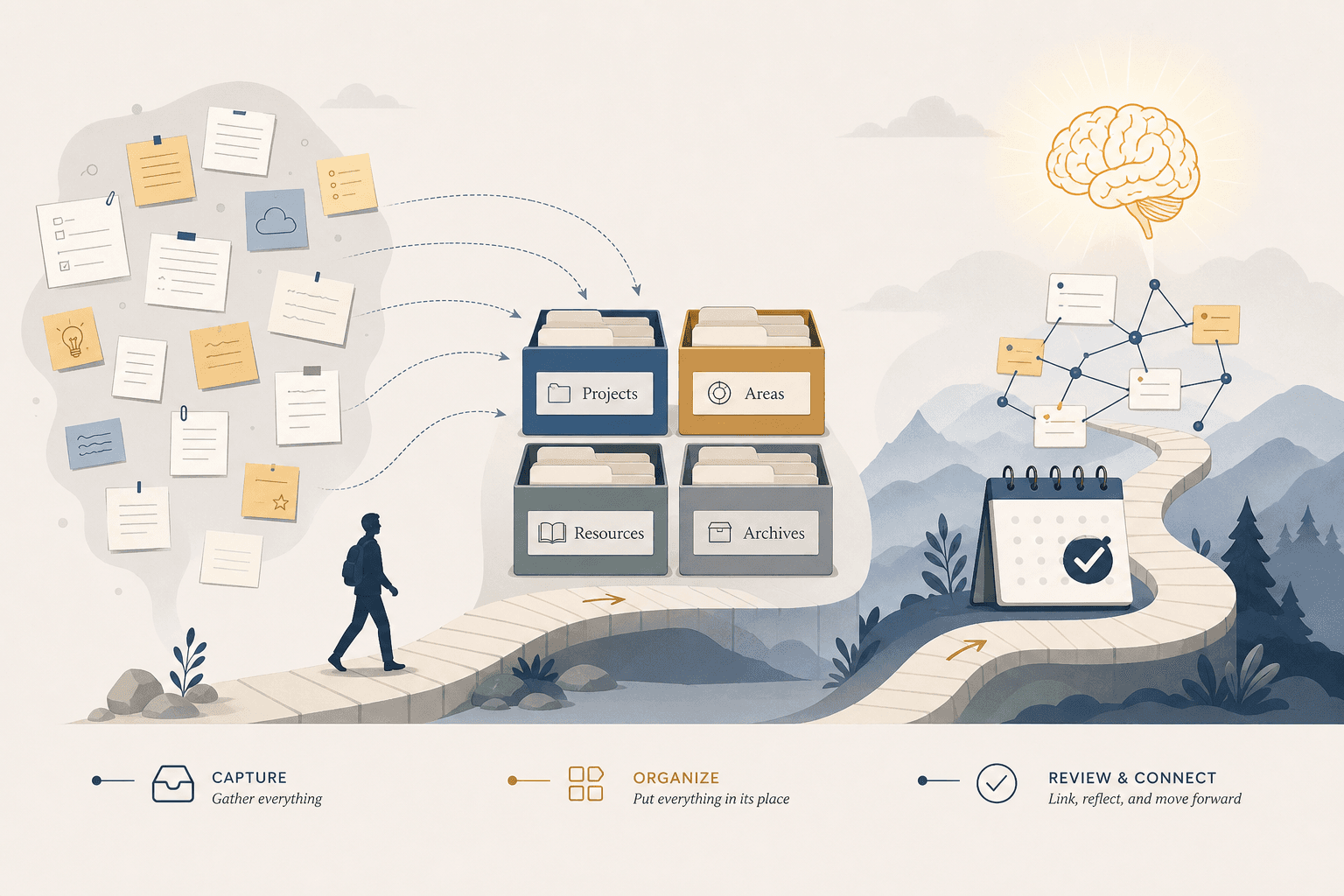
 Concept
How to Build a Personal Knowledge Management System From Scratch: A 30-Day Starter Workflow
A progressive, habit-first guide for beginners overwhelmed by information overload. Instead of designing an elaborate system upfront, this 30-day workflow starts with capture volume, then introduces filing, daily habits, and a weekly review cycle — so your system grows with you, not before you.
Origin: Tiago Forte – Building a Second Brain
By Editorial Team
- PKM
- second-brain
- PARA
- beginner-friendly
- atomic-notes
Why Most PKM Attempts Fail Before They Start
Every personal knowledge management system performs four jobs: capture, organize, retrieve, and synthesize. Miss any one, and the system breaks. Yet the most common beginner mistake is to pour all energy into the second job — organizing — before the first one exists as a habit.
The result is a beautifully structured empty vault. You spend a weekend setting up folders, tags, and templates. By Wednesday you have captured three notes. By the following week you have abandoned the whole thing, convinced that PKM "doesn't work for you." The Atlas guide to PKM puts it plainly: people who tried PKM and bounced almost always over-invested in organize and under-invested in retrieve and synthesize.
This failure pattern is not your fault. The productivity industry sells systems — elaborate folder hierarchies, color-coded tagging schemes, multi-step workflows — because systems look impressive in screenshots. What it does not sell is the unglamorous work of building a capture habit first.
The 30-day workflow below inverts the usual order. You will capture first, organize later. You will build a habit before you build a structure. And by the end of the month, you will have roughly 100 notes, a working filing system, and — most importantly — a routine that keeps the system alive.
Days 1–7: Pick One Tool and Capture 30–50 Starter Notes Without Organizing
Your only goal for the first week is volume. Not quality. Not structure. Not the perfect tool. Volume.
Here is why: a capture habit cannot form when you have nothing to capture. If you start by designing folders, you will spend your limited willpower on decisions that do not matter yet — "Does this go under Resources or Areas?" — instead of on the act of capturing itself. The Atlas guide recommends capturing 30 to 50 starter notes in the first week without any filing or tagging. Just get raw material into your system.
Step 1: Pick one tool (and commit to it for 90 days)
Do not overthink this. Pick the note-taking app you already have installed, or the one with the lowest friction for your primary device. If you genuinely do not know where to start, our best note-taking apps comparison can help you choose. But the specific tool matters far less than the commitment to use it for 90 days without switching. Tool-hopping — switching apps every few weeks chasing a better feature set — is the single fastest way to kill a PKM system before it has a chance to compound.
What to capture in week one:
- Interesting quotes from articles you read
- Ideas that popped into your head during a meeting or walk
- Things you want to remember — a recipe, a recommendation, a fact
- Questions you want to explore later
- Frustrations or observations about your work or life
Do not tag them. Do not file them into folders. Do not link them. Just capture. The notes can be messy, incomplete, and disconnected. That is the point.
Days 8–14: Introduce PARA Filing — Re-File Your Starter Notes Into 4 Buckets
Now that you have raw material, you need a place to put it. PARA — Projects, Areas, Resources, Archives — is the simplest filing system for beginners because it asks only one question per note: "What is this for?"
The four buckets are:
| Bucket | What goes here | Example |
|---|---|---|
| Projects | Things with a deadline or deliverable | Write Q3 report, Plan vacation itinerary |
| Areas | Ongoing responsibilities with no end date | Health, Finances, Career development |
| Resources | Reference material you might use later | Book notes, Research papers, Tutorials |
| Archives | Completed or inactive items from the other three | Finished projects, Old area notes |
Spend days 8 through 10 re-filing your 30–50 starter notes into these four top-level folders. Do not create sub-folders yet. The beauty of PARA is that it is hard to mis-file something across only four categories. A note about a productivity technique you read? Resources. A note about your current project deadline? Projects. A note about your fitness goals? Areas. Done.
Days 11 through 14 are for continuing to capture new notes and immediately dropping them into one of the four buckets. You will make wrong calls — that is fine. PARA is designed to be refiled during your weekly review. The goal this week is not perfection; it is to build the reflex of asking "What is this for?" every time you save something.
Days 15–21: Build the Daily Capture Habit — 3 Things a Day (Read, Did, Thought)
By now you have a tool, a filing structure, and a pile of notes. The next step is to make capture a daily practice rather than a one-week sprint.
The formula is simple: each day, capture three short notes — something you read, something you did, and something you thought.
- Read: A sentence or two from something you consumed — an article, a book, a newsletter, a conversation. Not a summary, just the part that stuck.
- Did: An action you took — a decision you made, a problem you solved, a mistake you caught. This is your personal case study log.
- Thought: An idea, a question, a connection between two things. This is where synthesis begins.
Why this specific structure works: it covers input (read), action (did), and reflection (thought). Most people naturally over-index on one of these three. Knowledge workers tend to capture lots of "read" notes and very few "did" or "thought" notes. The Read-Did-Thought structure forces balance.
Drop each note into one of your four PARA buckets as you write it. If you are not sure which bucket, use Resources as a temporary holding area. The weekly review (coming next) will sort it out.
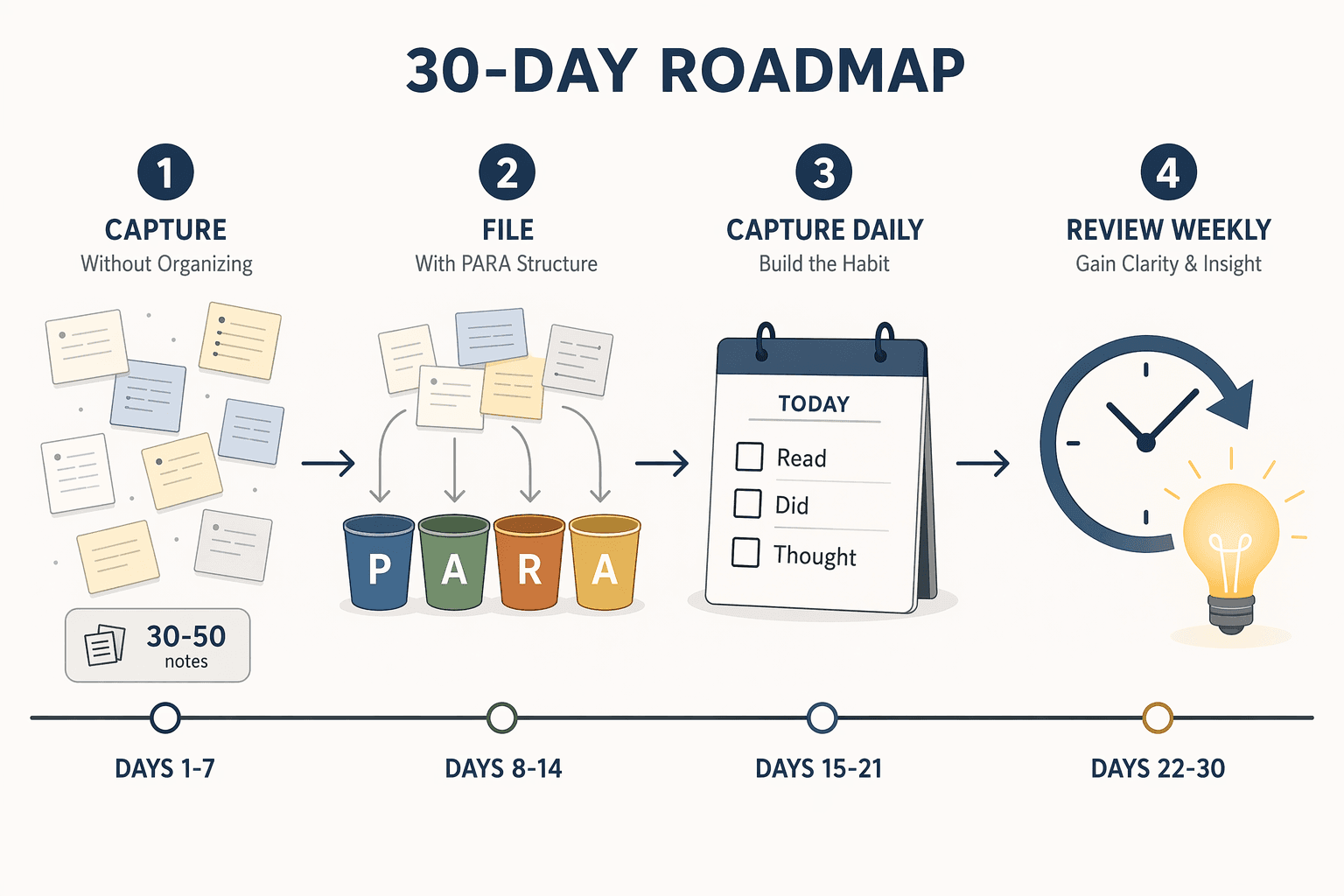
Days 22–30: The Weekly 30-Minute Review Cycle
Capture without review is hoarding. A 2020 study published in the Journal of Knowledge Management from Stanford University's Information Science department found that knowledge workers with structured PKM systems reported 37% higher productivity and 42% greater creative output compared to those without systematic approaches. But those gains come from retrieval and synthesis — not from capture alone.
The weekly review is the engine of retrieval and synthesis. Block 30 minutes on your calendar for the same day each week. During that session, run through this checklist:
- Re-file new notes. Move anything that landed in the wrong PARA bucket. Split long notes into atomic ones if needed.
- Link related ideas. If a note from this week connects to something you captured two weeks ago, add a link or a reference. This is where your knowledge base starts to become more than a collection of isolated facts.
- Archive completed projects. Move any Project notes that are finished into Archives. This keeps your active workspace clean and your attention focused on what is current.
- Surface one idea to write about or act on. Pick one note from the week and expand it into a short piece of writing, a decision, or an action item. This is the "synthesize" job in action.
The first review will feel slow. You will spend most of the 30 minutes just re-filing. That is normal. By the third or fourth review, you will have the rhythm down, and the linking and surfacing steps will start to produce real value.
Month 2 and Beyond: How Compounding Starts
After 30 days, you have roughly 100 notes, a working capture habit, and a simple filing structure. That is the foundation. Month 2 is where the system starts to pay you back.
Compounding happens when retrieval pays off. You search for something and find not just the note you were looking for, but a related note you had forgotten about. You connect an idea from week 2 with an idea from week 5 and see a pattern you would have missed otherwise. That is the moment PKM stops being a chore and starts being an asset.
To support this phase, consider using a structured template to guide your daily capture and weekly review. Our 30-Day PKM Starter System template provides a ready-made framework you can drop into any note-taking app. It includes a daily capture log, a weekly review checklist, and a simple PARA folder structure — everything you need to keep the system running without designing it from scratch.
What to add in month 2:
- Start linking notes more deliberately. When you capture something new, ask: "What existing note does this connect to?"
- Introduce a small set of tags (no more than 10) for cross-cutting themes that PARA does not capture — like #book, #meeting, or #idea.
- Experiment with one advanced method if you feel ready. Zettelkasten for idea generation, or the CODE framework (Capture, Organize, Distill, Express) for creative output.
But do not add anything until the foundation is solid. The single biggest predictor of long-term PKM success is not the sophistication of your system — it is whether you are still using it 90 days from now.
5 Traps That Will Kill Your PKM System (and How to Spot Them Early)
These traps emerge naturally in the first 30 to 90 days. Recognizing them early is the difference between a system that grows and one that gets abandoned.
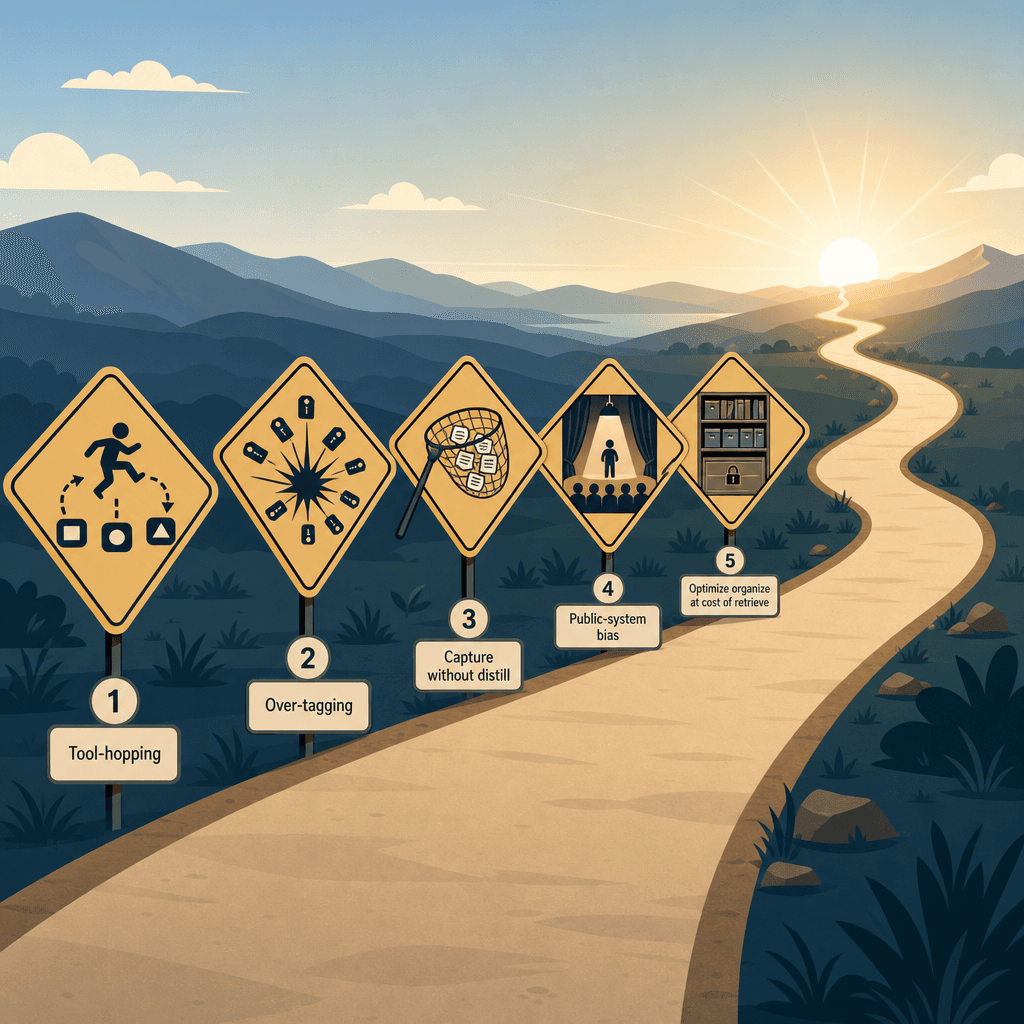
- Tool-hopping. You switch apps every few weeks because the next one promises better features. The fix: commit to 90 days with one tool before evaluating alternatives. The tool is rarely the bottleneck at this stage.
- Over-tagging. You start with 10 tags, then 50, then 200. Tags become useless because no single note has a clear home. The fix: limit yourself to about 10 top-level tags. If a tag has fewer than three notes attached, delete it.
- Capture without distill. You save 100 articles, highlight 5,000 passages, and never re-read any of them. Research cited in the MindSpaceX article suggests that 67% of saved articles and notes are never revisited. The fix: the weekly review. If you are not reviewing, you are hoarding.
- Public-system bias. You copy someone else's elaborate template — 47 folders, 12 databases, 8 linked views — and spend more time maintaining the template than capturing notes. The fix: start with PARA's four folders. Add complexity only when you feel the pain of the current system's limits.
- Optimizing organize at the cost of retrieve. You spend hours perfecting your folder hierarchy and tagging taxonomy, but when you need to find something, you cannot. The fix: test retrieval weekly. If you cannot find a note from last week within 30 seconds, your organization system is working against you, not for you.
How to Know When You've Outgrown the Beginner System
The system described in this guide is designed to last 3 to 6 months. After that, you may start noticing signals that it is time to evolve:
- Retrieval becomes slow. You have 500+ notes and the four PARA buckets feel too broad. You spend more than 30 seconds finding a note.
- You want deeper linking. PARA organizes by actionability, but you want to organize by idea and connection — the territory of Zettelkasten.
- You need a specific method for creative work. PARA is great for project management, but if your primary goal is writing, researching, or generating ideas, you may benefit from the CODE framework or a Zettelkasten approach.
- You feel the limits of your current tool. Not the tool's fault — you have simply outgrown its basic feature set and need bidirectional linking, graph views, or advanced querying.
When you reach this point, outgrowing the beginner system is a sign of success, not failure. You built a capture habit. You established a review routine. Now you are ready for a system that matches your maturity as a knowledge worker.
Our PKM method-tool pairing guide can help you choose the right combination of methodology and tool for your next stage. It maps methods (PARA, Zettelkasten, CODE, Johnny Decimal) to tools (Obsidian, Notion, Logseq, Roam) based on your primary use case — project management, idea generation, research, or creative output.
Comments
Join the discussion with an anonymous comment.