
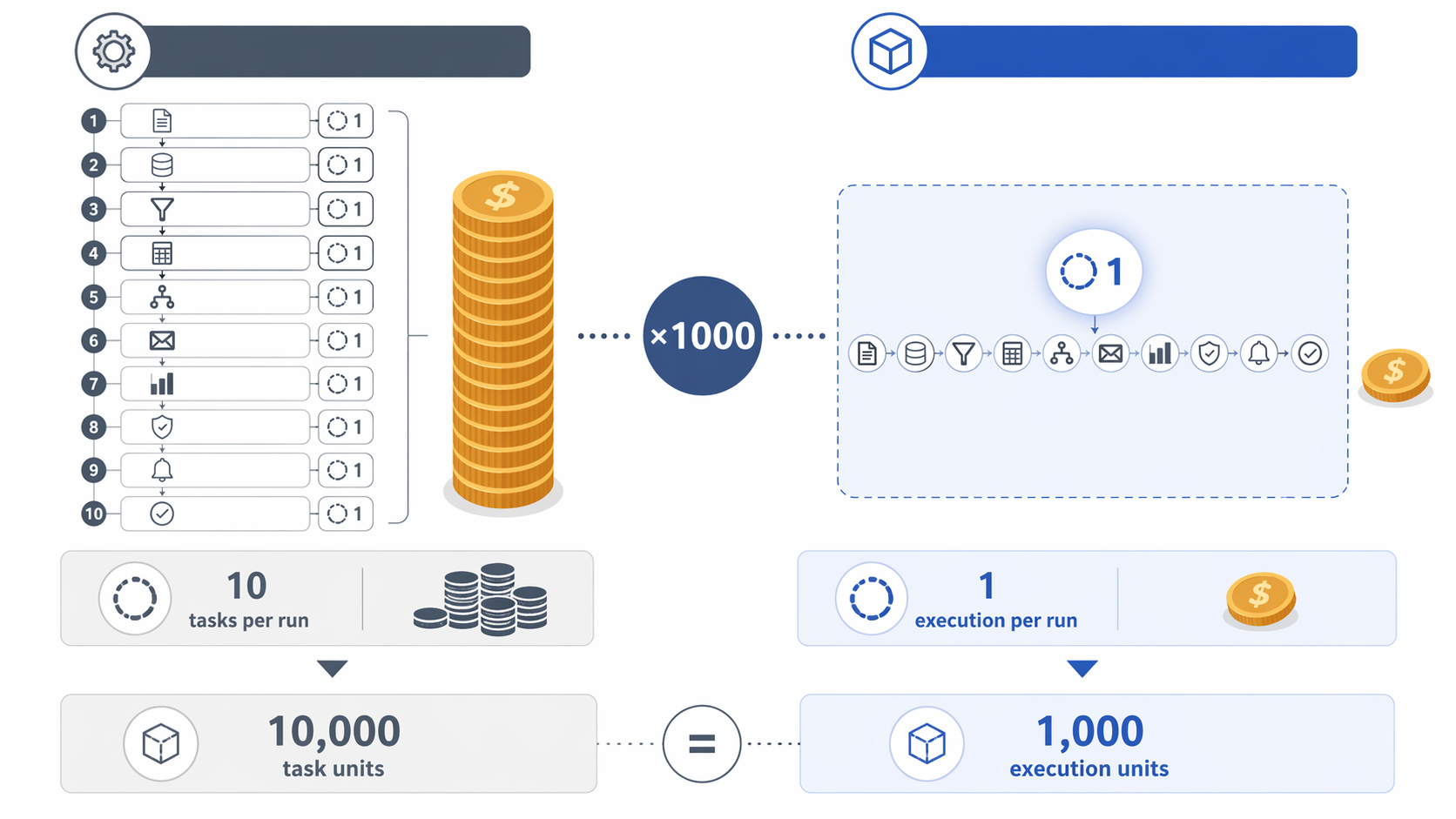
Start with the automation that looks harmless in a demo: one trigger, then ten actions. Maybe it creates a lead record, enriches it, sends a Slack alert, updates a spreadsheet, assigns an owner, writes to the CRM, sends an email, logs a task, notifies finance, and stores the payload. Run that workflow 1,000 times in a month and the billing math changes the comparison immediately. In Zapier, that pattern can consume 10,000 tasks. In n8n, the same pattern can count as 1,000 executions. That is the difference between paying for every step and paying for every completed run.[1][2]
That is why the best workflow automation tools in this comparison are not separated mainly by who has the longest connector list or the newest AI assistant. Zapier is still the easiest recommendation when a nontechnical team needs quick, low-volume automations and broad app coverage. Make is attractive when visual branching matters and the team wants a lower-cost way to experiment. n8n becomes much more compelling when workflows are high-volume, technically flexible, or subject to stricter data-control requirements.
Pricing figures and plan details change often. The pricing-related figures below were last verified from the cited sources on June 26, 2026; check the official pricing pages before signing a contract or migrating production workflows.
The pricing model matters before the feature list
A low-volume automation and a high-volume automation can look identical in a workflow editor. They do not look identical on an invoice. Zapier’s task-based model is easy to understand when workflows are short: each action that successfully runs consumes a task. Zapier’s own 2026 workflow automation overview lists plans starting at $19.99 per month for 2,000 tasks and emphasizes its large connector catalog and approachable automation builder.[1]
That model becomes more sensitive as workflows get longer. A five-action workflow that runs 1,000 times may consume about 5,000 tasks. A ten-action workflow that runs 1,000 times may consume about 10,000 tasks. The person building the automation may experience that as one workflow. The billing system may experience it as thousands of individual actions.
n8n’s execution-based model changes the shape of that calculation. In the same 10-step, 1,000-run example, n8n counts completed workflow runs rather than each individual step, so the usage lands at 1,000 executions instead of 10,000 tasks.[2] That does not automatically make n8n cheaper for every team; hosting, setup time, maintenance, and technical ownership still count. But it does mean long workflows and repeated runs are penalized differently.
| Scenario | Zapier task-based count | n8n execution-based count | Why it matters |
|---|---|---|---|
| 10-step workflow runs 100 times | About 1,000 tasks | About 100 executions | Small enough that ease of setup may matter more than billing efficiency |
| 10-step workflow runs 1,000 times | About 10,000 tasks | About 1,000 executions | The pricing architecture starts to matter |
| 10-step workflow runs every business day across several teams | Task usage rises with every action in every run | Execution usage rises with completed runs | Longer workflows become easier to justify on execution-based pricing |
Make sits between those instincts. Third-party comparison sources place Make’s entry pricing as low as $9 per month and describe it as a lower-cost, visual alternative for teams that want more control than a simple trigger-action chain without moving fully into self-hosted automation.[3][4] Its pricing should still be checked against current official plans, but the practical appeal is clear: it gives budget-conscious builders a canvas where branching and routing feel natural earlier.
Quick fit: Zapier, Make, and n8n in one pass
| Platform | Best fit | Pricing logic to watch | Workflow style | Connector position |
|---|---|---|---|---|
| Zapier | Nontechnical teams that need fast setup and broad SaaS coverage | Task-based billing; long multi-step workflows can become expensive at volume | Linear trigger-action paths, with newer AI-assisted building | 8,000+ pre-built connectors[1] |
| Make | Teams that want visual branching and lower-cost experimentation | Lower entry pricing in comparison sources, but usage details need current verification | Visual canvas with routers and scenario-style design | Roughly 1,500–2,000 integrations in comparison sources[3][4] |
| n8n | Technical teams, high-volume workflows, regulated data, or custom API work | Execution-based cloud billing or free self-hosting option | Node-based workflows with code, HTTP, AI, and self-hosting flexibility | 1,000+ native connectors plus HTTP and node flexibility[2] |
Connector count still matters. If a team depends on a niche SaaS tool and Zapier already has a polished connector for it, that can save hours or days. Zapier’s 8,000+ integrations are a real advantage for quick adoption.[1] But connector count should not be treated as the whole decision. Once the main systems are covered, the harder questions are usually: How many times will this run, how many steps does it contain, who can maintain it, and where does the data go?
Zapier: fastest path to a working automation
Zapier is the tool I would still hand to a busy operations manager who needs a form submission to create a CRM record, notify a sales rep, and add a calendar reminder by the end of the afternoon. Its biggest strength is not that it can do everything; it is that many people can get something useful running without waiting for engineering.
The platform’s 8,000+ pre-built connectors reduce the number of awkward API detours a small team has to make.[1] The trigger-action mental model also helps new builders understand cause and effect. When the workflow is short, the volume is modest, and the apps are standard business tools, Zapier’s task billing may be perfectly acceptable.
The weak point appears when a “quick Zap” becomes a business process. Multi-step workflows, looping logic, frequent polling, and department-wide adoption can all turn a friendly automation layer into a recurring cost center. That does not make Zapier a bad choice. It means someone should estimate task consumption before the workflow becomes invisible infrastructure.
Zapier’s 2026 AI additions, including Copilot and Agents, also lower the barrier to creating automations through natural-language instructions.[1] That helps with the blank-page problem. It does not remove the need to understand task consumption, permissions, ownership, or what happens when the person who created the automation leaves the company.
Make: better when the workflow needs a map
Make earns its place when the workflow is easier to reason about visually than as a long vertical chain. Branching, routing, filters, and multi-path scenarios are central to its appeal. For teams that think in diagrams, the canvas can make the workflow’s logic easier to inspect before it breaks.
Its connector catalog is smaller than Zapier’s, with comparison sources placing it around 1,500–2,000 integrations.[3][4] That is still enough for many teams. The difference matters most when a team relies on a less common app, or when a native connector’s quality affects how much custom work is needed.
Make’s lower reported entry pricing also makes it appealing for experimentation.[3][4] A small team can build and test branching workflows without immediately committing to heavier infrastructure. The tradeoff is that visual freedom can become visual clutter. A canvas is helpful when someone maintains it; it is less helpful when every exception becomes another branch that nobody names clearly.
Make’s 2026 AI layer, including Maia and AI Agents, belongs in that same practical category: useful for building and extending scenarios, but not a reason by itself to ignore usage limits, role management, or review processes.[3][4]
n8n: stronger when scale, APIs, or data control drive the decision
n8n is less about giving the least technical person the shortest route to a first automation and more about giving a team room to build workflows that behave like internal systems. It offers 1,000+ native connectors, but the more important detail is the combination of HTTP support, node flexibility, code-friendly customization, execution-based billing, and self-hosting.[2]
That flexibility matters when a workflow touches custom APIs, internal databases, data transformation, or repeated high-volume operations. The team may need someone comfortable with debugging payloads and reading logs. In exchange, they get a platform that is less boxed in by pre-built connector assumptions.
n8n 2.0, released in January 2026, added native LangChain integration, more than 70 AI nodes, and support for self-hosted LLMs.[2] Those additions put it in the same broad AI automation conversation as Zapier and Make, but with a different operational implication: teams can design AI-assisted workflows without necessarily sending sensitive workflow data to a third-party AI API.
The self-hosting option is also the clearest dividing line for regulated or security-conscious teams. n8n is the only one of the three in this comparison positioned around full self-hosting for teams working under HIPAA, GDPR, SOC 2, or similar data-control obligations.[2][5] That does not automatically make a self-hosted deployment compliant; the team still has to configure access, logging, retention, encryption, and vendor review correctly. But it gives the security team a different conversation than “trust our SaaS workspace and the external AI services attached to it.”
Compliance is not a checkbox in the connector directory
Most automation mistakes do not start as security mistakes. They start as convenience. Someone copies a customer note into a spreadsheet because the CRM export was annoying. Someone sends ticket details into an AI summarizer because it saves ten minutes. Someone adds a webhook that nobody documents. Six months later, the question is not whether the workflow was useful. The question is who approved the data path.
For teams with ordinary business data and low regulatory exposure, Zapier or Make may be perfectly reasonable if access controls, shared ownership, and app permissions are handled cleanly. The SaaS model is convenient because the platform handles hosting and much of the operational burden.
For teams handling protected health information, sensitive customer records, financial workflows, or strict contractual data controls, the question changes. The team may need to know where data is processed, whether it leaves its environment, which subprocessors are involved, how logs are retained, and whether AI calls can be kept local. In that situation, n8n’s self-hosting and local-LLM support are not just technical preferences; they are procurement and audit tools.[2][5]
AI helps build workflows, but it should not choose the platform for you
All three platforms now use AI language heavily. Zapier has Copilot and Agents.[1] Make has Maia and AI Agents.[3][4] n8n has LangChain integration, more than 70 AI nodes, and local LLM support.[2] If the only question is whether a platform can assist with AI-powered workflow creation or AI steps inside a process, the answer is no longer very differentiating.
The more useful question is what kind of AI risk the workflow introduces. An AI-generated automation can still misroute data. An agent can still take an action that needs approval. A summarization step can still expose customer content to a service the legal team has not reviewed.
That caution is not theoretical. Gartner predicts that more than 40% of agentic AI projects will be canceled by the end of 2027, citing issues such as escalating costs, unclear business value, and insufficient risk controls.[6] That does not mean teams should avoid AI automation. It means agentic branding should not outrank boring questions like billing unit, approval path, audit trail, and rollback plan.
How to choose without overfitting the comparison
The broader reason this decision keeps coming up is simple: repetitive work is everywhere. One automation statistics roundup reports that 94% of companies perform repetitive tasks that could be automated.[7] But “could be automated” is not the same as “should be automated in the same tool.”
A useful selection order is volume first, then complexity, then compliance, then AI. If a workflow is simple, low-volume, and owned by nontechnical staff, Zapier’s speed can outweigh its task-based meter. If the workflow branches heavily and the team benefits from seeing logic on a canvas, Make deserves a close look. If the workflow is long, frequent, API-heavy, or governed by strict data rules, n8n moves from “more technical option” to the safer architectural bet.
- Choose Zapier if the team needs fast adoption, broad SaaS coverage, and simple automations that will not generate painful task volume.
- Choose Make if the team needs visual branching, lower-cost experimentation, and a clearer canvas for multi-path workflows.
- Choose n8n if high-volume execution, custom API work, self-hosting, local AI models, or regulated data control are central requirements.
If you are still deciding what category of automation you need, a broader use-case comparison such as workflow automation tools compared by use case for knowledge workers or a distinction like no-code vs. enterprise RPA may be a better starting point than forcing a Zapier-Make-n8n decision too early.
References
- The best workflow automation tools in 2026, Zapier
- The 9 best AI workflow automation tools in 2026, n8n
- Versich workflow automation comparison, Versich
- HatchWorks workflow automation comparison, HatchWorks
- Top 10 Open Source Workflow Automation Tools in 2024, Activepieces
- Best AI Workflow Automation Tools, Elementum
- Workflow Automation Statistics and Trends, Kissflow