
Most teams do not start shopping for workflow orchestration tools because they want a new category of software. They start because the handoffs have become hard to trust. A form submission creates a ticket, the ticket updates a spreadsheet, the spreadsheet feeds a billing queue, someone approves an exception, and six months later nobody is sure whether the alert belongs to ops, finance, RevOps, IT, or the person who built the original automation during a quiet Friday afternoon.
That is the point where tool roundups become slippery. Zapier, Make, n8n, Power Automate, Airflow, Prefect, Camunda, Appian, Wrike, Teamwork.com, and several other products can all appear under the same search term. They do not solve the same ownership problem. Some connect apps. Some let business teams design approval flows. Some schedule data jobs. Some run durable, governed business processes with audit trails and exception handling.
The useful first question is not “Which workflow orchestration tool has the most features?” It is “Which tier can reliably own the full process after launch?”
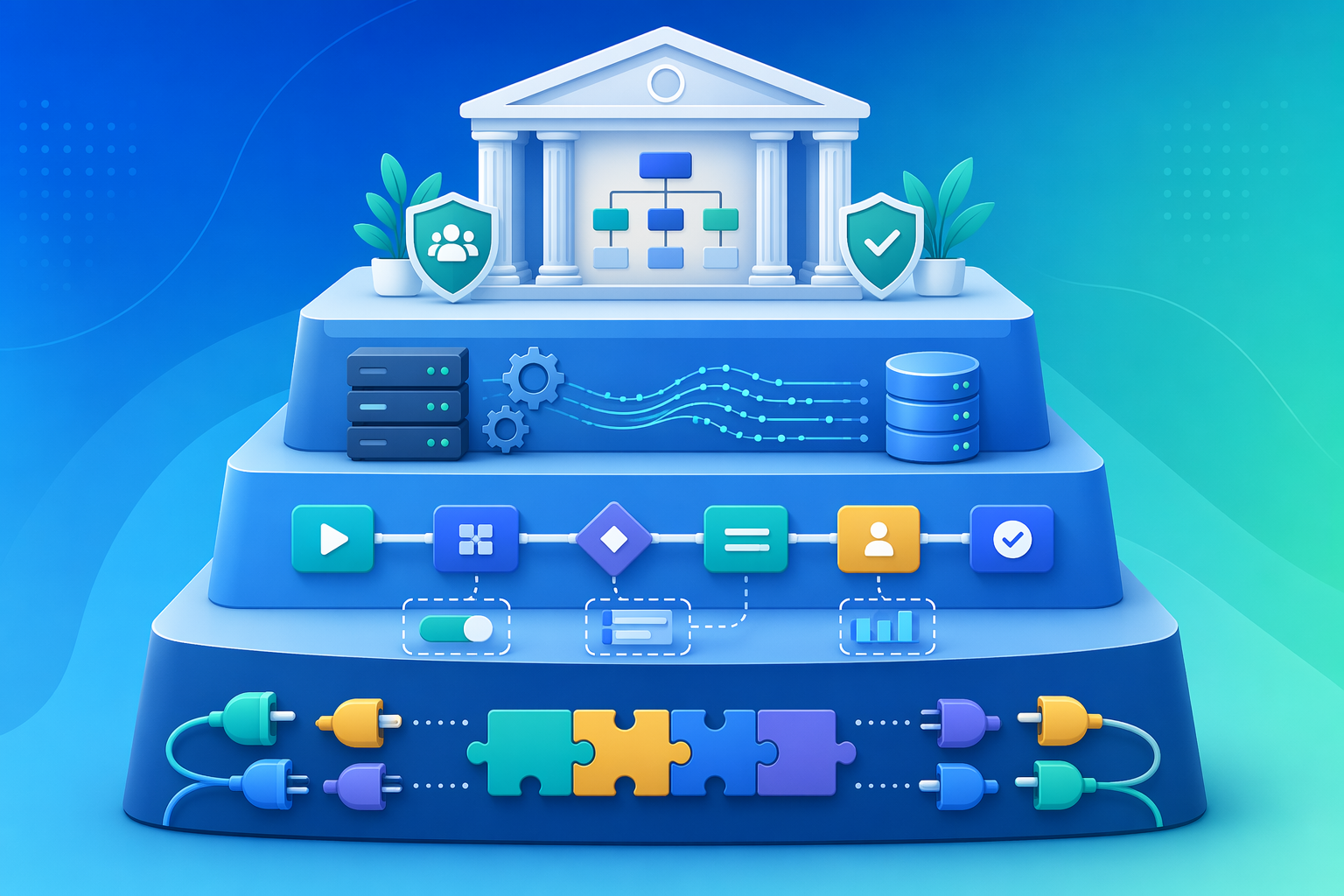
The Four Tiers Behind the Category
Workflow orchestration is growing into a large market. One 2026 market report estimated the workflow orchestration market at $19.36 billion in 2025 and projected it to reach $36.45 billion by 2030, a 13.5% compound annual growth rate; last verified June 28, 2026.[1] That growth explains why so many vendors now use orchestration language. It does not mean every team needs the same class of tool.
The more practical diagnosis is sprawl. Stonebranch reported in its 2026 Global State of IT Automation Report that 89% of organizations manage multiple automation platforms.[2] When teams say they need orchestration, they often mean they need a way to make those scattered automations observable, governed, and maintainable.
| Tier | Typical tools | Best owner | Best fit | Where it strains |
|---|---|---|---|---|
| No-code app connectors | Zapier, Make, n8n Cloud | Ops, admin, analyst, RevOps, solo builder | Cross-app workflows, alerts, lead routing, lightweight approvals, record updates | High-volume multi-record workflows, complex branching, unclear failure ownership |
| Hybrid low-code platforms | Microsoft Power Automate, Celigo, Workato-style integration platforms | Business systems team, IT-supported ops, integration admin | Department workflows that need governance, connectors, approvals, and some technical controls | Teams without platform ownership or admins who can manage permissions and change control |
| Data-pipeline engines | Airflow, Prefect, Dagster-style tools | Data engineering, analytics engineering, platform team | Scheduled jobs, dependencies, retries, data workflows, code-reviewed pipelines | Knowledge-worker workflows that need human approvals, business UI, or nontechnical ownership |
| Enterprise BPM and process suites | Camunda, Appian, Pega-style suites | Enterprise architecture, process excellence, IT, compliance-heavy operations | Long-running processes, auditability, case management, regulated workflows, complex exceptions | Small teams that need speed more than formal process governance |
The boundaries are not perfect. n8n can be self-hosted and used by technical teams. Power Automate can be used for small automations. Camunda can orchestrate developer-owned services. The point of the tiering is not to put every product in a box forever. It is to stop comparing tools that expect different maintainers.
No-Code Connectors: Fast to Launch, Easy to Overload
Zapier, Make, and n8n are usually the first serious stop for knowledge workers. They are popular because the first working version can be built by the person closest to the problem. A sales ops manager can route leads. A support lead can create escalation paths. A founder can connect forms, CRM, email, Slack, and a database without waiting for a sprint slot.
That speed is valuable. It is also where many teams confuse task automation with process ownership. A clean prototype answers, “Can these apps talk to each other?” A production workflow has to answer different questions: who monitors failures, who changes the logic when the CRM field changes, who pays when volume doubles, and who explains the workflow to the next person.
Zapier remains the easiest fit when the workflow owner is nontechnical and the workflow is mostly app-to-app automation. Its connector ecosystem and approachable builder make it a sensible default for small teams that value time-to-launch over fine-grained control. The tradeoff is billing exposure when workflows become multi-step and record-heavy.
Make is often stronger when a team wants visual control over branching, routers, and scenarios. It can feel more like a workflow canvas than a simple trigger-action chain. That helps when the process has several paths, but it also means someone has to understand how those paths interact when a scenario fails halfway through.
n8n is the flexible option in this tier, especially for teams that want more technical control or self-hosting. It can be run as a cloud product or operated by the team itself. That makes it attractive when Zapier spend has started to sting, but the word “self-hosted” should not be treated as a discount code. It moves work from the vendor bill into someone’s operational queue.
The Pricing Trap Shows Up at Volume
The cleanest way to see the difference is a 10-step workflow processing 1,000 records. In one published comparison, that workload is counted as 10,000 tasks in Zapier, one execution in n8n Cloud, and 10,000 operations in Make. The same logical workflow can land against very different pricing meters: Zapier’s example maps to a $49/month plan, n8n Cloud to a $20/month plan, and Make to a $9/month plan in that comparison.[3]
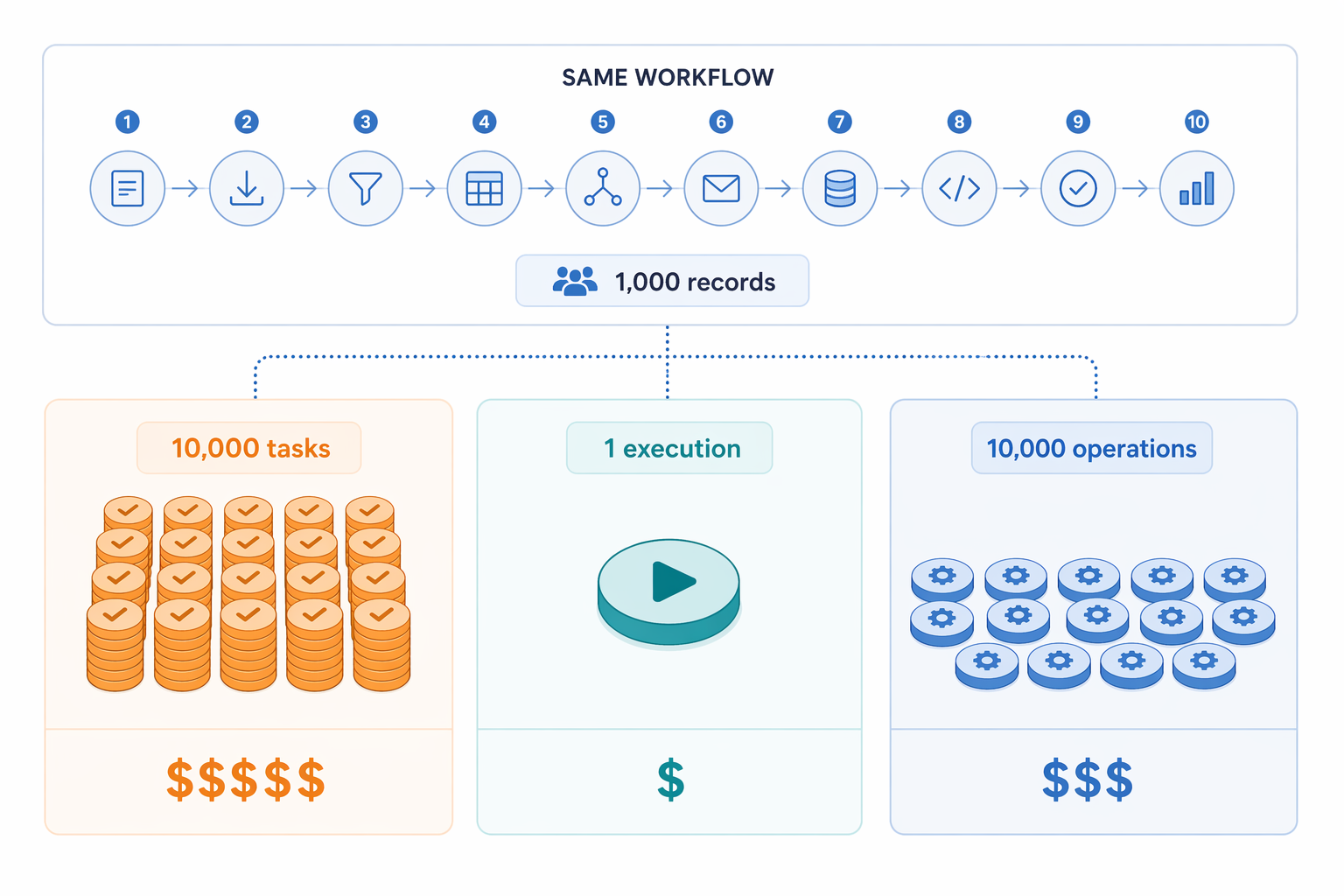
Those prices should not be read as a permanent universal ranking. Plans change, add-ons matter, and real workflows include errors, polling, retries, filters, and premium connectors. The lesson is narrower and more durable: billing units matter as much as feature lists. A tool that is cheap for one-step alerts can become expensive when each record passes through many actions.
Open-source economics have the same catch. One 2026 analysis put the self-hosted n8n break-even point against Zapier at roughly $80 to $100 per month of Zapier spend, provided someone on the team can maintain the server.[4] That condition carries most of the sentence. If the team already has a developer or systems-minded operator who can handle hosting, upgrades, credentials, logs, and recovery, self-hosting can make sense. If not, the “free” path may simply hide a support obligation inside a person’s week.
For teams comparing this tier in detail, the useful shortlist is simple: choose Zapier when the maintainer is nontechnical and speed matters most; choose Make when visual branching and scenario control matter more; choose n8n when flexibility, self-hosting, or technical customization justify the maintenance burden.
Hybrid Low-Code Platforms: Where Governance Starts to Matter
The next tier is for teams that have outgrown personal automations but are not trying to run a developer-owned pipeline platform. Microsoft Power Automate is the most common example for organizations already deep in Microsoft 365 and Dynamics. Celigo and similar integration platforms often appear when business systems, ecommerce, ERP, CRM, and finance workflows need more structure than a lightweight connector can comfortably provide.
This tier is less about whether a workflow can be built and more about whether it can be governed. Who can publish flows? Which credentials are shared? Can changes be reviewed? Can admins see failures across departments? Can IT enforce policy without becoming the builder for every small process change?
Vendor roundups from The Digital Project Manager, Teamwork.com, Enate, Elementum, and Wrike all include broad coverage of orchestration and workflow-management tools, but their category boundaries vary because several of those publishers are also vendors or commercially adjacent to the space.[5][6][7][8][9] Their listings are useful for discovering products. Their “best for” labels need to be checked against your maintainer, your volume, and your governance requirements.
Hybrid low-code tools are a good fit when the workflow is owned by a business systems function rather than a single enthusiastic builder. They are also a better fit when approvals, permissions, and auditability matter, but the process still needs business users close to the design. They are a poor fit when nobody has been assigned platform administration. Low-code without ownership becomes another layer of automation sprawl.
Data-Pipeline Engines: Excellent for Jobs, Awkward for Human Process
Airflow, Prefect, and similar tools belong in a different conversation from Zapier-style app automation. They are built for scheduled, dependency-aware workflows, usually expressed as code and maintained by data or platform teams. If a job must run after another job, retry on failure, expose logs, and move data through controlled stages, this tier is often the right one.
Where teams get into trouble is using a data orchestration tool as a substitute for a business process tool. A pipeline engine can coordinate tasks beautifully, but it will not automatically give a customer success manager a pleasant approval interface, a finance admin an exception queue, or an operations lead a no-code place to update routing rules. Those can be built around it, but then the team is building an internal product, not just configuring a workflow.
This tier is strongest when the workflow owner is technical and the work product is data, infrastructure, or backend execution. It is weaker when the workflow is mainly a sequence of human decisions across departments. A data team can own retries and dependency graphs. It should not be expected to become the help desk for every approval step that sales, finance, and operations disagree about.
Enterprise BPM Suites: Heavyweight for a Reason
Enterprise BPM and process orchestration suites such as Camunda, Appian, and similar platforms are built for durable processes that need formal ownership, audit trails, exception handling, and integration with enterprise systems. They make sense when the process is important enough that a broken handoff is not just annoying; it creates compliance, customer, financial, or operational risk.
This is the tier for long-running workflows, complex approvals, case management, and processes that must survive personnel changes. It is also the tier most likely to punish a small team that only needed reliable app automation. The platform may be capable of far more than the team can govern, configure, and justify.
Procurement comfort and executive familiarity do matter here. A large organization may choose a suite because it fits security review, vendor management, compliance, and enterprise architecture standards. Those are real constraints, even when a smaller tool could produce a faster prototype. The mistake is pretending those constraints are product features. They are organizational requirements.
AI Workflows Still Need Ordinary Ownership
AI has made orchestration sound more urgent, but it has not removed the basic operating questions. Stonebranch reported that only 21% of organizations have deployed AI workflows at enterprise scale, identifying orchestration and governance as the bottleneck rather than AI capability itself.[2] That distinction matters. A model can draft, classify, summarize, or route. A production workflow still needs permissions, retries, auditability, cost controls, human review points, and someone accountable when an output is wrong.
For most knowledge-worker teams, “AI-ready” should not outrank maintainability. If the workflow cannot be explained without the original builder in the room, adding AI usually increases the number of places where judgment can disappear. Start with the orchestration layer: what triggers the work, what context is passed, where a human reviews, where the result is stored, and how exceptions are handled.
A Practical Shortlist by Team Situation
The best workflow orchestration tool is usually the one whose failure mode your team can actually handle. A polished demo does not tell you who receives the alert at 7:30 on Monday morning or who updates the workflow after a field name changes.
| Your situation | Start with | Reason |
|---|---|---|
| A nontechnical team needs to connect SaaS apps quickly | Zapier, Make, or n8n Cloud | The workflow owner can build and adjust the process without waiting for engineering. |
| A small team has rising task costs and some technical capacity | n8n Cloud or self-hosted n8n | Execution-based pricing and self-hosting may help, but only if maintenance is assigned. |
| A department needs approvals, permissions, and admin visibility | Power Automate, Celigo, or another hybrid low-code platform | Governance and platform administration matter more than fastest initial setup. |
| A data or analytics team needs scheduled jobs with dependencies | Airflow, Prefect, or a similar pipeline engine | Code-based orchestration fits retry logic, logging, and data workflow ownership. |
| A regulated or enterprise process must survive audits and complex exceptions | Camunda, Appian, or an enterprise BPM suite | Durable process governance is worth the implementation weight. |
A useful buying conversation can be short, but it has to be specific. Name the maintainer before choosing the platform. Estimate volume against the billing unit, not just the monthly starting price. Decide whether self-hosting is an actual capability or an optimistic line in a budget. Separate workflows that move records between apps from workflows that govern a business process over time.
If the unresolved question is whether the team needs orchestration at all, use an orchestration-versus-automation diagnostic before shopping. If the main concern is cost, compare free, paid, open-source, and commercial options by total cost of ownership rather than subscription price alone. If the choice is between no-code and developer-focused tools, decide who will maintain the workflow after the first version ships.
Choose the simplest tier that can reliably own the full process, survive the expected volume, and be maintained by the people actually responsible for it. Anything more is usually platform weight. Anything less becomes a workflow someone inherits without the tools to keep it alive.
References
- Workflow Orchestration Market Report, The Business Research Company, February 2026.
- Global State of IT Automation Report, Stonebranch, 2026.
- n8n vs Make vs Zapier, Digidop, 2026.
- Open Source Workflow Automation Tools, Leland, 2026.
- Workflow Orchestration Tools, The Digital Project Manager, 2026.
- Workflow Orchestration Tools, Teamwork.com, 2026.
- Workflow Orchestration Tools, Enate, 2026.
- Best Workflow Orchestration Tools, Elementum, 2026.
- Workflow Orchestration Tools, Wrike, 2026.