
The fastest way to buy the wrong tool is to treat “workflow automation,” “process workflow software,” and “BPM” as three names for the same thing. They overlap in demos because every vendor can show a trigger, an approval, and a dashboard. They do not overlap when your team has to maintain the process six months later.
Use the category first, then compare products. Zapier, Make, and n8n usually sit in workflow automation. monday.com, Wrike, Kissflow, and ClickUp often fit process workflow software. Signavio, Blue Prism, Pega, and Appian belong closer to BPM. The question is not which one sounds more advanced. The question is what kind of process you are actually trying to control.
| Category | Best shorthand | What it controls | Typical fit | What breaks if you choose it wrong |
|---|---|---|---|---|
| Workflow automation | Trigger-action sequences between apps | Tasks and handoffs | Simple app-to-app workflows across a few people | It becomes a web of fragile automations with no shared process view |
| Process workflow software | A structured work hub | Requests, approvals, routing, status, and ownership | Teams that need repeatable processes without enterprise BPM overhead | It either feels too light for governance or too heavy if the process was only a two-step automation |
| BPM | Lifecycle governance for business processes | Process design, modeling, monitoring, optimization, and compliance across departments | Organizations with dedicated process ownership and enterprise governance needs | It creates implementation cost, adoption drag, and admin burden if the team only needed visibility and approvals |
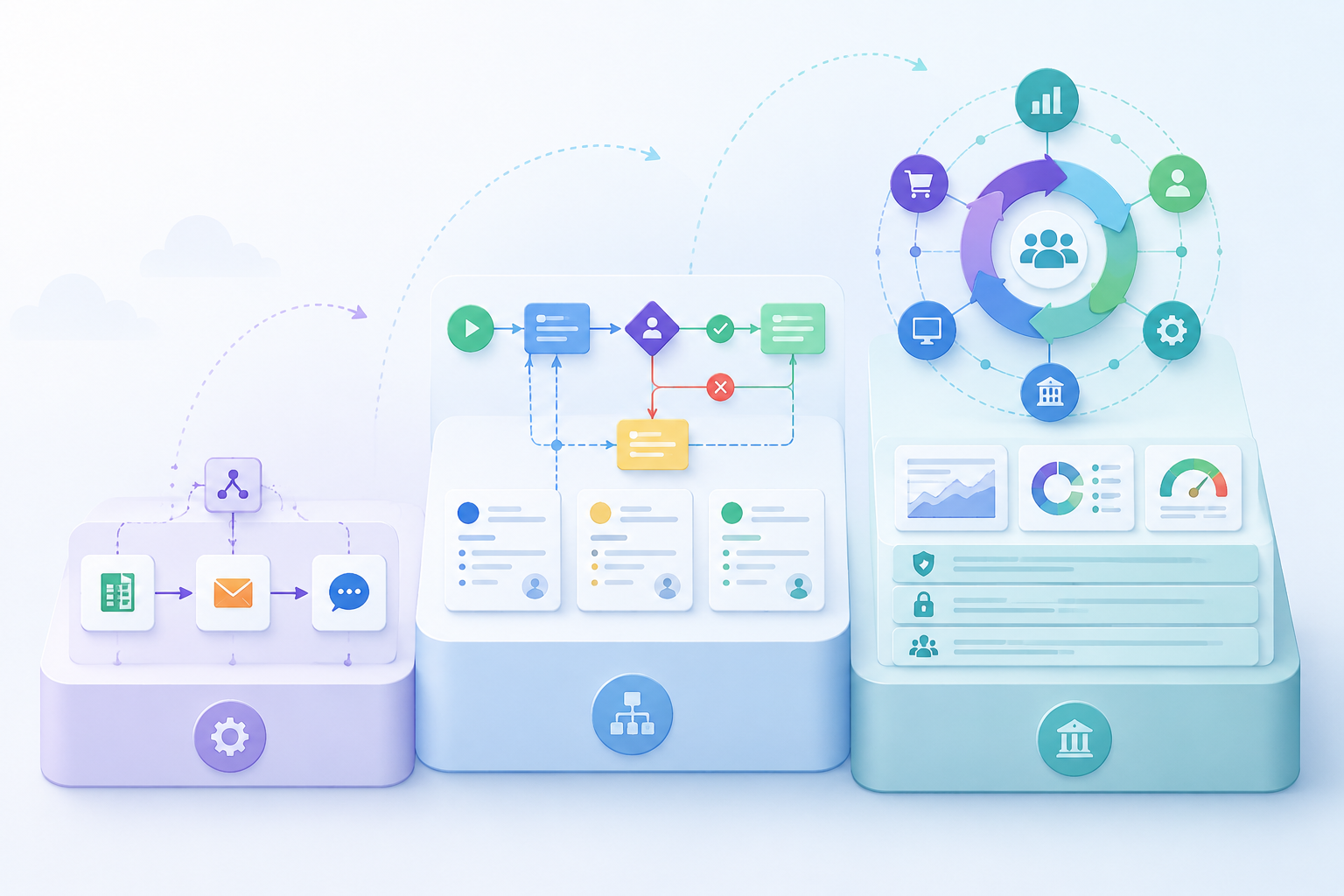
Start With Scope, Not Feature Count
Signavio draws the useful line by treating workflow as a narrower sequence of tasks and BPM as a broader discipline for managing and improving end-to-end business processes.[1] Blue Prism makes a similar distinction: workflow helps move work through steps, while BPM looks at the wider management of processes across the organization.[2] Kissflow’s framing is the most practical for a team lead: workflow is usually about completing a defined sequence, while BPM covers design, analysis, execution, monitoring, and optimization.[3]
That still leaves a messy middle. Many teams do not need full BPM, but they also need more than a trigger that says, “When a form is submitted, create a task.” They need a place where work waits, routes, escalates, gets approved, and leaves an audit trail. That is where process workflow software earns its keep.
The urgency is real. Kissflow cites a Cornerstone study finding that 68% of employees have too much work to handle daily.[3] That number should not be used as a lazy promise that any automation will help. Overloaded teams can be harmed by the wrong software too: more tabs, more exceptions, more “who owns this now?” messages, and more cleanup after a process quietly escapes the tool.
When Workflow Automation Is Enough
Workflow automation is enough when the work is mostly a clean chain of events: something happens in one app, and something should happen in another. A new lead arrives, so a row is added to a spreadsheet. A form is submitted, so a Slack message goes to a channel. A support ticket closes, so a follow-up email is sent.
Tools like Zapier, Make, and n8n are strong when the process is small enough to describe as “if this, then that, then maybe one more thing.” The best use cases are repetitive, rule-based, and low-drama. Nobody needs to debate ownership, compliance, version history, or whether the process should be redesigned. The job is to stop humans from copying data between systems.
- Choose workflow automation if the process starts with a clear trigger and ends after a few predictable actions.
- Choose it if exceptions can be handled manually without creating operational risk.
- Choose it if the team does not need a shared queue, approval history, or formal process owner.
- Be careful if the automation becomes the only place where the process logic lives.
The warning sign is not complexity by itself. A Make scenario or n8n workflow can be technically sophisticated. The warning sign is operational dependency without operational visibility. If five people need to know where a request stands, who is blocking it, why it changed path, and whether an approval happened, a chain of app automations starts to feel like a hidden machine under the floorboards.
Where Process Workflow Software Fits
Process workflow software is for work that has structure, ownership, and repeatability, but does not require a full enterprise process management program. This is the category for department-level processes: purchase requests, client onboarding, content approvals, hiring coordination, contract review, IT intake, finance approvals, marketing production, and cross-functional service requests.
The useful test is whether the team needs a shared process hub. If the answer is yes, a simple automation tool may only move notifications around the problem. A work hub gives the team one place to submit requests, assign owners, see status, route approvals, attach context, and review what happened later.
| If your team says... | You probably need... |
|---|---|
| “We keep losing requests between email, Slack, and spreadsheets.” | A shared intake and tracking workflow |
| “Approvals depend on amount, department, or request type.” | Conditional routing |
| “Managers need to see what is waiting and what is overdue.” | Status visibility and workload views |
| “We need proof of who approved what.” | Approval history and audit-friendly records |
| “The process changes, but we cannot rebuild everything every time.” | Configurable workflow design |
This is why process workflow software is often the right category for teams of 5–200 people. The work is too coordinated to live inside one person’s inbox, but the organization may not have process architects, BPM administrators, or the patience for a heavyweight implementation. monday.com, Wrike, Kissflow, and ClickUp can all be evaluated in this zone, though they approach it differently.
A practical buyer should look less at whether the product page says “workflow,” “automation,” or “process” and more at what happens when a request gets complicated. Can the workflow branch? Can an approval be reassigned? Can someone see every request waiting on finance? Can a manager change the workflow without filing an IT ticket? Can the team understand the tool without becoming part-time system admins?
This category also has the easiest place to overspend in small ways. A team buys a flexible work management platform, builds a beautiful board, adds automations, and still has no enforceable intake path. Or it buys a form-and-approval tool that handles the first workflow well, then collapses when another department asks for a different routing rule. The demo looked like process control. The daily reality is another workaround.
The Middle-Category Fit Test
- Process complexity: More than a task chain, less than enterprise process architecture.
- Team scope: One team, one department, or a few collaborating departments.
- Approval depth: Multiple approvers, conditional paths, or escalation rules.
- Visibility need: Managers need status, bottleneck, and ownership views without asking for updates.
- Governance need: The process needs consistency and records, but not enterprise-wide process modeling.
- Implementation capacity: The team can configure workflows, but does not have a dedicated BPM practice.
If most of those lines feel familiar, stay in the process workflow software category before you let a vendor pull you into BPM language. You can still care about governance. You can still need audit history. You can still run serious work. You just may not need lifecycle process modeling, enterprise repositories, simulation, and organization-wide optimization.
When BPM Is the Right Answer
BPM is not “workflow software with more features.” It is a broader management discipline for designing, executing, monitoring, and improving business processes across an organization.[1][2][3] That distinction matters because BPM assumes a different buyer, a different operating model, and a different tolerance for implementation work.
Signavio, Blue Prism, Pega, and Appian make more sense when the organization needs formal process governance across departments. The process may touch finance, operations, legal, compliance, customer service, and IT. Someone needs to model the current state, design the future state, monitor performance, manage exceptions, and keep the process aligned with policy. That is not the same as giving a marketing team a better approval workflow.
BPM becomes credible when there is a real process owner and a real reason to manage the lifecycle. Regulated operations, enterprise compliance, shared services, complex claims, high-volume service delivery, and cross-department transformation programs can justify the weight. In those settings, a lighter workflow tool may fail because it cannot represent the process deeply enough or enforce the governance the organization needs.
The mistake is recommending BPM to every team with approvals. A department that mainly needs intake, routing, and visibility can drown in BPM overhead. The team does not become more mature because the tool has a process modeler. It becomes slower if nobody owns the model, maintains the logic, or translates the platform into daily work.
What Goes Wrong When the Category Is Wrong
The cleanup cost of a bad category choice is rarely visible in the sales cycle. It shows up later, when the workflow has too many exceptions, the team stops updating the tool, or a manager realizes the dashboard is only showing the parts of the process that people remembered to enter.
Kissflow cites Camunda’s State of Process Automation report: 90% of automation projects fail due to technical issues, 37% due to implementation costs, and 25% due to no overall vision.[3] Those figures are not proof that any one category is unsafe. They are a warning that automation failure is often a design and fit problem before it is a software problem.
| Wrong choice | Likely consequence |
|---|---|
| Using workflow automation when you need process workflow software | The team gets fast app connections but no reliable place to manage work, approvals, or exceptions. |
| Using process workflow software when you only need workflow automation | The team adopts a heavier work hub for a problem that could have been solved with a small trigger-action automation. |
| Using BPM when you need process workflow software | The organization pays for governance depth before the team has the capacity or need to use it. |
| Using process workflow software when you need BPM | The process looks organized at the team level but lacks enterprise governance, modeling, and optimization. |
This is also why pricing pages can mislead. A low monthly cost does not help if the tool cannot handle the process. A higher platform cost may be reasonable if it prevents compliance gaps or replaces manual coordination across departments. Budget realism is not “pick the cheapest.” It is matching the cost to the process burden the tool will actually carry.
A Practical Decision Route
Before comparing vendors, write down one real process your team needs to improve. Not a wish list. One process. Then walk it through these questions.
- Does the process mainly move data or notifications between apps? If yes, start with workflow automation.
- Does the process need intake, ownership, approvals, routing, status visibility, and records? If yes, evaluate process workflow software.
- Does the process span departments with formal modeling, monitoring, optimization, and compliance governance? If yes, BPM belongs on the table.
- Who will maintain the process after launch? If the answer is unclear, reduce category complexity before you buy.
- What happens when the process changes? If every change requires a specialist, make sure the process is important enough to justify that dependency.
For a simple example, imagine a team that wants every website form submission to create a CRM lead and notify sales. That is workflow automation. Now imagine the same form starts a client onboarding process with document collection, internal review, approval gates, handoffs between sales and operations, and overdue work tracking. That is process workflow software territory. If onboarding is part of a regulated, enterprise-wide operating model with formal process ownership, performance monitoring, and continuous optimization across regions or departments, BPM becomes more plausible.
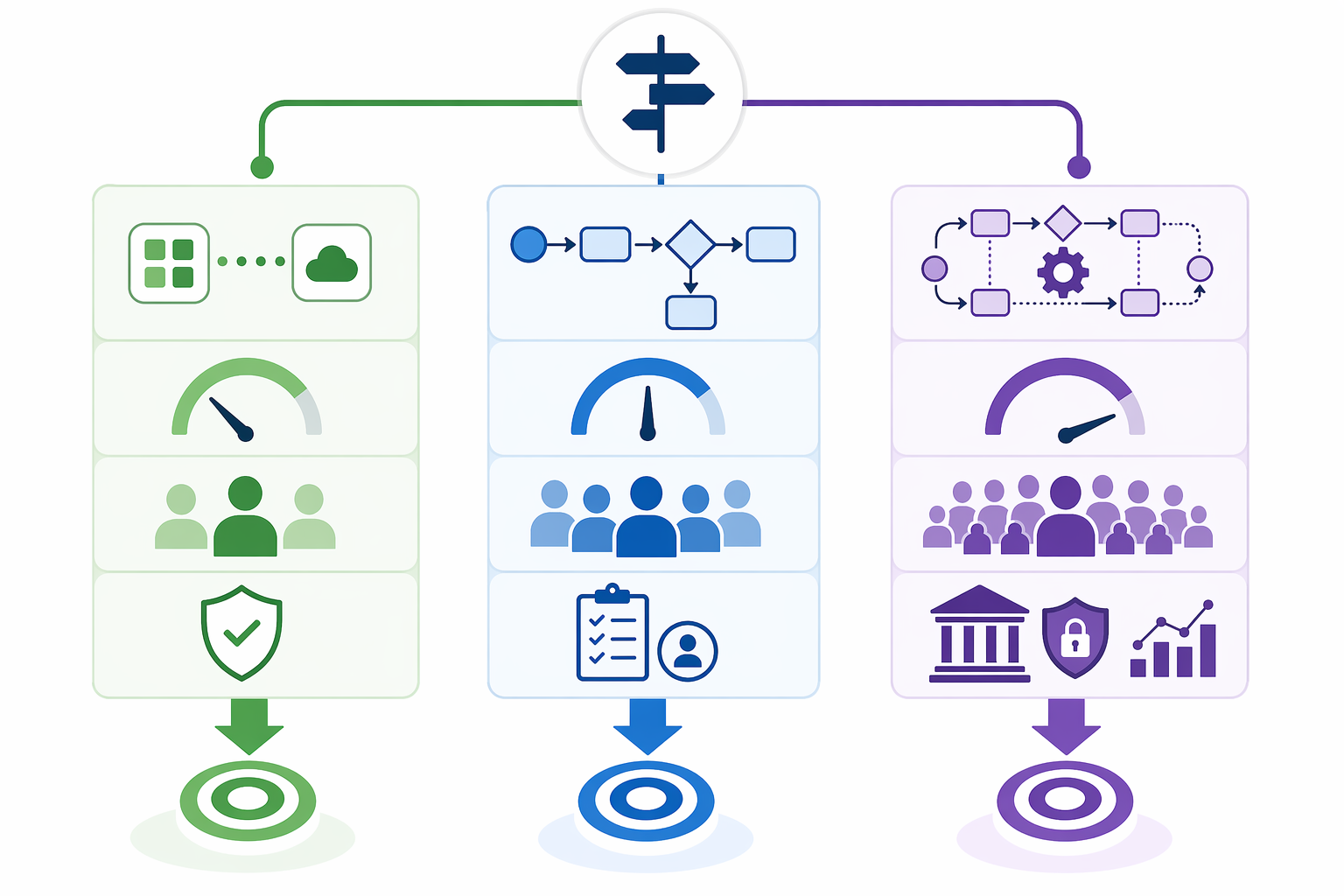
How to Shortlist Without Getting Pulled Off Track
Once the category is clear, the vendor conversation gets much cleaner. A workflow automation shortlist should test connectors, branching, error handling, maintainability, and who can safely edit automations. A process workflow software shortlist should test request intake, approval logic, workload views, permissions, audit history, reporting, and ease of configuration. A BPM shortlist should test modeling depth, governance, monitoring, integration architecture, compliance fit, and the organization’s ability to run the platform as a process discipline.
Do not let a two-step integration demo stand in for process governance. Also do not let enterprise process language convince a small team that it needs a platform it cannot administer. The right category should make the next six months easier for the people doing the work, not just make the buying deck look more mature.
If your process is simple and app-driven, go deeper into workflow automation comparisons such as 7 Workflow Automation Platforms Compared: Find Your Best Fit in 2026 or Zapier vs Make vs n8n. If you need approvals, routing, and a shared work hub, compare process workflow tools by tier and team fit in Process Workflow Tools Comparison or Business Process Workflow Software for Small Teams. If the decision genuinely involves enterprise process governance, move to BPM vs Workflow Tools or BPM Workflow Software Compared.