
The best workflow automation tools do not separate cleanly into “good” and “bad.” They separate into tools you will still understand six months from now, tools your stack already supports, and tools whose pricing model will not punish the way your workflows actually run.
That distinction matters because automation is no longer a niche experiment. The global workflow automation market is estimated at $26.01 billion in 2026 and is projected to grow at a 9.41% CAGR toward $40.8 billion by 2031.[1] At the same time, repetitive work has not vanished: one automation statistics roundup reports that 94% of companies still perform repetitive tasks that could be automated, while 90% of employees say automation improved their jobs.[2] Another reports that 86% of employees believe automation would help them work more efficiently.[3]
So the question is not whether automation is worth considering. It is which platform fits the workflows you will actually maintain: simple app-to-app handoffs, branching operational processes, AI-heavy research and writing steps, document routing, or Microsoft-native approvals.

Quick Picks by Use Case
- Choose Zapier if you need the broadest app coverage, fast setup, and familiar no-code automation across many SaaS tools.
- Choose Make if you want a visual builder, more control than basic no-code tools, and can keep an eye on step-based usage.
- Choose n8n if you are technical, want self-hosting or source-available flexibility, and prefer execution-based pricing over per-step billing.
- Choose Gumloop if AI reasoning is central to the workflow and you want bundled LLM costs instead of managing separate model API spend.
- Choose Relay.app if you want the gentlest learning curve and human-friendly workflow building matters more than maximum configurability.
- Choose Microsoft Power Automate if your team already lives in Microsoft 365, Teams, SharePoint, Outlook, Dynamics, and Power Platform.
- Choose ClickUp if you mainly want automations inside your project management workspace rather than a dedicated cross-app automation hub.
Pricing and feature details in this article were last verified on 2026-06-27. Automation vendors change packaging quickly, especially around AI features, task limits, and team seats, so treat the numbers here as a decision aid rather than a substitute for checking the current pricing page before purchase.
Workflow Automation Tools Compared
| Tool | Best for | Skill level | Pricing behavior | AI fit | Ecosystem fit | Not for you if |
|---|---|---|---|---|---|---|
| Zapier | Broad no-code automation across many SaaS apps | Beginner to intermediate | Task-based; free plan includes 100 tasks/month and 2-step Zaps; paid plans start at $19.99/month for multi-step Zaps, last verified 2026-06-27.[4] | Good for orchestrating AI steps, especially when AI is one part of a wider app workflow | Very broad: 9,000+ integrations.[4] | You expect complex, high-volume workflows to stay cheap without monitoring task usage |
| Make | Visual builders who want branching scenarios and budget-friendly entry | Intermediate | Per-step credit model; steps, including error-handling paths, can add up in complex workflows.[5] | Useful for visual AI workflows, but model/API cost may sit outside the automation bill depending on setup | Strong SaaS coverage, though not as broad as Zapier | Your workflows have many tiny steps and you do not want to think about credit consumption |
| n8n | Technical users, developers, and teams that want control | Intermediate to advanced | Execution-based pricing with unlimited steps per execution run; source-available with self-hosting option.[6] | Strong if you are comfortable wiring AI calls, code nodes, and custom logic | Best when you can tolerate some setup or host/manage infrastructure | No one on the team wants to own technical troubleshooting |
| Gumloop | AI-heavy workflows with visual construction | Beginner to intermediate | Bundled LLM cost positioning; may be cheaper for AI-heavy workflows than tools requiring separate API keys, depending on usage.[7] | Excellent fit when AI reasoning, extraction, enrichment, or generation is the workflow’s center | Designed around AI-native automation rather than classic app-directory breadth | Most of your automations are simple app handoffs with little AI reasoning |
| Relay.app | Teams that value simplicity and clean handoffs | Beginner | Vendor packaging should be checked directly; the main value is lower setup friction rather than maximum pricing complexity | Useful for approachable AI-assisted workflows, not the most technical AI playground | Best for teams that want readable, maintainable workflows | You need deep custom logic, self-hosting, or developer-grade control |
| ClickUp | Project and operations teams that want automation inside one workspace | Beginner to intermediate | Workspace pricing; advanced automation conditions sit in higher tiers.[8] | Useful when AI and automation live inside task/project work | Strong if ClickUp is already where work is assigned and tracked | You need a neutral automation layer across many unrelated apps |
| Microsoft Power Automate | Microsoft 365-heavy teams and enterprise approvals | Beginner to advanced, depending on flow complexity | Per-user and platform-style licensing; Agent 365 is listed at $15/user/month, but a fuller Microsoft AI automation stack can exceed $99/user/month.[9] | Strong inside Microsoft’s Copilot, Agent, and Power Platform direction | Excellent for Teams, SharePoint, Outlook, Excel, Dynamics, and Azure-adjacent work | You are not already paying for or administering Microsoft’s ecosystem |
| Pipedream | Developers connecting APIs and event-driven workflows | Advanced | Developer-oriented usage model; check current pricing against expected events and compute needs | Strong if AI calls are part of code-first workflows | Best for API-literate users, not general no-code operations teams | You want a drag-and-drop tool a nontechnical teammate can comfortably maintain |
| Jotform Workflows | Form-centric approvals, intake, and routing | Beginner | Free plan available; pricing depends on broader Jotform limits.[10] | Limited compared with AI-native workflow tools | Best when the workflow starts with a form submission | Your automation needs extend far beyond forms, approvals, and document-style intake |
If you want a broader market map beyond this shortlist, start with the workflow automation tools comparison. If your real decision is the classic three-way split between Zapier, Make, and n8n, the more focused Zapier vs Make vs n8n comparison is the cleaner next read.
Start With Technical Comfort, Not the Feature List
The most expensive automation mistake is not choosing a tool with fewer features. It is choosing a tool whose maintenance burden lands on the wrong person.
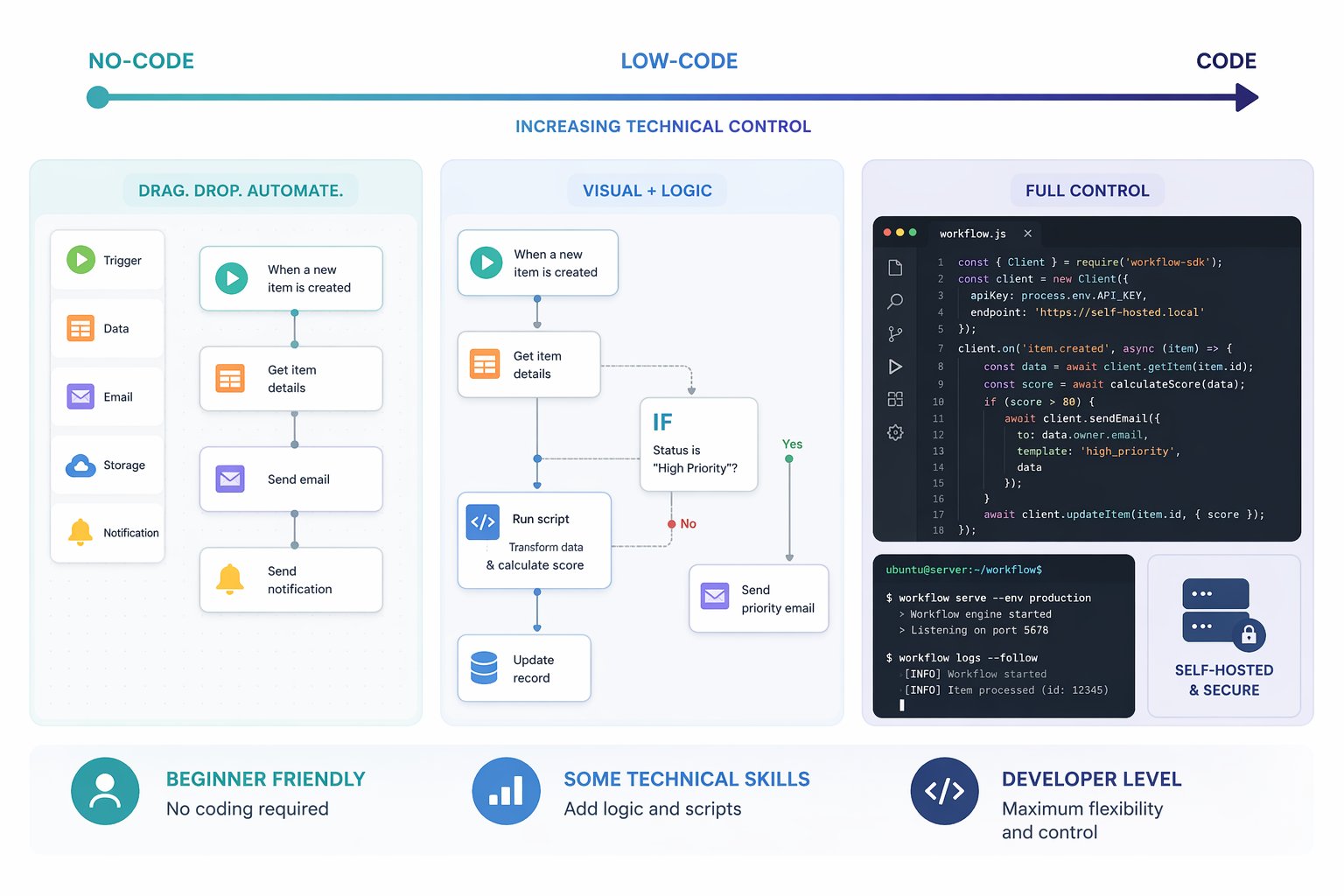
A beginner can often build a working automation in Zapier, Relay.app, ClickUp, Jotform, or Power Automate because the tool narrows the path: pick a trigger, choose an action, map fields, test. That constraint is not a weakness when the workflow is straightforward. A new lead comes in through a form, a Slack message posts, a task is created, and a CRM record is updated. The goal is not elegance. The goal is that the next person can open the workflow and see what is happening.
Make sits in the middle. Its visual canvas is friendlier than code, but it invites more architecture: routers, branches, filters, retries, and data transformations. That is useful when the workflow has genuine variation. It is also where small teams can accidentally build something only one person understands.
n8n and Pipedream belong closer to the technical end. n8n’s source-available model, self-hosting option, and JavaScript/Python nodes give a team more control than a sealed no-code tool.[6] That control is valuable when you need custom API calls, internal systems, private deployment, or advanced error handling. It is less charming when the only person who understands the workflow is on vacation and a webhook silently starts failing.
A Practical Skill-Level Split
| If this describes you | Start with | Be careful with |
|---|---|---|
| You are a freelancer or solopreneur automating admin work | Zapier, Relay.app, Jotform Workflows | n8n, unless you actually want to manage technical setup |
| You run operations for a small team and need visible branching logic | Make, Zapier, Relay.app | Overbuilding every exception into the first version |
| You are a developer or technical operator connecting APIs | n8n, Pipedream | Tools that hide too much error handling or execution detail |
| Your team already works in Microsoft 365 all day | Power Automate | Buying a separate automation hub before checking what your Microsoft licenses already cover |
| Your work already lives inside a project management system | ClickUp | Mistaking workspace automation for a full cross-app integration platform |
| Your workflows depend on AI extraction, classification, or generation | Gumloop, Zapier, Make, n8n | Ignoring token, model, and retry costs |
This is where a ranked list is least useful. A technical user may outgrow Relay.app quickly. A beginner may find n8n’s flexibility exhausting. A Microsoft-heavy operations team may get more value from Power Automate than from a tool with a prettier cross-SaaS directory. The right platform is the one whose complexity matches the person responsible for keeping it alive.
Pricing Models Matter More After the First Workflow
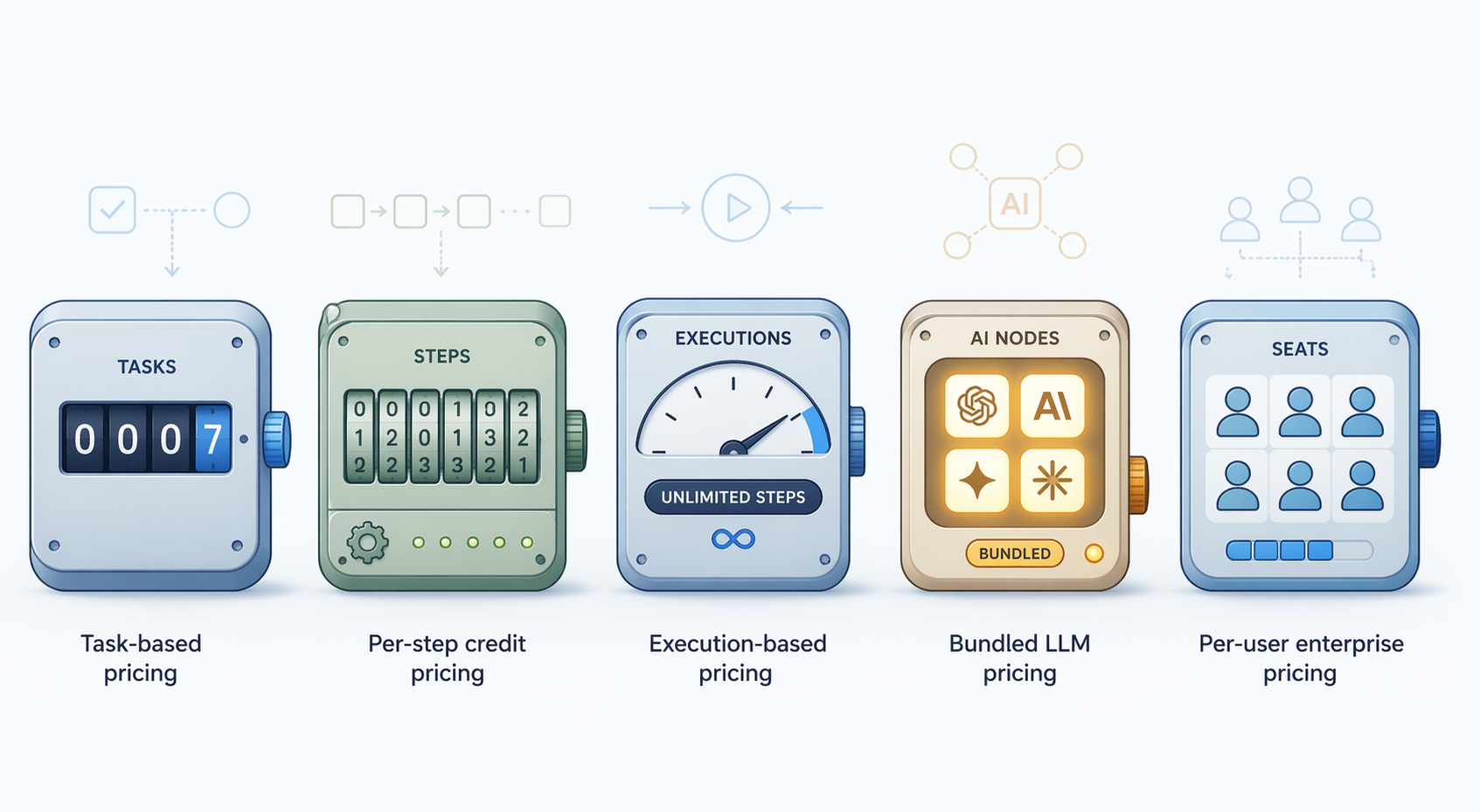
Most automation tools feel affordable during testing. The bill changes when a workflow runs often, branches into multiple paths, retries after errors, uses AI models, or touches many records at once.
| Pricing model | How it usually feels in real workflows | Tools to watch |
|---|---|---|
| Task-based | Easy to understand at low volume; can rise quickly when every successful action counts against a monthly limit | Zapier |
| Per-step credit | Good for visual control, but complex scenarios with routers, filters, and error paths may consume more units than expected | Make |
| Execution-based | Attractive for complex workflows because one run can include many steps, but failed runs and hosting/ops still need attention | n8n |
| Bundled LLM | Cleaner for AI-heavy users who do not want separate API-key accounting; still needs monitoring if AI usage expands | Gumloop |
| Per-user/platform | Can be efficient inside an existing enterprise stack; can become expensive when licenses, AI assistants, and platform add-ons stack together | Microsoft Power Automate |
| Workspace-tier | Makes sense when automation is part of project management; less useful if the automation needs are mostly outside the workspace | ClickUp |
Zapier’s model is the easiest to reason about at the start: the free plan includes 100 tasks per month and 2-step Zaps, while paid plans start at $19.99/month for multi-step workflows, last verified 2026-06-27.[4] That is friendly for a few clean handoffs. It becomes less tidy when one customer action triggers several downstream updates, notifications, spreadsheet rows, and AI steps.
Make’s per-step credit model rewards people who can design efficient scenarios. It can also make a visually elegant workflow more expensive than expected when each module, branch, and error-handling route consumes operations. One vendor comparison notes that this can cost 3–5x more than execution-based models at high complexity, so treat it as a directional warning, not a universal rule.[5][6]
n8n’s execution-based pricing changes the calculation. If a workflow can run many steps inside one execution, complex logic may be more economical than it would be under per-step billing.[6] The tradeoff is ownership. Self-hosting can reduce vendor lock-in and increase control, but someone has to manage deployment, updates, credentials, and failures.
Gumloop is worth separating because AI costs behave differently from ordinary app actions. Its AI-native positioning and bundled LLM cost model can be attractive when the workflow’s expensive part is not “send a Slack message” but “read, classify, summarize, extract, compare, and generate.”[7] If that is your use case, also read about the AI workflow automation token cost trap before assuming any AI workflow will stay cheap at scale.
Power Automate has a different kind of pricing risk. Microsoft lists Agent 365 at $15/user/month, but the fuller stack of Copilot, Agent 365, and Power Automate licensing can exceed $99/user/month depending on what is included and who needs access.[9] For an organization already standardized on Microsoft, that may still be rational. For a small team outside that ecosystem, it is a lot of machinery to buy for basic app-to-app automation.
Budget-conscious readers should also compare the current low-cost plans in budget-friendly workflow automation tools for small businesses, especially if the goal is to stay near or under a tight monthly spend rather than build a full operations layer.
Where Each Platform Fits Best
Zapier: Broadest No-Code Coverage
Zapier remains the safest first stop for many knowledge workers because of its integration breadth: 9,000+ apps, according to Zapier’s own 2026 automation roundup.[4] Vendor-owned numbers should not be mistaken for impartial product judgment, but integration breadth is still a practical fact. If your workflow touches a CRM, email tool, spreadsheet, calendar, form builder, support desk, and AI assistant, Zapier is often the platform most likely to have a ready-made connector.
The maintenance advantage is familiarity. Many nontechnical teammates have seen a Zap before. They understand the trigger-action pattern. They can usually inspect a failed run without learning an entirely new mental model. The limitation is that convenience can become volume cost, especially when workflows grow from a single handoff into multi-step operations.
Make: Visual Control for People Who Will Watch the Meter
Make is a better fit when the workflow needs a visible map: branching paths, conditional logic, data transformations, and multi-app scenarios. It is often more satisfying than linear no-code tools for operators who want to see how the process moves.
The tradeoff is that the visual map is not free from accounting. Per-step pricing means the shape of the scenario affects cost. A tidy-looking workflow with several branches and error paths can consume more credits than a buyer expects.[5] Make is a good choice when the builder is also willing to review usage after the workflow is live.
n8n: Control, Extensibility, and the Burden That Comes With Both
n8n is the tool on this list most likely to appeal to someone who dislikes sealed boxes. Its source-available model, self-hosting option, execution-based pricing, and JavaScript/Python nodes make it attractive for teams that want to combine no-code-style building with developer-level escape hatches.[6]
That is a real advantage for API-heavy workflows, internal systems, and teams that need to keep logic close to their own infrastructure. It is also a real maintenance commitment. If the workflow is business-critical, someone needs to understand credentials, logs, error recovery, hosting, and version changes. Technical control is only useful when the team has technical capacity.
Gumloop: AI-Native Workflows Without Separate Model Accounting
Gumloop belongs in the shortlist when AI is not a decorative step but the work itself. If the workflow reads incoming documents, classifies them, extracts structured fields, drafts responses, enriches leads, or reviews research material, an AI-native canvas can be more natural than bolting model calls onto a traditional automation flow.[7]
The bundled LLM cost positioning is the important buying signal. For AI-heavy workflows, separate API keys and token billing can make “cheap automation” difficult to forecast. Bundling does not eliminate usage risk, but it can make planning easier if the included limits match your workload.[7] For readers specifically choosing among no-code AI-leaning platforms, the Zapier vs Make vs Gumloop comparison is the more focused branch.
Relay.app: The Cleanest Entry Point
Relay.app is for teams that would rather ship a few reliable workflows than admire a complicated automation diagram. The tool’s public materials emphasize simplicity, and G2 reviews note a 4.9 rating.[11] Ratings are only one signal, but in this category ease of use is not cosmetic. It affects whether the workflow survives staff changes, busy seasons, and the first failed run.
Relay.app is not the obvious pick for developer-heavy API orchestration or self-hosted control. Its strength is the opposite: readable flows, human handoffs, and a low-friction learning curve.
ClickUp: Automations Inside the Workspace
ClickUp should not be judged as a Zapier replacement. It is an all-in-one workspace with built-in automation, and its advanced conditions are tied to higher tiers.[8] That makes it useful when the workflow is already inside ClickUp: task status changes, assignments, reminders, project updates, and internal routing.
It is less convincing as a neutral automation layer across a messy SaaS stack. If the process begins and ends in project work, ClickUp may save you from buying another tool. If the process crosses many systems, a dedicated automation platform will usually be cleaner.
Microsoft Power Automate: Best When Microsoft Is Already the Operating System
Power Automate makes the most sense when Microsoft is not just one app in the stack but the environment where work happens: Teams, Outlook, SharePoint, Excel, Dynamics, and Power Platform. In that setting, automations can sit close to permissions, documents, approvals, and enterprise administration.
The enterprise case is stronger than the solo-user case. Forrester documents a 248% three-year ROI for Power Automate, but that finding comes from an enterprise deployment context, not from a freelancer automating a few handoffs.[12] The number is useful as evidence that Power Automate can matter at scale. It is not a promise that a small team will see the same return.
Pipedream and Jotform Workflows: Useful, but Narrower
Pipedream is worth considering if you are comfortable with APIs, events, and code-oriented workflow design. It should not be blended into the beginner no-code set just because it automates things. The buyer is different.
Jotform Workflows is narrower but clear: form-centric routing, approvals, and intake. The free plan makes it approachable for simple cases, last verified 2026-06-27.[10] If your workflow begins with a submitted form and ends with an approval or notification, that narrowness may be an advantage. If you need a general automation hub, it will feel boxed in.
AI Steps Need Their Own Buying Test
AI support is now common enough that “has AI” is a weak filter. A better test is whether the AI step is occasional, central, or risky.
- Occasional AI: A Zapier or Make workflow that summarizes a form response or drafts a notification may be enough.
- Central AI: A Gumloop-style AI-native workflow is more plausible when extraction, reasoning, and generation are the core work.
- Technical AI: n8n or Pipedream makes sense when you need custom model calls, code, internal APIs, or self-hosted control.
- Microsoft AI: Power Automate belongs on the shortlist when Copilot, Teams, SharePoint, and Microsoft permissions are already part of the process.
The risk is not only cost. AI steps can introduce variability: an extraction can fail, a classification can be uncertain, a generated answer can need review, and a retry can multiply usage. A good AI workflow includes a place for human review when the consequence of a wrong answer is meaningful.
Fast “Not for You” Checks
| Tool | Skip or delay it if... |
|---|---|
| Zapier | You already know the workflow will be high-volume, multi-step, and cost-sensitive. |
| Make | No one wants to monitor step consumption or understand why a scenario used more operations than expected. |
| n8n | Your team wants no-code convenience and has no technical owner for hosting, credentials, or debugging. |
| Gumloop | AI is only a minor add-on and most automations are ordinary app handoffs. |
| Relay.app | You need deep customization, self-hosting, or code-heavy API orchestration. |
| ClickUp | Your workflows mostly happen outside ClickUp or require broad cross-app integration. |
| Power Automate | You are not invested in Microsoft 365 and do not want Microsoft licensing complexity. |
| Pipedream | The workflow needs to be maintained by nontechnical operators. |
| Jotform Workflows | The process is not form-led and needs a general automation platform. |
For document-heavy teams, the better comparison may be narrower than this article. Intake, approvals, signatures, and document routing behave differently from general SaaS automation, so a document workflow automation comparison for small teams will usually be more useful than another broad platform list.
The Shortlist Rule
If you are still split, narrow the decision to two tools by asking four questions in order: Which apps must connect on day one? Who will maintain the workflow when it breaks? Does the workflow need AI reasoning or only app handoffs? Which pricing model matches the number of runs, steps, users, and AI calls you expect?
That usually produces a sensible shortlist: Zapier for broad no-code coverage, Make for visual branching on a budget, n8n for technical control, Gumloop for AI-heavy workflows, Relay.app for simplicity, ClickUp for workspace-native automation, and Power Automate for Microsoft-native teams. Choose the platform that matches the workflows you will actually maintain, not the one that looks most impressive in a demo.
References
- Workflow Automation Market - Size, Report & Forecast — Mordor Intelligence, Jan 2026.
- 50+ Crucial Workflow Automation Statistics and Trends for 2026 — Kissflow.
- Workflow Automation Statistics & Trends in 2026 — Cflow.
- The best workflow automation tools in 2026 — Zapier blog.
- Make pricing page — Make, last verified 2026-06-27.
- The 9 best AI workflow automation tools in 2026 — n8n Blog.
- 10 best AI workflow automation tools I'm using in 2026 — Gumloop blog.
- ClickUp pricing page — ClickUp, last verified 2026-06-27.
- Microsoft pricing pages — Microsoft, last verified 2026-06-27.
- Jotform pricing — Jotform, last verified 2026-06-27.
- Relay.app website and G2 reviews — Relay.app and G2.
- Forrester Total Economic Impact study for Microsoft Power Automate — Forrester.