
The useful question in 2026 is no longer whether AI can help with writing, summarizing, searching, and cleaning up routine work. It can. The harder question is: what can you safely use without feeding client material, employee notes, legal drafts, source files, or internal strategy into someone else’s training or data-sharing pipeline?
That question has moved from privacy-team worry to everyday operations problem. Okta’s 2026 survey found that 52% of employees use unapproved AI tools at work, while 58% of organizations have already experienced an AI-related security incident.[1] Cisco’s 2025 Data Privacy Benchmark Study also found that data privacy is now the top concern for most organizations using generative AI.[2] In plain terms: people are using AI anyway, and the cleanup work is landing on admins, privacy officers, and managers who may not even know which tools are in the workflow.

A privacy-safe AI productivity tool is not simply a tool with a better-sounding privacy page. The useful distinctions are architectural: whether the model runs locally, whether prompts can be used for training, whether files are encrypted in a way the provider cannot read, whether connectors can reach old documents, and whether the assistant has access to credentials, calendars, drives, email, or chat history.
Incogni’s 2025/2026 AI platform privacy ranking is a helpful baseline because it compares mainstream assistants on data collection, training controls, transparency, and third-party sharing. Le Chat from Mistral AI ranked as the least privacy-invasive mainstream platform, while ChatGPT scored well on transparency but still raised concerns around model training and third-party sharing. Meta AI, Gemini, and Copilot appeared at the more privacy-invasive end of the ranking, with concerns including vague policies, difficult or unavailable training opt-outs, and broader data collection on mobile.[3]
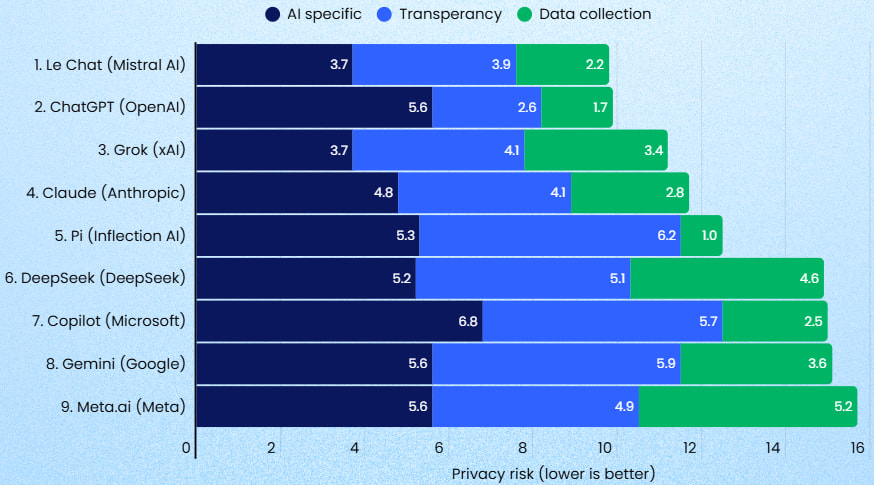
That does not make every mainstream assistant unusable. It does mean they should be treated as connected systems, not blank chat boxes. The risk is often less cinematic than a breach: a copied contract clause here, a pasted HR note there, an assistant connected to a drive with years of over-shared folders, and nobody remembering which permission created the exposure.
The Three Privacy Architectures That Matter
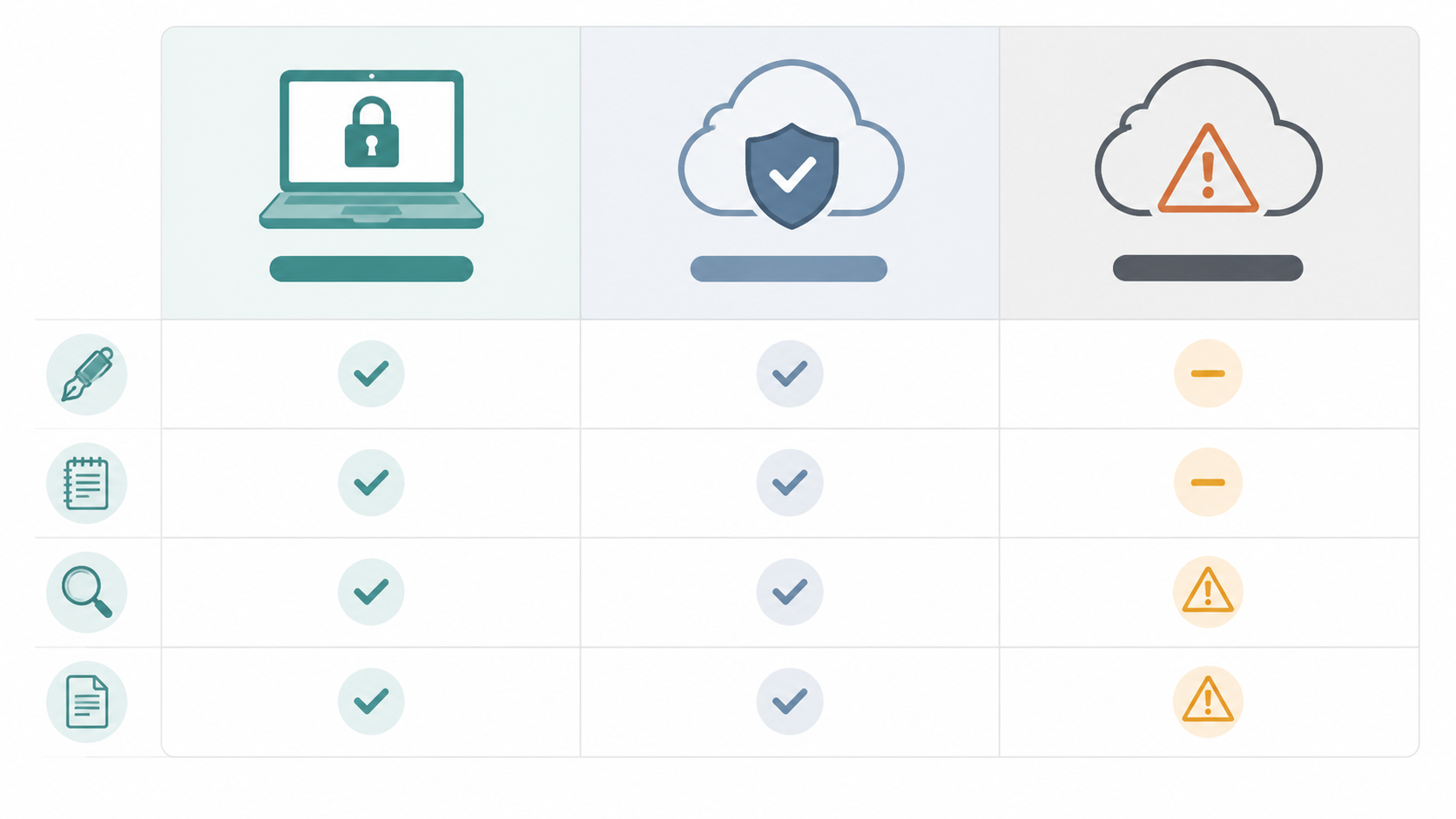
For practical buying decisions, privacy-safe AI productivity tools fall into three groups. The labels matter less than the data path.
| Architecture | Typical tools | Where the data goes | Best fit | Main trade-off |
|---|---|---|---|---|
| Local-first | Ollama, Jan.ai, LM Studio | Prompts, files, and outputs stay on the user’s device after the model is downloaded | Sensitive drafting, private document Q&A, offline summarization, code or research notes | Setup friction, model downloads, weaker built-in collaboration |
| Privacy-forward cloud | Proton Scribe, Le Chat | Data is processed in a provider-controlled environment with stronger privacy controls or no-training commitments | Writing, email, general assistant work, lower-friction team adoption | Still requires trust in vendor architecture and policy |
| Mainstream connected assistants | ChatGPT, Gemini, Copilot, Meta AI | Data may interact with platform accounts, connectors, cloud files, mobile permissions, or training settings depending on plan and configuration | Broad ecosystem integrations, workplace search, embedded office workflows | Connector sprawl, training settings, third-party sharing, legacy permissions |
The local-first category is the cleanest from a data-boundary point of view. Ollama, Jan.ai, and LM Studio are designed to run open models on the user’s own machine, so the assistant can draft, summarize, rewrite, and answer questions about local files without sending the working material to a third party after setup.[4]
The second category is more convenient: cloud tools with privacy-forward commitments. Proton Scribe is especially relevant for writing and email because Proton describes it as an AI writing assistant that can run locally and is built around Proton’s zero-access end-to-end encryption model under Swiss jurisdiction.[5] Le Chat is not local-first, but Incogni’s ranking makes it a stronger candidate than many mainstream assistants when a cloud general assistant is acceptable.[3]
The third category includes the tools many teams already have: Microsoft Copilot in Microsoft 365, Gemini in Google Workspace, ChatGPT, and consumer AI assistants tied to large platforms. They can be excellent at reducing friction. They also inherit the mess of the systems they connect to.
Local-First Tools: Best Privacy, Real Setup Work
Local AI is the gold standard when the material is genuinely sensitive: client deliverables, unpublished research, source code, legal drafts, acquisition notes, medical-adjacent documentation, or HR material. With Ollama, Jan.ai, or LM Studio, the model runs on the computer in front of you. There is no vendor-side prompt log to trust, no cloud assistant to misconfigure, and no third-party training pipeline involved once the model is installed.
The 2026 version of local AI is also much less hostile to ordinary users than earlier versions. Local AI guides describe capable offline use on an 8 GB RAM laptop without a dedicated GPU, helped by GGUF quantization that can compress models by roughly 60% to 75% with under about 5% quality loss.[4] Other local setup guides describe the same practical shift: smaller models have become good enough for drafting, summarization, rewriting, coding help, and document Q&A on normal hardware.[6]
| Tool | What it feels like | Good use cases | Who should avoid it |
|---|---|---|---|
| Ollama | A lightweight local model runner, especially comfortable for people willing to use simple commands or pair it with another interface | Private drafting, coding help, local document workflows, repeatable internal setups | Users who freeze at command-line instructions |
| Jan.ai | A more app-like local AI assistant experience | Private chat, writing help, summaries, general assistant work without sending prompts to a cloud model | Teams that need polished admin controls and managed rollout on day one |
| LM Studio | A desktop application for downloading and running local models with a visual interface | Trying different models, local document Q&A, non-developer experimentation | Users who want the assistant already embedded in email, docs, and calendar |
There is a caveat that should not be hidden in a footnote: local does not mean no setup. Users usually need a one-time internet download for model files, commonly in the 2 GB to 40 GB range, and “fully offline” applies after that download and configuration are complete.[4] A person who only wants a writing suggestion inside an email window may not tolerate that friction, no matter how elegant the privacy architecture is.
Local-first tools are strongest when the task is self-contained. Ask a local model to rewrite a paragraph, summarize a PDF, draft a policy outline, compare notes, or answer questions over a folder of documents. That is exactly where privacy-safe AI productivity tools now compete well with mainstream assistants. Ask the same tool to search across your cloud drive, update a CRM, schedule meetings, or pull context from six SaaS platforms, and the lack of ecosystem integration becomes visible.
Writing and Email: The Easiest Place to Choose Privacy
Writing is the first use case to move off risky defaults because it rarely requires the assistant to access a large connected system. Most of the value comes from transforming text the user already has: soften this reply, shorten this client update, turn these bullets into a memo, draft three versions of this announcement, summarize this thread before I respond.
For private writing and email, Proton Scribe is the standout cloud-adjacent option. Proton says Scribe can run entirely locally, is integrated into Proton’s encrypted environment, and is built so Proton cannot access users’ messages under its zero-access encryption model.[5] That combination matters because email writing is full of material people underestimate: names, contract terms, health details, salary context, vendor disputes, internal deadlines, and client strategy.
A local runner is still the safer choice when the draft itself is highly confidential. The workflow is less seamless but simple enough: copy the relevant text into a local assistant, ask for a rewrite or summary, review the output, and paste the cleaned result back into the working document. That extra step is annoying. It is also a visible boundary, and visible boundaries prevent a surprising amount of accidental disclosure.
Mainstream assistants remain useful reference points here. Microsoft Word Copilot, Google Gemini in Docs, and ChatGPT can produce polished first drafts and fast rewrites. The privacy question is whether the tool is operating inside a managed plan with the right training settings, retention controls, and connector boundaries. If nobody on the team can answer that, the default should be to keep sensitive writing out of the assistant.
- Use Proton Scribe when the main job is email or prose cleanup and the team already wants an encrypted writing environment.
- Use Jan.ai, LM Studio, or Ollama when the draft includes sensitive client, legal, financial, HR, or unpublished material.
- Use mainstream assistants for low-sensitivity drafts only after confirming training, retention, and connector settings.
- Do not paste entire inbox threads into any assistant unless the thread participants, attachments, and quoted history are appropriate for that tool.
Meeting Notes: Privacy Depends on Who Enters the Room
Meeting notes are harder than writing because the assistant often needs to join a call, record audio, transcribe speakers, store a transcript, and summarize action items. That creates more data than a prompt box. It may include people who never agreed to a particular AI vendor, especially in client calls or hiring conversations.
For highly sensitive meetings, the safer pattern is not a bot that silently joins every calendar event. Record only when appropriate, store the file where the team already has access controls, and use a local model for summarization after the meeting. This is less automatic, but it keeps the assistant out of live conversation capture and reduces the number of places a transcript can live.
For ordinary internal meetings, a privacy-forward cloud assistant may be acceptable if the team has reviewed retention, training, sharing, and deletion controls. The important distinction is adoption versus safety: a meeting bot can save time and still be a poor fit for legal, HR, board, medical, or client-confidential conversations.
The Samsung ChatGPT incident remains a useful caution because employees reportedly pasted sensitive code and meeting content into ChatGPT in 2023. Cyberhaven also found that a measurable share of corporate data pasted into AI tools was confidential.[7] Those examples are not proof that every meeting assistant is unsafe. They show how quickly routine convenience turns into unmanaged disclosure when the tool is outside the team’s data policy.
Search and Document Q&A: Watch the Connectors
Search is where AI feels magical and where old permissions come back to collect interest. A document Q&A assistant can answer across folders, wikis, tickets, email, and chat logs. If those systems are clean, the assistant becomes useful. If those systems contain years of loose sharing, abandoned groups, and “everyone” permissions, the assistant can surface information that was technically accessible but practically buried.
This is the main Microsoft Copilot risk worth taking seriously. The concern is not that Copilot is malicious; it is that Copilot can expose the consequences of permissions sprawl by making over-shared documents easier to find. Vellum’s 2026 private assistant analysis frames this as a practical enterprise risk: AI agents inherit access from the systems they connect to, so old distribution lists and broad file permissions become live search surfaces.[8]
Local document Q&A avoids much of that problem when the user chooses the folder or files deliberately. The assistant can summarize a contract set, extract themes from research notes, or compare policy drafts without connecting to the entire workspace. The trade-off is narrower scope. It will not automatically know what is in the CRM, the project tracker, or last year’s shared drive unless someone gives it that material.
Credential isolation is the more advanced version of this boundary. Vellum describes private assistant designs where credentials are stored in a separate process that the model cannot access directly.[8] That pattern matters for agentic tools because the assistant may need to retrieve information or take actions without becoming a loose container for every token and password in the workflow.
General Assistance: Le Chat Is the Cleaner Cloud Reference Point
For general assistance — brainstorming, explaining a concept, summarizing public information, drafting outlines, preparing agendas, turning notes into a plan — a cloud chatbot is often the easiest tool to adopt. The privacy question is whether it collects more data than the task requires and whether the user can opt out of training.
Le Chat deserves attention here because Incogni ranked it as the least privacy-invasive of the mainstream platforms it evaluated, citing limited data collection and stronger opt-out options.[3] That does not make it equivalent to local AI. It makes it a more defensible choice when the task is low to moderate sensitivity and the user needs a cloud assistant that is easier than running local models.
ChatGPT is more complicated. Incogni ranked it highly on transparency, especially the readability of its privacy policy, but still flagged concerns around model training and third-party data sharing.[3] In practice, that means plan type and settings matter. A carefully configured business environment is a different risk profile from a personal account where someone casually pastes client notes.
Gemini, DeepSeek, Pi AI, and Meta AI were flagged by Incogni as platforms that did not appear to allow users to opt out of having prompts used for model training, and all nine investigated platforms collected user data from publicly accessible sources that could include personal information.[3] The Captain Compliance cross-reference also placed Meta AI, Gemini, and Copilot among the most privacy-invasive options, with particular concern around mobile data such as precise location, contacts, and media access.[9]
| Use case | Safer default | Acceptable alternative | Avoid when |
|---|---|---|---|
| Private drafting | Local-first tool | Proton Scribe | The draft includes legal, HR, client-confidential, or unpublished material |
| Email cleanup | Proton Scribe | Local-first copy-and-paste workflow | The assistant would need access to entire inbox history without clear controls |
| Meeting summary | Local summarization from an approved recording | Reviewed cloud meeting assistant | The meeting involves HR, legal, board, medical, or sensitive client topics |
| Workspace search | Local folder-based Q&A for sensitive files | Managed enterprise assistant after permissions review | Drive and group permissions have not been audited |
| General chatbot help | Le Chat or local assistant | Configured business plan from a mainstream provider | The prompt includes confidential data and training settings are unclear |
Cost Is Not Just Subscription Price
Local AI has an appealing cost profile once it is installed. Local AI Master’s cost analysis contrasts cloud plans that run about $20 to $200 per month per user with local models that have no per-query or per-seat fee beyond electricity and hardware already in use.[4] For freelancers and small teams, that can be the difference between giving everyone a private assistant and rationing access to one or two paid seats.
But subscription price is not the only cost. Someone still has to choose models, document the setup, explain what can and cannot go into each tool, and answer the inevitable “why is this model slower than ChatGPT?” question. A privacy-safe setup that nobody uses is not a policy; it is shelfware with better intentions.
This is where Proton Scribe and Le Chat can be more realistic for some teams than a pure local-first stack. They reduce operational friction while improving the privacy posture compared with casual use of whichever mainstream assistant gave the best demo. That middle ground is often where adoption actually happens.
Regulation Makes the Sloppy Version More Expensive
The regulatory backdrop is another reason to stop treating AI privacy as a preference. The EU AI Act includes fines up to €35 million or 7% of global revenue, and the Colorado AI Act takes effect in June 2026.[9] Those figures do not mean every small team needs an enterprise governance program. They do mean that “we didn’t know employees were using it” is a weak operating model.
Public trust is also not keeping pace with adoption. Pew Research’s 2026 findings, as summarized in the same privacy-ranking context, show that Americans remain cautious about AI data handling even as use accelerates.[9] A client may be comfortable with AI-assisted work and still object to their materials being pasted into an unapproved system.
A Practical Decision Scaffold
There is no universal winner because the right tool depends on the sensitivity of the data, the tolerance for setup, and the need for integrations. A neat demo is not enough. The tool has to survive the second week, when people stop reading policy pages and start dragging real work into the box.
- Choose local-first tools such as Ollama, Jan.ai, or LM Studio when the data is highly sensitive and the team can tolerate one-time model downloads, modest setup, and fewer built-in integrations.
- Choose Proton Scribe when the primary need is private writing or email assistance and the team values a lower-friction encrypted environment.
- Consider Le Chat when a cloud general assistant is acceptable and the team wants a stronger privacy posture than many mainstream consumer AI platforms.
- Use mainstream assistants cautiously when connectors, mobile permissions, workspace search, or organizational file access are involved.
- Audit permissions before enabling AI over shared drives, email, wikis, or chat history; the assistant will make old access decisions easier to exploit accidentally.
The safest AI productivity tool is not the one with the most impressive demo. It is the one whose data boundaries still make sense after a week of real work: after the first client deck, the first messy email thread, the first meeting transcript, and the first folder full of documents nobody has audited in years.
References
- AI Agents at Work 2026 — Okta
- The best tools for managing AI data privacy risks in 2026 — Transcend
- Gen AI and LLM Data Privacy Ranking 2025 [2026] — Incogni
- Local AI Privacy Guide 2026 — Local AI Master
- Introducing Proton Scribe — Proton
- How to Run AI Models Locally in 2026 — AI Thinker Lab
- Data Privacy Risks When Using AI Tools — Secure Data Recovery
- 10 Best Private Personal AI Assistants in 2026 — Vellum
- 2026 AI platforms Privacy Rankings — Captain Compliance