
The budget conversation usually starts with a clean-looking subtraction: remove the managed workflow orchestration bill, install the open-source version, and the monthly software line drops toward zero. That can be the right move. It can also be the moment a team quietly creates an internal platform without assigning a platform owner.
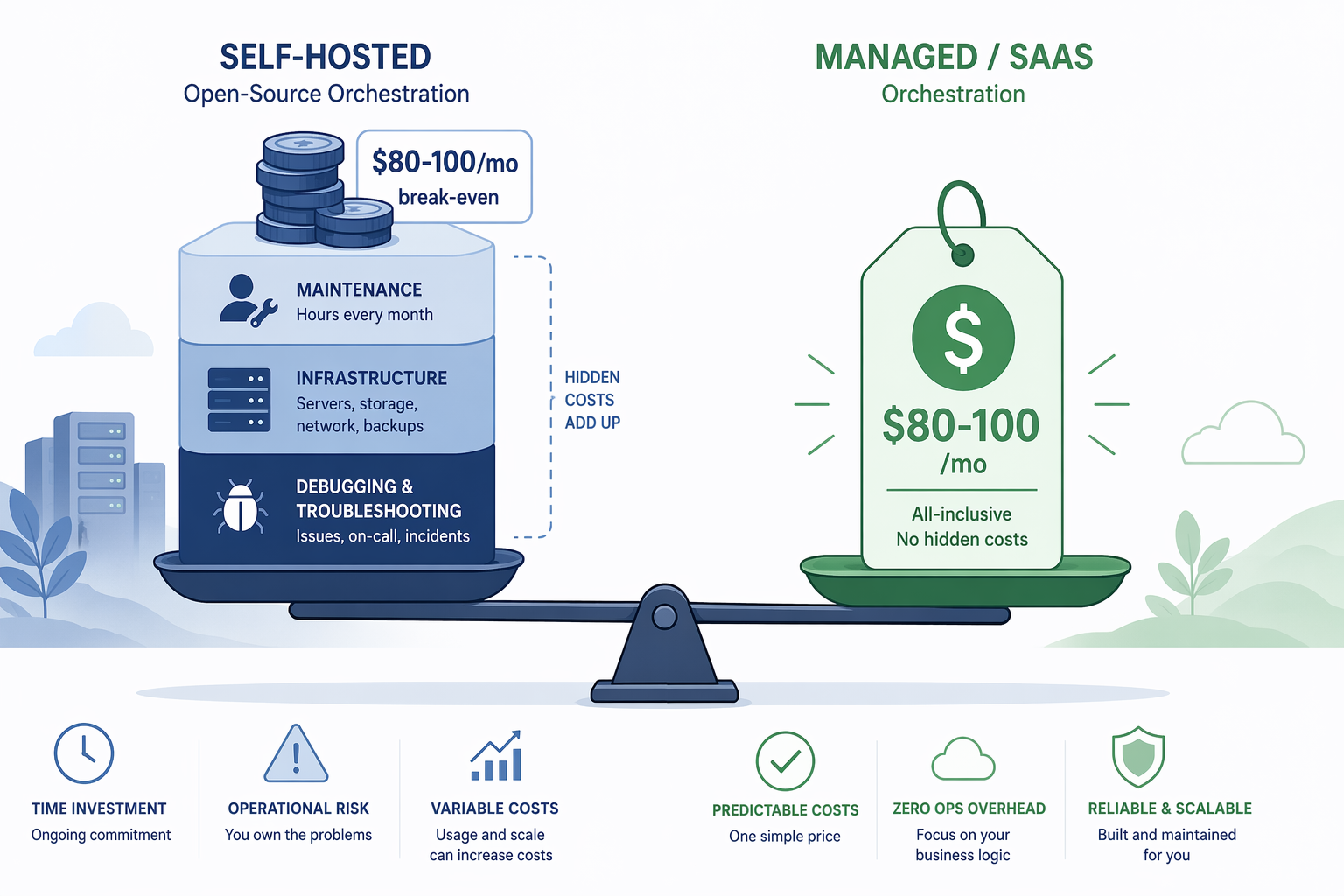
For most teams comparing workflow orchestration tools in 2026, the useful question is not whether open source is cheaper in principle. It is whether the avoided subscription is large enough to pay for maintenance time, infrastructure, monitoring, upgrades, backups, incident response, and the inevitable debugging after the original installer is busy with something else. A practical break-even starts around $80–100 per month in equivalent managed-service or SaaS spend, and even above that line, self-hosting only works when someone capable is explicitly responsible for operating it.

Start With Monthly Equivalent Cost
The cleanest way to compare open-source and commercial orchestration is to convert both choices into a monthly equivalent cost. That does not make every factor financial. It simply prevents the most common mistake: treating engineering time as free because it is already on payroll.
| Cost component | What to count | Why it changes the decision |
|---|---|---|
| Managed subscription or SaaS spend | Current monthly bill, overage charges, user seats, task runs, workspace limits | This is the visible cost the team wants to remove |
| Maintenance time | Setup, upgrades, patching, dependency work, workflow engine debugging, queue and worker care | This is where “free” usually becomes a labor trade |
| Infrastructure | Compute, database, storage, networking, secrets, logging, backups, external uptime monitoring | Small automation tools may stay cheap; Airflow-scale platforms often do not |
| Failure cost | Missed jobs, delayed data, broken customer workflows, recovery labor, after-hours response | A tool that runs important work becomes production infrastructure |
| Continuity | Named owner, documentation, access model, upgrade rhythm, alert routing | The system has to survive the person who first installed it |
That last row is the one budget spreadsheets tend to miss. The first month of a self-hosted deployment is often handled by the person most excited about the tool. The twelfth month is handled by whoever still has credentials, remembers where the Docker Compose file lives, and gets paged when a credential rotation breaks a workflow.
The $80–100 monthly threshold is not a law of physics. It is a sanity check. Below that range, the avoided subscription is usually too small to compensate for even a few hours of maintenance in a year. Above it, self-hosting becomes worth modeling, not automatically worth doing.
What Self-Hosted n8n Really Buys
n8n is a useful example because it can be genuinely economical. A small team with a few stable workflows, modest execution volume, and a comfortable operator may be able to run it without much ceremony. The mistake is assuming that the absence of a license fee means the operating cost is negligible.
Leland’s May 2026 cost framework estimates self-hosted n8n at 2–4 hours of initial setup and 1–3 hours per month of maintenance. At a $100 per hour loaded engineering rate, that maintenance time alone comes to roughly $1,200–2,400 per year before infrastructure and failure costs are counted.[1]
That figure is not an argument against n8n. It is an argument against hiding the operator. If the team is replacing a $20 monthly automation subscription with self-hosted n8n, the math is weak unless there is some other reason to self-host, such as data control, customization, or existing infrastructure discipline. If the team is replacing a much larger automation bill, the trade can make sense, but the savings should be calculated after assigning ownership.
This is also where migration discipline matters. Leland’s migration playbook calls out a common regret: shutting down the managed tool before validating parallel runs for two weeks. It also notes that teams skipping external uptime monitoring and error-notification webhooks on self-hosted instances consistently regret it within 90 days.[1]
The practical consequence is simple. A self-hosted automation engine should not be treated like a side project once business workflows depend on it. Someone has to know when it is down, what changed, how to restore it, and which downstream process is waiting.
For a deeper n8n-specific model, the internal analysis of open-source workflow automation TCO and break-even costs is the better place to go line by line. The broader point here is that n8n can be cheap, but only after the team counts the person keeping it boring.
Airflow Moves the Break-Even Up
Airflow changes the cost shape because it is rarely just “an app” once it matters. It needs a scheduler, workers, metadata database, logs, deployment process, secrets handling, alerting, and some answer to multi-team ownership. Many organizations can run that well. The ones that cannot still discover the complexity; they just discover it during incidents.
Leland’s 2026 framework puts Airflow infrastructure at roughly $100–1,000 or more per month, with 4–10 hours per month of maintenance.[1] At the same $100 per hour loaded engineering rate, maintenance alone adds $400–1,000 per month. Once infrastructure is included, self-hosted Airflow can easily cost more than the managed service it was supposed to replace, unless the team already has the operational patterns and volume to justify it.
This is why feature comparisons often miss the budget reality. A feature matrix can say that open-source Airflow supports what the team needs. It may be true and still not answer who patches the deployment, watches failed DAGs, handles queue saturation, upgrades providers, troubleshoots executor behavior, and explains to stakeholders why yesterday’s pipeline did not run.
Airflow 3.2 added multi-team deployment capabilities in April 2026, including isolated DAGs, connections, and executors per team, which can reduce some enterprise operating friction.[2] That matters. It does not turn Airflow into a maintenance-free service. Better isolation makes ownership cleaner; it does not remove the need for ownership.
Managed Open Source Is Not a Cop-Out
The lazy comparison is open source on one side and expensive commercial software on the other. In 2026, that binary is often false. Several workflow orchestration tools now have managed or hybrid entry points that keep the operational surface smaller without forcing a large enterprise commitment.
Prefect Cloud has a free Hobby tier with 1 developer seat, 1 workspace, and 5 deployments; its Team tier is listed at $100 per user per month in ZenML’s 2026 update.[3] Dagster+ pricing, effective May 2026, includes a Solo tier described as free with a $10 monthly pay-as-you-go credit model at $0.040 per credit, while the Hybrid tier charges no Dagster compute for self-hosted infrastructure.[3]
Those details complicate the usual spreadsheet argument. If a team can start on Prefect Cloud’s free tier or use a Dagster+ hybrid model while keeping compute in its own environment, the real comparison may not be “free self-hosted versus expensive managed.” It may be “thin managed control plane versus a platform we must fully operate.”
The same middle-path logic applies to services such as Astronomer for Airflow, MWAA, Temporal Cloud, n8n Cloud, and similar managed offerings. Pricing and limits need to be checked at the time of purchase, but the decision pattern is stable: if reliability matters and operations capacity is thin, paying someone else to absorb part of the platform burden can be cheaper than pretending internal labor has no cost.
Licensing Can Move Under You
Open-source status is not just a philosophical label in a cost model. It determines what a team can run in production, under which obligations, and whether a future upgrade changes the economics.
Camunda is the clean warning case. Comparisons published in 2026 note that with Camunda 8.6, Zeebe requires an enterprise license for production use, while the open-source option is non-production only.[4][5] That does not say anything general about n8n, Airflow, Dagster, Prefect, Temporal, or Kestra. It does mean that “we picked the open-source option” is not a permanent cost conclusion unless someone is watching the license and production-use terms.
This is one reason reversibility belongs in the decision. A team should know how hard it would be to move workflows, schedules, state, secrets, execution history, and operational knowledge if a pricing model, license, or hosted tier changes. Vendor lock-in is not only a commercial-product problem. A self-hosted system can also lock a team into its own undocumented installation.
The Decision Is Mostly About Operating Capacity
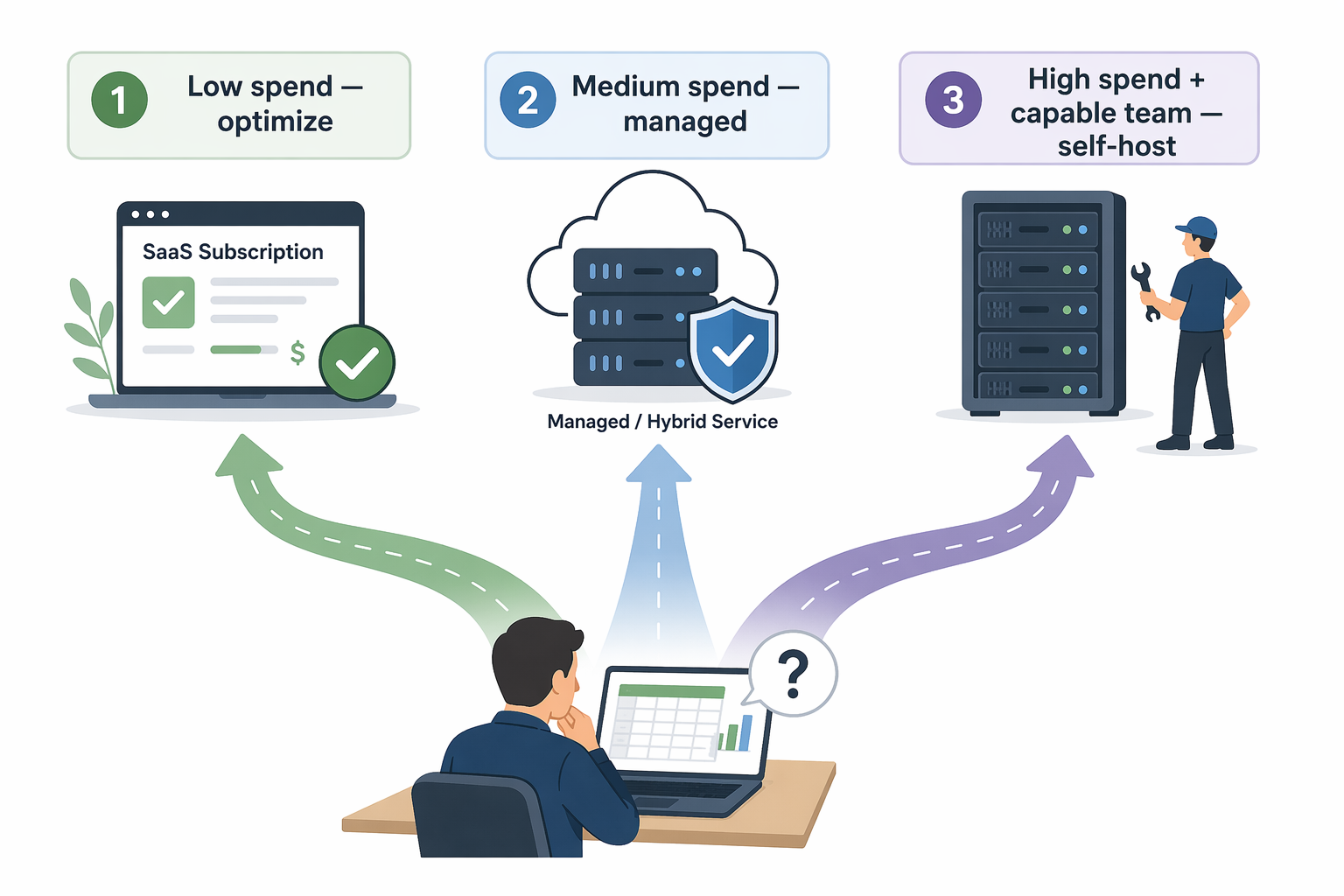
Once the visible subscription and hidden operating costs are on the same page, the decision usually sorts into three practical outcomes.
Low Spend: Optimize Before Migrating
If the current automation or orchestration spend is below roughly $80–100 per month, migration is usually the wrong first lever. The team should look for unused seats, excessive polling, duplicated workflows, noisy task runs, or a plan mismatch before building a self-hosted replacement. At that spend level, one debugging session can consume months of theoretical savings.
Some teams in this band also discover they do not need full orchestration yet. A lightweight automation platform, a managed starter tier, or a simpler scheduled job may solve the current problem without creating an internal platform. The diagnostic at workflow orchestration versus automation can help separate those cases before the cost comparison gets overbuilt.
Medium Spend: Prefer Managed or Hybrid Unless Operations Is the Point
In the middle range, the right answer is often a managed or hybrid service. This is where Prefect Cloud, Dagster+, Temporal Cloud, Astronomer, MWAA, n8n Cloud, and comparable offerings deserve serious evaluation. The team may still run compute, agents, workers, or data-plane components, but the service can remove enough control-plane work to be worth the bill.
This is especially true when the workflows are business-critical but the engineering group is small. A thin platform team can build impressive internal infrastructure for a while. The question is whether they can also keep patching, upgrading, monitoring, documenting, and training others while product work keeps arriving.
High Spend: Self-Host Only With a Real Owner
Self-hosting becomes attractive when the current bill is high enough, the workload is steady enough, and the team has platform competence it actually intends to use. That last condition is not decorative. It means the owner has time, authority, documentation standards, alerting expectations, and a maintenance budget.
- Name the owner before migration, not after the first failure.
- Run the managed and self-hosted systems in parallel long enough to compare outputs and failure behavior.
- Add external uptime monitoring and error notifications before production workflows depend on the system.
- Budget routine upgrade and patch work as recurring capacity.
- Write the rollback path while the old system still exists.
A technically strong team that enjoys running infrastructure may pass that test easily. For them, self-hosting is not a side chore; it is a capability. They may get better control, lower marginal costs, stronger internal knowledge, and fewer commercial constraints. The problem is not self-hosting. The problem is approving self-hosting while budgeting it as if nobody operates it.
A Practical Rule
For workflow orchestration tools, use the subscription bill as the start of the calculation, not the conclusion. If spend is low, optimize the existing tool before migrating. If reliability matters and operations capacity is thin, use a managed or hybrid tier. If spend is high and the team has a real maintenance owner, self-hosting can be the cheaper and better-controlled path.
Open source is cheapest when the team can afford the invisible work.
References
- The 10 Best Open-Source Workflow Automation Tools in 2026, Leland, May 2026.
- Airflow 3.x multi-team deployment capabilities, TechTarget, June 2026.
- ZenML 2026 update, ZenML, May 2026.
- Elementum comparison, Elementum, April 2026.
- Enate comparison, Enate, 2026.