
For Obsidian vs Notion for AI notes, the clean split is this: choose Notion if you want polished AI agents inside a cloud team workspace; choose Obsidian if you want local-first notes where AI is assembled through plugins and can, with the right setup, stay offline. That sounds like a feature comparison, but it is really a bargain comparison. Notion asks you to trust a managed workspace and pay for convenience. Obsidian asks you to tolerate configuration in exchange for control.
Last verified: July 5, 2026. Category: tool-comparisons.
| If this is your priority | Better fit | Why |
|---|---|---|
| Team pages, project docs, summaries, delegated workspace tasks | Notion | Native AI agents live inside the same cloud workspace where the team already works. |
| Private notes, unfinished thinking, client-sensitive research, offline control | Obsidian | Markdown files stay local by default, and AI can be routed through local models. |
| Lowest predictable solo cost | Usually Obsidian | Sync is optional and cheaper than a Notion paid plan plus AI, though API usage or hardware can change the math. |
| Least setup | Notion | AI is a product feature, not a plugin stack. |
| Most configurable AI workflow | Obsidian | Plugins can connect to local models, API keys, embeddings, and vault-specific workflows. |

The AI Difference Is Architectural, Not Cosmetic
Notion AI is native to Notion. It sits inside pages, databases, team wikis, meeting notes, and shared project spaces. In 2026, Notion presents AI as a multi-model system with agent capabilities, including model selection across GPT-5.2, Claude Opus 4.5, and Gemini 3, plus autonomous agent sessions and Custom Agents with credit billing.[1] The appeal is obvious if your work already lives in Notion: the AI does not need to be bolted on, indexed separately, or persuaded to understand the workspace structure.
Obsidian’s AI story is not one product feature. It is an ecosystem. Plugins such as Smart Connections, Copilot for Obsidian, Smart Composer, Text Generator, and Local GPT connect a vault to different models and workflows; guides current as of 2026 describe a mix of semantic search, chat-with-notes, writing assistance, local model support, and bring-your-own-key setups.[2][3] That is both the charm and the warning label. Obsidian can be shaped around your note system, but you are also the person doing the shaping.
In daily use, this produces different habits. In Notion, you might ask an agent to summarize a messy project page, draft a status update from meeting notes, or pull action items from a shared workspace. In Obsidian, you might use a plugin to search across a private vault, ask questions of a folder of research notes, generate a draft from linked markdown files, or run a local model through Ollama so the notes do not leave your machine.
That distinction matters more than whether both products now have “AI.” A cloud agent that can read shared team context is useful because it is close to the team’s work. A local model over a private vault is useful because it is close to your private thinking. Those are not interchangeable promises.
Privacy: Where Your Notes Go When AI Reads Them
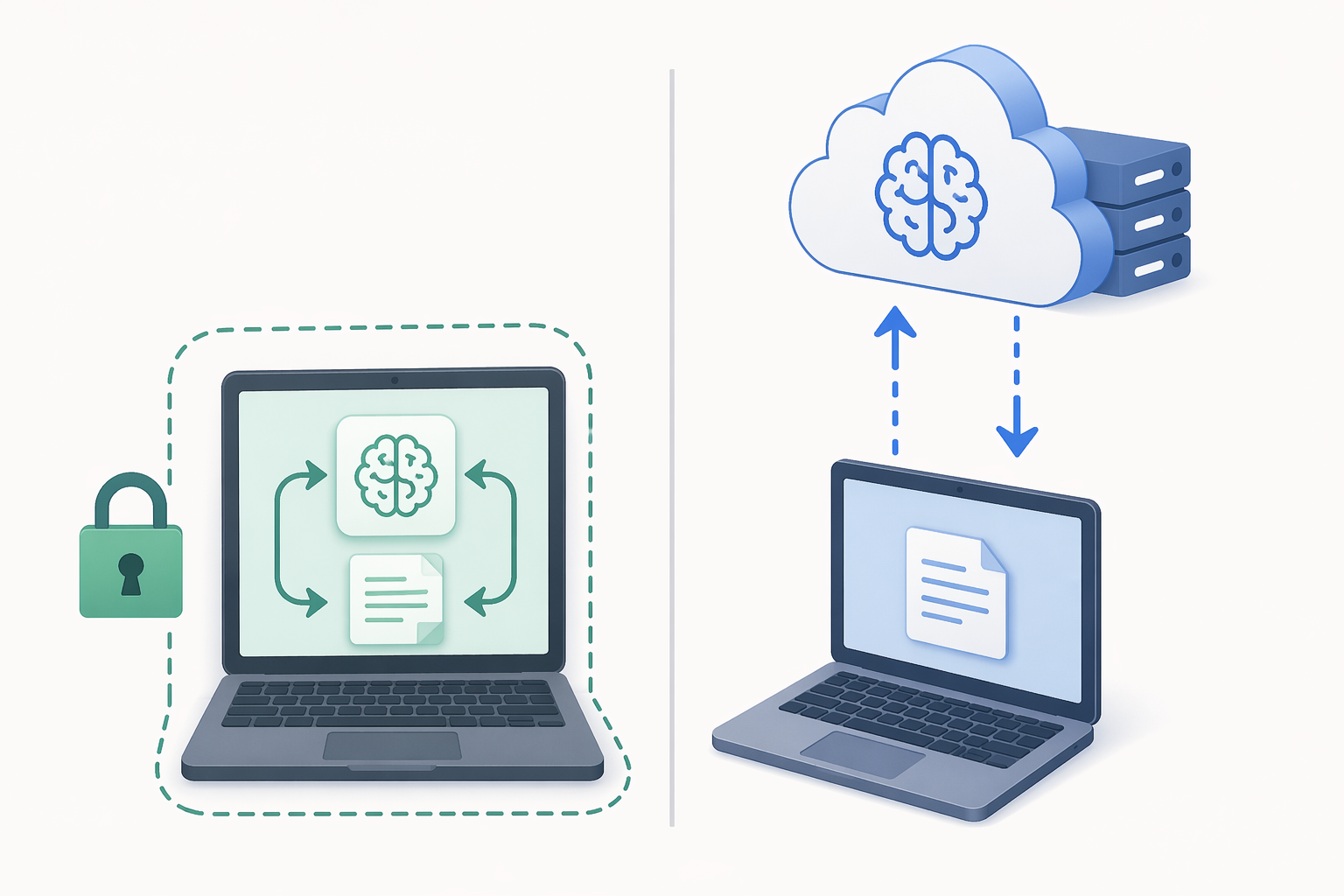
The privacy comparison is the load-bearing part of this decision. If AI is reading your notes, the first question is not whether the answer is clever. It is where the text goes.
Notion’s AI system is cloud-based. A privacy-focused comparison of Notion AI and local Obsidian AI notes that Notion AI sends content to third-party AI providers such as Anthropic and OpenAI, with 30-day data retention on standard plans, while zero-retention and HIPAA options are limited to Enterprise.[4] That does not make Notion careless; it means the privacy model is contractual and platform-managed. You are relying on Notion’s controls, its provider relationships, your workspace permissions, and the plan you are on.
Obsidian starts from a different place. Your vault is a folder of local markdown files. If you connect Obsidian to a local model through Ollama, the same comparison describes the route as one where no note data leaves the machine, with no server-side retention policy needed because there is no third-party AI server in the loop.[4] For a journal, a dissertation vault, therapy notes, sensitive client research, or a half-formed business plan, that difference is not a checkbox. It changes what you are willing to ask the AI.
There is a catch: Obsidian is only as private as the route you choose. If you install an AI plugin and point it at a commercial API, you have moved back into a provider-mediated workflow. That may be acceptable. Many people are comfortable sending selected notes to a model provider for better results. But it is no longer the same privacy posture as local Ollama inference. “Obsidian supports local AI” is not identical to “every Obsidian AI setup is local.”
For team knowledge, Notion’s cloud architecture can be the right trade. A shared workspace already assumes shared access, permission management, and network availability. Notion’s AI becomes another layer over that workspace. For private knowledge, the same architecture feels heavier. A private vault full of unfinished notes is not just another database waiting to be summarized.
Cost: The Sticker Price Is Only the First Line
For a solo user, the rough 2026 budget split is stark. Notion Plus with the AI add-on comes to about $216 per year, based on the Plus plan and the $10 per user per month AI add-on listed in Notion’s pricing.[5] Obsidian Sync is listed at $60 per year, while the major AI plugins themselves are free or community-distributed, with optional model API costs depending on how you configure them.[6][2][3]
| Setup | Approximate solo annual cost | What can change the cost |
|---|---|---|
| Notion Plus + Notion AI | About $216/year | Custom Agents credit usage and plan changes |
| Obsidian + Obsidian Sync + free plugins | About $60/year before model costs | Paid API calls, paid plugins if adopted, or hardware for local models |
| Obsidian without Sync + local model | $0 software cost before hardware | A capable computer and the time to configure the stack |
That does not mean Obsidian is automatically cheaper for every real person. If you use GPT APIs heavily from an Obsidian plugin, the monthly bill can rise. If your laptop struggles with local models, the “free” local route may quietly become a hardware problem. For local AI models, 16GB or more of RAM is often the practical comfort line. A student with an older laptop may find Notion’s monthly AI add-on expensive, but also find local inference frustrating.
Notion’s newer Custom Agents also add budgeting uncertainty. Custom Agents launched with credit-based billing on May 4, 2026, and that pricing should be checked before teams build workflows around it.[1] A stable per-seat subscription is one thing; a credit meter attached to autonomous agents is another. It may still be worth it, especially if agents reduce coordination work, but it belongs in the budget conversation before adoption, not after the first invoice.
If you are comparing broader free and paid note-taking options, the site’s free note-taking apps comparison is a useful companion. For this head-to-head, the important point is narrower: Notion charges for an integrated AI workspace; Obsidian keeps the app layer inexpensive, then lets model choice, sync choice, and hardware decide the rest.
Setup Difficulty: Notion Saves Time, Obsidian Spends It Up Front
Notion’s AI advantage is not only polish. It is removal of chores. A team member does not have to pick an embedding model, choose a vector store, test plugin compatibility, or explain why a local server is not running. They open Notion, use the AI tools in the workspace, and keep moving. For a manager trying to get a team to document work consistently, that matters more than theoretical flexibility.
Obsidian asks for more judgment. A local-first AI setup might involve installing Ollama, downloading a model, choosing an AI plugin, pointing the plugin at the local endpoint, deciding which folders to index, and testing whether the answers are useful. If you use API-based models instead, you need to manage keys, costs, and provider settings. None of this is impossible, but it is work that lands on the user, not the vendor.
The most dangerous Obsidian recommendation is the breezy one: “Just use plugins.” Plugins are software maintained by people with finite time. The 2026 plugin guides identify Smart Connections, Copilot, Smart Composer, Text Generator, and Local GPT as active options, but community plugin health can change, and some projects may depend heavily on one maintainer.[2][3] Before moving a research workflow or client-note system onto a plugin, check recent releases, issue activity, documentation, and whether export remains simple if the plugin stalls.
A technically comfortable solopreneur may enjoy that control. A student trying to finish a paper probably should not spend three nights debugging embeddings unless privacy or offline access is truly central. A team member who just needs an AI summary before a meeting should not be made to understand local model routing.
Performance at Scale
On large personal archives, Obsidian’s local design can feel faster because the files and index live on the machine. One published 2026 benchmark reported Obsidian searching 5,000 notes in about 0.3 seconds, compared with about 1.8 seconds for Notion; at 10,000 notes, the same source reported Notion search degrading to roughly 5–7 seconds. It also reported RAM usage of 180–250MB for Obsidian and 400–600MB for Notion.[7]
Those numbers should be treated as indicative, not universal. Hardware, network quality, workspace structure, note length, plugins, and cache state all matter. Still, the direction matches the architecture. A local markdown vault has fewer moving parts for basic search. A cloud workspace with permissions, blocks, databases, and network calls can do more collaborative work, but it has more to coordinate.
AI performance adds another layer. Notion’s cloud models may produce stronger results with less local strain because the computation is not happening on your laptop. Obsidian with local models may preserve privacy but deliver slower or weaker answers depending on the model and machine. If you are choosing Obsidian specifically for offline AI, test your actual vault on your actual computer before declaring the setup solved.
Team Collaboration Is Where Notion Earns Its Friction
Notion is easier to defend when the notes are not really “notes” anymore. They are project hubs, product specs, meeting records, decision logs, task databases, and onboarding docs. In that environment, AI agents can reduce coordination work: summarize a long page, draft an update, pull unresolved tasks from scattered notes, or help a new teammate understand a workspace without asking five people for context.
Obsidian can be shared, and Obsidian Sync exists, but it is not trying to be the same kind of live team workspace. Its strengths are personal knowledge management, durable markdown files, links, local folders, and user-controlled extensions. Obsidian’s newer Bases feature is relevant for structured views, but full parity with Notion databases should not be assumed from the available material.
For readers comparing the broader AI note-taking landscape, the distinction mirrors a larger pattern covered in Best AI Note-Taking Apps: Capture and Synthesis Need Different Tools. Capture, collaboration, synthesis, and private thinking do not always belong in one app.
Which AI Workflow Fits Which User?
| User | Likely better choice | Reason |
|---|---|---|
| Student on a tight budget | Obsidian if setup is tolerable; Notion if convenience matters more | Obsidian can keep software costs low, but local AI may strain older hardware. |
| Privacy-conscious researcher | Obsidian | Local markdown plus Ollama can keep AI processing on the machine. |
| Small team already using Notion | Notion | Native AI agents work where the shared docs already live. |
| Solopreneur with client-sensitive notes | Obsidian for private notes; possibly Notion for shared client-facing docs | The boundary between private thinking and shared deliverables matters. |
| Nontechnical user who wants AI summaries immediately | Notion | Less plugin selection, less configuration, fewer moving parts. |
| Power user who likes configurable systems | Obsidian | Model choice, plugin choice, offline routing, and markdown ownership are the point. |
A simple rule helps: if the AI needs to act on shared work, Notion has the cleaner path. If the AI needs to read private knowledge, Obsidian gives you more ways to keep control. If both are true, do not rush to merge the workflows just because one app can technically stretch.
The Hybrid Setup Is Useful, but Not Free
Some power users keep Notion for team collaboration and Obsidian for personal knowledge. Tech-insider.org describes this hybrid pattern and notes MKBHD as an example of a user associated with running Notion for team collaboration and Obsidian for personal knowledge management.[7] The pattern makes sense: shared work in the shared tool, private thinking in the private vault.
The cost is not only money. Two systems create boundary decisions. Does a meeting note start in Notion because it involves a team, then get distilled into Obsidian because it affects your long-term thinking? Do client notes live in Obsidian until they become a deliverable? Which app is the source of truth when a project changes? Hybrid systems fail less from ideology than from small duplicate decisions made every day.
A hybrid setup is worth considering when the separation is obvious: Notion for shared pages, tasks, and workspace AI; Obsidian for private research, long-term notes, and offline AI. It is not worth adopting merely because comparison articles refuse to pick a lane. If the boundary is fuzzy, one tool may be calmer.
Decision Rule
Choose Notion for AI notes if you want native cloud AI, team-ready agents, shared workspace context, and minimal setup. It is the safer default for teams and for users who value a polished experience more than local control.
Choose Obsidian for AI notes if your priority is privacy, offline capability, markdown ownership, and configurable model routing. It is the stronger choice for people willing to maintain a plugin-based setup and verify that their chosen AI route actually keeps data where they expect it to stay.
Use both only when the split between shared work and private thinking is valuable enough to maintain. Notion and Obsidian can coexist, but the second tool should reduce risk or friction, not become another place to lose your notes.
References
- Notion AI — Notion
- Best AI Plugins for Obsidian 2026 — Shadow.do
- Best Obsidian AI Plugins 2026 — SystemSculpt
- Notion AI vs Obsidian AI: Local Intelligence for PKM — Flowith
- Notion Pricing — Notion
- Obsidian Sync — Obsidian
- Notion vs Obsidian 2026 — Tech Insider