
A personal CRM template in Notion usually fails quietly. The first day is satisfying: contacts imported by hand, tags arranged, birthdays added where you happen to know them, a few “follow up soon” dates placed with optimism. Two weeks later, the system has already started asking for more attention than the relationships themselves. By month two, the database still looks organized, but the information inside it has stopped being alive.
That is the real comparison problem. Not which Notion CRM template has the prettiest gallery view, the most properties, or the most complete dashboard. The useful question is which template will still get opened when adding a new contact takes thirty seconds, when a follow-up reminder appears before the relationship goes cold, and when the database is small enough that reviewing it does not feel like another job.

The abundance does not help as much as it appears to. OnePageCRM reported more than 1,100 CRM templates on the Notion marketplace in January 2026, including more than 200 personal CRM templates.[1] That sounds like choice; in practice, it creates a second maintenance problem before the first one has even begun. Most people do not need a broader template search. They need a harsher filter.
Why Most Notion Personal CRMs Go Stale
The failure usually starts with capture. Notion is flexible, but a basic Notion database does not natively pull contacts from your phone, email, calendar, or LinkedIn. Someone has to notice the new person, open the database, create a page, fill the fields, assign the tags, and remember enough context to make the entry useful later. That is manageable for a handful of people. It becomes fragile once the database is expected to reflect real life.
The second failure is follow-up. A “next contact date” field looks responsible, but it only works if the template makes that date visible at the right time and gives the user a review habit that survives busy weeks. Community patterns cited by OnePageCRM and 2sync describe Notion CRM templates being abandoned within two to four weeks, with lack of automatic contact sync as a recurring cause.[1][2]
The third failure is field inflation. Many templates confuse completeness with survivability. They add company, role, birthday, city, last interaction, next interaction, relationship type, opportunity value, deal stage, status, priority, notes, source, tags, sentiment, and custom views. Each field looks harmless in isolation. Together, they turn every new contact into a small administrative project.
The fourth failure is a flat contact list. A former client, a close friend, a conference acquaintance, and someone you met once through a mutual connection do not require the same review rhythm. When everyone sits in one undifferentiated database, the system either nags too much or helps too little.
The Three Features That Matter After Week One
A Notion personal CRM that survives daily use usually does three things well. It keeps data entry light, it separates relationships by priority, and it creates a durable reason to review people before the information gets stale.
- Low-barrier entry: a new contact should need only a name, relationship tier, context note, and optional next follow-up. Everything else should be optional.
- Relationship tiers: the template should distinguish close relationships from weak ties so the review cadence matches the actual social weight.
- Follow-up or review triggers: the template should surface who needs attention without requiring the user to manually scan the whole database.
The relationship-tier idea is where Dunbar-style circles are genuinely useful, as long as they are treated as a sizing heuristic rather than a universal law. 2sync summarizes a Heart / Trust / Encounter / Network model attributed to Dunbar and Uphabit, using tiers of roughly 5, 15, 50, and 150-plus relationships.[2] The point is not to prove that every person has exactly 150 meaningful connections. The point is to stop pretending that every contact deserves the same database behavior.
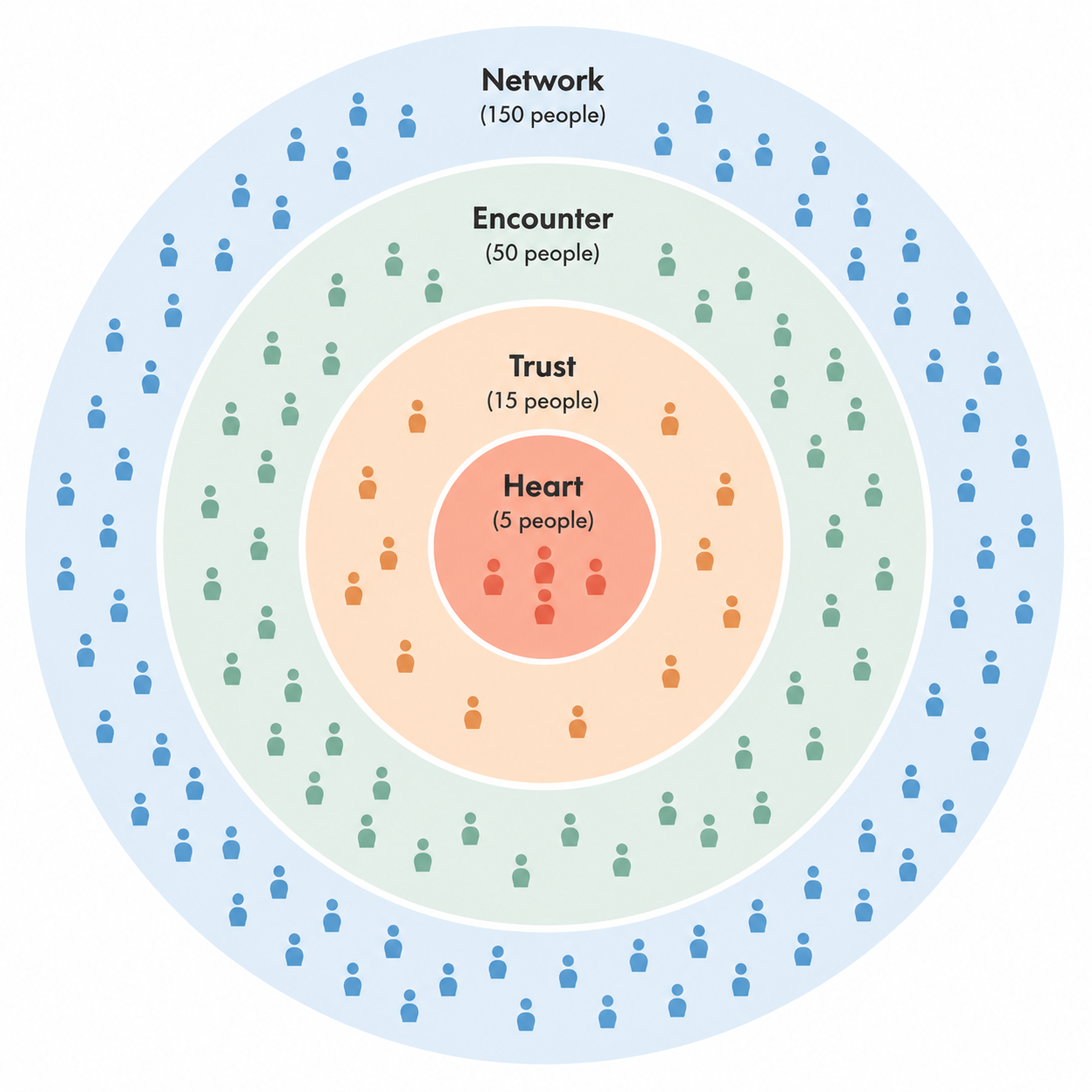
For a freelancer or knowledge worker, this changes the template decision. A simple Notion setup can work well for a manageable network, especially under roughly 150 active relationships. Once the contact base grows beyond that, the missing sync layer becomes less of an inconvenience and more of a structural weakness.
Quick Comparison: Which Templates Are Most Likely to Survive?
| Template or approach | Best fit | Survival strength | Main strain point |
|---|---|---|---|
| Client List by EdriansNotes | Freelancers and service providers managing clients | Strong structure; highly rated at 4.89/5 by 2sync | Can feel more like client operations than personal relationship upkeep |
| Notion Sales CRM | Solo sellers, consultants, and pipeline-driven work | Strong deal and pipeline tracking; rated 4.83/5 by 2sync | Optimized for sales stages, not warm personal maintenance |
| Standard Notion Personal CRM | Small personal networks and first-time users | Easy to understand and low-cost to start | Lower comparative rating visibility and limited automation |
| Minimal tiered personal CRM | People who want the lightest sustainable system | Best match for Heart / Trust / Encounter / Network review habits | Depends on disciplined manual capture unless paired with sync |
| OnePageCRM-tested free Notion CRM options | Users comparing free templates before committing | Useful for seeing common strengths and weaknesses across free options | Free templates still share Notion’s native sync limitation |
| Zapier-style build-your-own Notion CRM | Users willing to design a lean database and automation flow | Lets you avoid bloated template fields | Requires setup decisions that many people never finish |
| 2sync hybrid Notion CRM setup | Users who want Notion plus contact/calendar sync | Addresses the manual-sync failure more directly | Adds a paid layer, reported at $7/month by 2sync |
Those ratings are useful, but they should not be mistaken for a personal CRM verdict. 2sync’s 2026 roundup gives Client List by EdriansNotes a 4.89/5 and Notion’s Sales CRM a 4.83/5, which makes them obvious contenders.[2] The harder question is whether their strengths match the relationship-maintenance job, not whether they are polished CRM systems in general.
Client List by EdriansNotes: Strong, But More Client-Centered Than Personal
Client List by EdriansNotes is the template to take seriously if your “personal CRM” is really a working client memory system. Its high 2sync rating is not surprising: depth and structure are exactly what client management needs.[2] You want to know who the client is, what work is active, what was promised, what is owed, and where the relationship stands commercially.
For freelancers, that structure can be a relief. The template gives client relationships a place to live instead of scattering context across email, invoices, notes, and memory. If the relationship has active projects or future revenue attached to it, the extra fields are not decorative; they reduce risk.
The strain appears when you try to use the same template for non-client relationships. A designer you met at an event, an old colleague, a mentor, and a friend in another city do not need the same operational scaffolding as a paying client. If every person enters through a client-shaped form, lightweight social maintenance starts to feel overbuilt.
Use this one if your network maintenance is tied to service delivery, referrals, and repeat business. Be more cautious if you mostly want to remember who matters, when you last spoke, and why you wanted to stay in touch.
Notion’s Sales CRM: Excellent Pipeline Tool, Uneven Personal CRM
Notion’s Sales CRM has a different kind of strength. 2sync rates it 4.83/5 and highlights it for pipeline tracking.[2] That is exactly where it should be judged. If your relationships are connected to leads, opportunities, deal stages, and revenue movement, a sales CRM view can make the next action obvious.
It becomes less convincing when the purpose is personal continuity. Sales stages are not relationship tiers. A contact can be commercially inactive and still personally important. Another contact can sit in a pipeline while having little long-term relationship value. If the main view is built around deals, the template may pull your attention toward transactions rather than maintenance.
That does not make it a bad choice. It makes it a specific choice. Consultants, coaches, fractional operators, and solo sellers may benefit from the pipeline logic because their follow-up has a commercial consequence. For a broader personal CRM, it needs pruning: fewer deal fields, clearer relationship tiers, and a review view that is not only about sales movement.
Standard Notion Personal CRM: Good First Draft, Easy to Outgrow
The standard Notion Personal CRM template has one underrated advantage: it does not intimidate the user immediately. For someone who has never kept a relationship database before, a basic contacts table with notes and follow-up fields is better than a heavily engineered command center.
Its weakness is also predictable. 2sync’s top-rated 2026 CRM list places stronger emphasis on templates such as Client List by EdriansNotes and Notion’s Sales CRM, while the standard Notion Personal CRM does not appear as a top-rated contender in the same way.[2] That does not prove it is ineffective. It does suggest that the default template is more of a starting point than a finished survival system.
If you use it, add only what the default version is missing for long-term use: a relationship tier property, a “review this week” view, and a fast-capture view with the fewest possible required fields. Resist the urge to turn it into a miniature enterprise CRM. The more it asks from you at entry, the less likely it is to be current when you need it.
A Minimal Tiered Template Is Often the Best Personal Fit
The best personal CRM template in Notion for many people is not the most complete one. It is a small database built around relationship tiers and review dates. The contact page can be almost plain: name, tier, context, last interaction, next review, and notes. If a field does not change what you do next, it probably does not belong in the first version.
| Tier | Useful review behavior | What the template should show |
|---|---|---|
| Heart | Frequent personal attention | People you do not want hidden among casual contacts |
| Trust | Regular check-ins | Close collaborators, mentors, friends, and important peers |
| Encounter | Occasional review | People worth remembering when context returns |
| Network | Lightweight search and resurfacing | Weak ties, acquaintances, and broader professional contacts |
This is where Dunbar-style sizing helps. The template does not need to enforce exact limits, but it should make overcrowding visible. If the Heart tier has thirty people, it has stopped meaning anything. If the Network tier is full of people you never search, review, or contact, it may be an archive rather than a CRM.
A minimal tiered template also reduces the awkwardness of adding partial information. You may not know someone’s birthday, company, location, or preferred contact method yet. You probably do know why you want to remember them. That is enough to create the record.
Free Template Roundups Are Useful, But They Cannot Remove the Core Friction
OnePageCRM’s January 2026 review of free Notion CRM templates is useful because it tests actual free options rather than treating the marketplace as a gallery.[1] That kind of comparison is especially helpful for spotting common weaknesses: too much manual entry, unclear follow-up behavior, and templates that are better at looking complete than staying current.
Still, a free template cannot make Notion something it is not. Without a sync layer, someone must keep the contacts current. That is not a moral failing or a productivity flaw. It is the operating cost of choosing a flexible workspace over a dedicated relationship tool.
If you are comparing free templates, ignore any option that requires a full profile before a contact becomes useful. Favor templates that let you add a person from memory in under a minute, assign a tier immediately, and trust a review view to bring them back later.
Build-Your-Own Notion CRM: Best When You Know What to Leave Out
Zapier’s guide to turning Notion into a CRM is most useful as a reminder that a template is not the only path. You can build a lean contacts database, add views for follow-up, and connect parts of the workflow to other tools if you are willing to design the system yourself.[3]
The danger is over-design. Building your own CRM invites the same fantasy that ruins many templates: if the database can hold a field, maybe it should. A better approach is to start with the review behavior and work backward. Decide which people need to resurface weekly, monthly, quarterly, or only when searched. Then create only the properties needed to support that behavior.
A custom build is a good fit if you already know your relationship categories and dislike adapting someone else’s structure. It is a poor fit if the setup phase becomes a way to postpone the actual habit of logging and reviewing contacts.
The Sync Question: When Notion Needs Help
The strongest argument against a pure Notion personal CRM is not aesthetic. It is sync. A 2024 RelationOps survey cited second-hand by Storyflow found that 84% of solo founders who maintained personal CRMs beyond two years used a tool with auto-sync, though the original methodology and sample size were not independently verified in the materials reviewed. Treat that as a directional warning, not a settled benchmark.
2sync’s hybrid approach matters for this reason. Its 2026 guide describes a Notion sync option at $7/month, giving users a way to keep Notion as the interface while reducing the manual upkeep that kills many CRM databases.[2] That price changes the comparison: the question becomes whether you want Notion badly enough to pay for sync around it.
Dedicated personal CRM tools make the opposite trade. Dex positions itself around relationship management features that Notion does not provide natively, including contact sync and reminders built for staying in touch rather than managing a generic database.[4] Clay occupies similar territory for people who want a more automated relationship layer. Pricing reported in the reviewed 2026 materials placed Dex around $12/month and Clay around $10/month, while Notion Plus was listed at $10/user/month and Notion Business at $20/user/month as of the February to June 2026 source window.[2][4]
Notion 3.0 also complicates the value calculation. AI Agents introduced in September 2025 can support more automated reminder workflows, but the reviewed materials place those capabilities on the Business plan at $20/user/month.[2] At that point, a free Notion template is no longer the real comparison. You are comparing a paid Notion stack against tools built specifically for personal relationship management.
Which One Should You Choose?
Choose Client List by EdriansNotes if your relationship database is mostly client-facing and you benefit from deeper structure. It is the strongest option here for freelancers whose follow-up is tied to projects, repeat work, and referrals.
Choose Notion’s Sales CRM if your contacts live inside a pipeline. It is not the cleanest personal CRM, but it is a sensible working CRM for people whose next relationship action is often a sales action.
Choose a minimal tiered personal CRM if your real goal is to stay in touch with a manageable network. Build around Heart, Trust, Encounter, and Network tiers; keep required fields scarce; and make the review view impossible to miss.
Choose a synced Notion setup or a dedicated tool such as Dex or Clay if manual upkeep is already the reason your last CRM died. Paying for sync is less romantic than finding the perfect free template, but it addresses the actual failure point.
For readers already comfortable in Notion, broader template literacy still helps; our guide to Notion note-taking templates is a useful companion if you are deciding how much of your work system should live in templates at all.
The decision rule is simple enough to keep honest: use a simple tiered Notion template if your network is human-sized and you will honor lightweight review prompts. Add sync, or move to a dedicated personal CRM, if manual entry and manual remembering are already the parts you do not do.
References
- Top 7 Free Notion CRM Templates: Fully Tested & Reviewed, OnePageCRM, January 2026.
- 10 best Notion CRM templates in 2026, 2sync, February 2026.
- Notion CRM template: How to turn Notion into your CRM, Zapier.
- Notion vs Dex: Best Personal CRM in 2026?, Dex.