
A work operating system template for freelancers sounds like the clean answer to a messy problem: one place for leads, projects, tasks, notes, content, finances, and client records. A good Notion Freelance OS can absolutely do that internal organizing work. The trouble starts when the system has to leave your desk and meet the client.
The practical choice is not “Notion or subscriptions.” It is whether your freelance business needs native invoicing, e-signature contracts, and client portals inside the same workflow. Notion templates are usually a one-time purchase in the $15–$99 range, while all-in-one platforms commonly sit somewhere between $0 and $99 per month; Plutio’s comparison estimates that a Notion-based setup with add-ons such as FreshBooks, DocuSign, and Toggl can reach $62–$81 per month.[1] That estimate comes from a vendor with its own platform to sell, so it should not be treated as neutral research. It is still useful because it prices the exact handoff points freelancers tend to forget when they buy a template.
| Freelance setup | What it usually covers well | Where the extra cost appears | Best fit |
|---|---|---|---|
| Notion Freelance OS template | CRM, projects, tasks, notes, dashboards, lightweight finance tracking | Invoicing, payment collection, e-signatures, time tracking, client portals | Freelancers who mostly need internal project control |
| Notion plus specialist tools | Custom internal hub plus preferred accounting, legal, and time tools | Multiple subscriptions and manual data transfer between tools | Freelancers who already like their finance/legal stack |
| All-in-one freelance platform | Leads, proposals, contracts, invoicing, payments, projects, and client communication | Recurring platform subscription and less Notion-style customization | Service businesses where quote-to-cash work happens every week |

The real buying question is quote-to-cash
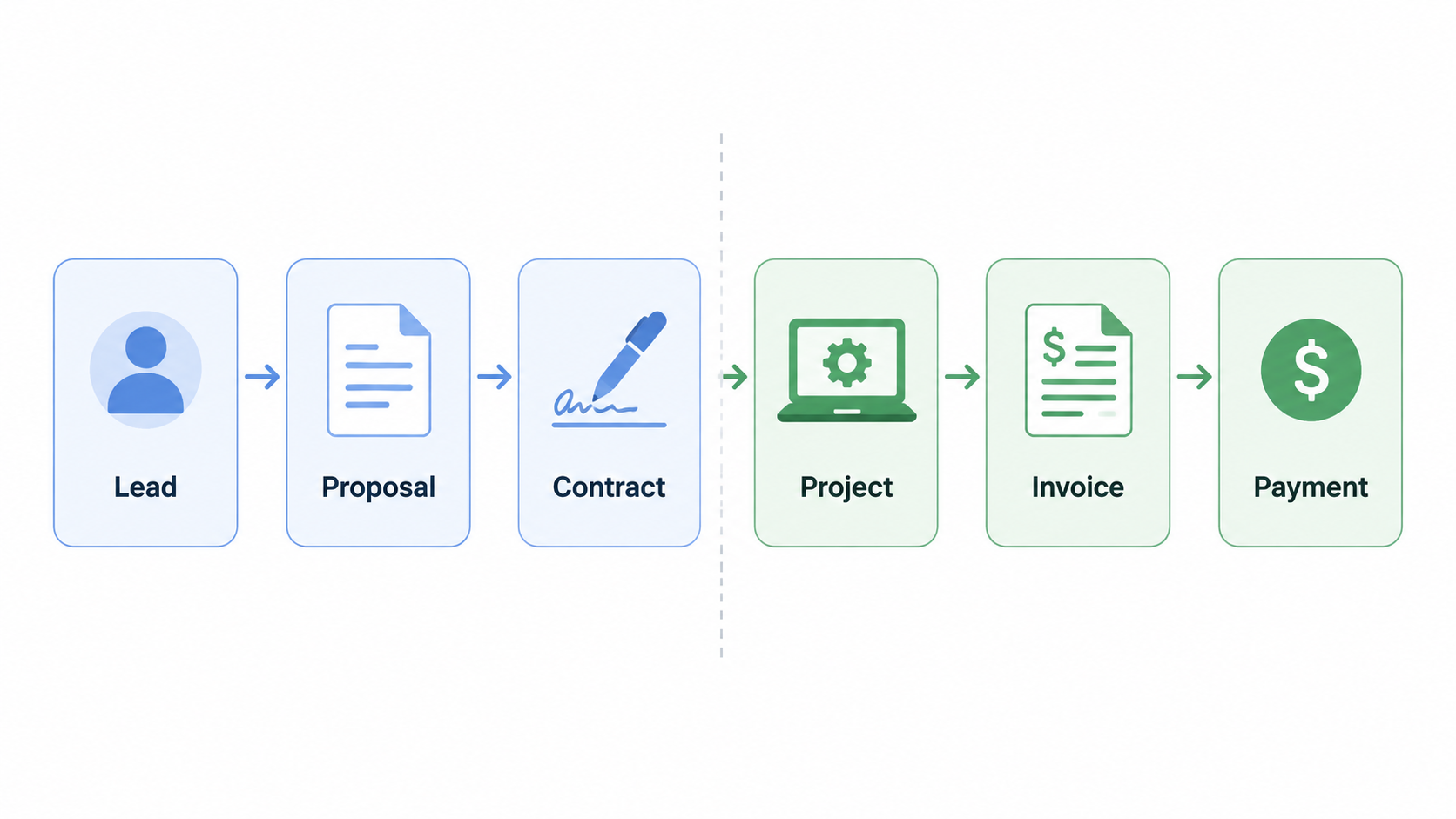
For a freelancer, “work operating system” should translate into a sequence, not a vibe: capture the lead, send the proposal, get the contract signed, do the work, track the time or milestone, send the invoice, collect payment, and keep the client from asking where everything lives.
Notion is strong in the middle of that chain. It can hold the CRM record, the project database, the task board, the meeting notes, the content calendar, the asset list, and the internal finance tracker. A well-built template can reduce the daily scramble of remembering what is due, who is waiting, and which deliverable belongs to which client.
But Notion does not become an invoicing tool because a database has a “status” property called Paid. It does not become an e-signature tool because a contract page is beautifully formatted. It does not become a client portal because a shared page contains links to deliverables. Those distinctions matter because each missing native function either becomes manual admin or another subscription.
Agiled’s own comparison puts a solo freelancer’s separate-tool stack at $1,356 per year versus $588 per year for an all-in-one setup, a claimed difference of $768 per year.[2] That figure is also vendor-published and not independently verified. Still, it points at the same operational pattern as the Plutio estimate: once the template needs outside help for money, signatures, and client access, the cheap purchase price stops being the full price.
What Notion Freelance OS templates actually cover
The strongest case for a Notion Freelance OS is not that it replaces a business platform. It is that it gives a solo worker a customizable command center for a one-time cost. That can be enough for many freelancers, especially those who bill through another system, work on fixed deliverables, or have a simple client list.
Premium examples show the shape of the category. Easlo’s Freelance OS is priced at $79 and presents itself around project management, clients, tasks, income, expenses, and documents.[3] Notion Everything’s Freelance OS is also listed at $79 and shows 873+ reviews with a 4.9-star rating.[4] Notion’s own marketplace also includes free freelance templates, which makes the low end of the decision very real: a freelancer can start without buying anything at all.[5]
Popularity and polish are useful signals, but they do not answer the workflow question. A template can have a polished dashboard, a CRM pipeline, a task database, a project area, and a finance tracker while still leaving the freelancer to create invoices elsewhere, collect signatures elsewhere, and send clients to yet another place for deliverables. If the buyer only needed internal control, that is fine. If they expected a business back office, it is a problem.
Time tracking is the small crack that reveals the larger issue. NotionApps reviewed 16 freelancer templates and found that only 3 included any time-tracking capability.[6] Even that finding should be read narrowly: it says whether the templates include some time-tracking feature, not whether they provide billing-grade time approval, invoice conversion, or reporting. For hourly freelancers, that difference is not cosmetic.
If time tracking is central to your billing, compare the template’s time fields against dedicated time management software for freelancers and teams before assuming a database view will hold up. A task timer, an hour log, and an invoice-ready time report are three different things.
Where a Notion template is legitimately enough
A Notion template is a sensible choice when the paid work does not require much client-facing infrastructure. A writer who invoices through an accounting app they already trust, a designer who works on fixed-fee projects with a separate contract process, or a consultant who mainly needs a clean record of clients, deliverables, and follow-ups may not gain much from moving everything into a subscription platform.
- Choose a Notion template if your main problem is remembering work, not processing transactions.
- Choose a Notion template if your invoicing, contracts, and payments are already handled in tools you like.
- Choose a Notion template if clients do not need to log into a portal or approve work inside your system.
- Choose a Notion template if you want to modify your databases, views, and fields more than you want a fixed workflow.
This is also where the broader Notion ecosystem helps. If the main need is relationship tracking rather than full business operations, a Notion personal CRM template comparison may be more relevant than a large Freelance OS. Many freelancers do not need a maximal dashboard. They need a reliable place to see who they owe, who owes them, and what conversation comes next.
The hidden stack behind a cheap template
The expensive part of a Notion setup is rarely the template. It is the stack that forms around it. A typical service freelancer can end up with Notion for projects, FreshBooks or another finance tool for invoices, DocuSign or another signature tool for contracts, Toggl or another tracker for time, Stripe or PayPal for payment links, and email for everything the client cannot find.
Plutio’s estimate puts the Notion-plus-add-ons workflow at $62–$81 per month when FreshBooks, DocuSign, and Toggl are included.[1] The exact number will vary because freelancers choose different plans, discounts, and tool combinations. The operational issue is steadier than the price: every separate tool creates another place where the client name, project name, rate, deadline, or payment status may need to be copied.
That copying sounds harmless until it happens after the paid work is done. The project is complete, the client is happy, and now the freelancer is rebuilding the same engagement in an invoicing app. If there is a contract amendment, it lives in another tool. If a client asks whether the invoice was paid, the answer is not in the project dashboard. The work operating system did not fail at task management; it failed at handoff.
Automation can reduce some of this friction, especially for freelancers comfortable connecting forms, databases, accounting software, and email. But automation is not free just because it is no-code. It has to be designed, tested, maintained, and occasionally repaired when a field name or integration changes. If that is the path you are considering, compare the available workflow automation tools for non-technical users as part of the real system cost.
When all-in-one platforms become cheaper despite the subscription
A monthly bill is not automatically worse than a one-time template purchase. It is worse when it duplicates tools you already need and like. It can be better when it replaces several subscriptions and removes the handoff work between them.
The pricing spread is wide enough that the category should not be judged as one thing. The research set for this comparison includes Agiled at $0–$99 per month, Plutio at $19 per month, Bonsai at $25 per month, HoneyBook at $19 per month, Dubsado at $20 per month, and Indy at $12 per month.[1][2] Those numbers do not prove which product is best; they show that “subscription platform” can mean a modest monthly bill or a larger operating expense depending on the plan and feature needs.
The economic case improves when the same platform handles the parts Notion cannot natively handle: proposals, contracts with e-signature, invoices, payment collection, client portals, and sometimes scheduling or forms. For a service-based solopreneur who sends proposals and invoices every week, the value is not only the saved subscription cost. It is the fewer status checks, fewer copied fields, and fewer “where is that link?” messages.
Agiled’s $1,356-versus-$588 annual comparison should be read with caution because it is original research on Agiled’s own domain and positions Agiled favorably.[2] Even so, the structure of the comparison is worth borrowing for your own decision. List the tools you would actually use with Notion, add their annual cost, then add the admin cost of maintaining the connections. If that number is above the platform you would otherwise choose, the one-time template is not the cheaper system.
The lock-in tradeoff
All-in-one platforms ask for a different compromise. You get a more complete quote-to-cash workflow, but you accept the platform’s structure. Your invoices, contracts, client records, and project communication may become harder to move later. You may also discover that a platform’s project management area is less flexible than the Notion dashboard you would have built yourself.
That is not a small tradeoff for freelancers who think through their work visually or who have unusual project stages. A Notion setup can be shaped around the way you actually think. An all-in-one platform is often better at enforcing the business process. The question is which part of your work currently causes more drag.
Do not confuse this with enterprise Work OS software
The phrase “work operating system” also gets used for enterprise tools such as Monday.com and Smartsheet. That is a different search lane. Those products can be powerful for teams, departments, and cross-functional reporting, but they are not the main alternative to a Notion Freelance OS for a solo service business trying to manage proposals, signatures, invoices, and client follow-up.
A freelancer choosing between a $79 Notion template and a freelance business platform does not need an enterprise software taxonomy. They need to know whether the system can carry the paid engagement from first inquiry to collected payment without making the freelancer become the integration layer.
A practical verdict matrix
| Your freelance situation | Better starting point | Why |
|---|---|---|
| You need a personal command center for tasks, projects, notes, and client records | Notion Freelance OS template | The template solves the internal organization problem without adding a monthly platform bill |
| You already use separate finance, contract, and time-tracking tools that you trust | Notion as an internal hub | Replacing working specialist tools may create more disruption than value |
| You send proposals, contracts, invoices, and payment reminders frequently | All-in-one freelance platform | Native quote-to-cash features can replace several subscriptions and reduce manual handoffs |
| You bill hourly and need accurate time-to-invoice reporting | Dedicated time tool or all-in-one platform | Many freelancer templates do not include time tracking, and basic time logs may not be invoice-ready |
| You mainly want fewer tools and fewer places for client data to drift | All-in-one platform, priced against your real stack | The subscription may be cheaper than maintaining several add-ons |
For task-only freelancers, a Notion Freelance OS template is often enough. For freelancers who already have preferred finance and legal tools, Notion can still be the internal workspace that keeps projects and relationships visible. For service-based solopreneurs whose work depends on proposals, signed agreements, invoices, payments, and client portals, the all-in-one platform deserves to be priced before the template is purchased.
There is also a simpler philosophy underneath the spreadsheet: reduce the number of places your business can leak attention. If that is the problem you are trying to solve, a digital minimalism productivity setup may be a better frame than another feature comparison. The right freelance operating system is the one that leaves you with fewer unpaid handoffs after the client work is done.
References
- Best Notion Alternatives for Freelancers in 2026 — Plutio
- 11 Best All-in-One Software for Freelancers [2026] — Agiled
- Freelance OS | Notion Template — Easlo
- Freelance OS — The Best Notion Freelance Template — Notion Everything
- Top 10 Free Freelance Templates — Notion Marketplace
- 16 Handpicked Notion Templates for Freelancers (2025) — NotionApps