
Most “best note taking app” lists are written as if notes are just prettier text boxes. For developers, that misses the part that starts to hurt later: whether the notes live in a repo, whether code blocks survive export, whether old decisions can be found with grep, whether sync requires a proprietary cloud, and whether the tool still works when the app company changes direction.
The useful comparison is not one universal winner. It is a spectrum: plain Markdown files in VS Code, local-first Markdown knowledge bases, queryable outliners, encrypted terminal-friendly apps, and collaborative team documentation. Each solves a different maintenance problem.

| Workflow | Best fit | Why developers care | Trade-off | Pricing note, last verified June 2026 |
|---|---|---|---|---|
| VS Code + Markdown + Git | Zero new app, repo-native notes, runbooks, ADRs | Plain files, grep, diff, commits, editor-native code blocks | No backlinks, graph view, polished capture, or mobile-first note UX | Free |
| Obsidian | Local-first personal knowledge base | Notes are ordinary .md files on disk; easy to edit outside the app | Best solo; collaboration and sync are paid or external concerns | Free for personal use; Obsidian Sync listed at $48/year |
| Logseq | Outliner notes with dynamic queries | Datalog queries can pull TODOs, namespaces, and blocks into live views | Public beta status and future licensing make durability less settled | Free in public beta, with possible paid licensing ahead |
| Joplin | Encrypted notes with terminal access | Open-source, end-to-end encryption, and a terminal client | Sync is less frictionless if you do not already have a service or server | Free and donation-ware; sync may require paid storage or self-hosting |
| Outline | Shared engineering documentation | Self-hosted or hosted collaborative wiki for teams | Not a personal PKM replacement | $0 self-hosted, or roughly $10–20/month hosted |
| Anarlog | Bleeding-edge developer-first meeting notes | CLI install via brew and local Ollama support are interesting | Vendor-authored ranking places its own product first | Treat pricing and ranking claims as product-positioning, not neutral testing |
Several 2026 roundups now include developer-specific criteria such as Markdown support, code blocks, Git friendliness, CLI access, local-first storage, and sync model, but the evidence is uneven. Anarlog’s developer list is useful because it tests for those criteria, yet it also ranks its own product first, so its conclusions need to be read as vendor-authored rather than neutral testing.[1] PCMag’s 2026 note-app testing gives a broader cross-check for mainstream apps such as Obsidian, Joplin, and Logseq.[2]
Start with the boring baseline: Markdown files in a repo
Before installing a note app, it is worth asking whether the thing you want is actually a documentation workflow. A folder named notes/ or docs/decisions/ inside an existing repo already has properties many note apps try to re-create badly: search, history, review, plain-text portability, editor integration, and predictable backup.
VS Code handles Markdown side-by-side: raw Markdown in one pane, rendered preview in another, opened with Ctrl+Shift+V. GitDoc can auto-commit changes every 30 seconds, which turns version history into a background behavior instead of another ceremony.[1]
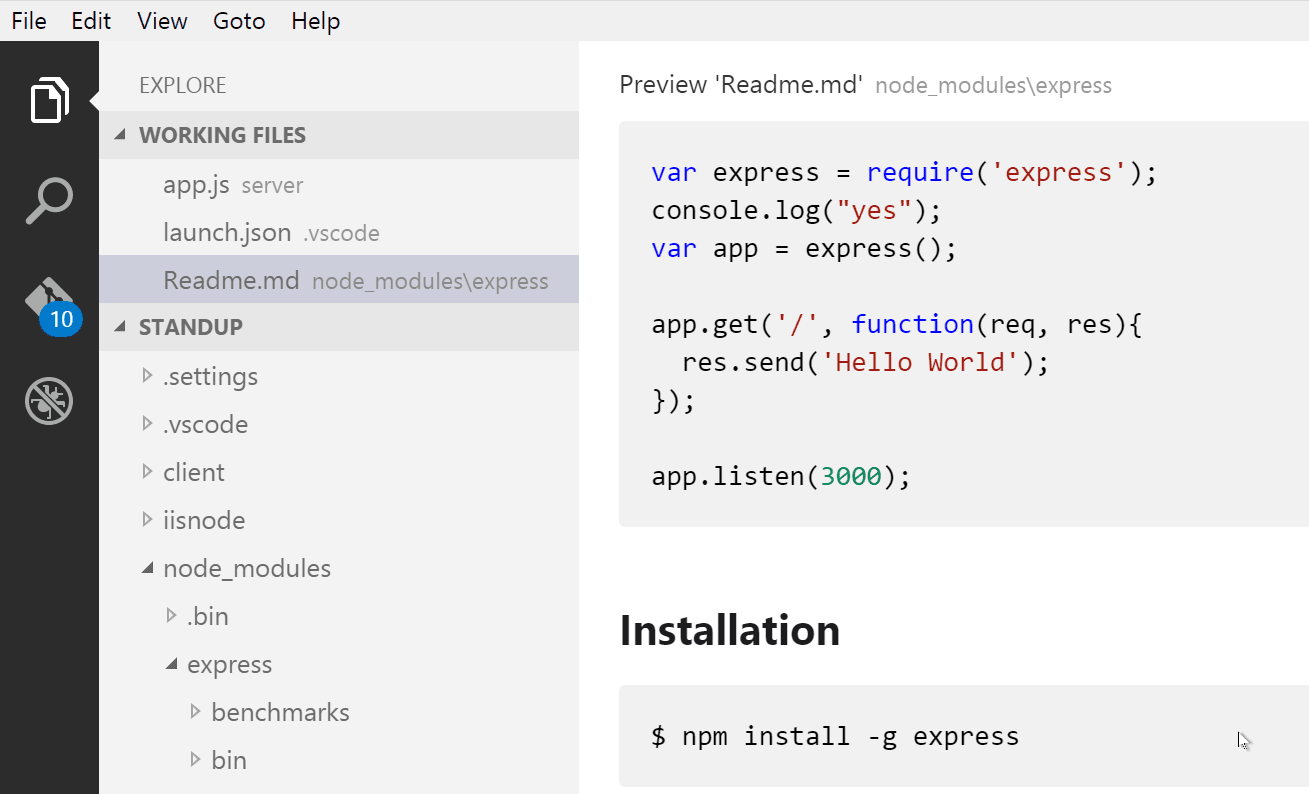
That setup is not charming. It will not give you a graph view. It will not surface forgotten ideas through backlinks. It will not be pleasant on a phone unless you add more pieces. But for runbooks, architecture decision records, migration notes, incident notes, command snippets, and “why did we do this?” archaeology, the repo is often the most honest place for the note to live.
The failure mode is also legible. If the system stops working, the notes are still files. You can open them in another editor, grep through them, diff them, move them, or delete the tooling around them. That matters more than it sounds when a note archive stops being a hobby and starts becoming infrastructure.
A simple repo layout that stays maintainable
docs/
  decisions/
    2026-04-use-postgres-logical-replication.md
  runbooks/
    rotate-api-keys.md
    restore-search-index.md
  meetings/
    2026-06-18-platform-sync.md
  snippets/
    psql.md
    kubectl.md
The important part is not the exact folder names. It is that the file path carries enough meaning that future search has something to hold onto. If every note is dumped into one directory with a poetic title, the repo will still decay. If notes are split by operational use—decisions, runbooks, meetings, snippets—the cleanup burden drops.
- Use Markdown for anything that may need to be reviewed, diffed, or copied into a pull request.
- Put durable team knowledge near the code it explains.
- Use Git history for “what changed?” rather than trying to reconstruct edits from memory.
- Do not pretend this replaces a knowledge graph. It replaces a surprising amount of note-app ceremony.
Obsidian: the strongest local-first PKM choice for plain-file people
Obsidian’s most developer-relevant feature is not the graph view. It is that notes are stored as ordinary .md files on disk. You can open the vault in VS Code, search it with command-line tools, edit files outside Obsidian, or put the directory under Git without needing Obsidian to bless the operation.[1][2]
That changes the risk profile. Obsidian can be your interface without becoming the owner of the archive. Backlinks, daily notes, local graph views, plugins, and fast cross-note navigation sit on top of files that remain inspectable. If the app stops fitting your workflow, the notes are still there.
For a developer, Obsidian works best when notes are personal but technical: API design sketches, debugging trails, learning notes, RFC drafts, postmortem prep, source-reading notes, and messy private thinking before something becomes team documentation. It is especially useful when the same idea shows up in many places: a service name, an authentication pattern, a recurring failure mode, a library you keep evaluating.
The trade-off is that Obsidian becomes powerful partly because it invites customization. Plugins, templates, properties, sync choices, folder taxonomies, and backlink habits can turn into a side project. The safe version is boring: keep the files readable as Markdown, avoid depending on too much plugin-specific syntax, and let links emerge where they reduce search work.
Pricing is also relatively easy to understand. Obsidian is free for personal use, while Obsidian Sync is listed at $48/year in the available June 2026 pricing material.[1][4] That paid sync cost is not automatically a problem; for some people, a supported sync layer is cheaper than debugging a homegrown one. But it should be counted as part of the workflow, not as an afterthought.
Logseq: when notes need to behave more like a queryable database
Logseq starts from a different shape. Instead of pages as the primary mental unit, it leans into outlining and blocks. That matters if your notes are full of tasks, meeting fragments, implementation details, references, and tags that need to be recombined later.
Its developer hook is Datalog: a declarative query language that can produce dynamic views such as TODOs due this week, blocks mentioning a specific API, or every block tagged with a namespace. Developer users describe this style as “SQL for your notes,” which is a fair shorthand for the appeal even if the syntax and mental model are their own thing.[1]
A hypothetical example: if every migration-related note is tagged consistently, a query can collect open follow-ups across daily notes, meeting notes, and project pages without manually maintaining a status document. The gain is not that Logseq stores more text. The gain is that fragments can remain where they were captured while still appearing in a working view.
That is powerful, but it asks more of the user. Outliners reward consistent capture habits and punish vague tagging. Queryable notes are only useful if the blocks carry useful metadata. If your notes are mostly long-form explanations, design memos, or prose-heavy research, Obsidian’s page-and-file model may feel less fussy.
The other caveat is business-model durability. The available research describes Logseq as free and in public beta, moving toward a paid license, so its free status should not be treated as permanently settled in the same way as a pile of Markdown files in Git.[1][4]
Joplin: encryption and terminal access, with sync friction attached
Joplin is the serious choice when the note system needs open-source software, end-to-end encryption, and a terminal client. Among mainstream note apps in the research set, it is called out for having a terminal client alongside cross-platform encrypted sync.[1][2]
That combination has a specific audience. If you manage notes over SSH, live in terminal multiplexers, or want a notes app that does not assume every interaction happens through a polished desktop UI, Joplin deserves attention. It is also a better fit than most glossy PKM tools when encryption is a first-order requirement rather than a settings-page checkbox.
The cost is sync complexity. Joplin is free and donation-ware in the available June 2026 material, but syncing across devices may require a paid storage service such as Dropbox or OneDrive, or self-hosted infrastructure.[1][4] That is not a deal-breaker. It is just not the same kind of “it works everywhere now” experience people expect from consumer note apps.
Joplin also sits in a different emotional category from Obsidian and Logseq. It is less about building a personal knowledge graph and more about owning a reliable encrypted notebook with enough developer affordances to stay out of the way. If terminal access and E2EE are not important to you, its strongest reasons get weaker quickly.
Outline belongs in the team documentation lane
Team documentation is not personal knowledge management with more users. The permissions model, review culture, ownership, discoverability, and editing expectations are different. This is where Outline makes sense: a self-hosted or hosted collaborative wiki for technical documentation rather than a private notebook competing with Obsidian or Logseq.[1]
Use this lane for things other people must trust: onboarding docs, service ownership pages, incident response guides, deployment processes, support escalations, internal API explanations, and documents that need shared editing. If the note needs to outlive one engineer’s laptop and be discoverable by the team, it should probably not be trapped in someone’s personal PKM vault.
The available pricing material puts Outline at $0 for self-hosting or roughly $10–20/month for hosted use, last verified June 2026.[1][4] Self-hosting is not free in operational terms, of course. Someone has to patch it, back it up, monitor it, and decide who owns it when the enthusiastic adopter changes teams.
Anarlog is an interesting signal, not the verdict
Anarlog is worth mentioning because it points at a real direction in developer note tools: meeting notes with a CLI installable via brew install and local LLM support through Ollama.[1] That is the kind of feature set that understands developers are often allergic to SaaS-only capture flows and cloud-only AI.
The caveat is built into the source. A product-authored roundup that ranks its own product first can still contain useful feature comparisons, but it should not be allowed to crown the winner. Treat Anarlog as a bleeding-edge signal: promising direction, developer-native packaging, and local model support, but not yet the boring default for long-lived engineering notes.
How the workflow actually differs
The useful test is end-to-end: capture, edit, search, link or query, version, sync, and share. A note app can be excellent at one stage and annoying at another. Developers usually feel the pain later, when the capture high is gone and the archive has to answer questions under pressure.
| Stage | VS Code + Git | Obsidian | Logseq | Joplin | Outline |
|---|---|---|---|---|---|
| Capture | Good if you are already in the repo or editor; weak for mobile quick capture | Fast for personal notes and daily notes | Strong for fragmented daily capture and tasks | Solid across clients, including terminal-oriented use | Best for shared docs, weaker for private scratch work |
| Edit | Excellent for code-heavy Markdown | Good Markdown editing with app-level navigation | Best for block and outline editing | Good general note editing | Good collaborative document editing |
| Search | Grep, ripgrep, editor search, Git-aware workflows | App search plus file-system search | Search plus query-driven retrieval | App search across encrypted notebook data | Workspace search for team docs |
| Link/query | Manual links only unless you add tooling | Backlinks and local knowledge graph | Datalog queries and block references | Less focused on knowledge-graph behavior | Document hierarchy and team navigation |
| Version | Native Git history | Possible through Git because files are plain .md | Depends on setup and storage approach | Depends on sync and export habits | Depends on workspace history and hosting model |
| Sync | Whatever Git remote or file sync you already use | Paid Obsidian Sync or external sync choices | Public beta ecosystem; sync expectations may change | Requires service or self-hosted sync path | Built around hosted or self-hosted shared workspace |
| Share | Pull requests, repo docs, static sites, pasted Markdown | Good for personal export; collaboration is not the core lane | Good for personal systems, less obvious for team docs | Good for private encrypted notebooks | Best of this set for team-facing documentation |
This is also where older community guidance still helps, with limits. A 2019 developer-oriented dev.to article focused on free tools for programmers, which is useful as a reminder that cost and code-friendly editing have long mattered to this audience, but it should not be treated as current pricing or feature evidence for 2026.[3]
Routing rules for developers in 2026
If you want the least new machinery, use VS Code, Markdown, and Git. Add GitDoc if automatic 30-second commits reduce enough friction to make version history real instead of aspirational.[1] This is the default to beat.
If you want a durable local-first personal knowledge base, use Obsidian. Its advantage is not that it has the flashiest interface; it is that the archive remains a directory of ordinary Markdown files while the app adds backlinks, navigation, and graph-oriented context on top.[1][2]
If your notes are closer to a living task database than a folder of essays, use Logseq. The Datalog layer is the reason to choose it, especially when dynamic views matter more than long-form Markdown comfort.[1]
If encryption and terminal access are the requirements you cannot compromise on, use Joplin. Be honest about sync before committing; the app is free and open-source, but the full multi-device workflow may involve paid storage or self-hosting.[1][4]
If the problem is shared engineering documentation, use Outline or keep docs in Git where review and ownership already exist. Personal PKM tools can prepare ideas, but they should not become the only source of truth for a team.
The best note taking app for a developer is the one whose failure mode you can tolerate. Plain files fail into files. Obsidian fails into Markdown. Logseq fails best when your query habits are disciplined. Joplin fails acceptably when encryption matters enough to justify sync work. Outline fails like infrastructure, which means it needs an owner.