
For a Microsoft 365 organization, the Copilot versus ChatGPT Enterprise decision is not really a contest over which chatbot sounds smarter in a demo. It is a buying decision about where work happens, where sensitive data already lives, and how much rollout effort the company is willing to fund after the license order is signed.
The short version: Microsoft 365 Copilot is the stronger embedded workflow AI when Outlook, Teams, SharePoint, OneDrive, Word, Excel, and PowerPoint are already the operating layer of the company. ChatGPT Enterprise is the stronger standalone reasoning environment when teams need flexible analysis, cross-platform work, or an AI workspace that is not tied to Microsoft Graph. Buying both can make sense, but only if the organization defines separate lanes instead of letting two expensive assistants compete for the same vague “productivity” budget.

| Decision point | Microsoft 365 Copilot | ChatGPT Enterprise or Business |
|---|---|---|
| Best for | Microsoft-heavy organizations that want AI inside documents, meetings, email, Teams, and SharePoint | Teams that need flexible reasoning, analysis, drafting, coding support, and cross-platform work |
| Not for you if | Your useful work data is scattered outside Microsoft 365 or your permissions model is already messy | Users need native access to Microsoft 365 tenant context without manually supplying files or prompts |
| Pricing last verified | July 2026: qualifying Microsoft 365 base license plus Copilot add-on | Business pricing reported as standalone per-user pricing, with Enterprise typically handled through sales |
| Security posture | Inherits Microsoft 365 permissions, Purview sensitivity labels, and DLP controls | Enterprise controls depend on the ChatGPT plan and how users supply or connect data |
| Grounding model | Microsoft Graph grounding across approved Microsoft 365 work data | User-provided context and connected sources rather than native Microsoft tenant grounding |
| Adoption risk | Can become shelfware if teams do not learn where it fits in daily Microsoft workflows | Can win user preference but create context, governance, and reintegration work |
| ROI evidence | Commissioned and partner-reported evidence is favorable but should be treated as directional | Often easier to start cheaply, harder to measure against specific Microsoft workflow savings |
The Real Price Is Not the Add-On Price
The first pricing mistake is comparing Copilot’s add-on price with ChatGPT’s standalone price. Microsoft 365 Copilot requires a qualifying Microsoft 365 base license, reported in the current pricing material as ranging from $12.50 to $57 per user per month, plus the Copilot add-on. As of July 2026, the Copilot Business add-on is listed at $21 per user per month after the $18 promotional rate expired on June 30, 2026, while the Enterprise add-on is $30 per user per month. That puts the practical all-in range at about $34 to $87 per user per month depending on the Microsoft 365 tier underneath it.[1][2]
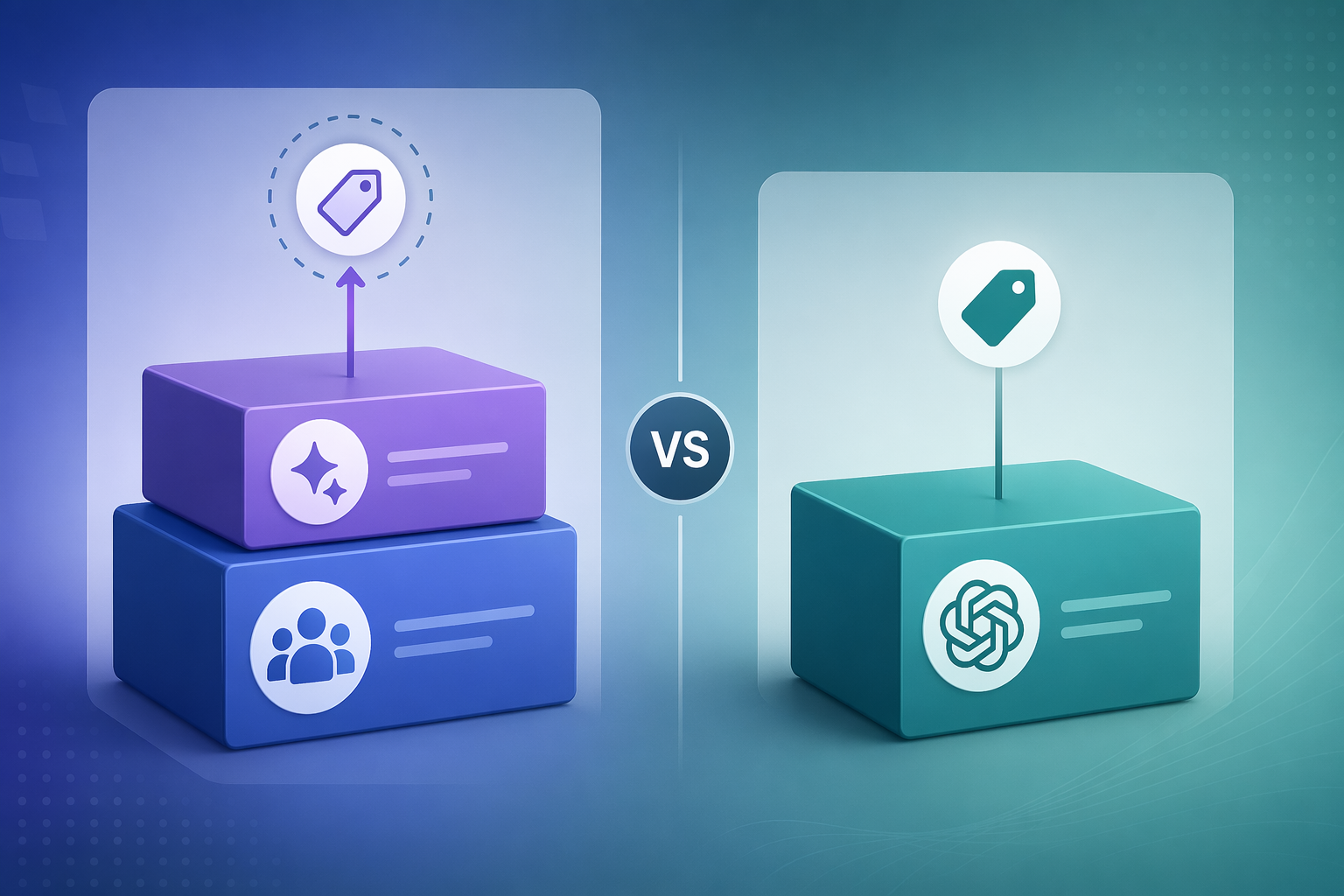
ChatGPT Business is reported at $20 to $25 per user per month as a standalone plan, without a Microsoft 365 base-license dependency.[3][4] That does not automatically make it cheaper in the only way that matters. If the company already owns the Microsoft 365 license, the incremental budget conversation may focus on the Copilot add-on. If the company is deciding what a new AI capability costs from zero, the Microsoft base license belongs in the calculation.
| Cost item | Microsoft 365 Copilot | ChatGPT Business |
|---|---|---|
| Base productivity suite required | Yes, a qualifying Microsoft 365 license is required | No Microsoft 365 base license required |
| AI add-on or subscription | $21 per user/month for Copilot Business or $30 per user/month for Enterprise add-on as reported for July 2026 | $20–25 per user/month as reported for Business |
| Practical monthly range | About $34–87 per user/month including base license and add-on | About $20–25 per user/month for Business |
| Budget risk | Buyers undercount cost if they quote only the Copilot add-on | Buyers undercount cost if they ignore integration, governance, and context-management work |
There is also a 2026 timing issue procurement should not bury in a footnote. Microsoft announced base Microsoft 365 price increases of 12% to 17% on some Business SKUs effective July 1, 2026, and the Copilot Business promotional rate ended the day before. Any business case built on spring 2026 pricing should be rechecked before approval, especially if the rollout depends on hundreds or thousands of seats.[1][2]
The cleaner procurement comparison is not “$30 versus $25.” It is this: are you paying for an AI layer that can act inside the Microsoft 365 environment your staff already uses, or are you paying for a flexible AI workspace that users must feed with the right context and then translate back into systems of record?
Grounding and Security Are the Actual Product Difference
Microsoft 365 Copilot’s advantage is not just that it sits beside familiar apps. Its answers can be grounded in organizational data through Microsoft Graph, and Microsoft says it enforces existing permissions, Purview sensitivity labels, and data loss prevention policies when doing so.[5] That means a user asking Copilot about a project can receive an answer shaped by the meetings, files, chats, and emails they are already allowed to access, rather than by whatever they remembered to paste into a prompt.
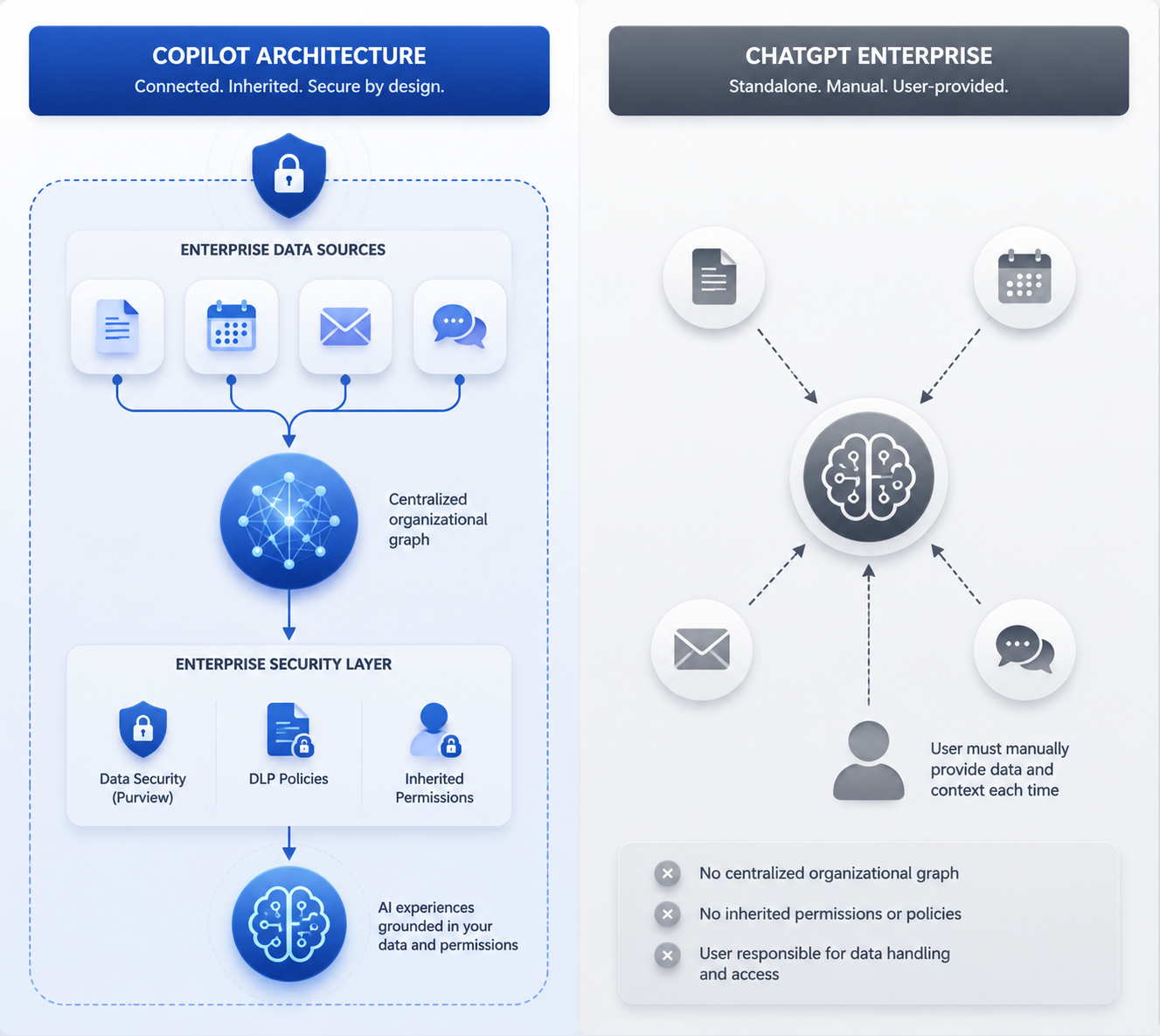
That inheritance is not a decorative enterprise feature. It changes the operating burden. In a Microsoft-heavy organization, the AI layer can respect the same access boundaries that already govern SharePoint sites, Teams channels, email, and documents. The buyer still has to clean up overshared content and poorly maintained groups; Copilot does not magically fix bad permissions. But it works inside a governance model the IT team already owns.
ChatGPT Enterprise and Business deserve credit for a different strength. They give teams a powerful, flexible reasoning environment that can help with synthesis, drafting, analysis, coding, and open-ended exploration across many domains. The tradeoff is context. In the comparison material available for this article, ChatGPT does not have native Microsoft 365 tenant access in the way Copilot uses Microsoft Graph; users supply context through prompts, files, or configured connections, and the organization must govern how that context gets there.[3][5]
That difference matters most in mundane workflows. A sales manager preparing for a customer meeting may need the latest email thread, the account plan in SharePoint, the Teams discussion where legal flagged a contract issue, and the calendar invite with the attendees. Copilot is designed to work closer to that pile of Microsoft 365 context. ChatGPT may produce a sharper strategy memo once given the right material, but someone or some integration has to supply it, permission it, and get the output back into the team’s workflow.
Where Each Tool Fits in Daily Work
Copilot is easiest to defend when the job begins and ends inside Microsoft 365: summarizing Teams meetings, drafting from Word files, finding project context across SharePoint and email, turning notes into PowerPoint drafts, or helping a manager catch up on a week of messages. The value is not that the model knows more in the abstract. The value is that the user does less assembly work before the AI becomes useful.
ChatGPT Enterprise is easier to defend when the work is less bounded by Microsoft apps: comparing market material from multiple sources, developing code or technical explanations, analyzing uploaded documents from different systems, creating first drafts of policies or research memos, or giving expert teams a general-purpose thinking space. It is also a cleaner fit for organizations that do not want their AI buying decision locked to Microsoft 365 licensing.
| Use case | Better first choice | Why |
|---|---|---|
| Meeting follow-up across Teams, Outlook, and shared files | Microsoft 365 Copilot | The useful context is already in Microsoft 365 |
| Open-ended analysis across mixed sources | ChatGPT Enterprise | The work benefits from a flexible standalone reasoning environment |
| Drafting a document from existing SharePoint materials | Microsoft 365 Copilot | Graph grounding and permissions reduce manual context gathering |
| Technical brainstorming, coding help, or exploratory research | ChatGPT Enterprise | Users are less dependent on native Microsoft workflow integration |
| Regulated department workflow inside Microsoft 365 | Microsoft 365 Copilot | Inherited labels, DLP, and permissions are central to the buying case |
| Companywide AI experimentation at lower standalone entry cost | ChatGPT Business | The subscription can be evaluated without buying Microsoft 365 Copilot seats |
The unpleasant middle is where many pilots stall: users ask broad questions in Copilot that do not need Microsoft 365 context, then compare the answer with ChatGPT and conclude Copilot is weaker. Sometimes that judgment is fair. Sometimes the pilot simply tested the wrong job. Copilot should be evaluated on workflows where Microsoft 365 context, permissions, and app proximity matter. ChatGPT should be evaluated where flexible reasoning and cross-platform work matter.
Adoption Data Cuts Both Ways
The user-preference data is not flattering for Copilot. In a January 2026 Recon Analytics finding reported by AI Business Weekly and GetPanto, when employees had simultaneous access to both tools, 76% chose ChatGPT for general knowledge work while 18% chose Copilot.[6][7] That is a real signal, especially for teams that mostly want an AI thinking partner rather than an assistant embedded in Microsoft workflows.
The same adoption picture is more complicated once deployment quality enters the frame. AI Business Weekly reported that about 20 million paid Copilot seats represented roughly 4.4% of an estimated 477 million Microsoft 365 commercial subscribers, and that independent surveys showed only 20% to 30% of purchased seats being used weekly at the average enterprise.[6] Those figures point to a familiar enterprise software problem: paid access does not equal habit.
But poor average utilization does not prove the product cannot work. GetPanto cites Wipro as an enterprise deployment with more than 95% monthly active usage, suggesting that the gap between purchased seats and useful adoption can narrow when the rollout includes training, workflow targeting, and management attention.[7] That example should not be generalized into a guaranteed outcome, but it does keep the analysis honest: Copilot failure is often a deployment failure, not only a model-quality verdict.
There is also a measurement mismatch. Microsoft’s reported monthly active usage framing can look healthier than independent weekly seat-utilization surveys because they measure different behaviors over different windows.[6] A procurement team should ask for the metric that matches the business case: weekly use by paid seat, task completion by department, meeting hours reduced, document cycle time shortened, or help-desk load avoided.
ROI Evidence Is Useful, Not Automatic
The most cited Copilot ROI numbers should be read with their label attached. Rand Group, a Microsoft partner, summarizes a commissioned Forrester Total Economic Impact study estimating 116% ROI, 9 hours saved per user per month, and $19.7 million in net present value for a composite organization of 25,000 employees deploying Copilot.[8] Those numbers are useful for building a directional model, not for promising the CFO that the same result will appear after license activation.
The first six months of measurement should be narrower than the vendor slide. For Copilot, track workflows that Microsoft 365 can actually observe or influence: meeting recap use, email summarization, document drafting from approved repositories, time spent searching for internal material, and department-specific cycle times. For ChatGPT Enterprise, track different outputs: analysis quality, research throughput, code-assist usage, proposal drafting, or expert-team productivity. One generic “AI productivity” KPI will blur the reason each tool was bought.
Seat assignment matters as much as product selection. Copilot seats should go first to roles whose work is saturated with Microsoft 365 context: managers in meeting-heavy functions, sales and customer teams living in email and shared files, operations leads coordinating across Teams, and knowledge workers who repeatedly assemble status from scattered Microsoft documents. ChatGPT seats should go first to teams with high reasoning load, mixed-source analysis, or technical work that benefits from a broad AI workspace.
What 2026 Changes, and What It Does Not
Copilot’s 2026 direction makes the comparison less static than it was a year ago. Coverage of Microsoft’s Wave 3 work describes multi-model intelligence that adds Claude from Anthropic alongside GPT, as well as agentic capabilities such as Copilot Cowork and deeper organizational context through Work IQ.[9][10] Those developments matter because they move Copilot beyond the image of a Microsoft-app sidebar and closer to a work agent that can reason and act across steps.
They do not remove the rollout problem. Agentic tools raise the value of good permissions, clean content ownership, and clear task boundaries. If an assistant can execute more steps, the organization needs even more confidence in what it can see, what it can change, and who reviews the result. The capability gap may narrow, but governance work does not disappear.
For buyers comparing agentic roadmaps more broadly, the relevant question is not whether one vendor has the more impressive announcement. It is whether the agent can operate where the company’s work already happens. A finance team that lives in Excel, Outlook, Teams, and SharePoint has a different answer from an engineering or research group that spends its day across repositories, notebooks, ticketing systems, and external material.
A Procurement Matrix for the Final Decision
| Choose | When the buying logic is | What to verify before signing |
|---|---|---|
| Microsoft 365 Copilot first | Microsoft 365 is the center of daily work, and value depends on secure access to meetings, files, email, chats, and documents | Qualifying license cost, permission hygiene, Purview and DLP readiness, target workflows, and weekly utilization goals |
| ChatGPT Enterprise or Business first | Teams need a flexible AI reasoning workspace across platforms, or the organization wants a lower standalone entry point | Data-handling rules, approved context sources, integration needs, output review process, and department-level success metrics |
| Both | Different teams need different AI jobs: embedded Microsoft workflow assistance and broader reasoning or analysis | Separate use cases, separate governance lanes, seat ownership, duplicate-spend controls, and a shared ROI model |
| Neither yet | The organization cannot identify workflows, data owners, security boundaries, or success metrics | Information architecture, permissions cleanup, pilot design, and budget accountability |
If the company’s useful work data lives in Microsoft 365 and the pain is buried in meetings, documents, email, Teams, and SharePoint, Copilot deserves the first serious pilot. If the pain is broader reasoning, mixed-source analysis, or giving expert teams a flexible AI workspace, ChatGPT Enterprise is the cleaner starting point. If both are funded, they need distinct jobs and distinct measures; otherwise the organization is not buying a strategy, just two subscriptions waiting to be underused.
References
- Microsoft 365 Copilot pricing, Microsoft
- Microsoft Copilot Pricing: How Much Does It Really Cost?, GoSearch
- Microsoft Copilot vs ChatGPT, Corsica Technologies
- Copilot vs ChatGPT, Jint
- Microsoft 365 Copilot vs. the competition, Microsoft
- Microsoft Copilot Statistics, AI Business Weekly
- Microsoft Copilot Statistics, GetPanto
- Is Microsoft Copilot Worth It? Here’s What We’ve Learned, Rand Group
- Microsoft Copilot, PCMag
- Microsoft 365 Copilot Adoption Guide for Businesses, Avantiico