
If you already know Zapier or Make, the simplest way to place the Model Context Protocol is this: Zapier and Make run workflows you define in advance; MCP lets an AI assistant discover and use tools while it is working through a task.
That distinction matters because the wrong mental model leads to bad operations decisions. MCP is not a new visual automation builder with prettier AI branding. It is a standard for connecting AI models to tools and data sources. A Zapier Zap or Make scenario says, "When this trigger happens, run these actions." An MCP-enabled assistant says, "Given this request and these available tools, which tool should I call next?"
For non-developers, that makes MCP useful, but not automatically safer or simpler. If a process must run every weekday at 9 a.m., retry when an API hiccups, notify the right person, and leave a clean audit trail, keep looking at Zapier, Make, n8n, or another automation platform. If the work starts inside an AI assistant and requires judgment, context inspection, tool selection, or company knowledge lookup, MCP becomes much more interesting.

The Quick Verdict
| Use case | Better fit | Why |
|---|---|---|
| A new lead arrives, enrich it, add it to CRM, notify sales | Zapier or Make | The trigger and actions are known before the workflow runs. |
| Every Monday, collect form responses and send a status digest | Zapier, Make, or n8n | Scheduling, retries, and repeatability matter more than AI judgment. |
| Ask an assistant to find the right documents, summarize them, and update a workspace | MCP | The AI needs to inspect context and choose which connected tool to use. |
| Let Claude use approved Zapier actions such as Slack, Gmail, Sheets, or CRM updates | Zapier MCP | Zapier supplies the app connections; MCP lets the assistant call them as tools. |
| Scrape or collect market data, have AI analyze it, then post and log the result | Hybrid | MCP can support the AI-facing tool use while Zapier or Make handles the operational follow-through. |
Zapier's own MCP page describes the bridge plainly: it exposes Zapier's app ecosystem as tools that AI assistants can use, with Zapier positioning access across thousands of apps through MCP-enabled actions.[1] That is a bridge, not a demolition notice for your existing automations.
What MCP Actually Is, Without the Protocol Fog
Anthropic introduced the Model Context Protocol in November 2024 as an open standard for connecting AI assistants to the systems where context and tools live.[2] IBM describes MCP in similar terms: a standard interface that helps AI models connect to external data sources and tools rather than relying only on the information inside the chat window.[3]
The non-technical translation is: MCP gives an AI assistant a structured way to see what tools are available, understand what those tools can do, and call them when a user asks for something. The AI is not just reading a pasted spreadsheet or hallucinating a workflow. It may be able to query a workspace, search files, create a task, update a record, or send information into another system, depending on which MCP servers are connected and what permissions have been granted.
The important nouns are easy to blur, so keep them separate:
- MCP is the protocol: the shared language or standard.
- An MCP server is the connector that exposes a specific app, database, workspace, or service to the AI.
- An AI client, such as Claude Desktop or another MCP-compatible assistant, is where the user asks for work to be done.
- Zapier, Make, and n8n are automation platforms: they orchestrate workflows with triggers, actions, schedules, conditions, and execution history.
Once those pieces are separated, the hype becomes easier to filter. MCP can make an AI assistant more capable. It does not, by itself, replace workflow scheduling, queue management, task accounting, exception handling, role ownership, or the unglamorous question of who fixes the automation on Tuesday morning.
Why Non-Developers Are Hearing About MCP Now
MCP moved from developer curiosity to business-user conversation because the setup path became less hostile. Anthropic's support documentation for Claude Desktop still covers local MCP server setup, but the broader direction has been toward connector directories and simpler installation paths rather than hand-editing configuration files.[4]
There are also more useful servers. Business-oriented MCP roundups now include tools such as Notion, Slack, Google Drive, Canva, Shopify, Stripe, HubSpot, Perplexity, and Octoparse, with some offering no-code or low-code connection paths.[5][6] That does not mean every setup is truly click-only. "No code" may still mean granting OAuth permissions, pasting a server URL, choosing scopes, or trusting a third-party connector with access to sensitive systems.
That gradient matters. A connector you install from a trusted directory is a different experience from a GitHub README that asks you to paste a JSON block into a config file. Both may be described online as MCP setup. Only one belongs in a calm afternoon for a busy operations manager.
When Zapier or Make Is Still the Right Tool
Most operational automation is not waiting for an AI assistant. It is waiting for a trigger.
A new Typeform response arrives. A payment succeeds. A row appears in a spreadsheet. A deal changes stage. A customer submits a support form. These are not ambiguous events. The business already knows what should happen next, and the value comes from making that next step boringly reliable.
Zapier and Make are built for that shape of work. They let a non-developer define a trigger, add actions, set filters, branch on conditions, run on a schedule, and inspect execution history when something fails. If the workflow is predictable, recurring, and tied to operational volume, a visual automation platform is usually the safer default.
Keep deterministic workflows out of the chat window
A good test is whether the work should happen even when no one is actively chatting with an AI assistant. If yes, it probably belongs in Zapier, Make, n8n, or a similar automation platform.
- Scheduled reports that run daily, weekly, or monthly.
- Lead routing based on form fields, geography, deal size, or product line.
- Invoice, payment, subscription, or fulfillment notifications.
- CRM updates where the same fields are mapped every time.
- High-volume data movement where cost and execution limits need watching.
This is also where pricing comparisons are more concrete. Zapier commonly makes teams think in tasks, Make in operations, and n8n in hosted or self-hosted infrastructure patterns. MCP does not have a comparable price meter because MCP itself is not the product you subscribe to. The bill usually comes from the AI platform, the apps being accessed, and any paid MCP server or hosted connector involved.
If you are already comparing automation platforms, it may help to start with a conventional stack comparison first, then layer MCP on top. We have a separate breakdown of Zapier vs. Make vs. n8n vs. Power Automate for that baseline decision.
When MCP Is the Better Fit
MCP starts to earn its place when the workflow is not fully known in advance. That usually means the AI needs to inspect context, decide which source to query, choose among available tools, or act on a user's instruction inside a live assistant session.
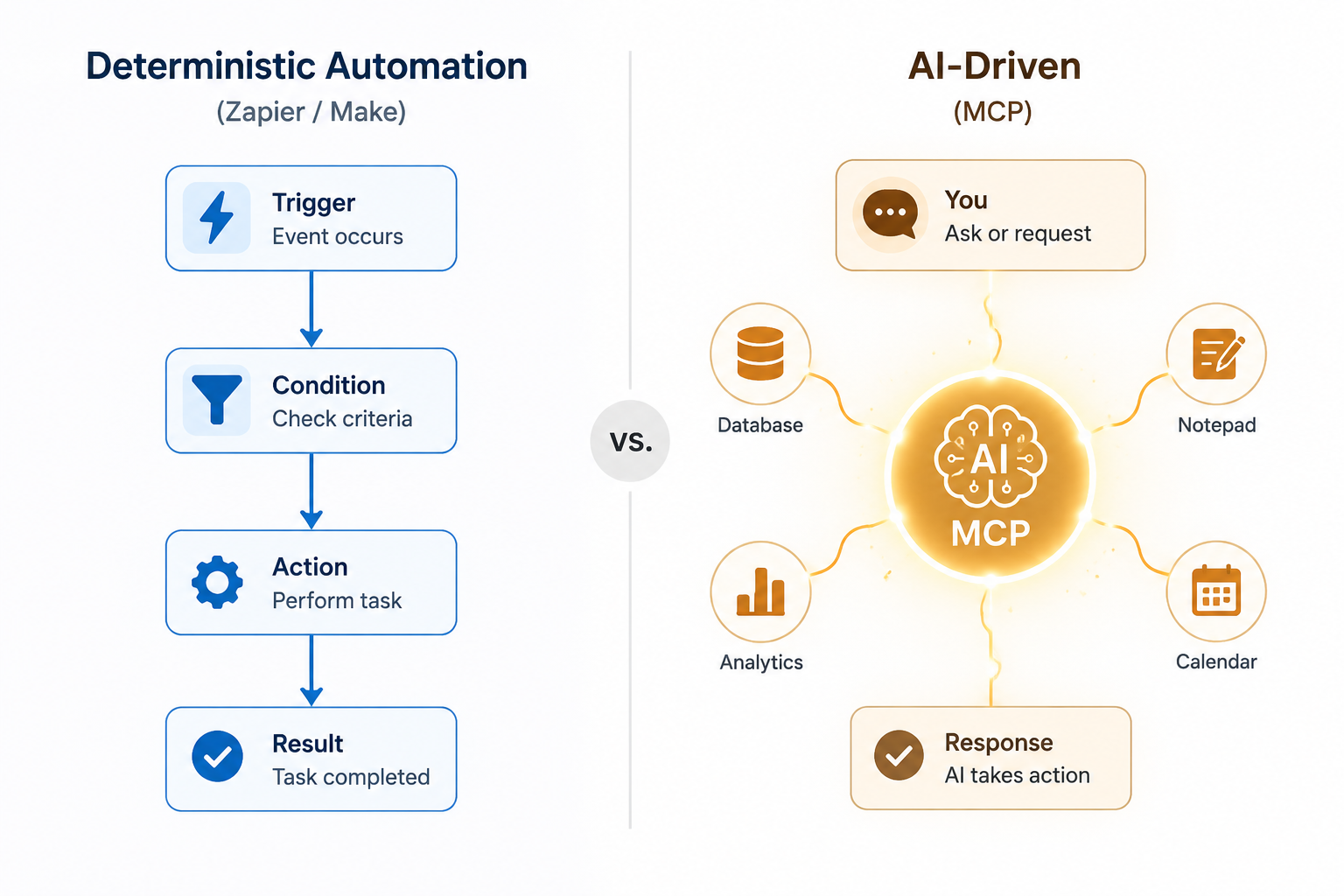
A normal automation says, "When a file lands in this folder, send this message." An MCP-enabled assistant might handle, "Find the latest onboarding docs, compare them with the customer notes from Slack, identify the missing setup items, and draft an update in Notion." That task is not just a chain of fixed app actions. It involves search, reading, judgment, and tool choice.
MCP is especially useful when the work has one or more of these traits:
- The user starts with a natural-language request rather than an app event.
- The assistant needs to search or inspect multiple sources before acting.
- The right tool depends on what the assistant finds.
- The task involves company knowledge, documents, conversations, or workspace context.
- The user wants to stay in the AI assistant while approving or refining the work.
Native MCP servers can be useful here because they may expose deeper, more flexible tool access than a traditional trigger-action connector. A Slack MCP server, for example, is not valuable because Slack messages are new. Zapier has handled Slack actions for years. It is valuable when the AI assistant needs to search, interpret, and act in a Slack-connected context during a broader task.
The same logic applies to tools such as Notion, Google Drive, Canva, Shopify, HubSpot, and Stripe. The question is not, "Can an automation platform connect to this app?" Often it can. The better question is, "Does the AI need to understand context inside this app before deciding what to do?"
MCP Is Tool Discovery, Not Operations Management
This is where a little skepticism protects the team. Thoughtworks' analysis of MCP notes that the protocol helps with the tool-discovery problem, but it is not a silver bullet for every integration or automation problem.[7] That is the cleanest practical boundary: MCP helps the AI know what it can use; it does not magically supply your operating model.
Someone still needs to decide which servers are trusted, which data can be accessed, whether the AI can write or only read, who reviews actions before they are taken, and what happens when the assistant makes a poor choice. For a non-developer, those are not side issues. They are the difference between a helpful assistant and a process nobody wants to own.
The Zapier MCP Bridge Is the Practical On-Ramp
The most practical bridge for many non-developers is not choosing MCP instead of Zapier. It is using Zapier through MCP.
Zapier's MCP integration lets an AI assistant access Zapier-powered actions as tools, which means a business user can keep familiar app connections and permission patterns while experimenting with AI-driven work.[1] Octoparse's non-technical MCP explainer describes this kind of setup as a way to let an assistant use Zapier-connected apps through natural language rather than forcing the user to build every interaction as a standalone automation first.[8]
That is a useful compromise. Zapier remains the layer with the app ecosystem and action definitions. MCP becomes the way an AI assistant discovers and calls those actions. The user experience feels more conversational, but the operational plumbing is not invented from scratch.
A typical request might sound like: "Summarize this new form submission, create a CRM note, and post the important part to the sales Slack channel." In a pure Zapier workflow, you would predefine the trigger, summarization step, field mapping, and Slack action. Through an MCP bridge, an assistant may interpret the request, decide which Zapier action to call, and ask for confirmation before writing to the destination system.
That sounds small until you have a workflow where the next action depends on the content. A support escalation, a competitive research update, or a customer handoff often needs a person to read and decide before the next app action happens. MCP lets more of that decision-making happen in the assistant. Zapier can still handle the posting, logging, and notifications.
A Hybrid Workflow That Actually Makes Sense
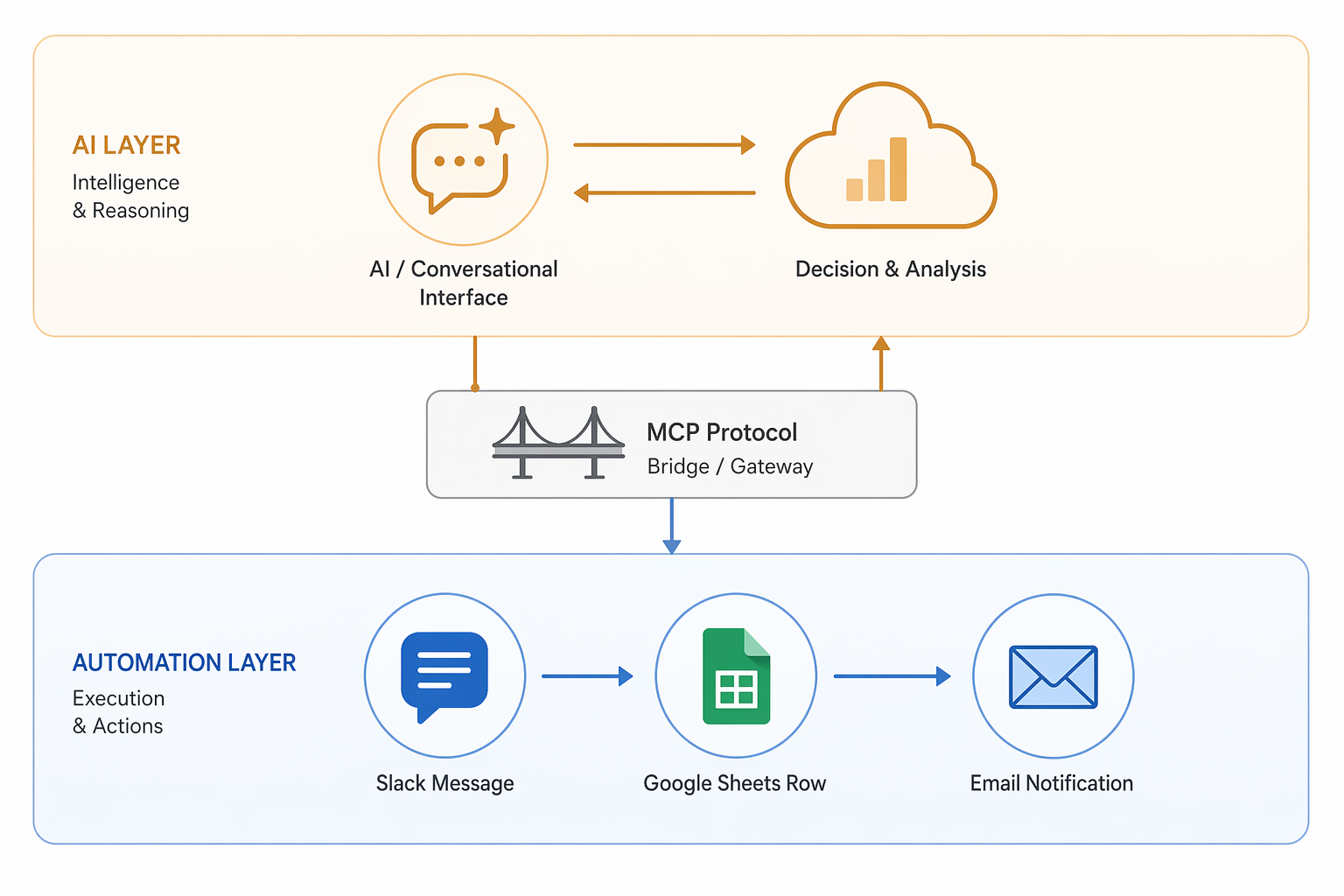
A good hybrid workflow gives each layer the job it is good at. Octoparse describes MCP use cases where data collection, AI analysis, and downstream app actions can be combined across MCP-connected tools and automation services.[8] The useful pattern is not "AI runs everything." It is more like this:
- A data tool collects fresh market or competitor information.
- An AI assistant reviews the collected information and identifies what changed.
- The assistant uses MCP-connected tools to choose the right next action.
- Zapier or Make posts the update to Slack, adds a row to Google Sheets, creates a task, or sends an email.
- A human reviews exceptions instead of babysitting every normal run.
In that setup, the AI is not pretending to be a scheduler. The automation platform is not pretending to understand nuance. The data collection tool gathers, the AI interprets, and the automation platform distributes the result.
This also keeps failure easier to diagnose. If the scrape fails, check the data collection step. If the summary is poor, adjust the instruction or review process. If Slack never receives the message, inspect the automation run. When every responsibility is dumped into an opaque AI session, the failure mode becomes much harder for a non-developer to untangle.
The Decision Checklist
Before moving an existing process toward MCP, ask the unexciting questions first. They are usually the ones that determine whether the workflow survives contact with real work.
| Question | If the answer is yes | If the answer is no |
|---|---|---|
| Does the workflow start from a predictable trigger? | Use Zapier, Make, n8n, or another automation platform. | MCP may be useful if the user starts inside an AI assistant. |
| Does it need to run on a schedule without human prompting? | Keep it in deterministic automation. | An AI-driven session may be acceptable. |
| Does the next step depend on reading and interpreting messy context? | Consider MCP or a hybrid flow. | A fixed trigger-action workflow is probably enough. |
| Do you need reliable retries, logs, and owner-friendly debugging? | Favor automation platforms for the operational layer. | MCP can still help with tool access and analysis. |
| Can the AI safely write to the destination system? | Use narrow permissions, confirmations, and clear review rules. | Start with read-only access or draft-only actions. |
| Would replacing the current automation create more risk than value? | Do not replace it; connect around it or test separately. | A new MCP-first workflow may be worth piloting. |
This is also where n8n deserves a brief mention. For teams comfortable with more technical setup, n8n can sit between no-code automation and developer-controlled workflows. Some teams will use it for deterministic orchestration while experimenting with AI and MCP-adjacent patterns elsewhere. If you are comparing AI-native workflow costs and execution tradeoffs, we have a separate guide on the AI workflow automation token cost trap.
Where Setup Is Truly No-Code, and Where It Is Merely No-Programming
"No-code" gets stretched too far in MCP explainers. For a business user, there are at least three different setup experiences hiding under that label.
- Click-and-authorize: choose a connector, approve access, and start using it.
- Paste-and-configure: copy a server URL or configuration value into the AI client.
- Local setup: install or run a local server, manage configuration, and troubleshoot environment issues.
The first experience is realistically accessible to most Zapier and Make users. The second is manageable for many operations people, but it is not the same as installing a Zapier app. The third may still be no-programming, but it is not something I would casually assign to a department coordinator who just needs to update a project dashboard.
The permission model deserves the same honesty. Connecting an MCP server to Google Drive, Slack, Notion, or Shopify is not a cosmetic setup step. It decides what the assistant can read, and sometimes what it can change. Start narrower than feels convenient. Read-only access and draft actions are not signs of fear; they are normal operational controls.
Pricing Is Not an Apples-to-Apples Comparison
Zapier, Make, and n8n can be compared by how they charge for workflow execution, even if the units differ. You can usually estimate volume: number of records, number of steps, number of operations, number of runs, hosting requirements, and maintenance overhead.
MCP does not price that way because MCP is not the service doing the billing. The cost may come from the AI assistant subscription, the connected business app, a paid MCP server, usage-based model calls, or the automation platform being called through an MCP bridge. A workflow can look cheap in the MCP layer and still become expensive once AI usage and downstream app actions are included.
For non-developers, the practical move is to price the whole path, not the acronym. If Claude analyzes the request, a Zapier MCP action updates the CRM, and Slack receives a notification, all three layers may matter: AI subscription or usage, Zapier task consumption, and the permissions or plan limits of the connected apps.
What I Would Not Replace Yet
I would not replace a stable scheduled automation just because MCP is newer. If invoices are being logged correctly, onboarding emails are going out, leads are routed, and stakeholders know where to check failures, that system has earned some respect.
The better first MCP experiment is usually a workflow that is currently too judgment-heavy for a normal Zap. Look for places where a person reads something, decides what it means, and then performs a small set of predictable actions. Customer intake triage, research summaries, document lookup, meeting follow-up, and competitive monitoring all fit that pattern.
Start with one assistant, one or two trusted servers, and one low-risk write action. If the AI needs access to sensitive systems, begin read-only. If it needs to create records, have it draft before it publishes. If it touches customers, keep a human approval step until the workflow has a track record.
So, Is MCP a Replacement for Zapier or Make?
No. MCP is not a replacement for Zapier or Make in the way one automation platform replaces another. It sits at a different layer. Zapier and Make orchestrate defined workflows. MCP helps AI assistants discover and use tools.
Use Zapier, Make, n8n, or another automation platform when the workflow is event-driven, scheduled, repeatable, and operationally accountable. Use MCP when the work starts with an AI assistant and depends on context, tool choice, or conversational iteration. Use them together when AI should analyze or decide, but a dependable automation platform should still post, log, notify, or repeat the operational steps.
For many non-developers in 2026, the safest first step is not rebuilding the stack. It is connecting an existing automation platform through MCP, testing one AI-driven workflow, and learning exactly where the assistant helps before giving it more responsibility.
References
- Zapier MCP page — Zapier — https://zapier.com/mcp
- Introducing the Model Context Protocol — Anthropic — https://www.anthropic.com/news/model-context-protocol
- What is the Model Context Protocol (MCP)? — IBM — https://www.ibm.com/think/topics/model-context-protocol
- Getting Started with Local MCP Servers on Claude Desktop — Anthropic Support — https://support.claude.com/en/articles/10949351-getting-started-with-local-mcp-servers-on-claude-desktop
- Best MCP Servers for Business Users in 2026 (No Coding Required) — Octoparse — https://www.octoparse.com/blog/best-mcp-servers
- Best MCP servers for AI agents in 2026 — Toloka — https://toloka.ai/blog/best-mcp-servers-for-ai-agents/
- The Model Context Protocol: Getting beneath the hype — Thoughtworks — https://www.thoughtworks.com/en-us/insights/blog/generative-ai/model-context-protocol-beneath-hype
- MCP Explained for Non-Coders: How AI Actually Does Work — Octoparse — https://www.octoparse.com/blog/what-is-mcp