
If your business process management workflow is mostly made of purchase requests, onboarding checklists, service tickets, recurring approvals, content reviews, or handoffs between departments, start your shortlist with low-code BPM. If the work is regulated, long-running, exception-heavy, deeply integrated into an enterprise stack, or closer to case management than routing, traditional enterprise BPM still earns its keep.
That is the category decision worth making before anyone falls in love with a demo. The wrong platform usually does not fail on day one. It fails three months later, when finance changes an approval rule, HR wants a new onboarding branch, IT is holding every workflow edit in its backlog, and nobody is sure who can answer the auditor.

| Decision factor | Low-code BPM platforms | Traditional enterprise BPM suites |
|---|---|---|
| Best fit | Predictable, routable, department-owned workflows: approvals, requests, checklists, ticket routing, recurring operational processes. | Regulated, exception-heavy, long-running case work: claims, loan processing, enterprise risk workflows, complex compliance processes. |
| Deployment time | Often positioned around 1–2 week deployment for simpler workflows, especially when business teams can configure the process directly.[1] | Often 3–12 months when the implementation includes process modeling, integration, testing, governance, and specialist configuration.[1] |
| Cost profile | Examples sit in a monthly or usage-based buying motion: Kissflow starts at $1,500/month for 50 users, Zoho Creator is listed at $8–$25/user/month, Activepieces starts from $5/active flow/month, and Camunda has a free tier.[2][3][4] | Estimated third-party pricing puts Pega around $150k–$500k+/year, Oracle BPM at $1,150/user or $57,500/processor plus annual support, and Appian around $60k–$300k/year.[2] |
| Process ownership | Business users and operations teams can often build and maintain workflows, with IT setting guardrails. | Process architects, BPMN specialists, developers, and IT teams usually own the design and maintenance cycle. |
| Compliance and audit depth | Good enough for many internal approvals and operational controls, but due diligence is needed for regulated records, retention, segregation of duties, and audit evidence. | Stronger fit when audit trails, governance, policy enforcement, and regulatory controls are central requirements rather than supporting features. |
| Case management | Works best when the path is mostly known in advance, with manageable exceptions. | Better for stateful work that can span months, branch unpredictably, and require human judgment, documentation, and rule changes over time. |
| Integration depth | Useful for common SaaS and departmental systems; depth varies widely by platform and plan. | Stronger fit when the workflow must live inside existing enterprise architecture, legacy systems, ERP, identity, records, and data-governance layers. |
| Shortlist examples | Kissflow, Zoho Creator, FlowForma, Activepieces, Camunda. | Pega, IBM Business Automation Workflow, Oracle BPM, Appian. |
The binary is useful, but it is still a simplification. Camunda, for example, can sit closer to a developer-led automation and orchestration layer than a classic business-user no-code tool, depending on how it is deployed. Some enterprise suites now advertise low-code experiences, and some low-code platforms add governance features as they move upmarket. The practical question is not whether a vendor can check a feature box. It is whether the operating model behind the tool matches the people who will maintain the work.
For a broader distinction between process tools and lighter workflow tools, see Process vs. Workflow Management: Tool Profiles for Knowledge Workers. This article assumes the team already wants BPM and is choosing the platform category.
The cost gap changes the buying conversation
Low-code BPM and traditional BPM do not merely sit at different price points. They create different procurement conversations.
A platform such as Kissflow, with published pricing starting at $1,500/month for 50 users and no setup fee, can often be evaluated as an operational systems expense rather than a capital project.[2] Zoho Creator’s published range of $8–$25/user/month puts it in a familiar SaaS buying frame for many mid-market teams.[3] Activepieces, starting from $5/active flow/month, is even closer to a usage-based automation decision than a full enterprise BPM procurement cycle.[4] Camunda’s free tier changes the entry point again, especially for technical teams that want to prototype before committing to an enterprise plan.[2]
Traditional suites belong to a different budget category. The pricing examples for Pega, Oracle BPM, and Appian are third-party estimates rather than official universal list prices, but the order of magnitude matters: Pega is estimated at $150k–$500k+/year, Oracle BPM at $1,150/user or $57,500/processor plus annual support, and Appian at $60k–$300k/year.[2] Those numbers may be justifiable in the right environment. They are hard to justify when the real work is routing approvals and collecting evidence that a manager reviewed something on time.
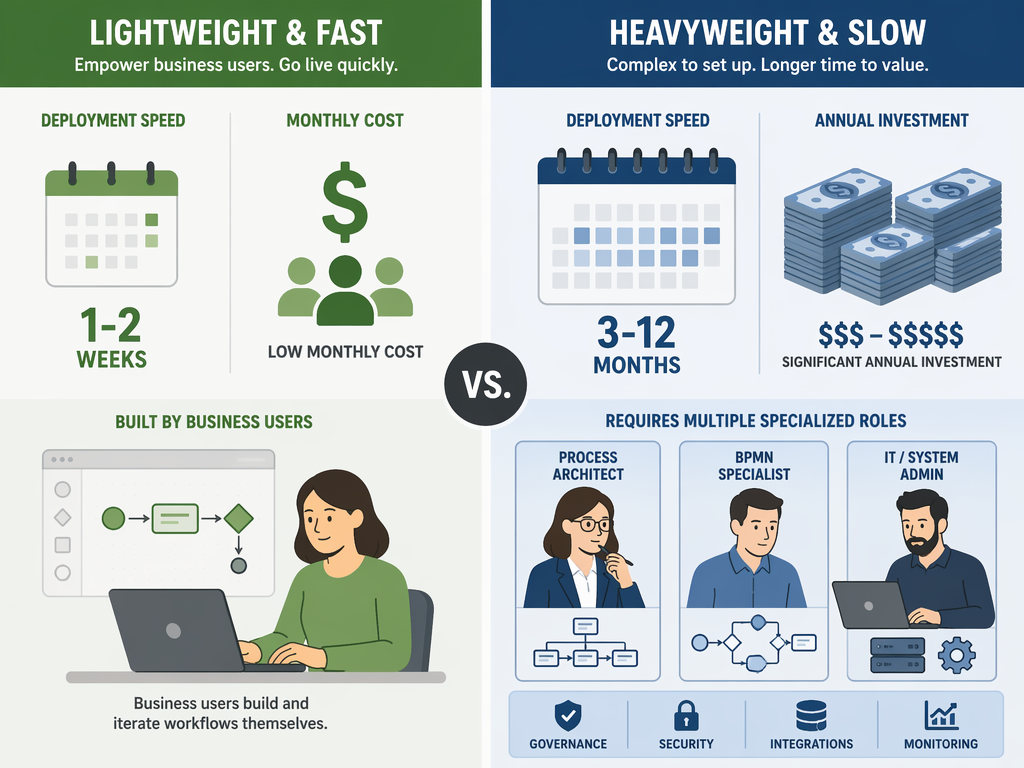
Implementation cost is the quieter line item. A traditional BPM program usually needs people who can model processes properly, translate business exceptions into BPMN or equivalent logic, manage integrations, test variants, and govern changes. That can be exactly the right discipline for a bank, insurer, healthcare organization, or large enterprise shared-services operation. It is a costly way to discover that three department heads simply wanted their approvals in one queue.
Vendor-published ROI and productivity claims should be handled carefully. The available figures include 30–50% productivity gains attributed to Forrester across secondary sources, and FlowForma claims 25–40% cost reduction, but those figures are not the same as guaranteed savings in a specific company. They are better treated as signals of what well-scoped automation can achieve, not as numbers to drop unchanged into a business case.
Time-to-value is really an ownership question
The headline timing contrast is simple: low-code platforms are commonly positioned around 1–2 week deployment for simpler workflows, while traditional enterprise BPM suites can take 3–12 months.[1] The useful explanation is not that one category is modern and the other is old. It is that the work moves through different hands.
In a low-code BPM model, the operations manager, finance systems lead, HR operations owner, or service desk manager can often map the workflow, edit fields, adjust approval paths, and test changes with IT review. The tool still needs governance. Someone still has to decide naming conventions, access rights, change control, data retention, and integration boundaries. But the day-to-day ownership can sit closer to the department that feels the pain.
That is why low-code can be faster in practice. A request to add a conditional approval step does not always need to wait behind infrastructure work, security reviews, ERP tickets, and developer availability. A business owner can make the change inside a guarded environment, then ask IT to review the parts that actually matter: identity, data exposure, system integration, and audit impact.
The danger is citizen-development sprawl. If every department builds its own approval app with its own fields, statuses, naming rules, and reporting logic, the company has not solved process management. It has distributed the mess. Low-code only stays low-cost when ownership is paired with standards: who can create workflows, who can publish them, who approves changes, which systems are authoritative, and how retired workflows are archived.
Team profile matters enough that it should be part of the shortlist discussion. A no-code operations team, a developer-led automation team, and an enterprise architecture group will make different choices even when they describe the same process pain. For a team-type view of this decision, see Workflow Orchestration Tools Compared by Team Type.
Where traditional BPM is still the safer choice
A low-code-first bias should not become a low-code-only rule. Some workflows are expensive because they deserve to be expensive.
Regulated processes can require more than a visible approval history. They may need detailed audit trails, retention controls, policy enforcement, segregation of duties, exception documentation, evidence of who changed a rule and when, and reporting that stands up to external review. If the workflow is part of the company’s compliance posture, the platform’s governance model matters as much as its form builder.
Case management is the other dividing line. A predictable workflow asks, “Which step comes next?” A case-heavy process asks, “What state is this matter in, what evidence has accumulated, which rules apply now, who is allowed to intervene, and what happens if the normal path does not apply?” Pega is specifically strong in complex, stateful workflows that can span months, such as insurance claims or loan processing. IBM Business Automation Workflow and Oracle BPM are also better fits when the workflow must integrate deeply with existing enterprise stacks.
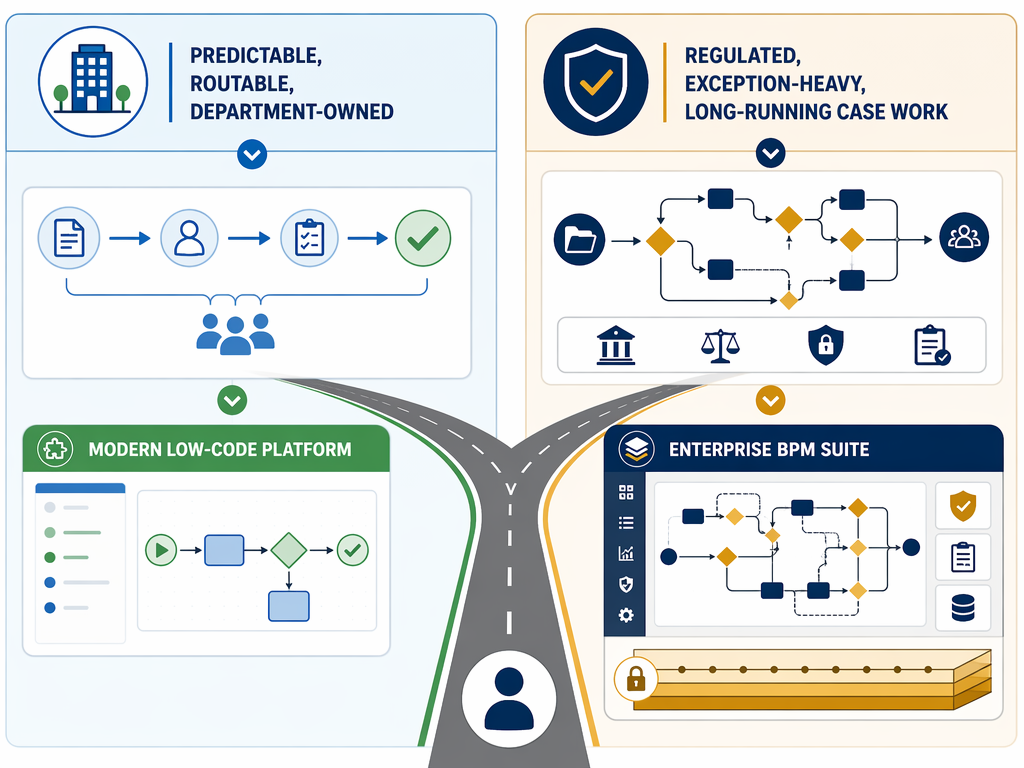
The mid-market trap is buying that depth before proving the requirement. A 200-person company may absolutely have regulated, exception-heavy work. But if the first wave of processes is vendor onboarding, purchase approvals, employee changes, facilities requests, or internal service workflows, a traditional suite can create more operating burden than control.
Low-code BPM platforms worth shortlisting
These are not interchangeable tools. They belong in the same broad low-code conversation, but they fit different operating models.
| Platform | Where it naturally fits | Watch point |
|---|---|---|
| Kissflow | A practical shortlist candidate for business-led BPM where teams want forms, routing, approvals, and workflow visibility without a long enterprise implementation. Published pricing starts at $1,500/month for 50 users.[2] | Validate governance, reporting, integration, and audit needs against your specific compliance requirements. |
| Zoho Creator | Good fit for teams already comfortable with the Zoho ecosystem or looking for app-style workflow tools at a published $8–$25/user/month range.[3] | Confirm how much BPM depth you need versus custom app building and database-style workflows. |
| FlowForma | A sensible candidate for Microsoft 365-centered organizations that want business users to automate forms and approvals inside a familiar environment. | Vendor-published cost-reduction claims should be treated as directional until tested against your own process volumes and labor assumptions. |
| Activepieces | Useful when the need is closer to automation flows across apps than full enterprise BPM. Published entry pricing starts from $5/active flow/month.[4] | Check whether workflow governance, auditability, and human approval controls are deep enough for BPM use cases. |
| Camunda | A strong option for technical teams that want process orchestration and are comfortable with developer involvement. A free tier is available.[2] | It may behave less like business-user low-code and more like a developer-led orchestration platform, depending on deployment model. |
The right low-code shortlist usually starts with the people who will maintain the workflows. If operations owns the backlog and IT mainly wants guardrails, favor tools that make change management visible without forcing every edit through developers. If developers own orchestration and business teams mostly submit requirements, a more technical platform can make sense.
Traditional BPM suites worth shortlisting
| Platform | Where it naturally fits | Watch point |
|---|---|---|
| Pega | Complex, stateful, long-running workflows where case management, rules, and exceptions are central rather than occasional. | Estimated third-party pricing places it in a six-figure annual category, so the process complexity should justify the platform burden.[2] |
| IBM Business Automation Workflow | Enterprise environments that already rely on IBM architecture and need deep process automation, governance, and integration. | Best evaluated with enterprise architecture and compliance stakeholders involved early. |
| Oracle BPM | Organizations with existing Oracle enterprise systems and workflows that need tight integration into that stack. Third-party pricing examples include $1,150/user or $57,500/processor plus annual support.[2] | Implementation scope can grow quickly if the workflow touches multiple systems of record. |
| Appian | Enterprise workflow and application programs where BPM, case work, data, and application development are part of the same broader platform decision. | Third-party estimates put annual cost around $60k–$300k/year, so it should be evaluated as a strategic platform rather than a departmental workflow tool.[2] |
Traditional BPM should be shortlisted when the workflow has enough consequence to require the extra machinery: regulated records, multi-month case states, deep enterprise integration, sophisticated rule handling, and audit requirements that cannot be satisfied by a lighter platform. In that environment, specialist ownership is not waste. It is part of the control model.
A decision framework for the shortlist
Use the first shortlist meeting to classify the work, not the vendors.
- Shortlist low-code BPM first if the process is predictable, repeatable, cross-functional, and maintained by operations or department owners.
- Shortlist low-code BPM first if the main pain is routing, visibility, ownership, reminders, approvals, and reducing spreadsheet or email follow-up.
- Shortlist traditional BPM if the process is regulated enough that audit trails, retention, segregation of duties, and compliance evidence are primary requirements.
- Shortlist traditional BPM if the work is case-based, long-running, exception-heavy, or dependent on deep integration with enterprise systems.
- Be cautious with either category if nobody can name the post-launch owner, the rule-change owner, the reporting owner, and the person accountable for audit questions.
For most 50–500 employee companies, the default assumption should be low-code BPM unless a hard requirement proves otherwise. That does not mean buying the lightest tool. It means refusing to pay for enterprise complexity before the workflow has shown it needs enterprise machinery.
If your processes are predictable, cross-functional, and maintained by operations teams, put Kissflow, Zoho Creator, FlowForma, Activepieces, and possibly Camunda on the low-code side of the shortlist. If your workflows are regulated, exception-heavy, deeply integrated, or case-based enough to justify the cost and implementation burden, evaluate Pega, IBM Business Automation Workflow, Oracle BPM, and Appian.
References
- BPM Solutions guide — Kissflow
- Enterprise BPM Pricing Explained — Kissflow
- Zoho Creator guide — Zoho
- Activepieces blog — Activepieces