
The confusing thing about AI productivity tools is that both sides of the argument can be right. A worker can honestly say that ChatGPT helped draft a client memo in half the time, Claude cleaned up a messy brief, Granola produced a useful meeting record, or GitHub Copilot removed the dullest part of a coding task. A manager can also look across the department three months later and struggle to find a measurable productivity gain.
That gap is where most AI tool buying goes wrong. Teams start by comparing features, model names, integrations, and pricing tiers. They should start one layer earlier: which recurring tasks are actually inside the tool’s capability boundary, and which tasks only look similar from a distance.
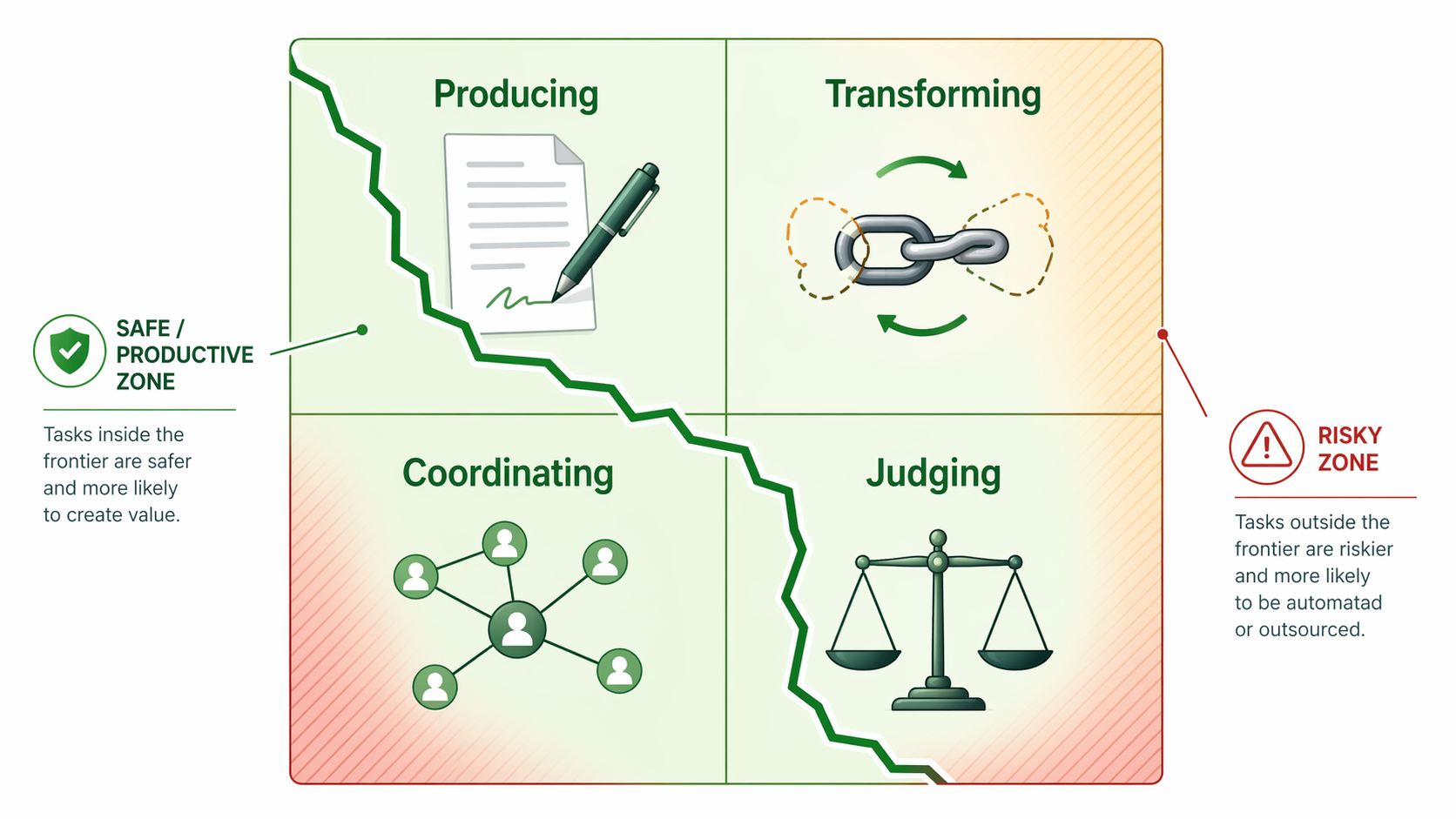
The best frame for this is the “jagged frontier” described in the MIT Sloan and BCG research on generative AI and high-skilled work. In a study involving more than 700 consultants, AI improved performance by about 40% on tasks inside its frontier, but reduced performance by about 19% on tasks outside it. Just as important, participants could not reliably predict which tasks were inside and which were outside the frontier.[1]

That finding explains why a tool can feel impressive in one hour and quietly damage the work in the next. AI is not simply “good at writing” or “bad at strategy.” Its usefulness depends on the task shape: whether the output is easy to check, whether the answer has a known standard, whether the cost of a plausible mistake is low, and whether the human remains close enough to catch the failure.
What the jagged frontier actually means
A smooth frontier would be convenient. Simple tasks would sit on one side, complex tasks on the other, and tool selection would be mostly a matter of ambition. The frontier described in the MIT Sloan/BCG work is not smooth. It is jagged: AI can perform surprisingly well on some tasks that look sophisticated, then fail on nearby tasks that look only slightly different.[1]
Inside the frontier are tasks where the model’s strengths match the work: generating plausible first drafts, summarizing known material, transforming text from one format to another, proposing code patterns, extracting action items, or coordinating routine scheduling constraints. The output still needs review, but the review burden is manageable because the human can tell fairly quickly whether the result is usable.
Outside the frontier are tasks where plausibility becomes dangerous. A strategy recommendation with hidden financial assumptions, a brand positioning decision that depends on market nuance, a legal or compliance-sensitive answer, or an analysis where one unsupported number can change the conclusion may all produce fluent output that takes longer to audit than to create properly.
The annoying operational detail is that workers often cannot see the boundary in advance. That is why buying “the best AI productivity tool” as a universal answer rarely works. The same person may have ten tasks in a week where AI is genuinely useful and three where it should be treated as an intern with a confident voice and no accountability.
Features are a poor substitute for task conditions
Most AI productivity tools are marketed by capability: writes, summarizes, transcribes, schedules, codes, automates, analyzes. Those labels are not useless, but they are too broad to make a good buying decision.
“Writing” can mean drafting a routine status update from bullet points, which is often a good AI task. It can also mean deciding how to position a sensitive pricing change to enterprise customers, where the phrasing depends on customer psychology, competitive context, legal review, and executive appetite for risk. The feature label is the same. The frontier position is not.
“Data analysis” has the same problem. Asking AI to explain a formula, suggest a chart type, or help clean a dataset can be useful when the analyst can verify each step. Asking it to own a board-level conclusion from messy data is a different task. The danger is not that AI will always be wrong. The danger is that it can be selectively wrong in ways that look finished.
This is also why adoption statistics and productivity statistics can diverge. Usage proves that people found moments of convenience. It does not prove that the final work product improved, that review time decreased, or that the organization captured the saved time instead of converting it into more checking, rewriting, and coordination.
A task-first way to choose AI productivity tools
Before comparing ChatGPT against Claude, Otter against Fireflies, or Cursor against GitHub Copilot, write down the recurring task you want to improve. Not the department. Not the job title. The task.
- Identify the recurring task. “Prepare weekly client update from notes” is useful. “Improve communication” is not.
- Decide whether the output is easy to verify. If a skilled worker can check the result quickly, AI has more room to help.
- Estimate the cost of a wrong answer. Low-cost errors can be edited. High-cost errors require tighter control.
- Classify what AI is doing: producing, transforming, coordinating, or judging.
- Shortlist tools only after the task boundary is clear.
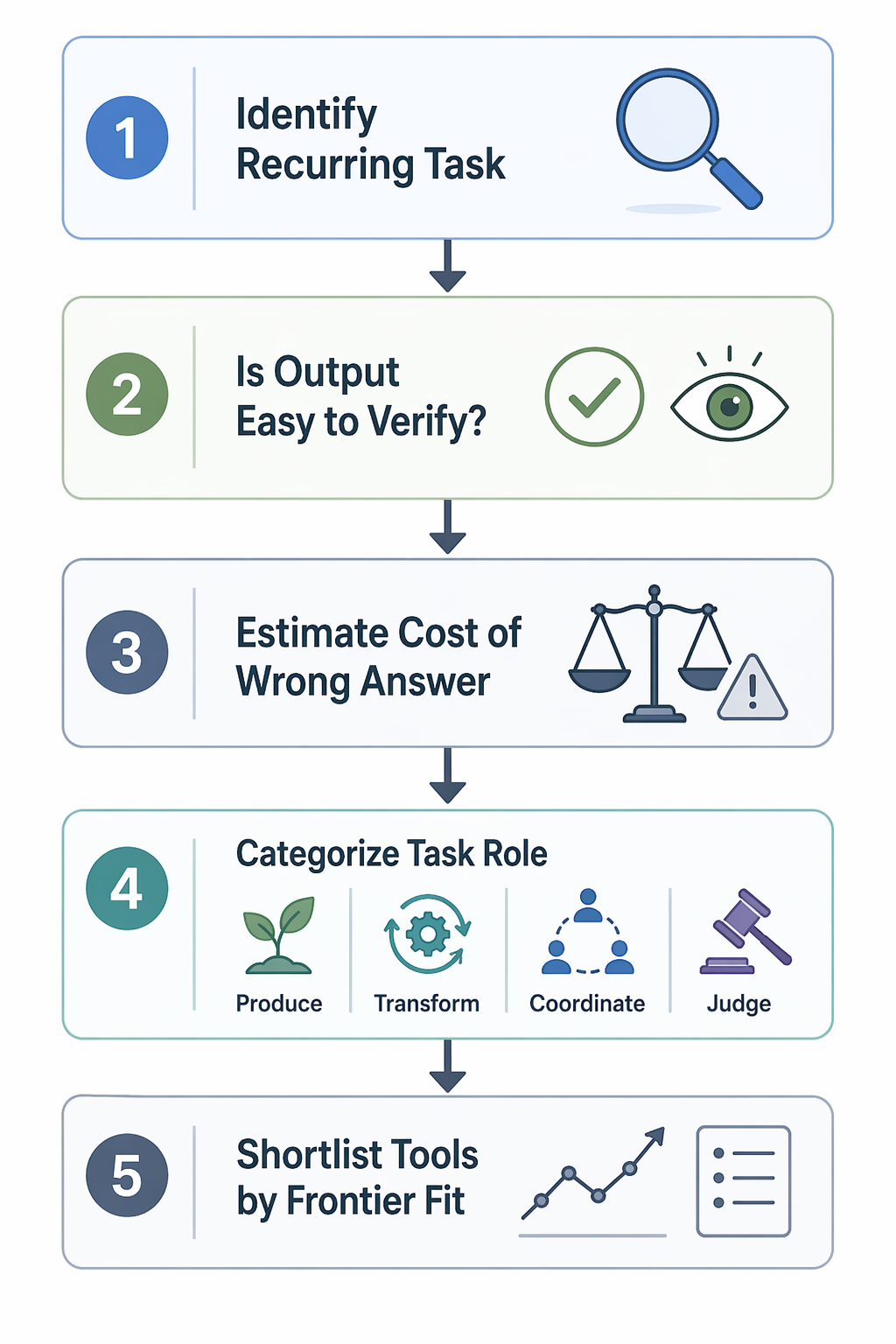
This sequence sounds slower than opening a vendor comparison page. In practice, it prevents the familiar mess: six overlapping subscriptions, unclear ownership, a Slack channel full of AI experiments, and no answer to whether the work is actually better.
Producing: useful when the draft is not the decision
Draft generation is one of the clearer inside-frontier categories when the human already knows the point being made. ChatGPT, Claude, and Grammarly can help turn rough notes into emails, proposals, outlines, summaries, and cleaner prose. The gain comes from reducing blank-page time and mechanical rewriting, not from outsourcing responsibility for the argument.
Task-specific savings data points in the same direction. this+that reports 69% time savings for writing tasks in its compilation of AI productivity statistics.[2] That kind of number is most credible when applied to bounded writing work: first drafts, tone changes, repurposing, and formatting. It should not be stretched to mean that AI can decide what a difficult message should say.
Transforming: strong when the source material is known
Summarization, extraction, reformatting, and rewriting usually work best when AI is transforming material that already exists. A meeting transcript becomes action items. A long research document becomes a brief. A dense email thread becomes a decision log. The human can compare the output against the source.
Tools such as ChatGPT and Claude can handle general transformation work, while meeting-focused products such as Granola, Otter, and Fireflies narrow the task further by capturing and organizing conversation. The narrower the job, the easier it is to design the review step: check names, decisions, deadlines, and open questions before the summary becomes the record.
Coordinating: valuable when constraints are explicit
Scheduling and coordination tools are not glamorous, which is part of why they can be useful. Motion and Reclaim operate in a task category where many constraints are visible: calendars, deadlines, focus blocks, recurring meetings, and availability. Zapier can connect routine handoffs between systems when the trigger and action are clear.
The same this+that statistics page reports 35% savings for scheduling coordination.[2] Again, the narrower interpretation is the safer one: AI can reduce coordination drag when the rules are explicit. It should not silently decide which stakeholder relationship matters most, which meeting can be skipped, or which deadline deserves escalation.
Coding: helpful for local acceleration, risky as unattended ownership
Code generation sits in an interesting part of the frontier because verification can be concrete but not always cheap. GitHub Copilot and Cursor can suggest boilerplate, tests, refactors, and implementation patterns. Lovable and Bolt can help produce prototypes quickly. The productivity gain is real when an engineer can inspect, run, test, and own the output.
It becomes a different task when generated code crosses into architecture, security-sensitive logic, production reliability, or unfamiliar dependencies. The model may still assist, but the workflow has to assume review, not acceptance. METR’s 2026 survey on AI usage among technical workers is useful here because it keeps the discussion close to actual developer experience rather than treating code tools as magic autocomplete.[3]
A practical decision matrix
Once the task is clear, tool comparison becomes less theatrical. The question is not which app has the longest feature list. It is whether the tool operates in a part of the workflow where AI output can be checked before it causes damage.
| Task type | Likely frontier position | Good use of AI | Tools to consider | Review requirement |
|---|---|---|---|---|
| Routine writing drafts | Often inside | Turn notes into first drafts, emails, outlines, and rewrites | ChatGPT, Claude, Grammarly | Human owns the point, tone, and final claim |
| Summarization and extraction | Often inside when source is available | Convert transcripts, documents, and threads into summaries or action items | ChatGPT, Claude, Granola, Otter, Fireflies | Check decisions, names, dates, omissions, and source fidelity |
| Scheduling coordination | Often inside when constraints are explicit | Protect focus time, suggest meeting slots, automate routine handoffs | Motion, Reclaim, Zapier | Human sets priorities and exception rules |
| Code assistance | Inside for bounded implementation; mixed for complex systems | Generate boilerplate, tests, local refactors, prototypes | GitHub Copilot, Cursor, Lovable, Bolt | Engineer reviews, tests, and owns shipped code |
| Data analysis support | Mixed | Explain formulas, suggest cleaning steps, draft chart narratives, inspect assumptions | ChatGPT, Claude, code assistants, spreadsheet AI features | Analyst verifies calculations, sources, and interpretation |
| Strategic judgment | High-risk or outside | Generate alternatives, pressure-test assumptions, surface missing questions | ChatGPT, Claude | Human decision-maker owns recommendation and consequences |
| Brand, positioning, and sensitive messaging | High-risk or outside | Explore options, identify tonal risks, draft variants | ChatGPT, Claude, Grammarly | Human evaluates context, audience, and reputational risk |
This matrix is deliberately uneven. Some categories deserve a tool shortlist. Others deserve a warning label. That is the point. A feature-first comparison tends to flatten every row into a shopping choice. A frontier-first comparison separates acceleration from delegation.
How to test a tool before the team standardizes on it
A serious pilot should test a task, not a tool in the abstract. Pick one recurring workflow with a visible before-and-after comparison: weekly status reporting, sales-call summaries, sprint planning notes, support-response drafting, code review prep, or analyst memo drafting.
- Define the work product: what must be produced, by whom, and for what decision.
- Set the verification step before the pilot begins.
- Track elapsed time, review time, rework, and output quality separately.
- Record where AI helped, where it created cleanup work, and where people stopped trusting it.
- Decide whether the workflow changes, not just whether the subscription renews.
The separate tracking matters. A tool can reduce drafting time and increase review time. It can make junior workers faster while shifting invisible checking work to senior staff. It can improve individual throughput while leaving the department’s bottleneck untouched. Those are different outcomes, and they should not be hidden inside a single “hours saved” estimate.
For a broader look at that measurement gap, the companion piece on the AI productivity paradox covers why individual time savings often fail to show up as organizational gain. If the immediate problem is implementation, start with how to design an AI workflow that actually saves time before adding another application to the stack.
Where the 2026 caveat matters
The MIT Sloan/BCG study used GPT-4-era tools in 2023, so the exact 40% gain and 19% decline should not be treated as permanent constants.[1] Models have improved, tool interfaces have become more specialized, and Stanford HAI’s AI Index reports that inference costs fell 280-fold in two years. A task that sat outside the practical frontier earlier may be closer to workable now.
That does not weaken the selection framework. It makes the framework more necessary. If the frontier is moving, teams need a way to revisit decisions without pretending that every new model release automatically turns into workflow productivity.
The same caution applies to broad claims about AI adoption and productivity. A February 2026 NBER pre-print reporting that 89% of firms saw no measurable productivity impact is provocative, but it should be read with the usual caveats around pre-print status and measurement lag. McKinsey’s finding that only 6% of organizations qualify as AI high performers points in a similar practical direction: the advantage is less about owning the flashiest tool and more about redesigning work around where AI can be trusted.
Shortlisting without turning this into another roundup
After the task map is done, a shortlist becomes straightforward.
- If the bottleneck is drafting and rewriting, compare general assistants such as ChatGPT and Claude with writing-focused tools such as Grammarly.
- If the bottleneck is meeting capture and follow-through, compare Granola, Otter, and Fireflies around transcript quality, action-item review, and where the notes live afterward.
- If the bottleneck is calendar friction, compare Motion and Reclaim based on how well their rules match the way your team actually protects time.
- If the bottleneck is engineering throughput, compare GitHub Copilot, Cursor, Lovable, and Bolt by task type: local coding assistance, refactoring, test generation, or prototype creation.
- If the bottleneck is handoff between systems, compare Zapier and similar automation tools by trigger reliability, exception handling, and auditability.
Readers who want role-specific buying guidance can use the AI productivity apps by role guide. If the task category is already clear and the next step is building a practical stack, the AI tool stack by use case and workflow bottleneck comparison are better next reads than another generic list.
The disciplined answer is not to crown one winner among AI productivity tools. Choose by task boundary. Keep AI close to work that is easy to verify, low enough in penalty to revise, or narrow enough to constrain. Use it more cautiously where the output becomes a judgment, recommendation, or source of record. Then revisit the decision as models and workflows change.
That is less exciting than a ranked list. It is also how the tool has a chance of improving the work instead of just adding another place where the work has to be checked.
References
- How generative AI can boost highly skilled workers' productivity — MIT Sloan
- Time Saved AI Productivity Tools Statistics — this+that
- AI Usage Survey — METR, May 11, 2026