
If you came here looking for a quick Gmail AI inbox priority setup, the first useful answer is a little annoying: in 2026, “Gmail AI” can mean several different things. It can mean free writing help and thread summaries already inside Gmail. It can mean Google’s newer Gemini-powered AI Inbox, which manages to-dos and topics but is still limited by plan, language, region, Smart Features settings, and rollout status. Or it can mean leaving the familiar Gmail interface for a third-party client, or handing parts of email to an autonomous assistant.
That distinction matters most for people with 50, 100, or 200 messages a day. A consultant scanning for client money, a manager waiting on approvals, a recruiter watching for a promising candidate, or a founder trying not to miss renewal notices does not need the most futuristic inbox. They need to know which tool will actually see the right mail, at the right time, with a setup they can live with every morning.

| Setup tier | Best for | Typical cost in 2026 | Availability risk | Not for you if |
|---|---|---|---|---|
| Free native Gmail AI | Writing help, suggested replies, summaries, and basic sorting while staying inside Gmail | Included with eligible Gmail access | Feature availability depends on region, language, and Smart Features settings | You need AI to actively decide what deserves attention first |
| Native Gemini AI Inbox | Gmail-native to-dos, topics, and AI triage when available | Requires an eligible Google AI plan: Pro at $19.99/month or Ultra at $124.99/month | US-only, English-only, Smart Features required, trusted-tester rollout as of July 2026 | You need something you can reliably turn on today |
| Third-party AI email clients | A faster daily inbox front end with stronger prioritization and workflow controls | Examples include Shortwave at $18/seat/month and Superhuman at $30/seat/month | Requires trusting a new interface on top of Gmail | You want Gmail’s native layout and settings to remain the main work surface |
| Autonomous assistants | Delegating follow-ups, routing, and workflow actions around email | Examples include Lindy at $49.99/month and Gmelius at $21/user/month | Higher operational and permission risk | You only need less inbox noise, not an assistant acting on your behalf |
Start With What Gmail Can Actually Do
Google’s own AI Inbox support page sets the narrowest boundary first: AI Inbox requires an eligible Google AI plan, a US region, English language, and Smart Features enabled. It also notes that initial to-dos can take up to seven days to appear after setup, which is not the kind of delay most people expect from an inbox feature they are trying to evaluate between meetings.[1]
Google announced in January 2026 that Gmail was “entering the Gemini era” and said AI Inbox was coming “in the coming months,” but that wording did not become a broad public release by July 2026.[2] Inbox Zero’s July status check reported that there was no public waitlist and that Google was rolling AI Inbox out to trusted testers only.[3] So the honest setup guide starts with access, not preferences.
That is the part many Gmail users miss. If someone says “Gmail has AI Inbox now,” they may be talking about a limited beta, not a switch inside every Gmail account. Paying for a Google AI plan also should not be treated as a guarantee that a specific account will immediately receive every AI Inbox capability while the product is still in this rollout state.
Tier 1: Free Native Gmail AI Is Useful, But Mostly Passive
The lowest-friction setup is to keep Gmail as-is and use the AI and sorting features Google already exposes: Suggested Replies, Help Me Write, thread summaries where available, tabs, categories, and other Smart Features. This is the right tier if your main friction is message drafting or quick scanning, not deciding what deserves attention first.
The catch is that Gmail’s helpfulness is bundled. Google’s help pages explain that Smart Features support things like automatic category sorting, but turning Smart Features off also disables related Gmail personalization features rather than letting users selectively keep every sorting behavior while refusing every AI-adjacent feature.[4] For a privacy-sensitive team, that is not a small preference toggle. It is a workflow decision.
For a light or moderate inbox, this may be enough. Suggested Replies can clear low-stakes acknowledgments. Help Me Write can reduce the blank-page cost of routine messages. Thread summaries can help when a conversation sprawls. But none of those features should be confused with a priority system that reliably surfaces an unfamiliar prospect, a cold enterprise lead, or a vendor warning you have never seen before.
- Use this tier if you mainly need faster replies, lighter scanning, and Gmail’s existing tabs.
- Avoid relying on it alone if your losses come from missed timing, not slow writing.
- Review Smart Features settings before assuming the AI layer is just a harmless writing add-on.
Tier 2: Gemini AI Inbox Is the Native Triage Option, If You Can Get It
AI Inbox is the first Gmail-native tier that sounds like a real priority setup rather than a writing assistant. Google describes it as a system for managing to-dos and topics with AI Inbox, which moves the product closer to the way busy people actually process email: not message by message, but by obligation, thread, decision, and waiting item.[1]
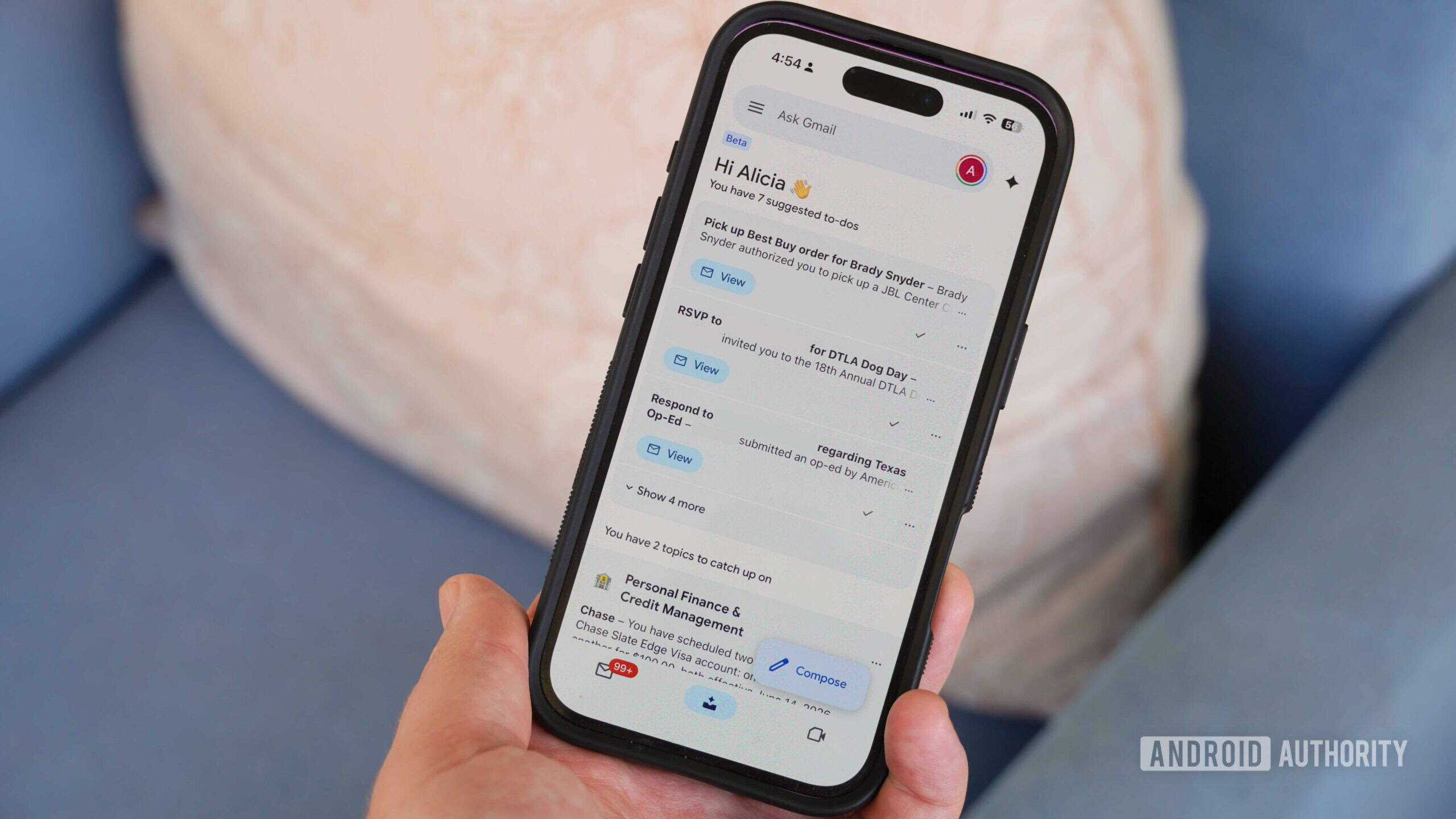
The setup requirements are concrete. AI Inbox needs an eligible Google AI Pro or Ultra plan, US region, English language, and Smart Features enabled. Google’s support page also says to-dos may take up to seven days to appear at first.[1] That last detail is easy to underestimate: if you are evaluating whether AI Inbox caught the right renewal notices, client asks, or approvals, the first week may not tell the full story.
The early user evidence is promising but uneven. Android Authority’s June 2026 hands-on called AI Inbox “surprisingly great,” while also reporting that important inboxes sometimes showed nothing even when important emails existed.[5] That is not proof that AI Inbox fails at prioritization. It is a warning against treating a beta inbox assistant as if it has already earned production trust for every high-value message.
This is where the difference between native integration and practical reliability gets uncomfortable. A Gmail-native AI system can, in principle, fit better than an overlay because it lives where the mail already lives. It does not ask you to migrate your daily muscle memory on day one. But if access is limited, the first to-dos can take days to appear, and real hands-on testing finds occasional empty priority views, the safe setup is staged rather than immediate replacement.
A sensible AI Inbox setup sequence
- Confirm that the account meets Google’s region, language, plan, and Smart Features requirements.
- Let the initial to-do generation window pass before judging coverage.
- Compare AI-generated to-dos against a manual search for clients, renewals, approvals, invoices, and deadlines.
- Keep existing labels, filters, stars, or manual review habits until the AI view has proven it catches the messages that carry real consequences.
- Avoid using it as the only source of truth for unfamiliar senders during the beta period.
For many professionals, the right answer in Q3 2026 is not “switch to AI Inbox.” It is “watch it closely, test it if your account has access, and do not dismantle your current safety rails just because the interface looks more intelligent.”
Tier 3: Third-Party AI Clients Replace the Work Surface
Shortwave and Superhuman belong in a different decision bucket from AI Inbox. They are not simply more Gmail settings. They ask you to make a new email client the place where you read, prioritize, and process Gmail. That can be exactly right if the bottleneck is the daily interface itself: too many threads, too much context switching, too slow to decide what gets opened next.
Shortwave is the more obvious candidate for people who want AI-assisted triage, summaries, and a different inbox organization model without waiting for Google’s beta path. Superhuman is usually a stronger fit for users who prize speed, keyboard-driven processing, and a premium email workflow. Their pricing puts them in a serious-work-tool category rather than a casual Gmail add-on: mid-2026 pricing places Shortwave at $18 per seat per month and Superhuman at $30 per seat per month.
The important boundary is unfamiliar senders. Superhuman’s own discussion of Priority Inbox notes a limitation of Gmail’s priority model: it relies on past behavior, so new leads may not surface as priority.[6] That matters for sales, recruiting, partnerships, consulting, and freelance work, where the valuable email often comes from someone the system has never learned to recognize.
A third-party client can be worth paying for when it changes the daily order of operations: open the inbox, see the likely important work, act on it, and leave with fewer unresolved decisions. But it also creates a new dependency. If your team already has training, compliance expectations, or shared habits around Gmail’s native interface, replacing the work surface is not a cosmetic choice.
Notion Mail belongs here mostly as a caution and migration trigger. Notion Mail is shutting down on September 22, 2026, which makes former users a natural audience for this decision. If that is your situation, the more focused comparison is Notion Mail vs Gmail AI, because the choice is not just “which inbox has AI,” but whether to return to Gmail-native workflows or adopt another front end.
Tier 4: Autonomous Assistants Are for Delegation, Not Tidying
Lindy, Gmelius, and MailMaestro should not be evaluated as if they are just prettier inboxes. They sit closer to delegation: drafting follow-ups, routing messages, connecting email to other workflow actions, or helping a team standardize how messages move from inbox to task, handoff, or response.
That can be powerful, especially for founders, agencies, sales teams, support-adjacent operators, or managers whose inbox is also a lightweight operations queue. But it raises a different trust question. A tool that summarizes a thread can be wrong and still be recoverable. A tool that follows up, routes, or triggers workflow actions on your behalf can create work, confusion, or customer-facing errors before you see them.
Lindy’s April 2026 comparison rated Gemini’s automation depth at 2 out of 5, Lindy’s own at 5 out of 5, and placed Gmelius and Shortwave in the 3-to-4 range.[7] That is useful as a map of how vendors position the category, not as neutral proof that one system will perform better in your inbox. Lindy sells automation, so its scoring deserves to be read as commercially interested evidence.
The price level reinforces the same point. Lindy at $49.99 per month and Gmelius at $21 per user per month are easier to justify when email is tied to revenue capture, customer follow-up, internal routing, or repeatable operating procedures. They are harder to justify if the real problem is that Gmail feels visually noisy at 9 a.m.
- Consider an autonomous assistant if missed follow-ups or routing delays have measurable consequences.
- Keep a human review step for client-facing or money-related messages until the workflow has been tested.
- Document what the assistant is allowed to do, where it should stop, and who checks exceptions.
- Do not buy delegation software when the actual need is a cleaner reading queue.
How to Choose Your Gmail AI Inbox Priority Setup
A useful setup decision starts with the part of email you want to stop doing manually. If the pain is writing, use native Gmail AI and keep your existing filters. If the pain is knowing what matters first, AI Inbox, Shortwave, or Superhuman are more relevant. If the pain is that email creates downstream work someone must assign, follow up on, or move into another system, then Lindy or Gmelius starts to make sense.
| Your daily problem | Most fitting tier | Main tradeoff |
|---|---|---|
| Replies take too long, but you usually know what matters | Free native Gmail AI | Limited triage depth |
| You want Gmail itself to group obligations and topics | Native Gemini AI Inbox | Access, rollout, and beta reliability |
| You want a faster priority-driven email interface | Shortwave or Superhuman | New daily work surface and subscription cost |
| You want email turned into follow-ups, routing, or workflow actions | Lindy, Gmelius, or similar assistants | Higher permission, review, and operational risk |
There is also a volume threshold hiding underneath the tool choice. Someone with 40 routine messages can often fix the day with Gmail labels, categories, keyboard shortcuts, and a few AI-assisted replies. Someone with 150 mixed messages, unfamiliar senders, client work, approvals, and renewal notices is not choosing an AI feature; they are choosing a control system.
If you are shopping beyond email and want to compare calendar, notes, task, and knowledge-work tools together, the broader Best AI Productivity Apps in 2026 guide is the better place to zoom out. For Gmail specifically, the decision is narrower and more practical: stay with free Gmail AI if you only need writing help and basic sorting; watch or test native AI Inbox if you meet the access requirements and want Gmail-native triage; choose Shortwave or Superhuman if the inbox interface is the bottleneck; consider Lindy or Gmelius only when you are ready to delegate follow-ups, routing, or workflow actions.
In 2026, the right Gmail AI inbox setup is less about the smartest model and more about how much control you are willing to trade for fewer inbox decisions.
References
- Manage to-dos & topics with AI Inbox — Computer - Gmail Help, Google Help
- Gmail is entering the Gemini era, Google Blog, January 2026
- Inbox Zero Blog status check on Gmail AI Inbox trusted-tester rollout, Inbox Zero Blog, July 2026
- Change your Gmail inbox layout; Organize your emails into categories, Google Help
- Gmail AI Inbox hands-on test, Android Authority, June 2026
- Superhuman Blog discussion of Priority Inbox limitations, Superhuman Blog
- Lindy April 2026 comparison of AI email automation depth, Lindy Blog, April 2026