
If the Garmin Cirqa has no screen, the productivity question is not “what does it stop you from looking at?” It is “what decision does it help you make?” For a knowledge worker, the useful decision is usually mundane and high-stakes: write the hard memo now, move the stakeholder call, do admin during the dip, take a walk instead of staring at a paragraph, or stop treating a low-recovery afternoon as a deep-work block.
The Garmin Cirqa release date is July 24, 2026, and the official U.S. price is $199.99. It has no mandatory subscription, Garmin says battery life is up to 10 days, and the band includes Body Battery, Training Readiness, HRV Status, sleep stages and scores, stress tracking, and Garmin’s Elevate Gen 4 sensor system.[1] That corrects the earlier $500 chatter: the official launch price is $199.99, not $500.[1]
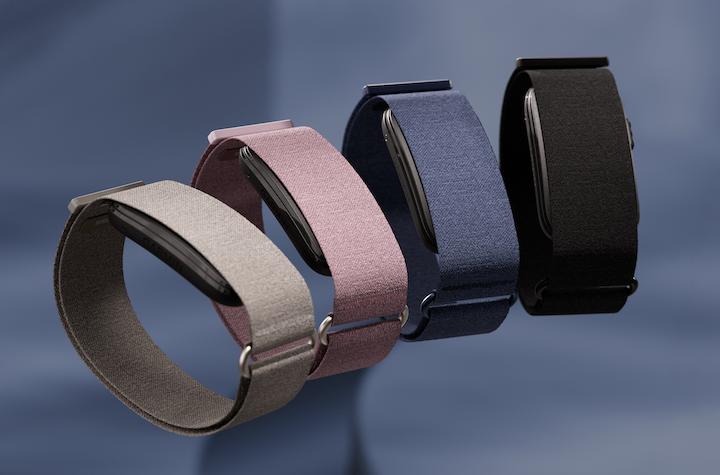
Garmin’s own positioning is careful. In the launch announcement, Garmin vice president Susan Lyman said Cirqa’s “inconspicuous design helps minimize distractions” and helps users make improvements “without commanding all their attention.”[1] That is a credible starting point, but it is not the same as Garmin promising a productivity tracker. The productivity case comes from how its recovery and energy signals can be used to schedule cognitive work.
The Screenless Part Is Only Half the Argument
A screenless band can be calmer than a smartwatch, but “less distracting” is not automatically “more productive.” A silent wristband that dumps vague wellness graphs into an app at night is still another dashboard. The better test is whether the device shortens the distance between a body signal and a work decision.
Cirqa has a stronger argument than a generic step counter because Body Battery gives a 0–100 energy-style score, while Training Readiness, HRV Status, sleep scoring, and stress tracking add context around recovery.[1][2] Garmin designed these metrics for health and fitness decisions, not for deciding when to write a strategy document. Still, the mapping is practical: a high-readiness, high-energy morning is a better candidate for analysis or writing; a depleted afternoon is better suited to email cleanup, lightweight review, or recovery.
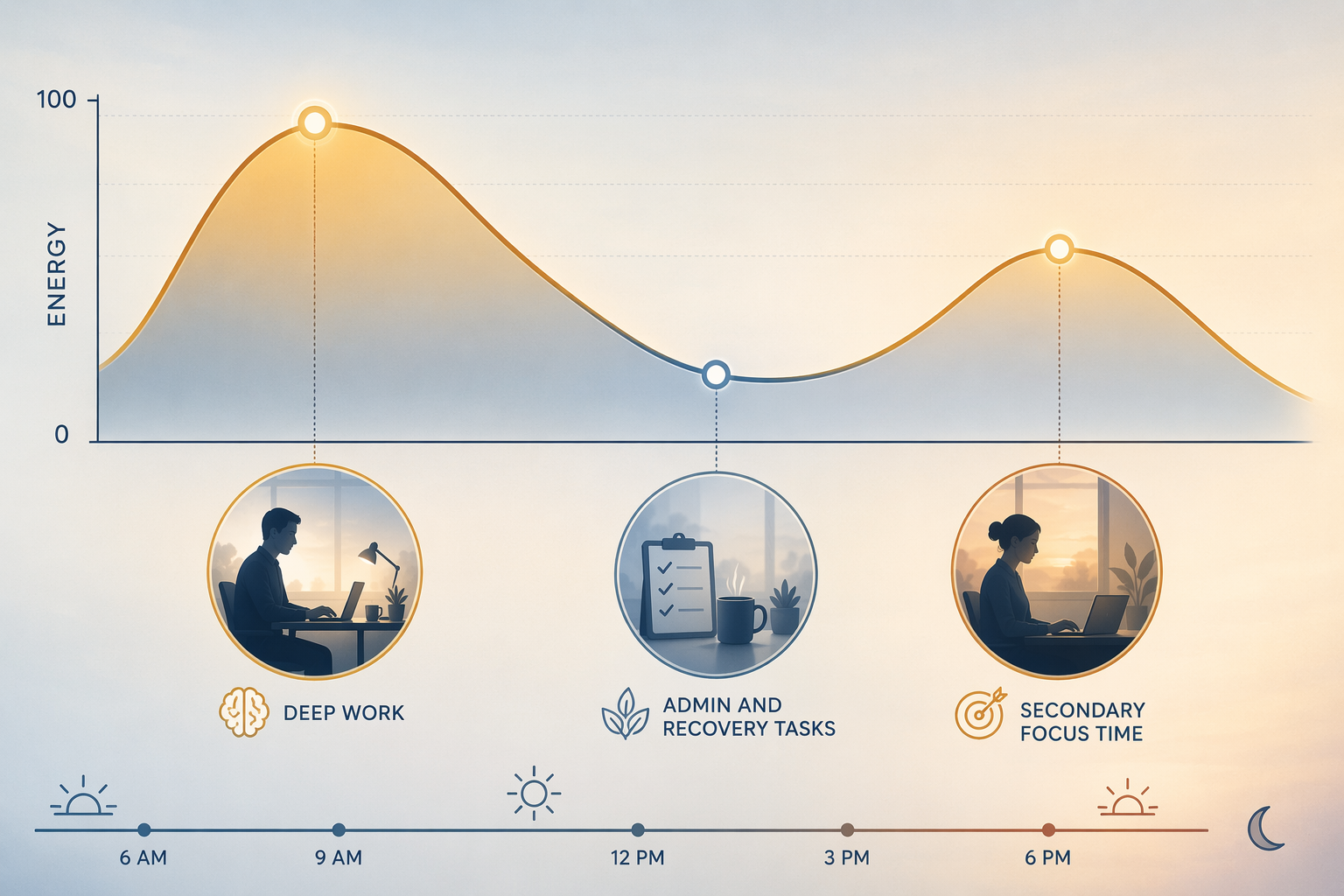
That is a synthesis, not an official Garmin claim. The band does not know whether your 10 a.m. task requires diplomacy, original thinking, or spreadsheet patience. It can tell you something about sleep, strain, stress, and physiological readiness; you still have to decide what kind of work deserves your best window.
Cirqa, Fitbit Air, and Whoop 5.0 at a Glance
| Device | Cost model | Battery life | Productivity-relevant strength | Main caveat |
|---|---|---|---|---|
| Garmin Cirqa | $199.99, no mandatory subscription | Up to 10 days | Body Battery, Training Readiness, HRV Status, sleep scores, and stress tracking can be turned into a simple energy-planning loop | No independent reviews yet; battery and sensor claims are manufacturer-reported at launch |
| Fitbit Air | $99 hardware, optional $99/year Google Health Premium for Gemini AI coach | 7 days | Lowest upfront cost; useful if you want a lighter screenless tracker and may later add coaching | Real value depends on whether the optional premium layer becomes necessary |
| Whoop 5.0 | Membership-only, $199–$359/year with device included | 14 days | Most mature recovery-coaching style loop for people who want ongoing interpretation | Recurring cost is the product, not an add-on |
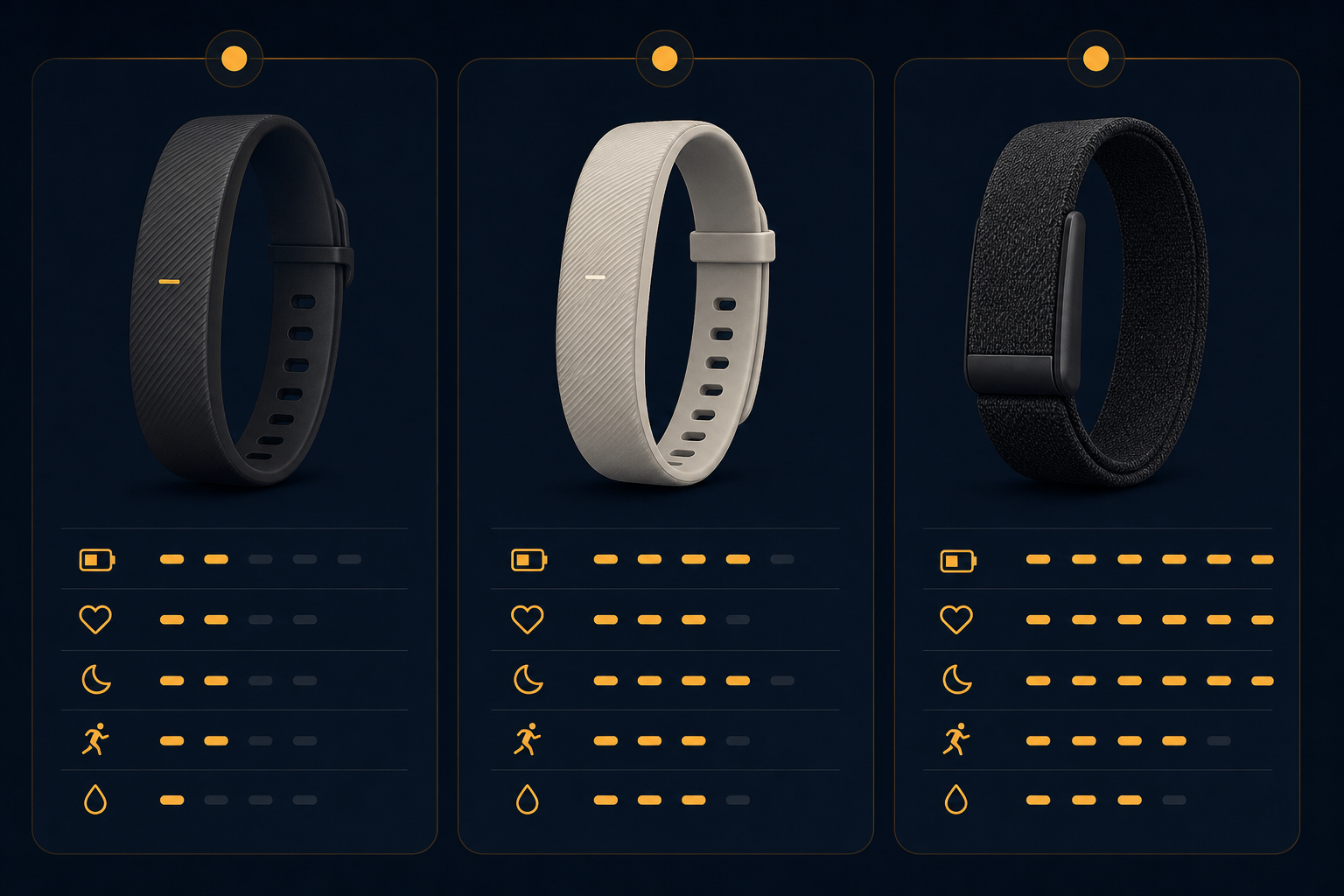
The comparison changes once you stop treating these as cheap fitness bands and start treating them as workday decision systems. Tom’s Guide lists Cirqa at $199.99 with up to 10 days of battery life, Fitbit Air at $99 with a 7-day battery, and Whoop 5.0 as a membership device with 14-day battery life.[2] The Verge’s launch coverage also emphasized the subscription contrast around Cirqa’s no-mandatory-fee model.[3]
Why Cirqa Is the Best Value for Workday Energy Management
Cirqa’s strongest productivity argument is not elegance, fashion, or the absence of a tiny screen. It is that the core energy signals are available without a required recurring fee. For someone trying to plan deep work, the daily loop can be simple: check recovery and energy in the morning, protect the strongest block for demanding work, put lower-cognitive tasks into the dip, and notice when several poor-readiness days are telling you to reduce load rather than optimize harder.
Body Battery is especially easy to translate because a 0–100 score already behaves like a planning signal. It should not be treated as a scientific measure of writing quality or meeting performance. It is more useful as a friction reducer: if the number, sleep score, and stress trend all point down, the decision to move a demanding task stops feeling like laziness and starts looking like resource allocation.
Training Readiness and HRV Status matter because they keep Body Battery from becoming a single-number superstition. A person can feel awake after coffee and still be under-recovered. A person can sleep long enough and still show a stress pattern that makes the afternoon a poor place for sensitive review or strategic thinking. The value is not that the band makes the decision for you; it gives you enough context to stop pretending every hour on the calendar has the same cognitive cost.
There are launch-day limits. As of July 22, 2026, the available materials are launch coverage and hands-on/spec reporting, not a body of independent long-term reviews. Garmin’s up-to-10-day battery life and Elevate Gen 4 performance should be treated as manufacturer-reported until broader testing confirms how they behave across sleep tracking, workouts, app syncing, and real office routines.[1][2]
The Missing Radios Matter More for Fitness Than Focus
Cirqa does not have onboard GPS, Wi-Fi, or ANT+, and it relies on Bluetooth and Connected GPS through a paired phone.[4] TechRadar flagged the missing feature set as a meaningful limitation against Fitbit Air and Whoop 5.0 in the fitness-tracker fight.[4] For runners, cyclists, or anyone who wants standalone workout capture, that matters. For desk-based productivity, it is less central.
The workday use case mostly needs passive recovery tracking, sleep context, stress signals, and enough battery life that the device is not another thing to manage. No Wi-Fi is inconvenient if you expect more independent syncing. No onboard GPS is a deal-breaker if you want phone-free outdoor training. Neither one stops the Cirqa from being useful as a low-friction energy-management band.
Fitbit Air Is the Cheaper Door In, Not Automatically the Better Deal
Fitbit Air’s $99 price is attractive because it makes the experiment cheaper. If the main goal is to see whether a screenless tracker changes your habits at all, lower upfront cost is rational. It also has a 7-day battery, which is long enough for most people to avoid daily charging anxiety.[2]
The catch is the optional $99-per-year Google Health Premium layer for the Gemini AI coach.[2][3] Optional is the important word. If you only want basic tracking, Fitbit Air stays inexpensive. If the reason you are buying a band is interpretation—what to do with recovery, fatigue, stress, and sleep—then the premium layer becomes part of the real comparison, even if it is not part of the shelf price.
For productivity buyers, Fitbit Air makes the most sense when the budget ceiling is firm or when you already live comfortably inside Google’s health ecosystem. It is less compelling if you dislike the slow creep from “affordable device” to “device plus annual intelligence layer.” That does not make the product bad; it changes what the $99 headline actually means.
Whoop 5.0 Still Wins for People Who Want Coaching More Than Ownership
Whoop 5.0 is the easiest device here to respect and the hardest to recommend casually. Its membership-only model costs $199–$359 per year with the device included, and its battery life is listed at 14 days.[2][5] That turns the purchase into a continuing relationship, not a one-time hardware decision.
The reason to pay is the recovery loop. Whoop has spent years teaching users to think in terms of strain, recovery, sleep debt, and readiness. For athletes, high-output founders, or people who genuinely want daily coaching and are willing to be managed by the system, the subscription can be easier to justify. You are not just buying a band; you are buying interpretation.
For a remote knowledge worker who mainly wants to protect deep-work windows, that may be more machinery than necessary. After one year, Whoop’s membership cost can already meet or exceed Cirqa’s one-time $199.99 price, depending on the plan.[1][2][5] After several years, the difference is not a small accessory premium; it is the central value question.
What a Useful Productivity Loop Actually Looks Like
The practical loop does not require checking an app every hour. In fact, that would defeat the point. A screenless band is most useful when it reduces the number of daily decisions, not when it turns physiology into a second inbox.
- Morning: check sleep score, Body Battery or recovery status, HRV trend, and stress context before assigning the day’s hardest work.
- High-readiness window: schedule writing, analysis, planning, technical review, or difficult stakeholder conversations.
- Low-energy window: move to email, documentation cleanup, meeting notes, expenses, lightweight review, or walking recovery.
- End of day: look for patterns, not excuses—late caffeine, poor sleep timing, overtraining, travel, or stacked calls.
A hypothetical example makes the distinction clear. If your calendar says 2 p.m. is open but your recovery signals and recent sleep are poor, the band has not “proven” you cannot do deep work. It has given you a reason to question whether that open slot is actually the best place for the task. The productivity gain is the better assignment of effort, not a magic increase in effort.
This is also where screenless design helps. 9to5Mac described screens in this category as potentially “a bug rather than a feature,” which captures the appeal for people already surrounded by displays.[6] A band that quietly collects recovery data and leaves the interpretation to a short check-in is better suited to knowledge work than another wrist computer asking for attention.
When You Should Skip a Screenless Band
A screenless band is not the right answer for everyone trying to work better. If you need quick message triage, timers, calendar glances, voice input, apps, or cellular safety features, a smartwatch category makes more sense. The distraction risk is higher, but so is the utility. Removing the screen would remove functions you actually use.
Smart rings sit on the other side of the decision. They can be more invisible than a wristband and may suit people who mainly want sleep and recovery trends without wearing another band. The trade-off is interaction style: rings are less like workday companions and more like passive sensors. That can be perfect if you only want a morning readiness check.
Cirqa’s lane is narrower and more useful than the launch hype might suggest. It is for someone who wants recovery and energy information with fewer interruptions, already understands that the calendar is a poor proxy for capacity, and does not want to subscribe indefinitely just to know whether today is a deep-work day or an admin day.
The Buying Decision
Buy Garmin Cirqa if you want the best long-term value for low-distraction energy management. The $199.99 price, July 24 availability, no mandatory subscription, up-to-10-day battery claim, and Garmin readiness metrics make it the strongest fit for productivity-focused buyers who want biometric guidance without joining another membership program.[1][2][3]
Choose Fitbit Air if the lower $99 upfront cost matters most and you are comfortable deciding later whether the optional $99-per-year Google Health Premium layer is worth it.[2][3] It is the budget route, but the premium layer should be evaluated separately from the hardware price.
Choose Whoop 5.0 if you want the most mature recovery-coaching experience and accept that the subscription is the product. At $199–$359 per year, it can be credible for people who will actually use the coaching loop, but it is harder to justify if your main need is simple workday scheduling guidance.[2][5]
For productivity tracking, Cirqa’s advantage is not that it makes work frictionless. It gives a knowledge worker enough recovery context to stop scheduling hard thinking as if every available hour were equal.
References
- Meet CIRQA Smart Band: The Screen-Free Health and Fitness Tracker from Garmin, PRNewswire, July 21, 2026
- Garmin Cirqa Smart Band Launch: Garmin Debuts a Screen-Free Whoop and Fitbit Air Competitor, Tom's Guide
- Garmin Cirqa Smart Band Fitness Tracker Wearables, The Verge
- The Garmin Cirqa Seemingly Lacks a Key Feature That Could Have Helped It Beat the Fitbit Air and Whoop 5.0, TechRadar
- Garmin Cirqa Is Here: 10 Top Facts About Garmin’s Screen-Free Tracker, Forbes, July 21, 2026
- As Garmin Cirqa Launches, Should Apple Make a Fitness Band or Ring? [Poll], 9to5Mac, July 21, 2026