
The small-business red tape problem is not a vague feeling that paperwork has gotten worse. The American Action Forum estimated that small businesses spend 379 hours a year on regulatory paperwork, with $64.6 billion in annual compliance costs and 3.3 billion hours of total burden across small firms.[1] That 379-hour figure is old enough to treat as a floor, not a ceiling.
More recent Canadian data from CFIB puts the annual red tape load at 256 hours, or 32 business days, and says that burden has increased 35% since 2020.[2] The U.S. Chamber’s Q4 2024 small-business report found that 51% of small businesses say regulatory compliance negatively affects growth, while 69% say small businesses spend more per employee on compliance than larger firms.[3] Different countries, different samples, same practical complaint: the smallest teams absorb the work with the fewest spare hands.

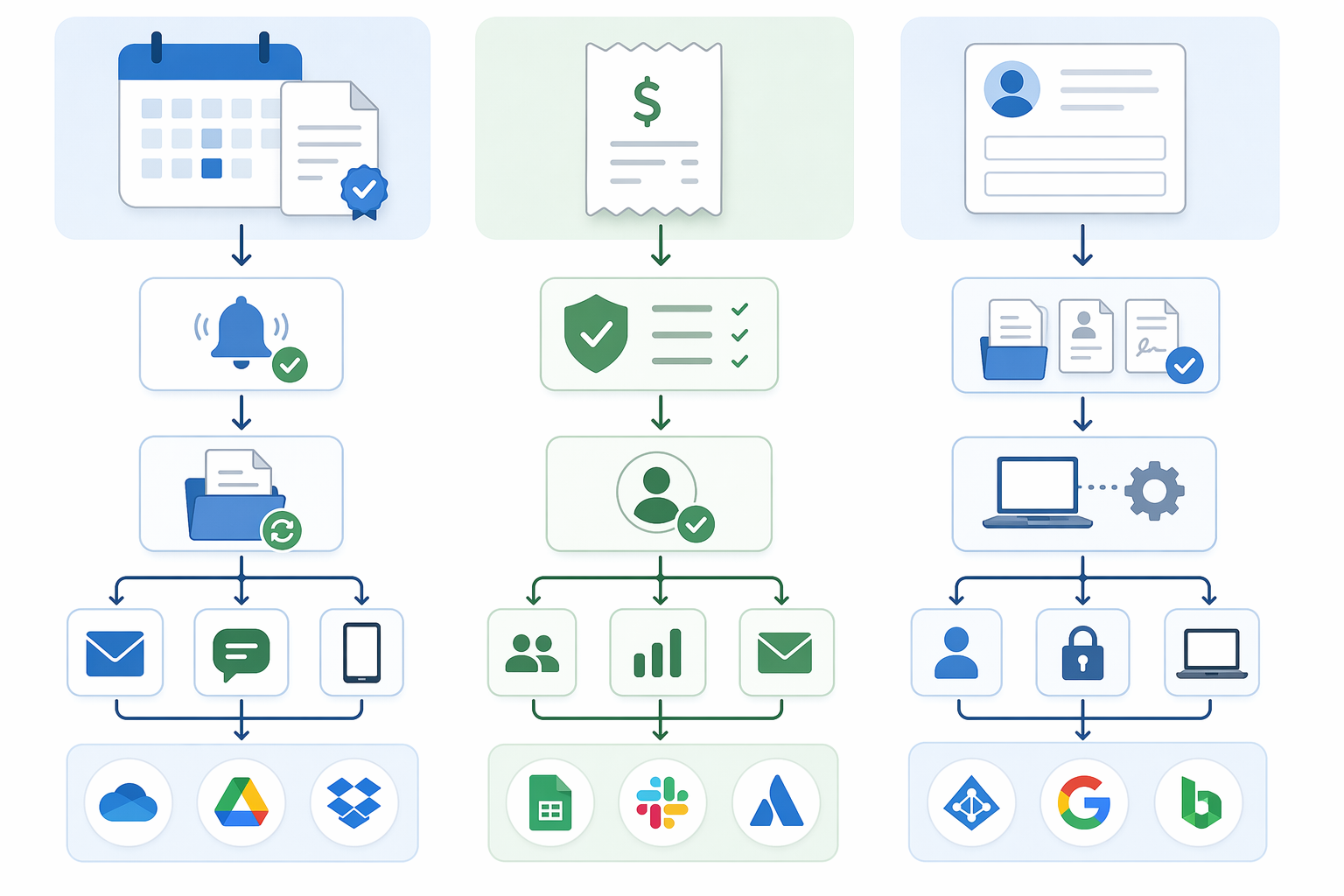
The useful answer is not another dashboard. It is a set of handoffs. A renewal notice lands in an inbox, creates a dated task, attaches the original document, alerts the right person before the deadline, and stores evidence after the renewal is complete. A receipt enters an expense tool, gets checked against policy, routes exceptions to a manager, and saves the approval trail. An onboarding form creates the next five tasks without someone retyping the same employee details into five places.
That becomes practical in 2026: connect the tools already on the desk before buying a larger system. If the company already uses Google Workspace, Microsoft 365, Slack, QuickBooks, Gusto, Expensify, Dropbox, DocuSign, or a payroll provider, the first productivity gain usually comes from wiring those tools together through Zapier, Make, Power Automate, or a similar workflow tool. For a broader tool comparison, see Best Process Automation Tools 2026.
There is enough adoption for this to be normal work, not frontier tinkering. Rippling reports, based on SBE Council survey data, that 77% of small businesses use at least one AI tool, 82% have invested in AI tools, and the median small business uses five AI tools.[4] Those are vendor-published figures, so they should not be read as independent proof that every automation pays off. They do show that the average owner is no longer starting from zero.
Start With The Chore That Keeps Coming Back
The best first automation is not the most impressive one. It is the compliance chore that has a predictable trigger, a deadline, a responsible person, and proof that must be saved afterward. If a task fails because someone forgot to check an inbox, update a spreadsheet, or chase an approval, it is a good candidate. If it fails because the business needs legal judgment, policy interpretation, or a tradeoff between risk and cost, automation can prepare the materials but should not make the decision.
| Recurring red tape task | Usual manual failure point | Automation trigger | Useful output |
|---|---|---|---|
| License and permit renewals | Renewal date sits in an email, PDF, or spreadsheet until someone remembers it | New renewal notice, calendar date, or spreadsheet row | Task, reminder sequence, document folder, and saved proof of filing |
| Expense policy enforcement | Receipts are approved first and reviewed later, when exceptions are harder to fix | New submitted receipt or expense report | Policy check, exception route, manager approval, and audit trail |
| Employee onboarding | The same employee details are copied into payroll, IT, benefits, forms, and training lists | Signed offer, completed onboarding form, or payroll profile creation | Checklist, account requests, document collection, and deadline reminders |
| Tax and payroll filing support | Dates and documents live across payroll, accounting, email, and folders | Payroll run, filing deadline, or accountant request | Packet of reports, reminders, and stored confirmation |
Do not begin by automating the whole business. Pick one row from that table and make it stop asking for attention every week. The point is to remove the repeat handling: open the message, download the attachment, name the file, remind the manager, update the tracker, and then prove later that the work was done.
License Renewals: Turn Dates Into Escalations
Licenses and permits are a good first target because the work is repetitive and the penalty for missing it is usually worse than the work itself. A simple renewal workflow needs four parts: a source of truth, a deadline, an owner, and evidence storage.
- Source of truth: a spreadsheet, Airtable base, Notion database, or compliance calendar with license name, jurisdiction, renewal date, owner, filing link, fee, and evidence folder.
- Trigger: a new row, changed renewal date, or scheduled check that runs daily or weekly.
- Action: create tasks 90, 60, 30, and 7 days before the due date, with the license record and filing link included.
- Escalation: if the task is not marked complete by the internal deadline, notify the owner or office manager instead of letting the reminder vanish.
- Evidence: when the renewal confirmation arrives, save the PDF or email to the right folder and update the tracker.
A lightweight version can run through Google Sheets, Gmail, Google Drive, and Slack. A row with a renewal date becomes a task in Asana, Trello, ClickUp, or Microsoft Planner. The reminder message includes the filing link and the folder where proof belongs. If the proof folder is still empty near the deadline, the automation sends one more alert to the person who can actually unblock it.
This is not glamorous, but it is the kind of setup that prevents the late-afternoon search through old email threads. It also gives the business a cleaner answer when a bank, landlord, insurer, marketplace, or regulator asks for current documentation.
Process speed has consequences outside the office, too. OECD analysis published in 2025 says regions where a license takes more than 60 days see 25% lower firm creation.[5] That statistic is regional, not a promise about any one company’s renewal calendar, but it points to the same operational truth: when approvals and licenses move slowly, business activity waits.
Expense Policy Enforcement: Catch Exceptions Before Reimbursement
Expense compliance gets messy when policy review happens after reimbursement. By then, the money is gone, the employee has moved on, and the office manager is left deciding whether to claw back a small amount or let the exception become precedent.
The workflow should run before payment:
- A receipt or expense report is submitted in the expense tool or through a form.
- The automation checks basic policy fields: amount, category, merchant, missing receipt, project code, approval threshold, or required note.
- Clean expenses continue to the usual approval queue.
- Exceptions go to the manager with the policy reason attached, not just a generic request to review.
- The approval, denial, or employee correction is saved with the expense record.
The important detail is the reason code. “Needs review” still creates an admin job. “Meal over limit,” “receipt missing,” “client name missing,” or “approval required above threshold” gives the reviewer enough context to act without opening three systems. If the business later needs to explain why an expense was reimbursed, the answer is already attached to the record.
For very small teams, this can be handled with an expense app, a shared policy table, Slack or email approvals, and a storage folder. For teams already inside Microsoft, Power Automate may be the cleaner option because approvals, SharePoint, Outlook, and Teams already sit close together; if pricing is the deciding factor, compare it against the company’s existing Microsoft licensing before adding a separate automation tool.
Employee Onboarding: One Form Should Start The Whole Chain
Onboarding is where small businesses accidentally build a part-time compliance job. The same employee name, start date, role, manager, location, tax form status, equipment need, policy acknowledgement, and system access request gets copied from an offer letter into payroll, HR files, IT requests, training lists, and calendar invites.
The cleaner setup is to make one completed onboarding form the trigger. That form does not need to be complicated. It needs enough structured fields to route the work without interpretation: employee type, state or work location, department, manager, start date, required equipment, required systems, and required documents.
| When the onboarding form is submitted | The automation should |
|---|---|
| Payroll profile is needed | Create a task for payroll setup or open the new-hire flow in the payroll system |
| Tax and employment forms are required | Send the document request and remind the employee until the status is complete |
| Manager approval is needed | Send the checklist to the manager with due dates tied to the start date |
| Equipment or software access is needed | Create IT tasks with role-based requirements |
| Policy acknowledgement is required | Send the handbook or policy packet and save the signed acknowledgement |
This is also where an integrated platform can make sense. If payroll, HR records, device management, app access, and document collection are already stitched together in one system, the company avoids maintaining a fragile chain of separate automations. Rippling reports that small businesses using AI-powered automation save 114 hours per employee per year and see $3.70 in return for every $1 invested, based on SBE Council survey data.[4] Because Rippling is the publisher, treat those numbers as vendor-sponsored evidence, not a neutral benchmark.
The buying question is not whether an integrated platform has more features. It is whether the current process crosses enough sensitive systems that a patchwork setup becomes its own thing to supervise. A five-person shop onboarding one employee a year may only need a form, a checklist, and document reminders. A 40-person company hiring across multiple states may get real value from a platform that keeps payroll, access, approvals, and records together.
Use Lightweight Automation Until The Handoffs Become The Risk
Zapier, Make, n8n, and Power Automate are useful when the work is mostly movement: take this event, create that task, notify this person, save that file, update this record. They are less useful when the hard part is interpreting a regulation or deciding whether the company should accept a compliance risk. For a side-by-side view of those tools, see Zapier vs Make vs n8n vs Power Automate.
A practical rule: use lightweight automation when the business can explain the process in one sentence. “When a renewal date is 60 days away, create a task and notify the license owner.” “When an expense is over the threshold, request manager approval.” “When a new hire form is complete, create onboarding tasks.” Those workflows are plain enough that the owner can inspect them later.
Move toward a compliance or HR platform when the workflow needs role-based permissions, detailed audit trails, framework-specific evidence, multi-state employment logic, or recurring access reviews. That is less about elegance and more about reducing the number of places where a sensitive record can drift out of sync. For small and mid-market automation strategy, see Best Business Process Automation Solutions for Small to Mid-Market Teams in 2026.
| Choose this | When it fits | What to watch |
|---|---|---|
| Zapier | Simple app-to-app automations, fast setup, nontechnical users | Costs can rise as task volume grows |
| Make | More complex branching, visual workflows, lower-cost high-volume scenarios | More setup discipline is needed |
| Power Automate | Microsoft-heavy teams using Outlook, Teams, SharePoint, and Excel | Licensing and connector rules need review |
| Integrated HR, payroll, or compliance platform | Sensitive records, audit trails, multi-step approvals, or frequent hiring | Higher annual cost and more implementation work |
Team size matters. A solo operator can tolerate a spreadsheet-backed workflow if reminders are reliable. A 25-person company needs clearer ownership and exception handling. A 100-person company needs permission controls, reporting, and audit trails that do not depend on one office manager remembering how the automation was built. For that scaling question, see Process Automation Tools for Small Business vs Enterprise.
What An Afternoon Setup Actually Looks Like
An afternoon build should not attempt a full compliance overhaul. It should produce one working automation, one owner, and one place to check whether it ran. A license-renewal setup is usually the cleanest starter project because it avoids sensitive payroll data and still removes a recurring failure point.
- Create a renewal tracker with license name, jurisdiction, due date, internal deadline, owner, filing link, status, and evidence folder.
- Add the next few known renewals manually instead of importing years of messy history.
- Build a scheduled automation that checks for due dates within the chosen reminder window.
- Create a task or message for the owner with the filing link and evidence folder included.
- Add a second reminder if the status remains incomplete near the internal deadline.
- When confirmation arrives, save the file to the evidence folder and mark the record complete.
The test is simple: can someone who did not build the automation look at the tracker and know what is due, who owns it, what has been filed, and where the proof lives? If not, the automation is only moving confusion faster.
Use the same shape for expenses and onboarding. Pick the event that starts the work. Name the person who must act. Put the document where it belongs. Save the approval or completion status. Then add escalation only where silence creates risk. Too many alerts train everyone to ignore the system.
When Compliance Software Is Worth Considering
A dedicated compliance platform is easiest to justify when the company must repeatedly collect evidence for audits, security questionnaires, customer requirements, or formal frameworks. At that point, the problem is no longer just reminders. It is evidence collection, control mapping, access records, policy acknowledgements, and proof that the same process happened consistently.
SOC 2 Auditors cites a Forrester Total Economic Impact study on Drata showing a 78% reduction in audit evidence collection time, from about 980 hours to about 220 hours annually.[6] That is a vendor-commissioned study cited in a market analysis, so it should not be treated as a universal result. It is still useful for one narrow point: evidence collection can be a large enough time sink that specialized software may pay for itself when audits are recurring.
The same SOC 2 Auditors analysis places many compliance platforms in the roughly $7,500 to $15,000 per year range, with actual pricing depending on company size and required frameworks.[6] That price is hard to defend if the business only needs renewal reminders and expense approvals. It becomes easier to defend when a customer contract, financing process, security review, or regulated workflow requires organized evidence on demand.
The dividing line is maintenance. If a Zapier or Make workflow quietly handles the task and the owner can review it in a few minutes, keep it lightweight. If the business is constantly checking whether the automation missed a permission change, document version, access review, or audit request, the low-cost setup has become a new admin job.
Where AI Helps, And Where It Should Stay Out
AI can help with the parts of compliance work that are repetitive and text-heavy: summarizing a renewal notice, extracting a due date from an email, classifying an expense description, drafting a reminder, or turning an onboarding request into a checklist. Those are useful assists when a human can inspect the output and the workflow has guardrails.
It should not be asked to decide whether a regulation applies, whether a worker is correctly classified, whether a license is sufficient for a new location, or whether a customer’s security requirement can be accepted. Those questions need judgment, and sometimes professional advice. Automation can gather the documents and push the decision to the right person. It cannot carry the risk for the business.
The safer AI pattern is assistive: extract, draft, summarize, route, and remind. The unsafe pattern is authoritative: approve, interpret, waive, or certify without review. For teams comparing AI-heavy workflow options, see Zapier vs Make 2026: AI and Agentic Workflows.
The Productivity Gain Is In The Connective Tissue
The hours lost to red tape are rarely sitting in one giant task called compliance. They leak out through small repeats: checking whether a form came back, asking who owns a renewal, searching for the latest certificate, reminding a manager to approve an exception, building the same onboarding checklist again, or proving six months later that the company did what it said it did.
That is why the highest-return move for many small businesses in 2026 is not a new app purchase. It is connecting the tools already in use so the next step happens without someone remembering to push it along. A workflow that moves documents, reminders, approvals, and evidence into the right places will not make compliance disappear. It will keep compliance from taking a fresh bite out of the day every time an email arrives.
References
- Red Tape Burdens on Small Businesses, American Action Forum
- Small businesses spend over 250 hours or 32 business days a year wrapped up in red tape, CFIB
- A Majority of Small Businesses Say Regulations Are Hindering Growth, U.S. Chamber, Q4 2024
- Small Business Automation, Rippling
- No more paper work: How reducing red tape can boost businesses in regions, OECD, 2025
- Best Compliance Software for Small Business, SOC 2 Auditors, 2026