
The fastest way to stop trusting a “cross-platform” note-taking app is to need one note on the wrong device. It is on the MacBook, but not on the Android phone. It looks right on the iPad, then opens awkwardly on the Windows work machine. The editor may be beautiful, the templates may be clever, and the AI menu may be long, but none of that helps when the meeting note you need is stranded somewhere else.
So the real question is not which app has the longest feature list. The useful question is: which cross-platform note-taking app survives the devices you actually use every week?
That distinction matters because sync failures are not a fringe annoyance. An analysis of 1–3 star reviews across note-taking apps found that 22% cited sync failures, making it the most common complaint category in that dataset.[1] For a note app, sync is not a bonus feature. It is the plumbing.

The short version: choose by device mix first
Six apps belong in the serious 2026 shortlist: Obsidian, Joplin, Standard Notes, Logseq, Notion, and OneNote. The first four are the cleanest fit if Linux is part of your life, because they offer native apps across Mac, Windows, Linux, iOS, and Android. Notion and OneNote are still important cross-platform choices, but their strengths are different: Notion is strongest when a team workspace matters, and OneNote is hard to beat when you want a capable free app across Mac, Windows, and mobile.[2][3]
| App | Platform coverage | Sync model | Privacy posture | Collaboration strength | Pricing signal | Not for you if... |
|---|---|---|---|---|---|---|
| Obsidian | Native Mac, Windows, Linux, iOS, Android | Local-first vaults; optional paid Obsidian Sync | Strong data ownership; notes stay accessible locally | Weak for real-time team collaboration | Core app free; Obsidian Sync listed at $48/year in the researched pricing table | You want effortless shared workspaces more than control over local files |
| Joplin | Native Mac, Windows, Linux, iOS, Android | Local-first with bring-your-own sync or Joplin sync options | Strong ownership angle; more setup responsibility | Limited compared with Notion or OneNote | Free app; BYO sync can keep costs low | You do not want to think about sync targets or setup |
| Standard Notes | Native Mac, Windows, Linux, iOS, Android | Encrypted sync service | End-to-end encryption by default, including on the free tier | Not built as a rich team workspace | Free privacy-first base; paid tiers expand features | You need databases, team dashboards, or heavy collaboration |
| Logseq | Native Mac, Windows, Linux, iOS, Android | Local-first graph/outliner; sync requires more deliberate setup | Strong ownership angle for PKM users | Not the main reason to choose it | Free core app; sync setup depends on path chosen | You want a conventional notes-and-folders app |
| Notion | Broad desktop, mobile, and web access | Cloud-first through Notion’s servers | Convenient, but requires trust in a hosted workspace model | Very strong for shared pages, databases, and team workflows | Useful free entry point; paid plans matter for heavier teams | You need local-first ownership or reliable offline-first behavior as the main priority |
| OneNote | Mac, Windows, iOS, Android, web; especially strong in Microsoft environments | Cloud sync through OneDrive | Tied to Microsoft account and OneDrive storage | Good sharing, especially for Microsoft users | Strong free option, with a 5GB OneDrive storage constraint for free accounts | You use Linux as a primary machine or attach lots of media |
Last verified: June 27, 2026 (UTC). Prices and plan details change often; the pricing signals above are based on sources published from late 2025 through Q2 2026 and should be checked against official pricing pages before committing to a paid annual plan.
Why native platform coverage is only the starting line
A web app can make almost anything look cross-platform in a comparison chart. That is not the same as having a dependable daily app on the machines where you actually work. Native app coverage matters because the failures that hurt most often happen at the edges: offline access on a train, file attachment handling on a phone, copy-and-paste behavior between desktop apps, or a note that syncs but arrives with formatting drift.
The cutoff used here is strict on purpose. Obsidian, Joplin, Standard Notes, and Logseq are the apps in the researched set with native apps on all five major platforms: Mac, Windows, Linux, iOS, and Android.[2][3] That does not automatically make them better for every person. It does mean they clear the first test for people whose device mix refuses to stay inside Apple, Microsoft, or Google boundaries.
Linux is the platform that usually exposes the gap between “available everywhere” and “available where I work.” If you use a Linux laptop, or you keep one around because your job, research, or development workflow requires it, the shortlist narrows quickly. OneNote becomes awkward because there is no full native Linux app in this comparison. Notion can still work through its broader web-first model, but that is a different promise from a native five-platform app.
Windows users have a different problem. Many apps technically run on Windows, but the best experience may have been designed somewhere else. OneNote, Obsidian, and Joplin are the three I would look at first if Windows is your work anchor. For a deeper Windows-only pass, see the Windows note-taking app comparison or the broader best note-taking apps for Windows in 2026.
Sync architecture is the decision, not a technical footnote
The 22% sync-complaint figure should change how these apps are judged.[1] It is tempting to compare note apps by editor style, backlinks, handwriting, templates, AI features, or database views. Those matter only after the app proves it can move your notes from one device to another without making you babysit it.
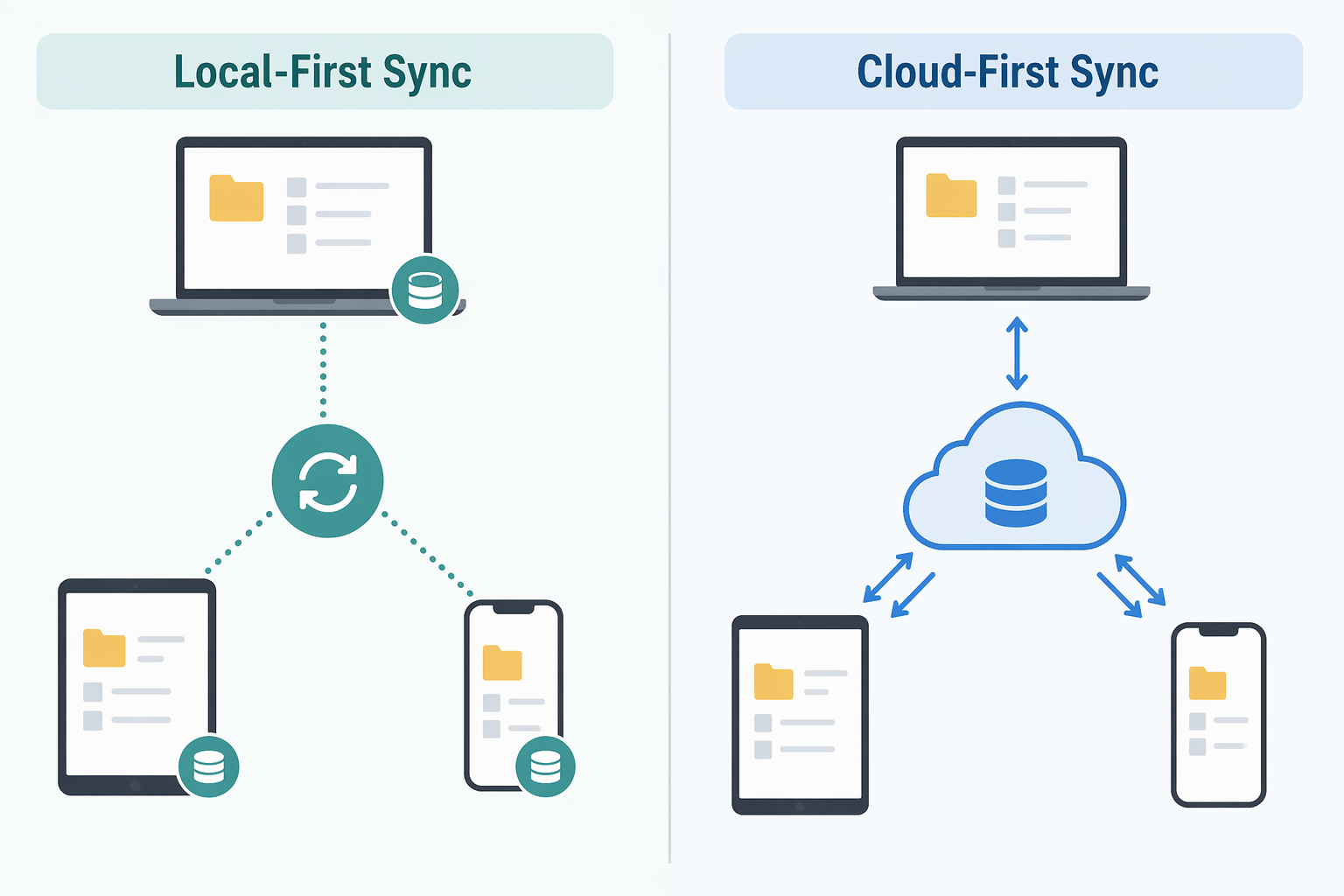
The six apps fall into three practical sync families.
- Local-first with optional or user-managed sync: Obsidian, Joplin, and Logseq. Your notes are primarily local files or local data, and sync is something you add or configure.
- Encrypted cloud sync: Standard Notes. Sync is part of the service, but the privacy model is the main selling point.
- Cloud-first workspaces: Notion and OneNote. Sync convenience and collaboration are central, but your notes live inside a hosted account system.
None of these models is automatically superior. A local-first app can be safer for long-term access and easier to leave, but it can also ask more from the user. A cloud-first app can feel effortless when every device is online and signed in, but it requires more trust in the vendor’s storage, account, export, and product decisions. The right question is where you want the complexity to live: upfront setup, monthly trust, or collaboration management.
If you need Mac, Windows, Linux, iOS, and Android
Start with Obsidian, Joplin, Standard Notes, and Logseq. These are the four apps in the researched set with native coverage across all five major platforms.[2][3] That is the cleanest answer for the person using a Windows desktop at work, a Linux laptop at home, and an Android phone in between.
Obsidian: strongest if you want ownership without giving up polish
Obsidian is the most convincing default for people who care about full platform coverage and long-term access to their notes. Its local-first model means the notes do not vanish from your machine if you stop paying for sync. That matters. A note app should not feel like rented memory.
The pricing signal is also unusually clean: the researched comparison lists Obsidian Sync at $48/year, while the core app remains free.[2] That makes it one of the better values if you want native Mac, Windows, Linux, iOS, and Android coverage with a first-party sync path. The caveat is that Obsidian is not a team workspace in the Notion sense. It can be shared and extended, but real-time collaboration is not the reason to choose it.
Choose Obsidian if your notes are primarily yours: research notes, work references, class notes, project thinking, drafts, and personal knowledge management. If you are still choosing based on laptop behavior first, the broader laptop note-taking app comparison is a useful side path.
Joplin: best when you want control and can tolerate setup
Joplin’s appeal is not mystery. It is free, open-source, available across the five major platforms, and comfortable for people who want notes they can manage without buying into a glossy hosted workspace.[2][3] It is a strong fit if you are willing to bring your own sync target or make deliberate choices about how your devices connect.
That setup burden is the trade. For some readers, it is a feature: fewer assumptions, more control. For others, especially students or workers who just need a class note or meeting note to appear on a phone before the next appointment, it can become one more system to maintain. Joplin is easy to recommend to technically comfortable users and harder to recommend to someone who already knows they will ignore sync configuration until something breaks.
Logseq: local-first, but more specific than universal
Logseq also clears the five-platform native coverage bar.[2] Its better fit is narrower, though. It is an outliner and graph-oriented personal knowledge management tool, not a generic notebook replacement for everyone. If your thinking naturally starts with daily notes, blocks, references, and linked ideas, Logseq can make sense. If you want folders, pages, and a conventional notes app, it may feel like the app is asking you to adopt its method before you can write anything down.
That does not make Logseq weak. It makes it specific. Readers choosing between Obsidian, Logseq, and other PKM-style tools should make that decision by method fit, not by a generic feature score. The PKM app comparison by methodology fit goes deeper on that question.
If privacy is the non-negotiable
Standard Notes deserves its own lane because it is not just another five-platform app. It is the only major cross-platform app in the researched set described as offering end-to-end encryption by default on its free tier.[5] That is a meaningful difference if the contents of your notes are sensitive by default rather than occasionally private.
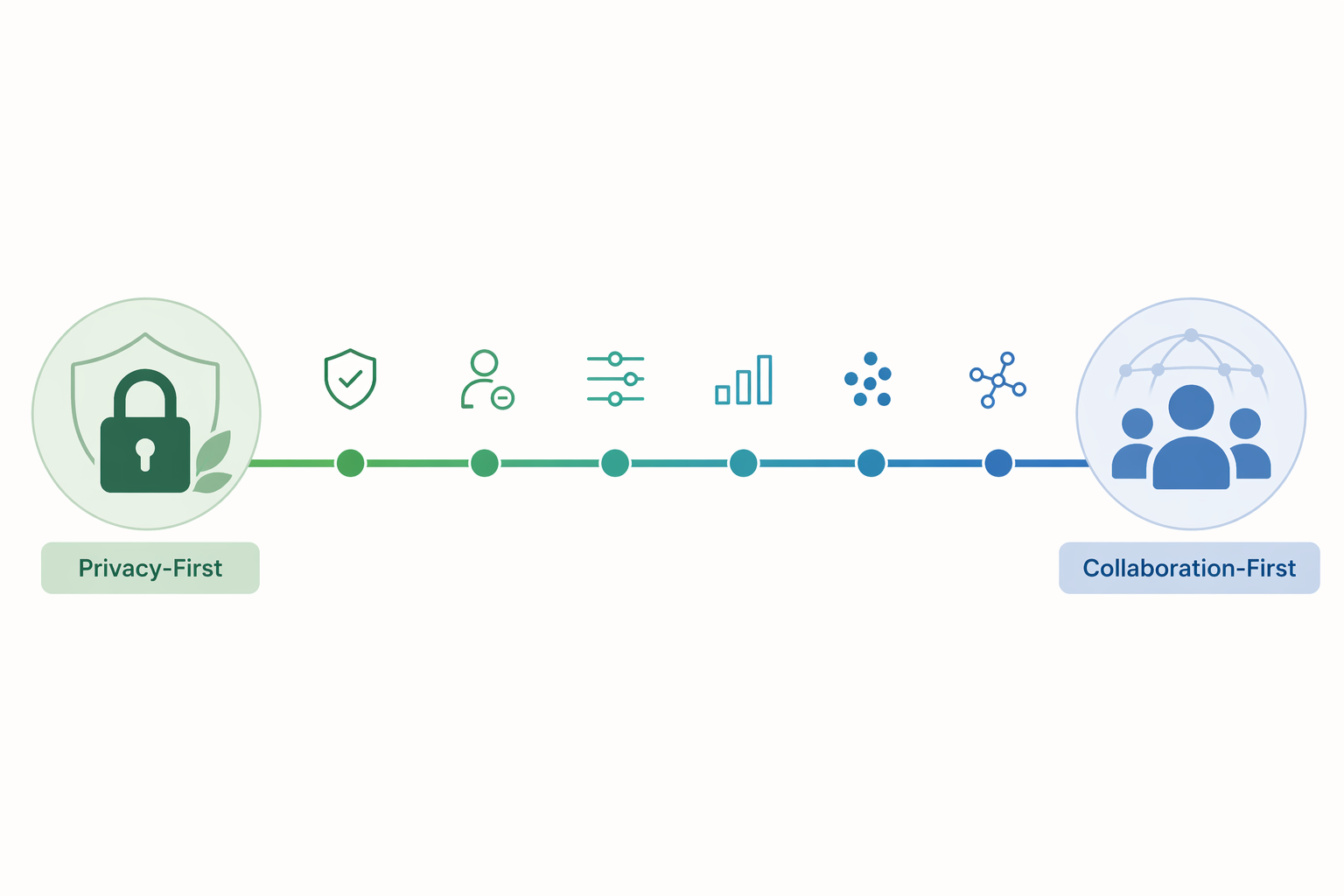
The trade-off is that Standard Notes is not trying to be Notion. If you need relational databases, shared project dashboards, or a workspace where multiple people build pages together all day, it will feel constrained. If the core job is private notes that sync across Mac, Windows, Linux, iOS, and Android with less exposure by default, that constraint is part of the point.
Privacy-first readers should still separate two ideas that often get blurred: encryption and ownership. Standard Notes gives you a strong encrypted-service model. Obsidian, Joplin, and Logseq give you more of a local-first ownership model. Those are related concerns, but they are not identical. If you are deciding between local-first and cloud PKM more broadly, use the local-first vs cloud PKM guide as the deeper fork.
If you want the best free fit for Mac, Windows, and mobile
OneNote remains the most practical free answer for a large group of people: Windows work computer, personal MacBook, iPhone or Android phone, maybe an iPad. It is especially attractive if you already live in a Microsoft account and do not need Linux as a primary desktop platform. Zapier identifies OneNote as a strongest free option, and PCMag also includes it among major note-taking recommendations.[4][3]
The storage caveat is not cosmetic. Free OneDrive storage is 5GB, which becomes a real constraint if your notes include images, PDFs, audio, screenshots, lecture slides, or heavy attachments.[4] For lightweight text notes, that may be fine for a long time. For students collecting class material or workers saving meeting artifacts, it can become the invisible ceiling.
OneNote is also the clearest example of why “cross-platform” has to be filtered through your actual device mix. Mac, Windows, iOS, and Android users can have a good experience. Linux users should be cautious. If your school or workplace already runs on Microsoft tools, OneNote may be the lowest-friction answer; students comparing that trade-off with Notion, Obsidian, and other study tools can jump to the student note-taking app roundup.
If collaboration is the main job
Notion is the easiest app here to understand and the easiest to over-recommend. If the work is shared pages, project databases, team documentation, lightweight wikis, and comments, Notion’s cloud-first model is a strength. It is built around the assumption that notes are often shared objects, not just private files.
That same assumption is the reason it is not the right default for everyone. The researched comparison frames Notion and Evernote as stronger for real-time collaboration, while local-first tools such as Obsidian, Joplin, and Logseq offer more data ownership but require more setup for sync.[1][2] That is the honest trade. Notion works everywhere in the sense that a cloud workspace can be reached from many devices. It does not give you the same local-first comfort as a folder of notes that remains useful outside the vendor’s system.
Choose Notion when collaboration is the point, not an occasional bonus. If most of your notes are personal, long-lived, and rarely shared, the convenience starts to look more expensive in non-dollar terms: account dependence, export friction, and less control over the underlying structure of your archive.
Where Evernote fits now
Evernote belongs in the market context, but it is hard to treat as a genuine cross-device recommendation in 2026 if the free tier is part of the decision. The researched pricing context lists Evernote Personal at $14.99/month, or $179.88/year, as the cheapest usable plan.[2][4] That is a very different proposition from Obsidian’s free core app with optional lower-cost sync, Joplin’s free BYO-sync path, or OneNote’s free Microsoft-backed model.
The problem is not that Evernote has no value. It is that a cross-platform recommendation has to survive normal multi-device use without immediately pushing the reader into a comparatively expensive plan. For this particular question, it is context rather than a finalist.
The device-mix recommendations
If you want the fastest practical choice, start with the devices you cannot change: the employer-issued Windows laptop, the personal Mac, the Linux machine, the phone you actually carry, the tablet where you annotate.
| Your weekly device mix or priority | Start with | Why |
|---|---|---|
| Windows + Mac + Android or iPhone, no Linux | OneNote or Obsidian | OneNote is the strongest free fit if Microsoft storage works for you; Obsidian is better if ownership matters more. |
| Linux plus any mobile device | Obsidian, Joplin, Standard Notes, or Logseq | These are the serious native five-platform choices in the researched set. |
| Privacy-first personal notes | Standard Notes | Default end-to-end encryption on the free tier gives it a clearer privacy posture. |
| Local-first personal knowledge management | Obsidian or Logseq | Obsidian is more broadly approachable; Logseq is better for outliner and graph-oriented workflows. |
| Freeform control with low cost and technical comfort | Joplin | Free, open-source, and flexible, with more responsibility for sync choices. |
| Team workspace, shared docs, project databases | Notion | Collaboration is central to the product rather than an add-on. |
| Microsoft school or workplace environment | OneNote | Low friction across Windows, Mac, and mobile, as long as OneDrive storage is enough. |
Feature parity should be the final check before you move everything. Create a real test note: text, checklist, image, PDF or attachment if you use them, links, and whatever formatting you rely on. Open it on every device you expect to use. Edit it on the phone. Edit it again on the laptop. Then check whether the result still looks like the same note. This small test catches more than a marketing page ever will.
The best cross-platform note-taking app is not the one with the most impressive demo. It is the one whose sync model, native platform coverage, and ownership trade-offs match the devices you actually use every week.