
First, clean up the name: Claude Opus 5 vs Copilot for note automation workflow is not a literal product-to-product comparison as of July 25, 2026. Claude Opus 5 is not a released model. In practice, the useful comparison is current Claude-family automation — especially Claude Code and MCP-style file access around Claude Opus 4.x-class models — versus Microsoft 365 Copilot inside OneNote and the wider M365 stack. It is also not GitHub Copilot; for note workflows, “Copilot” means Microsoft 365 Copilot.
The short verdict: if you are leaving OneNote, Notion, Evernote, or any other note app and need the automation to survive the move, Claude is the stronger partner. It can be wired into real files, read and write Markdown, follow vault rules, and help transform notes during migration. If your organization is staying in OneNote and Microsoft 365 long-term, M365 Copilot is easier, safer to roll out, and more pragmatic because it is already embedded where the notes, meetings, email, and tasks live.
Not for you if you only want a general chatbot comparison, a benchmark table, or a ranking of which assistant sounds more polished. The painful part of note migration is not whether an AI can summarize a page in a demo. It is whether the links still work, attachments are still findable, tags still mean something, and the automation does not disappear the moment the old app is closed.

The Migration Test Is Different From The Note-Taking Test
A note automation tool has to be judged at the point where notes are least tidy: before export, during conversion, after import, and then months later when the new system has become normal. That is where the difference between Claude and M365 Copilot becomes obvious.
| Migration stage | Claude via Claude Code/MCP | M365 Copilot in OneNote/M365 |
|---|---|---|
| Before export | Can help inspect exported files, draft scripts, and plan transformations around the target vault structure. | Can summarize and extract tasks inside OneNote, but does not prepare a cross-app migration. |
| During transformation | Can read and write Markdown, normalize headings, adjust frontmatter, rename files, and follow vault conventions when given file access. | No cross-app migration layer for moving OneNote, Evernote, or Notion content into another note system. |
| After import | Can operate directly on the new vault, especially when the destination is file-based or API-accessible. | Continues to work well if the destination remains OneNote or Microsoft 365. |
| Ongoing automation | Can preserve project rules in portable files such as CLAUDE.md inside the vault. | Has no equivalent portable configuration file that travels with a note archive. |
That table is the whole argument in compressed form. Copilot is convenient where Microsoft owns the surface. Claude becomes more valuable when the surface is the folder full of exported material: Markdown files, folders, attachments, inconsistent filenames, imported web clips, old daily notes, half-working links, and whatever naming scheme seemed reasonable three years ago.
Where Claude Starts To Matter: Touching The Vault
Claude’s migration advantage is not that it writes nicer summaries. Its advantage is that, with Claude Code and MCP-style integrations, it can be pointed at the working materials of a migration rather than trapped inside the source app’s interface.
The Obsidian examples are the clearest version of this. A January 2026 guide documents a setup where Claude Code works with an Obsidian vault through an MCP configuration involving the Obsidian REST API plugin, Python, and an MCP server; the author frames it as a quick-start path for AI-powered notes, while also marking that original guide as outdated after later updates. [1]
That caveat matters. This is not a polished one-click product path. It is closer to a power-user bridge: roughly 15 minutes of one-time configuration if everything goes cleanly, plus some comfort with plugins, local tooling, Python, or MCP servers. If those words make you want to close the tab, Copilot’s appeal is real. But if you have ever opened a migrated vault and found two thousand files waiting to be normalized, the trade looks different.
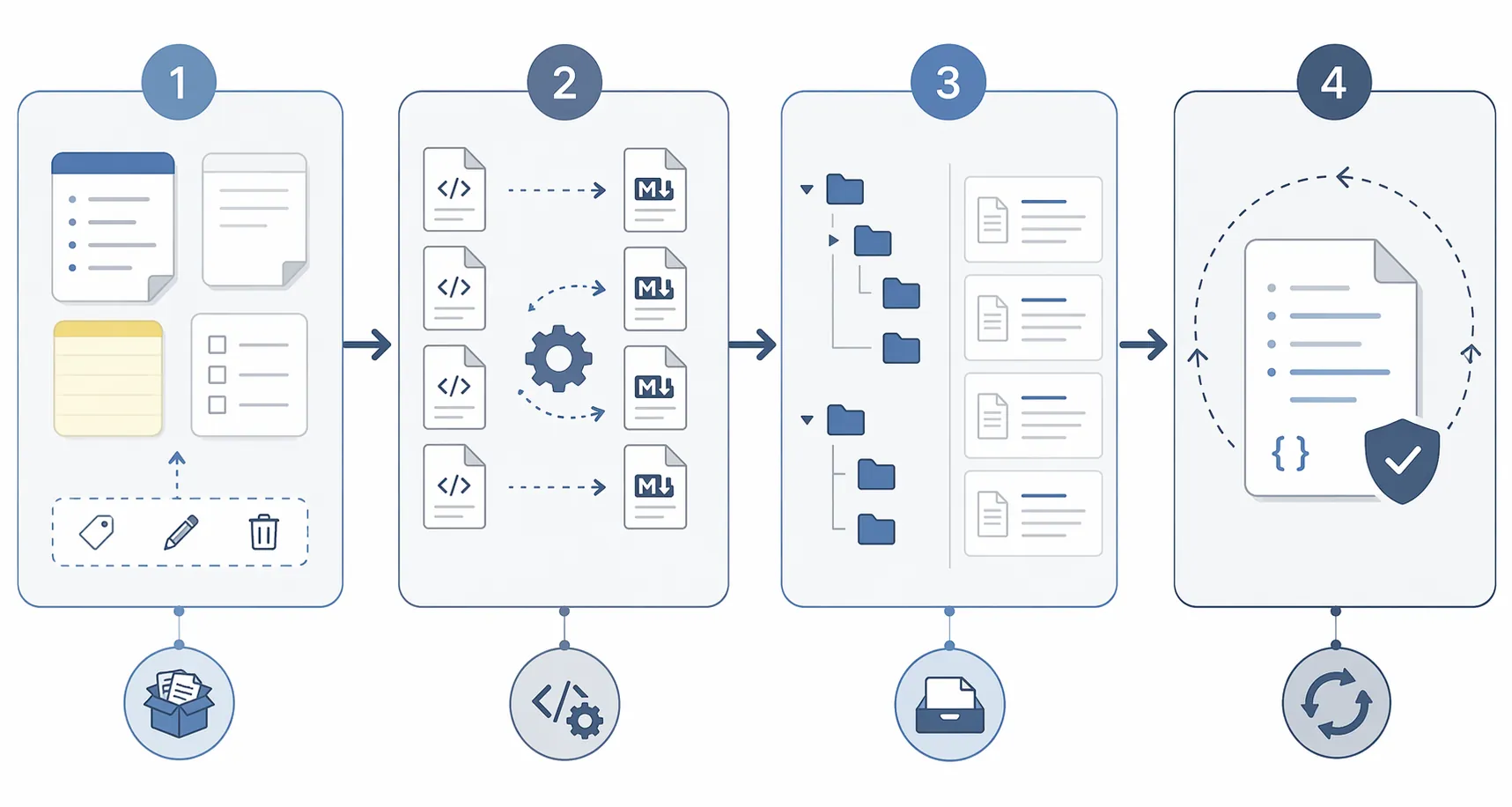
Once Claude has file-level access, the work changes. Instead of asking an assistant to “summarize my notes,” you can ask it to inspect a folder, identify malformed Markdown, rewrite imported headings, convert loose labels into YAML frontmatter, rename daily notes to match a convention, or flag internal links that probably broke during export. Those actions touch the migration surface. They are also testable: you can diff files, roll back in version control, rerun scripts, and verify a sample before applying changes across the vault.
The Notion-To-Obsidian Bridge Scenario
The Notion angle is especially interesting because it sits between a polished app and a portable destination. Notion added Claude Opus 4.6 as a selectable model in February 2026, which means some users can use Claude reasoning inside Notion before or around a migration rather than only after export. [2]
That does not mean Notion has become a universal migration tool, and it does not erase the need to inspect the exported files. It does create a useful bridge: Claude can help reason about Notion content while it is still in Notion, and then Claude Code or an MCP-connected workflow can help clean up the files once the content is moving toward Obsidian or another Markdown-based system.
Community reports around Claude Desktop, MCP servers, and Obsidian show users generating notes and automating vault work directly from Claude-connected setups. [3] The strongest user-reported migration claim is blunt: Claude Code can “write code to deal with the Notion exports perfectly fine” and can “move all of notion into obsidian.” That is a real signal, but it should be treated as early-adopter evidence, not as a guarantee that every export will be clean or every plugin stack will remain stable. [1][3]
The safer reading is narrower and still useful: Claude is better suited to migration work because it can participate in the messy middle. It can help create the scripts, inspect the result, and iterate on the file structure. That is different from saying Claude magically understands every historical quirk in your archive.
Why CLAUDE.md Is More Than A Prompt File
The most underrated part of Claude-style note automation is not a model feature. It is the ability to keep persistent project instructions inside the note system itself. A CLAUDE.md file at the root of an Obsidian vault can describe daily-note naming, folder rules, frontmatter expectations, journaling conventions, cross-vault query habits, or which folders should never be rewritten automatically.
That matters because it travels with the vault. If the vault is version-controlled, the automation instructions are version-controlled too. If the vault moves machines, the convention file moves with it. If the user changes apps later but keeps the Markdown archive, the operating rules are still visible. A setup like this does not make migration effortless, but it does stop the automation layer from being locked inside the old app’s memory.
A practical CLAUDE.md does not need to be elaborate. It can say: daily notes live in Journal/YYYY/MM; imported web clips keep their original source URL; project notes require status and next_review frontmatter; attachments are not renamed without approval. Those rules are exactly the kind of small, unglamorous constraints that keep a migrated archive from becoming a second cleanup project.
Where Copilot Is Actually Strong
M365 Copilot should not be dismissed. Inside OneNote, Microsoft’s official Copilot features are exactly the kind of embedded help many teams want: summarize notes, generate task lists, draft plans, and turn existing notes into more usable working material. [4][5]
That is useful before a migration too, in a limited way. If a OneNote notebook has years of meeting notes, Copilot can help extract action items or produce a cleaner summary before export. If the user is staying in OneNote, the value compounds: the notes remain in the same system where Copilot can continue to see Microsoft 365 context.
The Workflows agent expands that embedded story across Outlook, Teams, SharePoint, and Planner, so a Microsoft-heavy organization can automate handoffs around meetings, files, messages, and tasks without assembling a local plugin stack. [6] That is the natural habitat for Copilot: not a portable archive, but a connected work system.
The migration problem is what it does not solve. M365 Copilot does not provide a cross-app note migration layer. It does not give a OneNote-to-Obsidian transformation workflow. It does not offer a portable equivalent to CLAUDE.md. It does not become your automation partner after the archive leaves Microsoft’s surfaces. The moment the job becomes “clean these exported files and make them work somewhere else,” Copilot’s official strengths are beside the point.
Setup Burden Versus Control
The trade-off is not subtle. Copilot has almost no setup burden for an eligible Microsoft 365 user. Open OneNote, use Copilot, stay inside the Microsoft world. That is appealing for teams that care more about reducing friction than owning the automation layer.
Claude asks more. A serious migration workflow may involve Claude Code, an MCP server, Obsidian plugins, local permissions, folder access, and careful testing before bulk edits. The January 2026 Obsidian guide is useful as evidence of the pattern, but because it was later marked outdated, setup steps should be verified against current plugin and MCP documentation before anyone builds a production workflow around it. [1]
For a small notebook, that may be overkill. For a serious migration, it can be the difference between assisted cleanup and manual archaeology. The person with a few hundred casual notes may prefer OneNote convenience. The person with years of imported Evernote clips, Notion exports, PDF attachments, daily notes, and project logs needs tools that can operate where the files actually are.
| If this describes you | Better fit | Why |
|---|---|---|
| You are leaving OneNote for Obsidian or another Markdown vault | Claude | It can work with files and vault rules after export. |
| You are cleaning a Notion export before importing elsewhere | Claude | It can help write and iterate on transformation scripts. |
| Your company runs on OneNote, Teams, Outlook, SharePoint, and Planner | M365 Copilot | It is embedded across the tools your team already uses. |
| You want zero setup and no plugin maintenance | M365 Copilot | It trades portability for convenience. |
| You want automation conventions to travel with the archive | Claude | A vault-level instruction file can preserve rules outside the app. |
Cost Is Really Commitment
The pricing comparison is simple enough to matter without turning into a procurement spreadsheet. Claude Pro is listed at $20 per month as a standalone subscription. Microsoft 365 Copilot is listed at $30 per user per month, and it requires an eligible Microsoft 365 subscription; available M365 plan pricing ranges from $12.50 to $57 per user per month. [7][8]
The bigger issue is not the extra dollars in isolation. It is the commitment shape. Claude can be attached to a file-based workflow without requiring the note archive to live inside one productivity suite. M365 Copilot makes most sense when the organization already accepts Microsoft 365 as the long-term operating layer. If the notes are about to leave, paying for the embedded assistant does not solve the cleanup work waiting outside the gate.

The Decision Rule
Choose Claude if the notes need to outlive the app. That includes OneNote-to-Obsidian moves, Notion-to-Markdown cleanup, Evernote export normalization, vault restructuring, frontmatter cleanup, and any workflow where the assistant needs to read, write, rename, and verify real files. Expect setup. Test on copies. Keep version control or backups. The payoff is that the automation can follow the archive.
Choose M365 Copilot if the destination is still OneNote and the surrounding work lives in Microsoft 365. It is the better everyday assistant for users who want embedded note summaries, task extraction, meeting preparation, and workflow automation across Microsoft’s own apps without maintaining plugins or MCP servers.
There is no universal winner because the job is different. Copilot helps inside the room. Claude is better when you are packing the room, labeling the boxes, moving the boxes, and making sure the new shelves still make sense.
References
- Quick Start: Using Claude Code with Obsidian for AI-Powered Notes, mostlycopyandpaste.com, January 2026.
- Notion release, February 9, 2026, Notion, February 9, 2026.
- Obsidian forum thread #99542, Obsidian Forum.
- Take notes with Copilot in OneNote, Microsoft Support.
- Welcome to Copilot in OneNote, Microsoft Support.
- Get started with Workflows in Microsoft 365 Copilot, Microsoft Support.
- Claude pricing, Anthropic.
- Microsoft 365 Copilot pricing, Microsoft.