
If your recurring ChatGPT workflow keeps accumulating context across multiple chats, start with a Project. If the workflow needs to be packaged for other people, shared by link, listed publicly, or connected to outside systems through Actions, build a Custom GPT. That is the practical fork behind most ChatGPT Projects vs custom GPTs workflow decisions.
The confusing part is that both features can hold instructions and files. The important difference is where the work lives after the first clean setup. Projects behave like a workspace for continuing work; Custom GPTs behave like a reusable assistant for a defined task.

| Decision point | ChatGPT Projects | Custom GPTs | Better choice when... |
|---|---|---|---|
| Core role | A persistent workspace for related chats, files, and instructions | A packaged assistant with reusable instructions and optional capabilities | Use Projects for continuity; use Custom GPTs for repeatable delivery |
| Memory and context | Project-only memory can persist across chats inside the same Project | Starts fresh each session unless context is supplied again | Use Projects when the workflow changes and accumulates context over time |
| Advanced tools | Can support tools such as Deep Research, Agent mode, Study mode, Canvas, and Voice mode, depending on access | Does not provide Project workspace access to those tools | Use Projects when the work depends on research, drafting, iteration, or multi-step execution |
| Sharing | Supports workspace-style sharing in team contexts, but not public GPT Store-style distribution | Can be shared by link and distributed through the GPT Store | Use Custom GPTs when other people need a clean front door |
| External integrations | Best for ChatGPT-native work | Can use API Actions to connect with external services | Use Custom GPTs when the assistant needs to call outside systems |
| Files | File limits vary by plan, with reported caps of 5 files on Free, 25 on Plus/Go, and 40 on Pro/Enterprise | Reported cap of 20 files, up to 512MB each | Check the current limit before building a file-heavy workflow |
| Best-fit workflow | Client research, content pipelines, strategy work, ongoing study, long-running personal systems | Intake bots, brand assistants, team templates, public tools, assistants with Actions | Choose based on continuity versus distribution |
The Real Difference Is Where Context Lives
A Project can carry project-only memory across chats in that workspace. OpenAI describes Projects as a way to keep related chats, files, and instructions together, with memory scoped to the Project rather than mixed freely across unrelated work.[1] Independent comparisons make the same operational point: the Project is useful because the next chat can inherit the shape of the work instead of forcing you to rebuild it from scratch.[2]
That matters more than it sounds. A consultant working on one client account may have discovery notes, positioning decisions, meeting summaries, proposal drafts, and follow-up emails scattered across a month of chats. In a Project, those chats can belong to one workspace with shared instructions and project-specific context. The point is not magic productivity. The point is fewer orphaned decisions.
A Custom GPT is different. It can start with well-written instructions and attached knowledge, but it does not carry an ongoing memory of every prior session in the same way. Each new use begins as a new run of the assistant unless the user supplies the needed context again.[2] That is not a defect if the job is stable. It is exactly what you want from a packaged helper: consistent behavior, predictable instructions, and a clean start.

The common mistake is building a Custom GPT because the workflow feels important. Importance is the wrong test. The better test is whether the workflow depends on accumulating context. If it does, a Project usually gives the work a more durable home.
Use a Project When the Work Keeps Evolving
Projects fit work that produces residue: files, decisions, drafts, corrections, preferences, unresolved questions, and new constraints. That is why they suit private knowledge work better than a neat one-purpose bot.
- A freelancer can keep one Project for a research-heavy content pipeline, with source notes, outlines, editorial rules, and revision history in one place.
- A consultant can create one Project per client, keeping strategy context separate from other clients and reducing the need to re-explain the account.
- A founder can use a Project for internal planning where the assistant needs to remember product assumptions, hiring constraints, and prior tradeoffs.
- A student or analyst can use a Project for a long research topic where Study mode, Canvas, or Deep Research may matter more than shareability.
The file limit still matters. Reported Project file caps vary by plan: 5 files on Free, 25 on Plus/Go, and 40 on Pro/Enterprise.[2] Those numbers are useful planning constraints, not a promise that every account will feel identical in July 2026. If the workflow depends on a large document library, verify the current limit in your account before reorganizing everything around it.
Projects also become more attractive when the workflow uses advanced ChatGPT tools. Feature audits and comparisons identify Deep Research, Agent mode, Study mode, Canvas, and Voice mode as available inside Projects rather than inside Custom GPTs.[3][4] Deep Research is reported with a Plus allowance of 10 queries per month, while Agent mode is described as supporting multi-step browser-based actions.[3] Access can still vary by plan, device, region, and rollout, so treat tool availability as something to confirm, not something to assume.
Use a Custom GPT When the Workflow Needs a Front Door
Custom GPTs are still the cleaner choice when the workflow needs to be used by someone else without giving them access to your workspace. They can be shared by link or distributed through the GPT Store, while Projects support team-style sharing but not public distribution in the same way.[5]
That makes Custom GPTs useful for small businesses that want a standard assistant for staff, clients, or community members. A brand voice assistant, an onboarding helper, a proposal intake bot, or a policy explainer does not necessarily need long-running memory. It needs a consistent interface, stable instructions, and a way for other people to open it without touching private work.
OpenAI’s Custom GPT materials describe GPTs as customized versions of ChatGPT that can be tailored for specific purposes.[6] The practical value is packaging. A good Custom GPT can hide the messy instructions behind a simple interaction: upload this, answer these questions, receive this kind of output.
Custom GPTs also keep one important advantage that Projects do not replace: Actions. If the assistant needs to call an external API or connect outward to another service, a Custom GPT is the ChatGPT-native route. For workflows that reach beyond ChatGPT itself, that can outweigh the memory advantage of Projects.
The file cap is different here too. Independent comparisons report Custom GPTs as allowing up to 20 files, with each file capped at 512MB.[7] That can be enough for a compact knowledge base, but it is not the same as a living workspace. If the source material changes every week, a Project may be easier to maintain. If the knowledge base is stable and the assistant is meant to be reused by many people, a Custom GPT can be cleaner.
The Five-Question Decision Check
The fastest way to choose is to stop comparing feature lists and ask what would break once the workflow grows. These five checks cover most real cases.
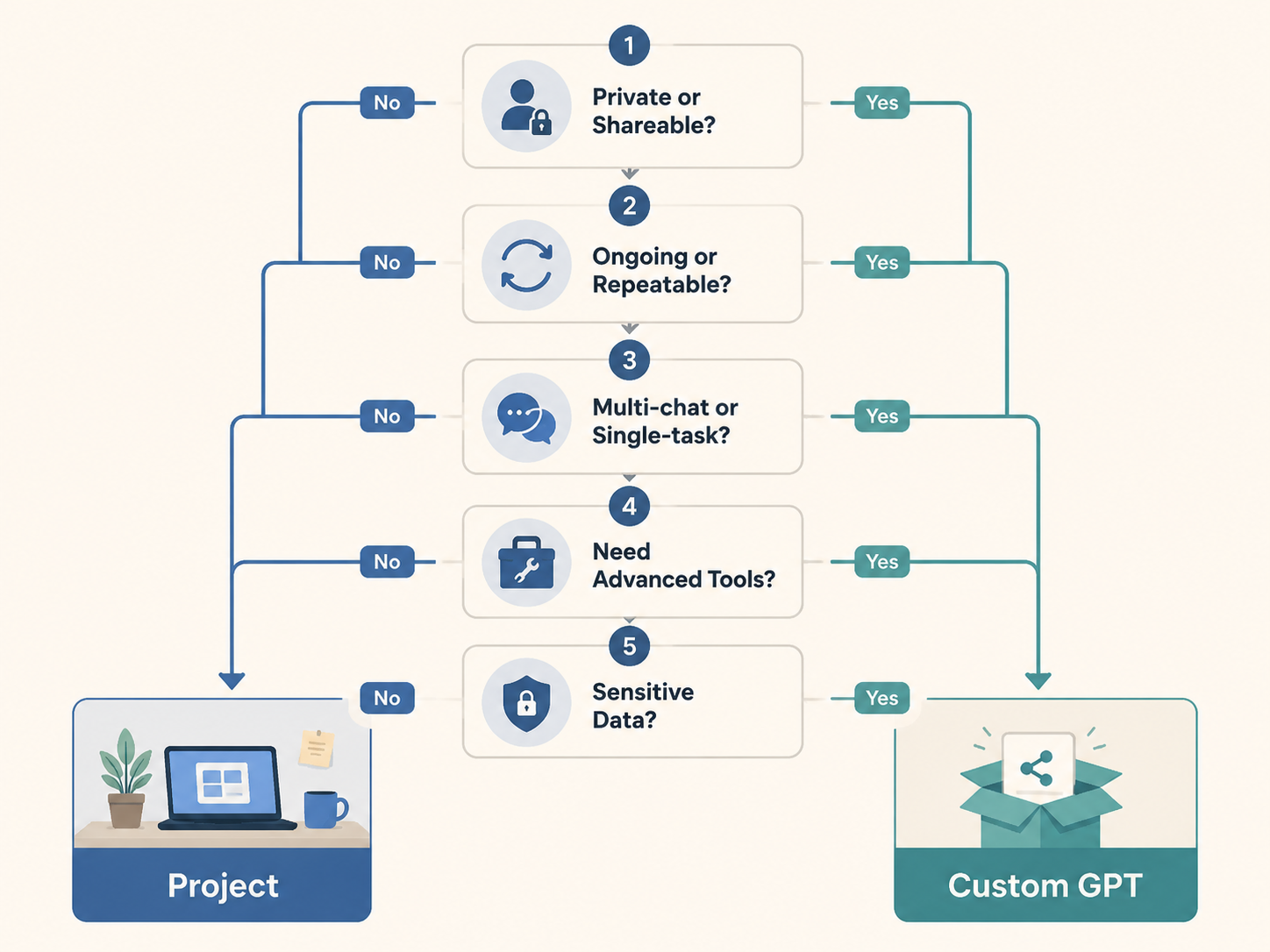
1. Is the workflow private or shareable?
If the work is mainly yours, use a Project. Private work benefits from continuity, not packaging. If teammates, clients, customers, or the public need to use the same assistant, consider a Custom GPT. Sharing is not a small edge case here; it is one of the strongest reasons to choose the GPT format.
2. Is the work ongoing or repeatable?
Ongoing work changes as you use it. It creates new context and depends on old decisions. That points to a Project. Repeatable work has a fairly stable path: collect inputs, apply instructions, produce output. That points to a Custom GPT.
3. Does it need multiple chats or one task at a time?
If one chat naturally leads to another, use a Project. Research, drafting, review, and revision rarely fit into one clean session. If each use is self-contained, a Custom GPT is often enough. A resume reviewer, support macro generator, or product description assistant can do useful work without remembering last month’s conversation.
4. Do you need Deep Research, Agent mode, Canvas, Study mode, or Voice mode?
If those tools are central to the work and available in your account, lean Project. This is especially true for research workflows where source gathering, synthesis, drafting, and revision happen in sequence. If the assistant mainly applies a fixed instruction set to user-provided inputs, the Custom GPT format may still be enough.
5. How sensitive is the data?
Sensitive context raises two separate questions: who can access it, and how easily it can be reused in the wrong place. A Project can keep work scoped to a specific workspace, which is useful for client-separated or topic-separated work. A Custom GPT is better when the shared assistant should contain only approved instructions and sanitized reference material. If the GPT is public or broadly shared, assume anything placed in its knowledge base needs a stricter review.
What Breaks When You Choose the Wrong One
Choosing a Custom GPT for context-heavy private work usually creates maintenance drag. You keep pasting background notes, updating instruction blocks, and wondering which chat contains the latest version of the thinking. The assistant may be well designed, but the work has nowhere to accumulate.
Choosing a Project for a shareable process creates the opposite problem. The workflow may run well for you, but it does not become a clean product for someone else. If a colleague needs to open a link and run the same assistant without seeing your workspace, the Project structure is the wrong container.
The most annoying boundary is that Custom GPTs do not simply run inside Projects. OpenAI Developer Community discussion confirms this as a missing capability rather than a normal supported workflow.[8] Workarounds include pasting the Custom GPT’s instructions into Project instructions, uploading an instruction file, or using mentions where available, but those are workarounds. They do not turn a Custom GPT into a Project-native assistant.
That limitation should change how you design from the start. If you know the workflow needs Project memory and advanced tools, do not build the whole operating system as a Custom GPT first and assume you can drop it into a Project later. If you know the workflow needs public sharing or Actions, do not hide it inside a private Project and expect packaging to be effortless.
A Practical Workflow Split
| Workflow | Recommended starting point | Why |
|---|---|---|
| Private client strategy workspace | Project | Context, files, decisions, and follow-up chats accumulate over time |
| Content research and drafting pipeline | Project | Research, outlines, drafts, and revisions benefit from continuity and tools such as Canvas or Deep Research |
| Reusable brand voice assistant for a team | Custom GPT | Staff need a consistent assistant without entering a private workspace |
| Public lead qualification or intake helper | Custom GPT | The workflow needs a shareable front door and possibly Actions |
| Personal study space for a course or topic | Project | Study mode, files, and multi-chat memory fit the shape of the work |
| Stable checklist-based document reviewer | Custom GPT | The task is repeatable and can start fresh each time |
| Workflow that may later become a productized assistant | Start with Project, then promote to Custom GPT | Develop the process privately first, package it only when another person or system needs it |
That last row is the safest default for many knowledge workers. Start in a Project while the workflow is still being discovered. Let the instructions, source files, decision rules, and output formats mature there. Once the process stabilizes and someone else needs to use it, extract the durable instructions into a Custom GPT.
This avoids overbuilding. Many workflows feel like they need a custom assistant on day one because the setup is exciting. A month later, the real problem is usually version control: which instructions are current, which files matter, which assumptions changed, and whether the next chat knows any of that. Projects handle that mess better.
Pricing and Availability Are Constraints, Not the Strategy
Plan differences can affect file limits and tool access. The research available for this comparison identifies Free, Plus, Pro, and Enterprise tiers, with Plus at $20 per month and Pro at $200 per month.[1] Advanced tools inside Projects may also appear differently across tiers, devices, regions, or rollout stages. In other words, the decision rule should come first, then the account check.
For a Project, confirm the tools and file capacity you actually have before moving a serious workflow. For a Custom GPT, confirm the sharing setting, knowledge file needs, and whether Actions are required. The correct container is still determined by continuity versus distribution; pricing only tells you how much room you have to execute.
The Bottom Line
Use ChatGPT Projects for private, ongoing, context-heavy work. Use Custom GPTs for repeatable, shareable, externally integrated tasks. If you are unsure, start with a Project and let the workflow prove itself. Promote it into a Custom GPT only when another person, team, customer, or system needs a packaged assistant.
References
- Projects in ChatGPT — OpenAI Help Center
- ChatGPT Projects vs Custom GPTs — Adventures in CRE, Updated Nov 2025
- ChatGPT Features 2026 — Suprmind
- Custom GPTs vs ChatGPT Projects — Ryan Doser
- ChatGPT Projects vs Custom GPTs Team Guide — Treyworks
- Using Custom GPTs — OpenAI Academy
- Personalizing AI: Custom GPTs or ChatGPT Projects? — Lead with AI
- Using Custom GPTs Within Projects/Folders in ChatGPT — OpenAI Developer Community