
The note-taking app is open. Your workspace loads, the sidebar looks normal, the notebook is still there, and sync may even be green. Then you ask the AI panel to summarize a lecture, draft meeting notes, search across a long archive, or turn a ChatGPT response into a Goodnotes document, and that one layer simply stops being useful.
That is the practical shape of a ChatGPT outage's impact on a note-taking workflow: the app does not have to be down for the workflow to break. The core editor can survive while the AI feature fails because it depends on a cloud AI service outside the note app itself.
The short answer is uncomfortable but not identical across tools. Notion AI, Goodnotes’ ChatGPT integration, and Evernote’s newer AI layer depend on cloud AI services and can fail independently of the main app. Obsidian is different: the risk depends on the plugin, the model provider, the user’s API key setup, and whether the plugin has retries, caching, or a graceful fallback.
The failure is hidden because the notebook still works
A clean outage is easy to understand. The app will not open, the service status page turns red, and the user knows to wait or switch tools. AI failures inside note apps are messier. They often look like a weak assistant, a stalled button, a generic error, or a feature that works for one person and fails for another.
That distinction matters during real work. A student does not discover the dependency while browsing a pricing page; they discover it when a lecture summary does not generate. A researcher finds it when semantic search cannot retrieve the buried quote they were relying on. A meeting attendee finds it after the call, when the AI notes are supposed to become the record. The failure arrives at the moment the feature was meant to remove friction.
Most feature pages describe what the AI can do in normal conditions. They are much less direct about what the AI depends on, whether there is a fallback provider, and what the user should expect when that upstream service is impaired. That is the missing operational detail.
AI outages are frequent enough to belong in app comparisons
The useful question is not whether ChatGPT or any other AI service is usually available. Most of the time, it is. The question is whether the failure rate is now high enough that a note-taking workflow should be designed with it in mind.
Ookla’s Downdetector analysis looked at 3.72 million user reports from January 2025 through April 2026 and found that high-signal AI platform disruption days rose from 6 in Q1 2025 to 51 in Q1 2026, a 750% increase. The analysis is U.S.-based, so it should not be treated as a global outage map, but it is strong evidence that AI service instability is no longer a rare edge case for U.S. users evaluating AI-heavy workflows.[1]
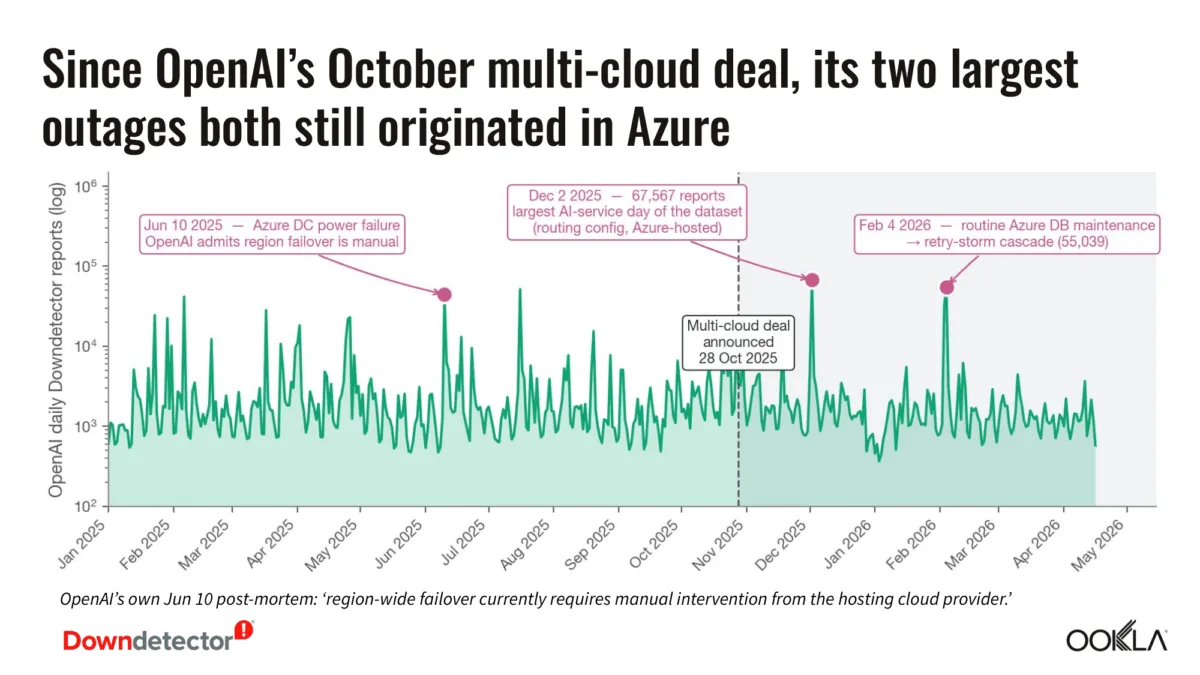
The June 10, 2025 ChatGPT outage gives the problem a more concrete shape. The incident lasted more than 12 hours, generated 44,517 Downdetector reports in a single day, and reached an estimated peak ChatGPT error rate of about 35%. OpenAI’s API was also affected, with an estimated error rate of about 25%, which matters for note-taking tools and plugins that do not use the consumer ChatGPT interface directly.[2][3]
The cause also matters. The June incident was attributed to a host OS update on cloud GPU servers, not to a user’s notebook, browser, local cache, or workspace configuration.[3] That is exactly why these failures feel so strange inside a note app: the local object the user is touching may be perfectly healthy while the remote AI layer is not.
It was not the only notable interruption in the surrounding period. A December 11, 2024 outage affected ChatGPT, the API, and Sora for about 4.5 hours, and a December 26, 2024 outage lasted about 9 hours after an Azure datacenter power failure.[3] Those examples should not be stretched into a prediction that any specific note app will fail on a schedule. They do show why “the app is online” and “the AI layer is dependable right now” are no longer the same reliability claim.
Where the dependency enters each note-taking app
The comparison that matters is not which assistant writes the prettiest summary. It is where the AI call goes, what fails when that call fails, and whether the user can see the risk before depending on it.
| Tool | AI dependency pattern | What can break during an upstream AI outage | Important qualification |
|---|---|---|---|
| Notion AI | Cloud AI providers, including more than one model provider | AI writing, summarization, Q&A, and AI-assisted workspace actions | A ChatGPT outage does not automatically describe every Notion AI failure path because Notion uses multiple providers |
| Goodnotes ChatGPT integration | ChatGPT consumer-side integration announced in March 2026 | Creating Goodnotes documents from ChatGPT output | This is a recent integration, so the risk is based on dependency design rather than a long outage history for the feature |
| Evernote v11 AI features | Cloud AI infrastructure behind AI Assistant, Semantic Search, and AI Meeting Notes | AI answers, semantic retrieval, generated notes, and meeting-note automation | The note archive may remain accessible while AI interpretation and generation are unavailable |
| Obsidian with ChatGPT plugins | Plugin-specific API calls, often using user-managed API keys | Chat, summaries, embeddings, smart connections, and model-assisted note operations | Plugins vary; retries, local cache, and provider choice can change the failure behavior |
That table is deliberately less tidy than a feature checklist. A multi-provider system, a consumer ChatGPT handoff, a cloud AI assistant, and a user-configured plugin ecosystem do not fail in the same way. Treating them as one generic “AI notes” category hides the part users need to test.
Notion AI: better than a single-provider story, still not local
Notion deserves more careful handling than a simple “ChatGPT goes down, Notion AI goes down” claim. Notion AI uses multiple AI providers, including Anthropic, so its reliability profile is not identical to the public ChatGPT consumer service. That may reduce exposure to one provider’s incident, but it does not turn the feature into a local capability.
The Ookla data is a reminder that diversification does not erase upstream risk. Anthropic accounted for 39 of the 51 high-signal AI disruption days identified in Q1 2026 in that analysis.[1] That does not prove Notion AI failed on all of those days, and it would be sloppy to imply that it did. It does show why “we use more than one AI provider” is not the same as “the user has an observable fallback when one provider is impaired.”
For someone comparing Notion against other AI note-taking tools, the right test is plain: if Notion AI cannot complete a summary, Q&A request, or rewrite, does the UI explain whether the problem is Notion, a model provider, rate limiting, workspace permissions, or temporary AI unavailability? If the answer is a generic failure state, the user is still debugging a hidden dependency.
That is also why AI dependency belongs next to the usual Notion evaluation points: database flexibility, collaboration, portability, and offline limitations. A broader Notion review can praise what Notion does well and still ask whether its AI layer tells users enough about where work is being routed.
Goodnotes: the March 2026 ChatGPT flow is only as available as the handoff
Goodnotes’ March 2026 ChatGPT integration is a cleaner dependency example because the feature is framed around creating Goodnotes documents from ChatGPT. Goodnotes announced the integration as a way to move from ChatGPT into structured Goodnotes study materials and documents.[4]
That is useful when the handoff works. It removes copying, formatting, and document setup friction. But the dependency is obvious once tested under failure: if ChatGPT is unavailable, the creation flow cannot be treated as a Goodnotes-native capability. Goodnotes may still open. Existing notebooks may still be readable. Handwriting, annotation, and local study materials may still be intact. The ChatGPT-to-Goodnotes document path is the part exposed to ChatGPT availability.
Because the integration launched in March 2026, there is not enough long-term public outage history for this specific Goodnotes feature to make broad claims about frequency.[4] The safer conclusion is narrower: the workflow’s reliability inherits the availability of the ChatGPT side of the connection. Anyone planning class notes, study guides, or repeatable document creation around it should test what happens when ChatGPT is slow, unavailable, or returning errors.
Evernote v11: AI can fail while the archive remains
Evernote’s newer AI direction puts the same issue inside a more traditional notes archive. Evernote v11, introduced in January 2026, made AI Assistant, Semantic Search, and AI Meeting Notes part of the flagship product story.[5] These are not decorative features for users who rely on them. Semantic Search changes how people retrieve old notes. AI Meeting Notes changes who or what produces the first draft of the record. AI Assistant changes how users interrogate the archive.
The failure boundary is important. An Evernote user may still be able to open notes, browse notebooks, and manually search text. What disappears during an AI-layer failure is interpretation: the assistant that answers across notes, the semantic retrieval that understands meaning rather than exact wording, or the generated meeting summary that was supposed to save cleanup time.
That makes Evernote’s AI reliability question different from the old Evernote reliability question. The old question was whether the note and sync system could be trusted. The new question adds whether the cloud AI layer can be trusted for the user’s actual retrieval and meeting workflow. For anyone already reconsidering Evernote because of product and pricing changes, that belongs in the same decision tree as export safety and migration planning; it is not a separate novelty feature. FlowDesk’s Evernote 2026 assessment is the better place to weigh those broader trade-offs.
Obsidian: plugin freedom moves the failure point closer to the user
Obsidian is the least fair target for blanket accusations because its core model is local-first Markdown files, and AI behavior usually arrives through community plugins rather than one official all-or-nothing AI layer. Plugins such as ChatGPT MD, Smart ChatGPT, and Smart Connections can connect a vault to OpenAI-style services using user-managed API keys.[6][7][8]
That flexibility helps, but it does not make remote AI local. During the June 10, 2025 incident, OpenAI’s API error rate was estimated at about 25%.[3] A plugin making API requests during that window could have seen failed completions, missing summaries, broken chat responses, or embedding-related problems, depending on what it was trying to do.
The better Obsidian plugins are easier to reason about because the user can inspect settings: provider, API key, model, retries, local files, and sometimes cached results. But plugin behavior varies. Some may retry gracefully. Some may leave the user with an error in the command palette. Some may preserve already-generated notes while failing on new requests. The vault is still yours; the AI request is still remote.
For users comparing Obsidian with more bundled tools in a note-taking apps AI and portability comparison, this is the trade: Obsidian often makes data ownership clearer, but AI reliability depends on the plugin stack the user assembles.
The status page problem
A status page usually answers the vendor’s question: are our systems operational? It may not answer the user’s question: will the AI feature I built into my workflow work right now?
Those can diverge. A note app can report healthy sync, authentication, editor availability, and file access while its AI provider is degraded. A plugin can be installed correctly and still fail because the model API is returning errors. A consumer ChatGPT integration can be correctly configured and still be unusable because the consumer service is unavailable.
The user should not have to reverse-engineer that chain in the middle of a meeting. At minimum, AI feature pages and status pages should disclose the upstream category: OpenAI API, ChatGPT consumer service, Anthropic, other model providers, vendor-hosted orchestration, or user-supplied API key. They should also say whether the product has automatic fallback, partial degradation, retries, or no fallback at all.
This is not a demand that every app expose its entire infrastructure diagram. It is a demand for enough information to plan work. If a feature is marketed as part of capture, search, meeting notes, or knowledge synthesis, its failure mode is part of the feature.
A simple reliability test before trusting AI notes
The fastest way to evaluate an AI note feature is to stop asking only what it can do and start asking what remains when it cannot do it.
- Name the upstream dependency: ChatGPT consumer service, OpenAI API, Anthropic, another provider, vendor-hosted AI, or user-managed API key.
- Separate the core app from the AI layer: confirm whether notes, search, export, sync, and editing still work without AI.
- Test the failure message: see whether the app explains temporary AI unavailability or returns a vague error.
- Check for fallback behavior: alternate providers, retries, local cache, manual export, or a non-AI workflow.
- Decide whether AI is convenience or infrastructure: a failed rewrite is annoying; failed meeting notes, semantic search, or study-note generation can block the work.
The shadow-AI pattern makes this more urgent. QueryPal CEO Dev Nag estimated that about 70% of ChatGPT usage at work is consumer-grade use without enterprise backup, based on analysis around the June 2025 outage.[5] That figure should be treated as expert analysis, not an OpenAI-published measurement. Still, it matches what many note workflows look like in practice: one person quietly adds AI to capture, cleanup, or retrieval, and nobody writes down the fallback plan.
For low-stakes use, that may be acceptable. If AI is just a faster way to polish a paragraph, the outage costs time. If AI has become the way notes are captured, searched, summarized, or migrated, the outage changes the reliability of the entire workflow. Anyone choosing among the best AI note-taking apps should compare that failure behavior alongside model quality and convenience.
What the outage changes in the buying decision
AI features now belong in note-taking comparisons, but so does AI failure behavior. A vendor that says “AI-powered” is making a cloud reliability claim, even if the marketing page presents it as a feature label.
That does not mean avoiding Notion, Goodnotes, Evernote, or Obsidian. People choose those tools for valid reasons: collaboration, handwriting, archive depth, local files, plugins, device support, or organizational habit. The point is to stop treating embedded AI as if it lives inside the notebook by default.
If AI is optional convenience, a hidden dependency is mostly an irritation. If AI is part of capture, search, meeting notes, study workflows, or migration planning, it becomes a single point of failure. The fair standard is simple: vendors should disclose upstream AI dependencies, and users should test whether work continues when the assistant goes dark.
References
- AI Platform Reliability: Downdetector Data from Millions of User Reports, Ookla, 2026.
- Status History, OpenAI.
- OpenAI Outage Postmortem: June 10, 2025 ChatGPT and API Incident, Spurnow, 2025.
- Goodnotes ChatGPT Integration, Goodnotes, March 2026.
- What the ChatGPT Outage Revealed About AI at Work, Built In, 2025.
- ChatGPT MD, GitHub.
- Smart ChatGPT, GitHub.
- Smart Connections, GitHub.