
Search for business process workflow software and the results look like they belong to different buying conversations. Zapier and Make promise quick app-to-app automation. Airtable, ClickUp, and Monday.com look like work hubs with automation attached. Kissflow sits closer to low-code BPM. Appian, Pega, IBM, and similar platforms are built for large-scale process management, governance, and enterprise architecture.
That mix is not a search-engine accident. The workflow software market has stretched in two directions at once: larger BPM suites for complex organizations, and accessible tools that let small teams automate real work without a months-long rollout. One market estimate cited in 2026 BPM comparisons values the BPM market at $20.38 billion in 2024 and projects it to reach $61.17 billion by 2030; another roundup cites that 64% of enterprises now use BPM tools and 58% depend on real-time analytics.[1][2] Those numbers explain the noise. They do not tell a five-person operations team what to buy.

The Shortlist by Team Need
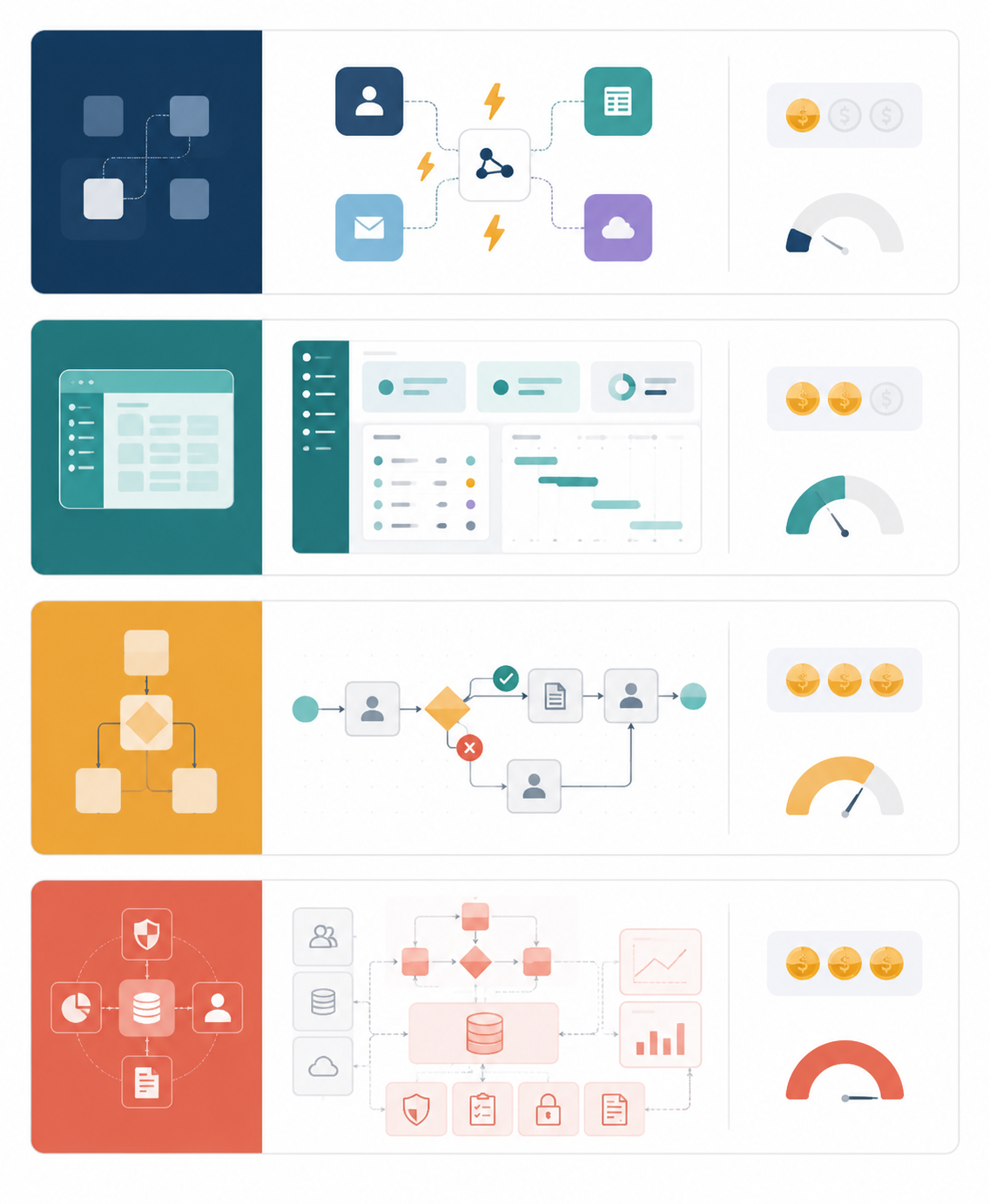
| Tier | Best fit | Typical starting price | Technical depth | Process complexity | Not for you if |
|---|---|---|---|---|---|
| Connector tools: Zapier, Make | Moving data and triggers between existing apps | Zapier from $19.99/month; Make from $9/month[3] | Low to medium | Simple to moderate | You need audit trails, formal process ownership, or end-to-end case management |
| All-in-one work platforms: Monday.com, ClickUp, Airtable | Teams that need work tracking, collaboration, records, and basic automation in one place | Monday.com from $9/seat/month; ClickUp from $7/user/month; Airtable from $20/seat/month[3] | Low to medium | Moderate | The process must be governed like a regulated business process rather than managed like shared work |
| Low-code BPM: Kissflow | Recurring approvals, forms, process ownership, and governance without enterprise BPM weight | Kissflow from $1,500/month for 50 users[4] | Medium | Moderate to high | Your process is mostly a few zaps, notifications, or task updates |
| Enterprise BPM: Appian, Pega, IBM and similar suites | Large organizations with complex compliance, integration, monitoring, and process lifecycle needs | Appian estimated at $60K–$300K+/year; Pega estimated at $150K–$500K+/year[4] | High | High | You do not have the budget, admin capacity, implementation time, or governance requirements |
The practical starting point is not “Which platform has the most features?” It is “How much process are we actually managing?” If the pain is that a form submission should create a task, update a spreadsheet, and notify a channel, a connector tool may be enough. If the pain is that nobody knows which request is open, who owns the next step, or where the current record lives, an all-in-one platform may be the better first fix. If the pain is recurring approvals, exceptions, permissions, and process monitoring, low-code BPM starts to make sense. If the process affects regulated operations across departments, enterprise BPM may be justified.
Why Zapier Can Appear Beside Pega Without Pretending They Are the Same Thing
The phrase “business process workflow software” gets used for several adjacent jobs. Workflow automation moves work from one step to another. Workflow management helps people see and coordinate that work. Process automation standardizes repeated sequences. BPM, in the stricter sense, manages a process through a lifecycle: design, model, execute, monitor, and optimize.[1]
That distinction matters because a small team can waste money in both directions. Buy too high and the team spends months configuring a platform for a process that needed two automations and a shared board. Buy too low and one patient coordinator becomes the human audit trail, fixing edge cases after every automated handoff breaks.
If you want the tighter BPM-only comparison, the adjacent BPM workflow software comparison is the better detour. This article keeps the lens wider because many small teams are not choosing between Appian and Pega. They are choosing whether the answer is Zapier, Make, Airtable, ClickUp, Monday.com, Kissflow, or something heavier.
Tier 1: Connector Tools for Fast App-to-App Automation
Connector tools are often the right first answer when the work already lives in several apps and the main problem is handoff friction. A lead arrives in a form. A customer updates a record. A signed document lands in storage. A status changes in a CRM. Someone should not have to copy that information into three other places.
Zapier and Make live here. Zapier is listed from $19.99 per month and is commonly described around a 7,000-plus integration ecosystem; Make is listed from $9 per month and around 3,000-plus integrations.[3] The exact plan fit depends on task volume and feature limits, but the pricing frame is the important part: these are tools a small team can try without turning the purchase into an IT capital project.
Where Zapier Fits
Zapier is strongest when a knowledge worker wants to connect familiar apps quickly. It is approachable, well documented, and broad enough that the first useful automation usually appears before the team has finished arguing about process architecture. That matters for small teams because the first win is often mundane: route a request, create a task, send a notification, add a row, update a contact.
Its weakness is also part of its appeal. Zapier can automate steps across a process, but it is not where most teams should model a governed process lifecycle. Once there are multiple approval paths, owner changes, exceptions, reporting obligations, and audit questions, a chain of zaps can become hard to reason about.
Where Make Fits
Make tends to suit teams that want more visual control over multi-step scenarios. It can feel less like filling out a recipe and more like mapping a small automation system. For ops-minded users, that visual layout can make branching and data movement easier to inspect.
The tradeoff is that a more flexible automation canvas can also invite overbuilding. If a workflow becomes so intricate that only one person understands it, the team has not escaped the spreadsheet-cleanup problem; it has moved the cleanup into an automation account.
For a deeper connector-specific breakdown, use the Zapier vs. Make vs. n8n vs. Power Automate comparison. The short version here is simple: connector tools are best when the process is mostly event-triggered movement between apps, not a formal operating model.
Tier 2: All-in-One Platforms for Work That Needs a Home
Many small-team workflows do not fail because automation is missing. They fail because the work has no reliable home. Requests arrive in email, decisions happen in chat, records sit in spreadsheets, and status lives in someone’s memory. All-in-one work platforms help when the team needs shared structure before it needs formal BPM.
Monday.com, ClickUp, and Airtable are not identical, but they occupy the useful middle of the market. Public comparison data lists Monday.com from $9 per seat per month, ClickUp from $7 per user per month, and Airtable from $20 per seat per month.[3] At that price level, the buying question changes from “Can we afford a process platform?” to “Which tool best matches the way our team already thinks about work?”
Monday.com: Visual Work Tracking With Automation Attached
Monday.com fits teams that want boards, owners, statuses, dashboards, and automations in a visually readable workspace. It is a good candidate when the process is collaborative: campaign intake, client onboarding, recruiting coordination, project requests, internal approvals, or recurring operations work that should be visible to more than one person.
It is less compelling if the team’s real problem is data modeling or complex branching logic. Monday.com can coordinate work well, but a team trying to build a lightweight operating database may find Airtable more natural.
ClickUp: Broad Work Management for Teams That Want One Workspace
ClickUp fits teams trying to consolidate tasks, docs, goals, views, and lightweight automation. It can be attractive when work is scattered across too many tools and the team wants fewer tabs before it wants formal process governance.
The caution is configuration sprawl. A broad workspace can absorb many use cases, but if every team builds its own fields, statuses, and automations without agreement, the organization may recreate the same inconsistency inside a new platform.
Airtable: Structured Records With Workflow Around Them
Airtable is often the stronger middle-tier choice when the workflow revolves around structured records: vendors, assets, content, applications, inventory, grants, customers, locations, or internal requests. It gives non-developers a database-like workspace without asking them to become database administrators.
That makes Airtable especially useful when the team has outgrown a spreadsheet but does not need a full BPM suite. It can hold the source of truth, expose different views to different collaborators, and trigger automations around record changes. It is not a substitute for enterprise process governance, but it can remove a surprising amount of operational drag.
If the choice is mainly between work-management platforms rather than BPM tiers, the workflow management software comparison by use case is the more focused read.
Tier 3: Low-Code BPM When Approvals Become a Real Process
Low-code BPM becomes interesting when a workflow stops being a few helpful automations and starts behaving like a process the business must own. The signs are familiar: recurring approvals, defined request types, role-based routing, exception handling, process visibility, form intake, status tracking, and managers asking for reports that are not manually assembled every Friday.
Kissflow is the clearest example in this comparison because it is positioned between lightweight workflow tools and enterprise BPM. Its pricing guide lists an entry point of $1,500 per month for 50 users, which is a serious jump from $7-to-$20 user-level tools but still below the annual ranges commonly associated with enterprise BPM suites.[4]
The deployment contrast is the bigger decision point. Kissflow’s enterprise BPM pricing guide describes low-code platforms as deploying in 1–2 weeks, while enterprise BPM suites can take 3–12 months.[4] That is not a small implementation detail. For a small team, three months can be the difference between fixing an intake workflow this quarter and asking the same coordinator to keep manually reconciling requests until next year.
Vendor-published low-code adoption claims should be treated as directional rather than destiny. Kissflow cites that 75% of organizations invest in low-code/no-code platforms and references Gartner’s estimate that low-code would account for more than 70% of process management apps by 2025.[5] Those figures support the general shift toward accessible process-building, but they do not prove that every team needs a low-code BPM platform now.
A Useful Test Before Moving Up to Low-Code BPM
- The process has a named owner, not just a person who cleans it up.
- Requests follow repeatable paths, even if there are exceptions.
- Approvals, handoffs, or permissions matter enough to standardize.
- Managers need visibility into bottlenecks, not just task completion.
- A broken automation would create operational risk, not just inconvenience.
If most of those statements are true, a low-code BPM platform deserves consideration. If only one is true, a connector tool plus a cleaner work hub may still be the better answer.
Tier 4: Enterprise BPM for Complexity That Actually Needs It
Enterprise BPM suites are not overkill because they are bad. They are overkill when the organization does not have enterprise problems. Appian, Pega, IBM, and similar platforms can support complex process orchestration, governance, integration, monitoring, compliance, and large-scale operational change. Those are real capabilities, and some organizations need them.
The cost and deployment profile simply belong in the buying conversation from the beginning. Kissflow’s 2026 pricing guide describes Appian in an estimated $60,000–$300,000-plus annual range and Pega in an estimated $150,000–$500,000-plus annual range, with enterprise BPM deployments taking 3–12 months.[4] Because several enterprise vendors use custom quotes, those figures should be treated as planning ranges rather than official list prices.
A small team should move into this tier only when the process complexity, compliance exposure, integration landscape, and administrative capacity justify it. “We want to automate approvals” is not enough. “We need governed process execution across departments, with monitoring, controls, integrations, and lifecycle management” is a different conversation.
Use Process Shape, Not Feature Count, to Choose
One useful way to diagnose the choice is to look at the shape of the process. BPM guidance often separates platforms and use cases into human-centric, document-centric, and integration-centric patterns.[5] The labels are plain, but they prevent a lot of bad buying.
| Process shape | What it looks like in a small team | Likely first tier to evaluate |
|---|---|---|
| Integration-centric | The main work is moving data between apps after triggers: new form, new deal, new file, changed status | Connector tools |
| Human-centric | People need assignments, approvals, comments, due dates, visibility, and reminders | All-in-one work platform or low-code BPM |
| Document-centric | Forms, contracts, files, applications, or records move through review and approval | Airtable, low-code BPM, or enterprise BPM depending on governance |
| Governance-heavy | The process needs auditability, monitoring, compliance, formal ownership, and controlled change | Low-code BPM or enterprise BPM |
A hypothetical example makes the difference clear. If a website form should create a CRM lead and alert sales, Zapier or Make is a reasonable first stop. If that same intake becomes a client onboarding process with assigned tasks, status views, deadlines, and internal collaboration, Monday.com, ClickUp, or Airtable may fit better. If onboarding requires controlled approvals, exception paths, reusable process forms, and bottleneck reporting, Kissflow starts to look more appropriate. If onboarding spans multiple regulated departments and core systems, enterprise BPM may finally be in scope.
For a broader automation category map, the process automation tools comparison gives more space to tools beyond the workflow and BPM frame.
When to Move Up a Tier
Teams usually feel the need to move up before they can name it. The connector workflow still runs, but nobody knows which automation owns a field. The shared board has grown into twenty statuses. Airtable has become the operational database, but permissions and approvals are getting awkward. Reports require exports. Exceptions live in comments. The process works because one person remembers how it works.
- Move from connector tools to an all-in-one platform when the team needs a shared place to see work, not just automated handoffs.
- Move from an all-in-one platform to low-code BPM when approvals, permissions, forms, and process reporting become recurring operating requirements.
- Move from low-code BPM to enterprise BPM when compliance, scale, system complexity, and governance justify a longer implementation.
- Move down a tier when the team cannot maintain the platform without a specialist or when the workflow is mostly a few app triggers.
Moving down is underrated. If a formal BPM tool is being used to send notifications, create tasks, and update rows, the team may be carrying platform weight it does not need. If a connector tool is being used as a hidden process engine, the team may be carrying operational risk it has not named.
Pricing Reality for Small Teams
The visible subscription price is only part of the cost, but it is still a useful filter. A small team can experiment with a connector tool or work platform at a price point that makes testing possible. Kissflow’s $1,500-per-month entry point changes the approval threshold. Appian- and Pega-level planning ranges change it again.[3][4]
| Tier | Budget implication | Implementation implication |
|---|---|---|
| Connector tools | Low monthly entry point; cost rises with usage and plan needs | Fast to test, but governance depends on how carefully the team documents automations |
| All-in-one platforms | Per-seat pricing can scale with team size | Adoption depends on whether the team standardizes fields, statuses, and ownership |
| Low-code BPM | Higher fixed monthly commitment | More setup discipline, but better fit for recurring process ownership |
| Enterprise BPM | Six-figure annual planning ranges are common in third-party pricing analysis | Longer implementation, more administrative capacity, and stronger governance expectations |
For a deeper budget view, use the business process automation pricing comparison. The key point here is that price and maintainability belong together. A cheap automation nobody owns becomes expensive in cleanup time. A powerful suite nobody can administer becomes expensive in a more obvious way.
Practical Picks
There is no universal winner for business process workflow software because the category now contains different jobs. A good shortlist starts with the kind of work the team is trying to make less painful.
- Choose Zapier if the team wants the quickest path to app-to-app automation across a broad integration ecosystem.
- Choose Make if the team wants more visual control over multi-step automation scenarios and has someone willing to maintain them.
- Choose Monday.com if the process is collaborative work that needs clear boards, owners, statuses, and dashboards.
- Choose ClickUp if the team is consolidating tasks, docs, views, and lightweight workflow into one broad workspace.
- Choose Airtable if the workflow revolves around structured records and the team has outgrown spreadsheets.
- Choose Kissflow if recurring approvals, forms, governance, and process visibility are now part of the operating requirement.
- Choose enterprise BPM only when complexity, compliance, integration depth, budget, and implementation capacity make that tier rational.
Start with connector tools when the process is mostly app-to-app movement. Choose an all-in-one platform when the team needs a shared operational home. Consider low-code BPM when approvals and governance become recurring. Reserve enterprise BPM for organizations whose complexity and budget can support the weight of the platform.