
The quickest way to choose the best smartphone for student note-taking in 2025 is to stop asking whether a phone “has a stylus” and ask what kind of writing system the student is actually getting. A passive stylus that taps the screen like a finger is not the same tool as an active pen with pressure sensitivity, palm rejection, and note-app integration. That difference shows up fast in a lecture hall, especially when the professor is moving through slides and the student is trying to write in the margin of a PDF without their palm adding three stray lines.
This comparison looks at 2025-model phones from the vantage point of Q3 2026. Newer phones may already be on shelves, including successors in the same families, but these three models still matter because they represent the real decision students and parents keep facing: pay for a premium active-stylus phone, save money with a budget built-in stylus, or stay in the Apple app ecosystem and accept that the phone itself is not a serious handwriting surface.

| Best fit | Phone | Why it wins | Main compromise |
|---|---|---|---|
| Best phone for handwriting precision | Samsung Galaxy S25 Ultra | Active S Pen support, 4,096 pressure levels, palm-friendly writing, and Samsung Notes integration | High price and a large phone body |
| Best low-cost built-in stylus option | Moto G Stylus 2025 | A stylus is built into the phone at a much lower price tier | Passive stylus, no pressure sensitivity, and unreliable palm rejection |
| Best phone for Apple/iPad note workflows | iPhone 16 Pro Max | Strong app ecosystem for capture, review, scanning, typed notes, and iPad continuity | No active stylus support on the phone itself |
The verdict before the spec sheet
Buy the Samsung Galaxy S25 Ultra if the phone itself has to be a serious handwriting device. Its S Pen supports 4,096 pressure levels, and PCMag notes Samsung Notes integration as part of the S Pen experience on the phone.[1] ZDNET also names the S25 Ultra as the best active-stylus phone, which matches the practical advantage that matters here: it is built for pen input rather than merely compatible with something that touches glass.[2]
Buy the Moto G Stylus 2025 if price matters most and the student understands what they are giving up. Digital Trends’ May 2025 review describes the Moto stylus as passive, with no pressure sensitivity and unreliable palm rejection.[3] That does not make it useless. It does mean the phone should be judged as a budget capture-and-annotation tool, not as a cheaper version of the S Pen.
Buy the iPhone 16 Pro Max if the student already lives in Apple Notes, GoodNotes, Notability, OneNote, or an iPad-based study workflow. It is the least convincing choice if the assignment is “handwrite full lecture notes directly on the phone,” because the iPhone lacks active stylus support. It becomes much more reasonable when the phone is the scanner, recorder, review screen, quick-edit device, and sync point for notes mostly written elsewhere.
Why stylus type matters more than the word “stylus”
Handwriting on a phone is already a cramped job. The screen is small, lecture seats are narrow, and the student is often balancing the phone against a textbook, a water bottle, or one of those folding desks that barely clears a laptop hinge. When the stylus system is good, the phone can capture a formula, a diagram, a quick underline, or a margin note before the class moves on. When it is bad, the student spends the next minute erasing accidental marks instead of listening.
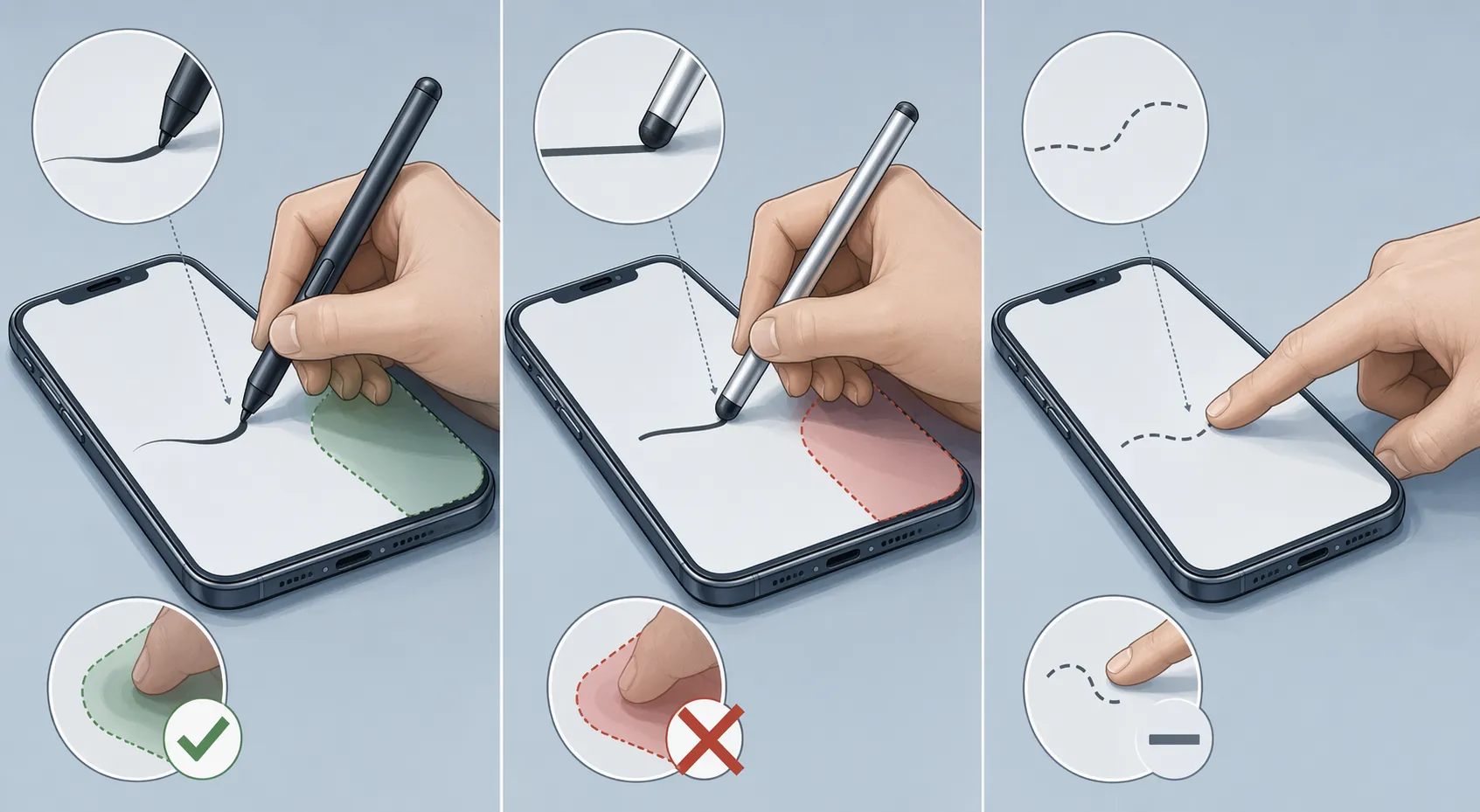
The Galaxy S25 Ultra is the only phone in this comparison built around active pen input. The S Pen’s 4,096 pressure levels matter because handwriting is not just location; it is variation. A pen stroke can get heavier, lighter, sharper, or more controlled. Even when a student is not making art, pressure response helps writing feel closer to a real pen and makes small marks easier to place with intent.[1]
Palm rejection is just as important, and often less appreciated until it fails. A student writing for more than a sentence needs somewhere to rest their hand. With an active stylus system, the phone can better distinguish the pen from the palm. With a passive capacitive stylus, the phone mainly sees touch. Digital Trends’ complaint about unreliable palm rejection on the Moto G Stylus 2025 is not a cosmetic issue; it is the kind of flaw that interrupts the act of taking notes.[3]
The Moto’s passive stylus still has a place. It can be useful for tapping tiny controls, jotting a short reminder, marking up a screenshot, circling a homework question, or signing a document. For a student who mostly types notes and only occasionally annotates, that may be enough. The trouble starts when the phone is expected to handle dense lecture handwriting day after day. Without pressure sensitivity and with unreliable palm rejection, the student has to slow down or change posture to compensate.[3]
The iPhone 16 Pro Max is in a different category because it does not offer active stylus support. Finger input works for quick highlights, checkboxes, taps, and small edits. It is not a substitute for a proper pen system when a student needs to write equations, sketch anatomy labels, or annotate a fast-moving slide deck directly on the phone.
Where each phone fits in a real class week
A phone used for student note-taking usually has more than one job. It catches a photo of the board, opens the professor’s PDF, records a reminder, stores a lab partner’s shared file, and becomes the review screen on the bus home. Broad phone-ownership statistics help explain why the device is so central, but they do not prove that students are successfully taking notes on phones. Pew reported that 95% of teens had access to a smartphone, while a JAMA Pediatrics study reported 66 minutes per day of in-school phone use; neither figure isolates phone-based note-taking.[4][5]
For handwriting-heavy students, the S25 Ultra is the safest pick in this group. It is the phone to choose for a student who expects to write directly on PDFs, mark up slides, sketch diagrams, and keep handwritten material organized without hauling out a tablet every time. Samsung Notes integration matters here because the stylus is not stranded at the hardware level; the built-in note app is part of the writing flow.[1]
For budget-constrained students, the Moto G Stylus 2025 is more honest when treated as a low-cost utility tool. It gives the student a built-in stylus that is always there, which is better than a loose accessory left in a backpack pocket. PCMag notes a 2-year OS update commitment for the Moto G Stylus 2025, and GSMArena also reviewed the Moto G Stylus 5G 2025 in the context of its budget phone positioning.[6][7] That update window is worth noticing for families trying to stretch a purchase across multiple school years, but it should not distract from the stylus limitations.
For Apple-centered students, the iPhone 16 Pro Max makes sense when the phone is not the main handwriting device. A student who writes on an iPad, reviews on an iPhone, stores files in iCloud, and submits assignments from a Mac may get more daily value from continuity than from phone-based handwriting. In that setup, the iPhone is less a notebook and more the pocket terminal for the notebook system.
Apps can rescue a workflow, but they cannot fully rescue bad pen input
Note-taking apps matter because classes do not all hand students the same kind of material. One professor uploads PDFs. Another posts slides after class. A lab partner shares images through an Apple-only message thread. A seminar expects typed reading notes, while a statistics class punishes anyone who cannot write symbols quickly. The best phone is the one that fits the student’s actual mix of handwriting, typing, scanning, filing, and reviewing.
Samsung has the cleanest Android story for handwritten phone notes because Samsung Notes and the S Pen are designed to work together. That does not mean every student should stay inside Samsung Notes forever, but it does mean the first writing experience is coherent. Students comparing Samsung Notes, GoodNotes, Notability, and OneNote should also look at a dedicated handwritten note-taking apps comparison before assuming the same app behaves identically across platforms.
GoodNotes is the caution flag for Android buyers. GoodNotes’ own FAQ says the Android version “does not offer the full range of features” and confirms that iCloud sync between Android and iOS is not supported.[8] That matters for a student who wants to write on an Android phone, review on an iPad, and keep one clean notebook library. The problem is not that Android has no note apps; the problem is that cross-platform promises often get weaker exactly where students need them to be boring and reliable.
This is where the iPhone 16 Pro Max earns its place despite the stylus problem. Apple Notes, GoodNotes, Notability, and OneNote all fit naturally into common iPad-centered study habits. If a student does serious handwriting on an iPad, then opens the same material on an iPhone to review key points, search text, scan handouts, check a reading list, or add a typed reminder, the lack of phone stylus support hurts less. It is still a limitation; it is just not always the deciding one.
Android students who do not want to pay for a premium Samsung phone should be more deliberate. Free built-in tools can be enough for short notes and annotations, while paid apps may help with organization, templates, export options, or PDF handling. The trade-offs are different enough that a separate look at free vs paid Android stylus note-taking apps is more useful than assuming the Moto’s built-in pen automatically solves the software side.
What not to overpay for
Camera quality, gaming performance, luxury materials, and benchmark scores can matter for a phone purchase, but they are mostly side issues for student note-taking. A better camera helps when students photograph whiteboards or handouts, and a faster phone can keep heavy apps from feeling sticky. Those are supporting comforts, not the reason one of these phones becomes the right note-taking choice.
Battery life also needs a practical reading. A student does not need a heroic battery claim as much as they need the phone to survive class blocks, commuting, library time, and the half-hour when every outlet is already taken. If the phone has to run navigation, messaging, readings, recordings, and notes in the same day, battery matters. It still does not erase the difference between an active pen and a passive stylus.
The bigger purchasing mistake is treating the cheapest stylus phone and the best stylus phone as versions of the same tool. They are not. The Moto G Stylus 2025 is a budget phone with a convenient passive stylus. The Galaxy S25 Ultra is a premium phone with an active pen system. The iPhone 16 Pro Max is a premium phone with the strongest case when the student’s real notebook is an iPad or app ecosystem, not the phone glass itself.
Final decision rule
Choose the Samsung Galaxy S25 Ultra if the student needs to handwrite seriously on the phone itself. The S Pen’s active input, pressure sensitivity, palm-friendly writing, and Samsung Notes integration make it the strongest note-taking phone in this comparison.
Choose the Moto G Stylus 2025 if the budget is firm and the student mainly needs quick notes, taps, signatures, simple sketches, and occasional markup. It is the built-in-stylus value pick, as long as everyone buying it understands that passive stylus limits are part of the deal.
Choose the iPhone 16 Pro Max if the student is already anchored in Apple and does most handwriting on an iPad. It is not the best phone for direct handwritten note-taking, but it can be the best phone inside a larger Apple note-taking system.
References
- Samsung Galaxy S25 Ultra Review, PCMag.
- The best stylus phones you can buy, ZDNET.
- Motorola Moto G Stylus (2025) review, Digital Trends, May 2025.
- Teens, Social Media and Technology 2023, Pew Research Center.
- In-School Phone Use and Adolescents’ Mental Health, JAMA Pediatrics.
- Motorola Moto G Stylus (2025) Review, PCMag.
- Motorola Moto G Stylus 5G (2025) review, GSMArena.
- Goodnotes for Android, Windows, and Web frequently asked questions, Goodnotes.