
Pricing and AI access in this comparison are treated as last verified in June 2026. That date matters: the note-taking app market is crowded, plans are moving, and several tools now reserve their most useful AI features for higher tiers. The category itself is no longer a sleepy utility market; one 2026 market report valued note-taking apps at about $15.46 billion in 2024 and projected $49.47 billion by 2035, though other market estimates use different scopes and base years, so that figure is best read as directional rather than definitive.[1]
If you only want the short version: do not pick note taking applications by feature count. Pick the architecture you can live with. Quick capture, long-term knowledge work, and team execution are different jobs. A tool that is excellent at one can become clutter, cost, or lock-in when forced to do another.
| App | Best fit in 2026 | Architecture | Platform fit | Budget position | AI availability | Not for you if... |
|---|---|---|---|---|---|---|
| Microsoft OneNote | Best free cross-platform choice; strong for students, meeting notes, handwritten notes, and mixed-device households | Capture-first with a free-form notebook canvas | Windows, Mac, iOS, Android, web; strongest inside Microsoft accounts | Free with 5GB OneDrive storage; Copilot requires Microsoft 365 access[2] | Useful AI is tied to Microsoft 365/Copilot rather than the free note app itself[2] | You want clean Markdown files, elegant exports, or a lightweight writing environment |
| Apple Notes | Best free choice for people already all-in on iPhone, iPad, and Mac | Capture-first with enough structure for everyday use | Excellent on Apple devices; weak outside the Apple ecosystem | Free with Apple devices; iCloud storage limits may matter | Apple Intelligence adds writing tools, summarization, and image generation in Notes on supported devices[3] | You need serious Windows, Android, or web-first access |
| Google Keep | Best for fast reminders, shared household notes, quick lists, and lightweight capture | Capture-first | Web, Android, iOS; strongest inside Google accounts | Free | Gemini integration is rolling out through 2026, but Keep remains structurally simple[3] | You need notebooks, databases, long-form research, or deep organization |
| Notion | Best active workspace for teams, databases, project documentation, and structured operating systems | Active-workspace | Strong cross-platform web and desktop experience | Plus is lower than Evernote Personal, but meaningful team AI moved into Business pricing in early 2026[4][5] | Notion AI moved behind Business-tier pricing, roughly $24–30 per user per month depending on billing; a 10-person team can land near $3,000/year[4][5] | You only need fast personal notes, local files, or a low-maintenance archive |
| Obsidian | Best for privacy-focused users, long-term knowledge work, linked notes, and local data ownership | Connection-first | Windows, Mac, Linux, iOS, Android; files live locally as Markdown | Free for personal and commercial use since 2025; paid sync/publish options are separate[6] | No native AI layer; AI depends on plugins or external tools | You need reliable meeting notes tomorrow and do not want to learn a system |
| Evernote | Best only if you already depend on its web clipping, archive, or legacy workflows | Capture-first archive | Broad cross-platform support | Free tier capped at 50 notes and 1 notebook; Personal is $14.99/month[4] | AI features exist, but the app is no longer the obvious value pick | You are starting fresh and price, export comfort, or free capacity are priorities |
| UpNote | Best value for polished personal notes without workspace sprawl | Capture-first with tidy organization | Mac, Windows, Linux, iOS, Android | $1.99/month or $39.99 lifetime; the lifetime plan is cheaper than 27 months of Evernote Personal[4] | Not the reason to choose it | You need team databases, local Markdown-first ownership, or advanced automation |
| Bear | Best low-cost writing and personal notes app for Apple users | Capture-first / writing-first | Apple ecosystem | $2.99/month for Bear Pro[4] | Not a leading AI workspace | You need Windows, Android, collaborative workspaces, or database-style organization |
| Storyflow | Worth a look for users who want notes to become projects and workflows | Active-workspace | Positioned around workspace-style productivity | Plus cited at $7.99/month in 2026 pricing comparisons[5] | Vendor materials emphasize workspace productivity; verify current plan details before committing[7] | You want an independently established standard rather than a newer vendor-defined category |
Independent roundups from Zapier and PCMag still help ground the basics — sync reliability, supported platforms, capture quality, organization, collaboration, and value — but 2026 adds a sharper question: what happens after the free plan, the AI promise, or the team rollout meets your real budget?[2][3]
Start with the job, not the app
Most note-taking comparisons get messy because they compare unlike things. A sticky-note app, a linked Markdown vault, and a team wiki can all store text. That does not mean they should be judged by the same checklist.
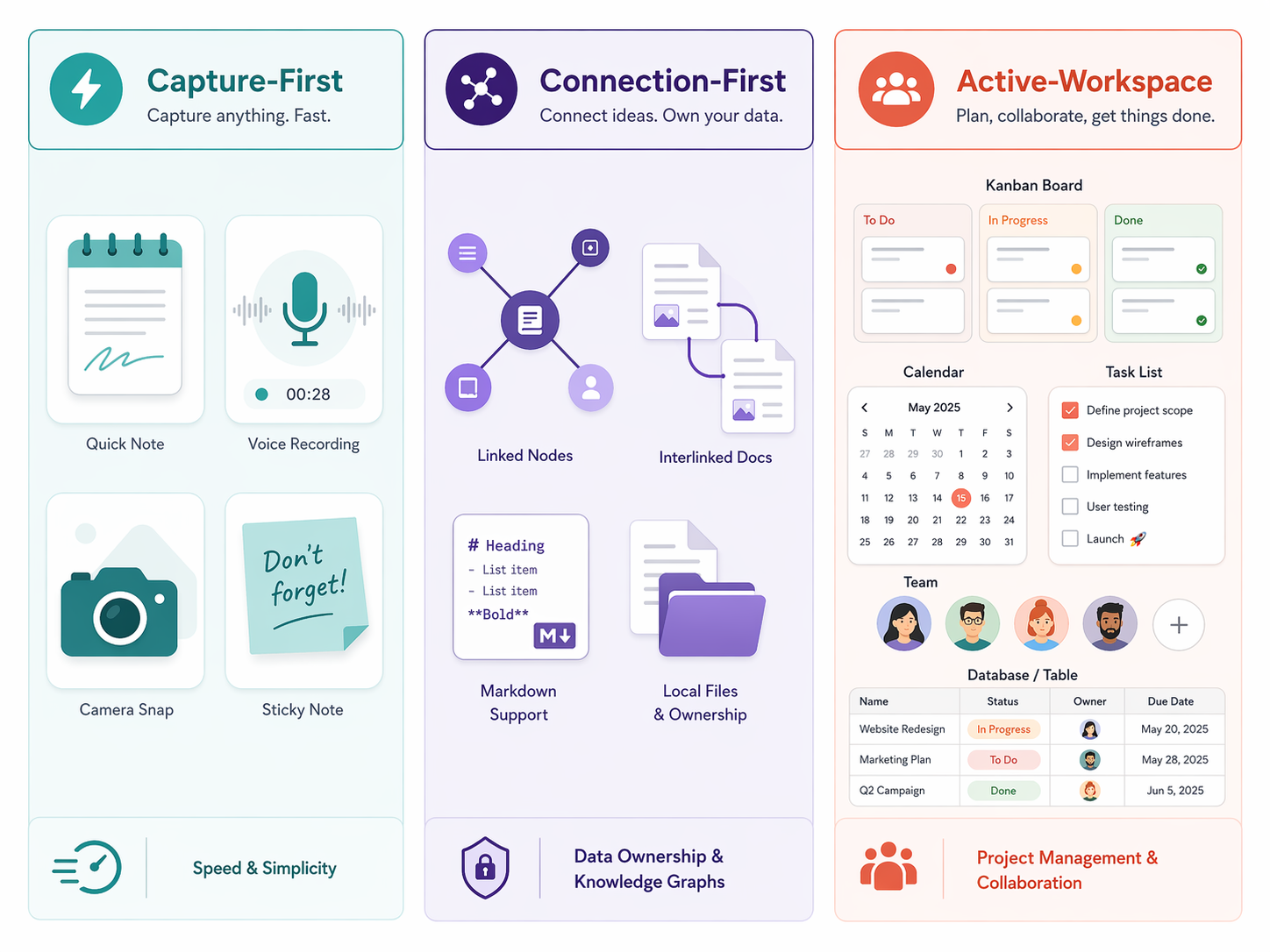
For practical choosing, the cleanest split is architectural: capture-first, connection-first, and active-workspace. This is not an official taxonomy handed down by the software industry. It is a useful working lens synthesized from current reviews, vendor positioning, and the way these tools behave once they are full of real notes.

Capture-first apps: fast, forgiving, and easy to outgrow
Capture-first tools are for the moment when you need to write something down before it disappears. OneNote, Apple Notes, Google Keep, Evernote, UpNote, and Bear all live mostly in this family, though they vary wildly in depth. Their value is speed: open the app, save the thing, find it later.
OneNote is the most generous free cross-platform answer here. Its free-form canvas handles typed notes, pasted screenshots, ink, lecture diagrams, and meeting scraps without forcing everything into a rigid page. The tradeoff is that OneNote can feel loose if you want a clean folder of portable Markdown files. It is excellent at being a digital binder; it is less satisfying as a tidy long-term writing archive.
Apple Notes is calmer. On an iPhone, iPad, or Mac, it is often the best no-decision option: fast capture, scanning, checklists, folders, smart folders, collaboration, and system-level convenience. Its problem is not quality. Its problem is reach. The moment your workday includes Windows or Android in any serious way, Apple Notes becomes less of a universal notes system and more of a comfortable Apple-side pocket.
Google Keep is even lighter. It is useful for grocery lists, reminders, shared household notes, and quick web-to-phone capture. It is not a research database. It is not a writing system. It is not trying to become a second brain. That restraint is useful if your notes are short-lived; it is limiting if your notes need to accumulate meaning over months.
Evernote belongs in this group historically, but its value case is harder now. A 50-note and 1-notebook free cap changes the character of the app for new users, and the $14.99/month Personal plan puts it above several polished alternatives.[4] If you already have years of clipped articles, PDFs, and searchable reference material in Evernote, staying may still be rational. Starting there from zero is harder to justify.
Connection-first apps: better archives, higher setup cost
Connection-first tools are built for notes that need to relate to other notes. Obsidian is the clearest example in this comparison: local Markdown files, backlinks, graph views, plugins, and a workflow that rewards deliberate structure. The app is free for personal and commercial use as of 2025, with paid services such as sync and publishing separated from the core app.[6]
The privacy and exit story is the appeal. Your notes are files you can see. They are not primarily entries inside a vendor’s database. For researchers, writers, technical workers, and anyone who has been burned by a migration, that matters. Atlas’s 2026 vendor framework gave Obsidian an 8.8/10 across criteria including atomic linking latency, data sovereignty, contextual retrieval speed, visual hierarchy flexibility, and offline-first integrity; because Atlas is a vendor blog, the score should be treated as one structured assessment rather than an independent verdict.[6]
Obsidian also has a real cost that does not show up on an invoice. It asks the user to make decisions: folders or links, tags or properties, plugins or plain files, daily notes or topic notes. Some people enjoy that because the system becomes theirs. Others spend two weekends customizing a vault and still cannot find last Tuesday’s meeting note. If the immediate need is dependable capture across a busy week, OneNote or Apple Notes will usually be kinder.
Active-workspace apps: powerful when notes need to become work
Active-workspace tools treat notes as part of a larger operating system: projects, tasks, databases, calendars, approvals, docs, and collaboration. Notion is the obvious example. Storyflow also frames itself around this workspace category, though its own blog is vendor material and should be read with that in mind.[7]
Notion is strong when a note is not really just a note. A product spec can sit beside a roadmap database. A meeting note can connect to tasks. A client portal can combine docs, status, and reference material. For a team lead, that consolidation can be useful. For a solo user who only wanted a quiet place to write down ideas, it can become a small administrative country.
The key decision is whether the workspace layer saves work or creates work. A well-built Notion setup can reduce scattered docs and duplicate status updates. A bad one becomes a maze of dashboards that everyone praises and nobody updates.
The 2026 pricing and AI split changes the recommendations
Older note-taking advice often treated AI as an add-on feature. In 2026, AI access affects the whole buying decision because the phrase “AI included” can mean very different things. It may mean free native writing help on a supported device. It may mean a Microsoft 365 entitlement. It may mean a higher team tier. It may mean plugins and external keys.
Notion is the clearest warning label. With Notion AI moving into Business-tier pricing in early 2026, a small team that previously could think in terms of Plus with an AI add-on now has to consider a Business plan around $24–30 per user per month, depending on billing. For 10 people, that can put the annual cost near $3,000 instead of roughly $1,200 under the older Plus-with-AI model described in 2026 pricing coverage.[4][5]
That does not make Notion a bad choice. It makes casual adoption expensive. If the team is replacing several tools and actually uses databases, permissions, project documentation, and AI assistance, the cost may be defensible. If the team just wanted nicer meeting notes, it is a poor way to spend budget.
Evernote’s pricing has a different problem. Its free plan no longer works as a serious long-term trial for most users because of the 50-note and 1-notebook limit, and Personal at $14.99/month sits above Notion Plus at $12/month, UpNote at $1.99/month, and Bear Pro at $2.99/month in cited 2026 pricing breakdowns.[4] A user who values Evernote’s capture and search may still pay. A new user comparing value will see the gap immediately.
The best budget story belongs to less dramatic apps. UpNote’s $39.99 lifetime option is cheaper than 27 months of Evernote Personal, using Evernote’s $14.99/month price as the comparison.[4] Bear’s $2.99/month Pro plan is also easy to justify for Apple users who want a polished writing-first notes app without building a workspace.[4]
The best free AI-adjacent story is not coming from the boutique note apps. Apple Notes benefits from Apple Intelligence features such as writing tools, summarization, and image generation on supported devices, while Google Keep is tied to Gemini integration rolling out through 2026.[3] OneNote remains the strongest free cross-platform notes app overall, but its serious AI path runs through Microsoft 365 and Copilot rather than the free app standing alone.[2]
Best picks by use case
Best for students: OneNote for most, Apple Notes for Apple-only campuses
Students need cheap, durable, and forgiving. OneNote wins for most because it handles typed notes, ink, screenshots, lecture slides, and cross-device access without making the student subscribe before finals week. The free 5GB OneDrive storage allowance is not infinite, but it is enough to make OneNote a real free option rather than a demo.[2]
Apple Notes is the simpler pick for students who live entirely on iPhone, iPad, and Mac. It is especially good when handwritten iPad notes, scans, and quick capture are the daily pattern. The risk is future portability: internships, labs, shared PCs, or Android devices can expose how Apple-bound the system is.
Best for teams: Notion, if the workspace is the product
For teams, Notion is the strongest recommendation only when notes are tied to execution. If the team needs project databases, documentation, client-facing pages, task views, and shared operating procedures, Notion can justify its complexity. If the team mainly writes meeting notes and stores decisions, a simpler shared OneNote notebook or Microsoft-based workflow may be cheaper and easier to govern.
The budget owner should price the actual plan, not the marketing page impression. The early-2026 AI move into Business pricing changes the total cost for teams that expected AI to sit cheaply on top of Plus.[4][5] Before migrating, check who really needs AI, who only needs read access, and who will maintain the workspace once the launch enthusiasm fades.
Best for privacy and data ownership: Obsidian
Obsidian is the easiest recommendation for users who want their archive in local Markdown files. It is also the easiest tool to over-recommend. Privacy-focused writers, researchers, developers, and long-term note keepers may love it because the archive remains inspectable and portable. A busy manager who needs a shared meeting-notes system by Monday may resent it by Wednesday.
The right Obsidian user values ownership enough to accept setup decisions. The wrong Obsidian user wants the app to make those decisions for them.
Best free app: OneNote, with ecosystem caveats
OneNote is the most broadly useful free pick because it is cross-platform and structurally capable. Apple Notes may be better on Apple devices. Google Keep may be faster for disposable capture. But OneNote covers more real note-taking situations without asking the user to pay immediately.
The caveat is cleanup. OneNote notebooks can become sprawling. Sections multiply. Pages get nested oddly. Search helps, but a free-form binder still needs occasional maintenance.
Best value: UpNote for individuals, Bear for Apple-focused writers
UpNote is the value pick for people who want a polished personal notes app and do not need team infrastructure. The $1.99/month plan and $39.99 lifetime option make it hard for more expensive capture-first apps to compete on price alone.[4]
Bear is narrower but excellent inside its lane: Apple users who write, tag, and organize personal notes in a clean interface. Its $2.99/month Pro price is low enough that the main question is not cost; it is whether Apple-only availability fits your life.[4]
Best cross-platform choice: OneNote for free, Notion for structured work, Obsidian for local files
Cross-platform is not one requirement. It can mean “I use Windows at work and an iPhone at home.” It can mean “my team uses browsers and nobody should install anything.” It can mean “my files must survive if I leave the app.”
For free cross-platform notes, choose OneNote. For browser-first structured team work, choose Notion after checking the plan cost. For local files across desktop and mobile, choose Obsidian if you are willing to learn it.
Where the popular apps fail
Notion fails when it is used as a personal scratchpad with a committee attached. The database model is powerful, but it invites structure before the user knows what structure is needed. If every note requires choosing a template, a relation, a status, and a property, the system starts taxing the very work it was supposed to support.
Obsidian fails when people mistake ownership for simplicity. Local Markdown is clean. The surrounding decisions are not always clean. Sync strategy, plugins, naming conventions, and backlinks can become their own hobby.
Evernote fails new users on value. It still has recognizable strengths, especially for people with old archives and web-clipping habits, but a restricted free tier and a $14.99/month Personal plan make it hard to recommend casually in 2026.[4]
Apple Notes fails at independence. It is comfortable, fast, and increasingly capable on supported Apple hardware, but it is not the app to choose if your work must move cleanly across Windows, Android, and non-Apple collaborators.
Google Keep fails at depth. That is acceptable if you use it for quick reminders and shared lists. It is a poor fit for serious research, course notes, technical documentation, or any archive that needs hierarchy.
A practical way to choose
- Choose capture-first if your notes are mostly meetings, lectures, reminders, scans, clips, and daily memory. Start with OneNote, Apple Notes, Google Keep, UpNote, Bear, or Evernote only if its legacy strengths justify the price.
- Choose connection-first if your notes accumulate into research, writing, technical knowledge, or a long-term personal archive. Start with Obsidian if local Markdown and data ownership matter more than instant convenience.
- Choose active-workspace if notes must become projects, databases, team documentation, and recurring workflows. Start with Notion, but price the real plan before moving a team.
- Check the weakest platform you use, not the strongest one. A beautiful Mac app may still be the wrong choice if you spend half your week on Windows.
- Export a small set of notes before committing. If leaving the app feels painful during a trial, it will feel worse after two years.
- Verify current AI access separately from the base plan. In 2026, AI availability is often a pricing question, not just a feature question.
The safest decision is not the app with the longest feature list. It is the app whose architecture matches the work you actually do, at a price you can keep paying, on the devices you actually use. Confirm the June 2026 pricing before you commit, test export before your archive matters, and do not pay for a workspace when all you needed was a dependable notebook.
References
- Note Taking App Market Size, Share Industry Report 2035 — Market Research Future, April 2026.
- The 7 Best Note Taking Apps in 2026 — Zapier.
- The Best Note-Taking Apps for 2026 — PCMag UK.
- Best Note-Taking App Options in 2026: Top Paid and Free Tools — Cloudwards.
- Best Note-Taking Apps 2026: Tested and Ranked — Tech Insider Australia.
- Best Note-Taking Apps (2026): Definitive Guide by Use Case — Atlas, April 2026.
- The 12 Best Note-Taking Apps in 2026 (We Tested Them All) — Storyflow.