
By Friday afternoon, a weekly status report is rarely just writing. It is collection, cleanup, summarization, formatting, delivery, and then the quiet review pass where someone notices that the “done” item is not actually done. If that takes 3–4 hours a week, it is no longer a small admin chore; it is a recurring workflow with enough repetition to deserve a better system. McKinsey, cited by PPM Express, puts the reporting-time opportunity at 13.5 hours per month saved, or up to 150 hours per year, and PPM Express also cites Kantar NA saving 17,000 hours annually through report automation in an organizational setting.[1]
The best automation recipe for a weekly status report is not the one with the most AI in it. It is the one that connects to where your project data already lives, can be fixed when it breaks, and still leaves a human responsible for judgment.

The Four Recipes at a Glance
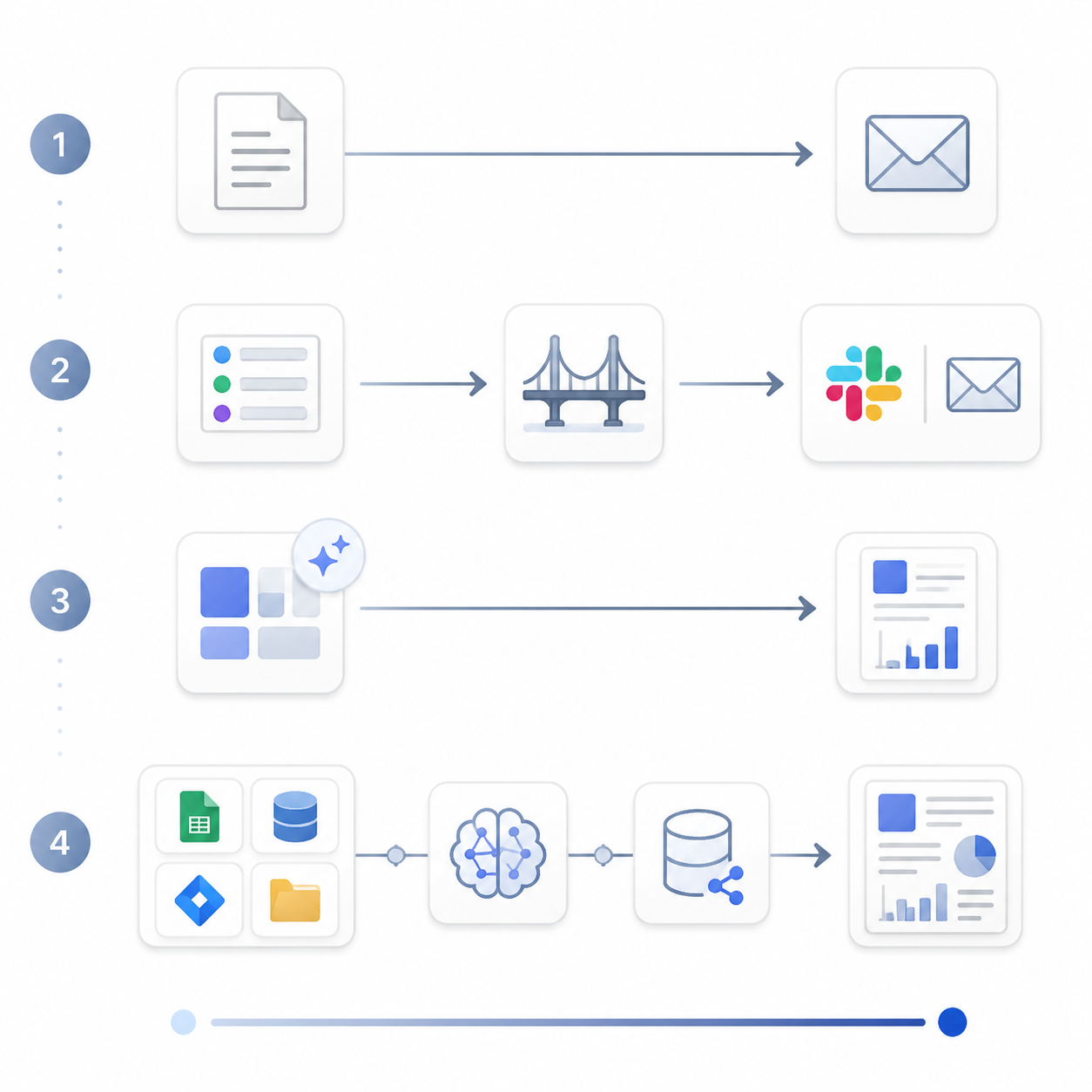
| Recipe | Typical Setup Time | Core Tools | Cost and Complexity | Best Fit | Maintenance Burden |
|---|---|---|---|---|---|
| 1. Scheduled Template | About 15 minutes | Smartsheet or Google Sheets with scheduled email delivery | Low cost, low complexity | Solo operators, freelancers, simple recurring updates, one source of truth | Low, as long as the sheet stays current |
| 2. No-Code Workflow Bridge | About 1–2 hours | Zapier or Make connecting Jira, Asana, Trello, or Notion to Slack, email, or a doc | Moderate cost, moderate complexity | Small teams with project data already spread across a project tool and a communication channel | Moderate; connectors, fields, and permissions need occasional care |
| 3. All-in-One AI Platform | About 30 minutes | ClickUp Weekly Report Prebuilt Agent or Notion AI Custom Agents | Low assembly if the team already uses the platform | Teams already living inside ClickUp or Notion | Low to moderate; depends on platform structure and database hygiene |
| 4. Custom AI Pipeline | About 2–4 hours | Zapier or Make plus OpenAI/Claude and Airtable or Google Sheets | Highest flexibility, highest complexity | High-volume reporting, multi-source reports, teams comfortable owning a custom workflow | High; prompt changes, source changes, API issues, and review rules all need ownership |
That table is the decision point. If your report comes from one clean tracker, do not build a four-tool pipeline. If your weekly update depends on five project boards, two owners, and an executive summary, a scheduled spreadsheet will probably just move the manual work into a different box.
Recipe 1: The Scheduled Template
This is the baseline: keep the weekly status report in a structured sheet or template, update the same fields each week, and schedule delivery. Smartsheet describes this as a simple way to automate weekly status reports by using a report or sheet as the source and sending it on a recurring cadence.[2]
It works when the reporting problem is mainly consistency. One person owns the tracker. The same audience needs the same few fields. Nobody needs data merged from multiple systems. The automation is not trying to understand the project; it is removing the “remember to send the update” step.
The failure mode is also plain: if the source sheet is stale, the automated report is stale. A scheduled template does not chase task owners, reconcile conflicting statuses, or turn vague notes into a useful executive readout. It is good because it is boring, and it stays good only if the sheet is treated as the actual source of truth.
Recipe 2: The No-Code Workflow Bridge
This is the recipe most teams should inspect first, because it matches how work usually happens: tasks live in Jira, Asana, Trello, or Notion, while the people waiting for the update live in Slack, email, or a shared doc. Zapier’s reporting automation pages and Make’s template marketplace both show the same broad pattern: a trigger starts the workflow, actions collect or transform the data, and the finished update is delivered somewhere people already check.[3][4]
A simple version might run every Friday morning, find tasks updated during the week, group them by project or owner, format the results, and post the draft into a Slack channel. A slightly more involved version might pull open blockers from Jira, completed milestones from Asana, and next-week priorities from a Notion database before sending a digest to stakeholders.
The useful question is not “Can Zapier or Make automate this?” Usually, some version can. The useful question is whether your status report follows a stable enough pattern for trigger-action logic:
- The same source tool holds most of the status data each week.
- The same fields matter: status, owner, due date, milestone, blocker, next step.
- The report has a repeatable destination, such as Slack, email, Google Docs, or Notion.
- Someone can understand the automation without needing to reverse-engineer every filter.
This recipe earns its keep when it cuts down copying and reformatting. It is less reliable when the weekly report depends on interpretation scattered across side conversations. If half the real status lives in Slack threads and private DMs, the workflow will either miss reality or force people to clean up the data before automation can help.
Cost and maintenance also matter here. No-code does not mean no ownership. Authentication expires. Field names change. A project lead adds a new status value. Someone archives a board. The workflow needs a clear owner, a test run, and a failure notification that goes to a person who will actually act on it.
Recipe 3: The All-in-One AI Platform
If your team already works in ClickUp or Notion, the shortest path may be inside the platform. ClickUp describes a Weekly Report Prebuilt Agent that can be enabled for a Space, while Notion describes AI Custom Agents that can compile updates from project databases into a reporting page.[5][6]
The phrase “already works in” is doing most of the work. These tools are strongest when tasks, docs, owners, and project updates are already organized in the platform. Then the AI agent has something structured to read. If the team only uses ClickUp for a subset of tasks, or Notion as a loose notes archive, the generated report can look polished while quietly omitting the work that happened elsewhere.
ClickUp also cites Salesforce’s State of Service Report in saying that 95% of decision-makers report cost reductions from AI automation.[5] That is a useful signal about executive appetite for automation, not proof that a prebuilt weekly reporting agent will save every team a specific number of hours. Adoption interest and measured effectiveness are not the same thing.
Use this recipe when the platform is already the operating system for the team. Avoid it when the platform would need a cleanup project before the report can be trusted. A prebuilt agent can reduce assembly work, but it cannot make a messy workspace true.
Recipe 4: The Custom AI Pipeline
The custom AI pipeline is the most tempting recipe to demo and the easiest one to leave behind as a maintenance problem. In this setup, Zapier or Make collects source data, an LLM such as OpenAI or Claude summarizes or rewrites it, and Airtable or Google Sheets stores intermediate data or review history. Zapier’s AI reporting material points toward this kind of LLM-assisted reporting pattern, though this recipe has less structured source support than the more platform-native options.[3]
It can be worth it. If you have ten recurring reports, multiple source systems, different audiences, and a weekly review meeting built around the output, customization may be the only way to remove enough manual work. A Medium practitioner described automating more than ten weekly reports and saving 15+ hours per week, but that should be read as one operator’s case, not a typical benchmark.[7]
The maintenance burden is the price of that flexibility. Someone has to own the prompt, the source mappings, the error handling, the handoff between tools, and the review rules. If the LLM writes “on track” because it saw three completed tasks but missed the unresolved dependency, the workflow did not fail technically. It failed operationally.
A safer pattern is to make the AI draft the report, not publish it as truth. Let it assemble highlights, blockers, risks, and next steps, then route the draft to the project owner for review. The human review step is not a lack of automation; it is the control that keeps the report connected to reality.
Choose by Data Home, Not Tool Hype
Start with where the status data already lives. A team with a disciplined Google Sheet does not need a custom AI pipeline. A team with well-maintained Jira projects and Slack-based stakeholders is a good candidate for a no-code bridge. A ClickUp-heavy or Notion-heavy team should try the native agent path before adding extra connectors. A team with high-volume, multi-source reporting can consider a custom pipeline, but only if it has someone willing to maintain it after the first week.
| If Your Situation Looks Like This | Start With This Recipe |
|---|---|
| You are a solo operator and already update one tracker | Scheduled Template |
| Your team uses a project tool, but stakeholders read Slack or email | No-Code Workflow Bridge |
| Nearly all project work already lives in ClickUp or Notion | All-in-One AI Platform |
| You manage many recurring reports across several tools | Custom AI Pipeline |
| Your source data is inconsistent or mostly verbal | Map and clean the process before automating |
The last row is the one people skip. Automation exposes messy reporting habits. It does not quietly repair them.
What to Map Before You Automate
Before building anything, write down the current report path in plain language: where the data comes from, who edits it, who receives it, who reviews it, and what happens if it is wrong. This does not need to become a process-design ceremony. A rough map is enough to show whether the real problem is collection, summarization, formatting, delivery, or approval.
- If collection is the slow part, connect the source tool to the report destination.
- If summarization is the slow part, consider an AI draft with human review.
- If formatting is the slow part, use a template before adding more tools.
- If approval is the slow part, automation may need routing and reminders more than summarization.
Do not start with the most politically important report. Start with the most annoying report that has low downside if the first version is clumsy. A low-risk report teaches you where fields are unreliable, which owners ignore prompts, and how your chosen tool reports failures.
The Maintenance Test
A weekly reporting automation is not finished when the first draft posts successfully. It is finished when someone else can tell what it does, where it gets data, how to fix a broken step, and when a human must review the output.
- Name the owner of the workflow, not just the owner of the report.
- Document each source, filter, field mapping, destination, and review step.
- Add failure alerts for broken connections, empty results, and delivery errors.
- Keep a sample successful output so future maintainers know what “normal” looks like.
- Require human review for AI-generated summaries before they reach decision-makers.
The simplest recipe that connects to your real source data and can be maintained by the team you actually have is usually the right one. Let automation remove the copy-paste labor. Keep humans responsible for the judgment.
References
- Project reporting automation statistics and Kantar NA example, PPM Express
- Killer Time Saver: Automate Weekly Status Reports, Smartsheet
- AI Weekly Reporting Automation and Status Report Generation Automations, Zapier
- Workflow template library, Make
- How to Automate Weekly Status Report With AI, ClickUp
- Automate weekly reporting, Notion AI
- How I Automated 15 Hours of Weekly Reporting, Medium