
The fastest way to make a bad AI purchase is to start with the vendor category. “AI assistant,” “agent platform,” and “productivity copilot” tell you almost nothing about where your work enters, where it leaves, and who has to clean up the output when the automation guesses wrong.
For AI task automation for knowledge workers, the useful question is narrower: what kind of work are you trying to remove friction from every week? Research has a different failure mode than spreadsheet cleanup. Writing drafts have a different review loop than multi-app handoffs. Scheduling tools help only if the calendar is actually the bottleneck.
There is enough upside to make the decision worth taking seriously. One 2026 ROI benchmark aggregator reports that the median knowledge worker saves 6.4 hours per week using production AI agents, and cites cost-per-task reductions from 9x to 156x across standardized knowledge-work tasks, with payback periods ranging from 4.1 to 9.3 months depending on task type.[1] Those numbers are useful context, not a shopping method. Saved time can become more meetings, more review cycles, or simply a higher output quota.
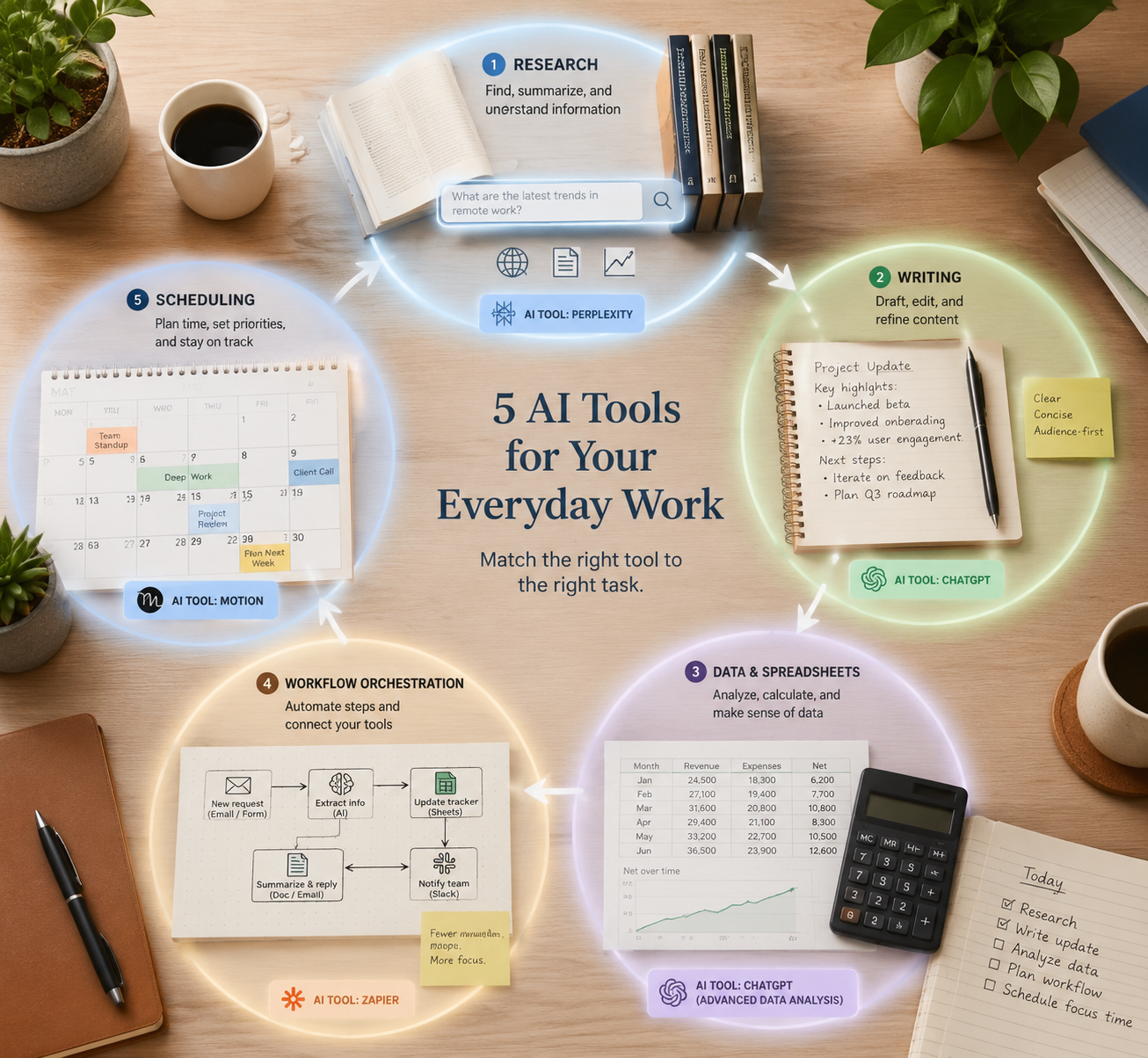
Quick Selection Map: Pick by the Work Type
| Daily task type | Strongest shortlist | Best-fit users | Pricing notes | Not for you if |
|---|---|---|---|---|
| Research | Perplexity, Claude | Analysts, researchers, PMs, strategists, anyone who needs sourced exploration before drafting | Typically subscription-led; verify current limits and model access before purchase | Your main problem is bulk spreadsheet transformation or multi-app execution |
| Writing and analysis | Claude, ChatGPT, Notion AI | Writers, operators, product teams, analysts, and teams already drafting inside docs or knowledge bases | Subscription-led for individual assistants; Notion AI depends on workspace adoption | You need repeatable row-by-row processing or unattended app-to-app workflows |
| Spreadsheet and data work | GPT for Work | Spreadsheet-heavy teams working in Excel and Google Sheets, especially for bulk enrichment, cleanup, classification, and drafting from rows | No per-seat pricing; model choice inside Excel and Google Sheets is the unusual part to verify against your usage pattern[2] | Your source data does not live in spreadsheets, or you need a general chat assistant more than bulk processing |
| Workflow orchestration | Zapier, Make, n8n | Ops, RevOps, support, marketing ops, and technical teams moving information across apps | Task-, operation-, or execution-based cost curves can diverge sharply at scale[3][4] | The work is mostly thinking, writing, or spreadsheet review rather than cross-app handoff |
| Scheduling and calendar | Motion, Reclaim | Managers, ICs, and coordinators whose pain is calendar pressure, task placement, and meeting protection | Subscription-led; value depends on calendar density, not feature breadth | Your calendar is not the constraint, or your organization will not let a tool actively manage availability |
The table is deliberately uneven. Some tools appear in more than one category because real work overlaps. Claude can help with research and writing. ChatGPT can sit beside almost any general knowledge-work process. That does not make them interchangeable. It means the first filter should be the work source, and the second should be the cleanup burden.
Start With Your Data Source, Not the Tool
Before comparing features, write down where the work begins. A spreadsheet row, a messy research question, a draft brief, a CRM update, and a crowded calendar do not ask for the same kind of automation.
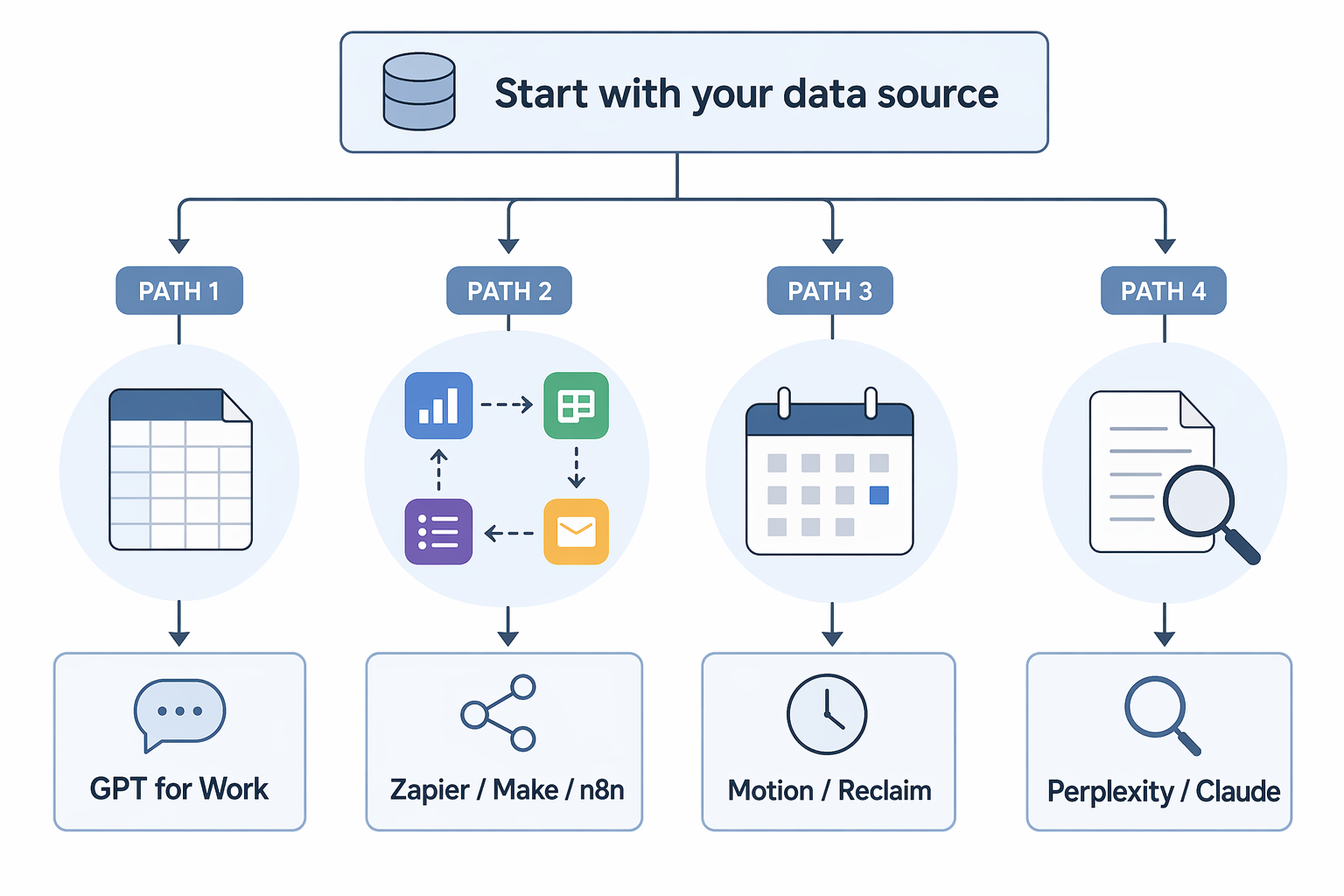
- If the work starts in Excel or Google Sheets, put spreadsheet-native automation on the shortlist before a general chatbot.
- If the work starts as a question that needs sources, start with research tools before writing tools.
- If the work starts in one app and ends in another, evaluate workflow platforms before conversational assistants.
- If the work starts as calendar congestion, do not buy a general AI assistant and hope it becomes a scheduling system.
- If the work starts in a shared knowledge base, consider whether the automation needs to live where the team already writes.
This sounds basic until procurement gets involved. Feature lists reward breadth. Daily operations reward fit. A tool that produces a beautiful answer in a demo can still create a second job if someone has to copy, paste, normalize, route, and audit the result afterward.
Research: Perplexity and Claude Are Useful for Different Kinds of Looking
Research-heavy work usually fails in one of two places: finding the right material or turning found material into a usable judgment. Perplexity is strongest when the immediate need is web research with visible source trails. Claude is stronger when the problem is reading, comparing, and synthesizing longer material into a structured analysis.
That distinction matters for PMs, market researchers, analysts, and strategy teams. If a task begins with “what has changed?” or “what are the credible sources saying?”, Perplexity belongs early in the workflow. If the task begins with a folder of notes, interviews, PDFs, strategy memos, or competing arguments, Claude is often the better first stop.
Neither tool removes the need to judge evidence. Vendor and publisher summaries can blur adoption, effectiveness, and preference. The human reviewer still has to notice whether a source proves the claim being made or only gestures toward it.
| Tool | Use it when | Watch the cleanup step |
|---|---|---|
| Perplexity | You need fast exploration with source visibility | Check whether cited sources actually support the exact sentence you plan to use |
| Claude | You need synthesis, comparison, or long-form reasoning from supplied material | Keep source boundaries clear so a clean answer does not overstate the evidence |
Writing and Analysis: Claude, ChatGPT, and Notion AI Are Not the Same Purchase
For writing and analysis, the question is not “which model writes best?” It is where the draft will be reviewed, revised, and reused. A clean first draft is helpful. A clean first draft that lands outside the actual review system can still become another copy-paste loop.
Claude is a strong fit when the work depends on careful reading, restructuring, tone control, and argument quality. It is a good match for long memos, research synthesis, policy drafts, product narratives, and analytical writing where the shape of the reasoning matters as much as the words.
ChatGPT is the more flexible generalist. It can brainstorm, draft, summarize, transform, analyze, and act as a working partner across many small tasks. That flexibility is valuable for people whose day changes every hour. It is less tidy as a system of record unless the team is disciplined about where final work lives.
Notion AI earns its place when the writing and knowledge base already live in Notion. The advantage is not that it replaces every other assistant. The advantage is that it reduces the distance between notes, docs, meeting artifacts, and team-facing pages. If your team does not use Notion heavily, that advantage mostly disappears.
| Tool | Best fit | Not for you if |
|---|---|---|
| Claude | Longer writing, synthesis, careful analysis, document-heavy reasoning | You mainly need app triggers, spreadsheet formulas, or calendar control |
| ChatGPT | General-purpose drafting, brainstorming, transformation, and mixed daily support | You need the tool to live inside one operational system without extra handling |
| Notion AI | Teams whose notes, docs, and knowledge base already sit in Notion | Your source material and approvals happen outside Notion |
Spreadsheet and Data Work: Give the Grid Its Due
Spreadsheet work has its own gravity. Rows are not just text. They are records, inputs, partial decisions, exceptions, and future audit problems. When AI automation treats a spreadsheet as a pile of prompts, the analyst becomes the integration layer.
GPT for Work is the standout for this specific category because it handles bulk AI processing natively inside both Excel and Google Sheets, supports model choice, and does not use per-seat pricing, according to its tool comparison guide.[2] That combination is more important than a broad “AI assistant” label for teams whose real work happens row by row.
The practical use cases are familiar: classify support tickets, enrich company lists, clean messy fields, draft product descriptions from attributes, normalize survey responses, translate rows, summarize comments, or turn semi-structured text into columns. None of those tasks is glamorous. They are exactly the tasks that consume afternoons because they are too judgment-heavy for a simple formula and too repetitive for a human to enjoy.
The pricing model also changes the evaluation. Per-seat pricing can punish broad internal adoption when occasional users only need a few batches. Per-task or API-style usage can become hard to predict when volume grows. GPT for Work’s no-per-seat positioning is unusual enough to matter, but the right comparison still depends on volume, model choice, and how often the same workflow runs.[2]
| Spreadsheet need | Why a spreadsheet-native tool helps | Where to be careful |
|---|---|---|
| Bulk classification | The prompt can run across many rows without manually pasting each item into a chat window | Sample the edge cases before running the full sheet |
| Data enrichment | The output can land beside the source fields where review already happens | Track which fields are AI-generated so later users do not treat them as verified facts |
| Text cleanup and normalization | Repeated transformations can stay inside the workbook or sheet | Do not automate away the exception review step |
| Drafting from structured rows | Attributes, categories, and notes can become first drafts at scale | Use constraints so every row does not become a slightly different brand voice |
This is also where cost-per-task claims need the most scrutiny. A single-row demo and a ten-thousand-row operational process are not the same purchase. If the work is high-volume and repeatable, even small differences in pricing mechanics can matter more than a nicer interface.
Workflow Orchestration: Use Zapier, Make, or n8n When the Handoff Is the Work
Workflow orchestration belongs in the shortlist when the task is not mainly to think, draft, or analyze, but to move work through systems: form submission to CRM, ticket to Slack, email to database, signed contract to onboarding task, lead score to sales alert.
Zapier, Make, and n8n are the natural comparison set here. Vendor-published workflow guides describe the category around app connections, triggers, actions, and increasingly AI-assisted automation, but their framing should not be treated as neutral evidence for which platform is best.[3][4]
For a concise rule: Zapier is usually easiest to start with, Make gives more visual control over scenarios, and n8n appeals to teams that want more technical flexibility and control. The real choice turns on connector coverage, governance, error handling, execution limits, and who will maintain the workflow after launch.
If workflow automation is your main buying decision, do not stop at this roundup. Use the deeper comparisons on workflow automation platforms, AI workflow automation by skill level, and the focused Zapier vs Make vs n8n comparison before committing to a platform.
| Platform | Best fit | Not for you if |
|---|---|---|
| Zapier | Teams that want broad app coverage and a lower-friction starting point | You need deep technical control or highly customized execution logic |
| Make | Teams that want visual workflow design and more control over branching scenarios | No one on the team will maintain scenario logic after the initial build |
| n8n | Technical teams that value flexibility and control | You need the simplest possible nontechnical setup |
The cost warning is straightforward: orchestration tools often become more expensive or more operationally fragile when volume rises, workflows branch, or retries accumulate. A cheap starter plan is not the same thing as a cheap operating model.
Scheduling and Calendar: Motion and Reclaim Help Only When Time Placement Is the Bottleneck
Scheduling tools are easy to overrate if the real problem is unclear priorities. Motion and Reclaim can help when work is genuinely calendar-constrained: meetings shift, tasks need protected time, and the day keeps being re-packed around other people’s availability.
Motion is a fit for people who want tasks and calendar planning to be actively arranged. Reclaim is a fit for people who want smarter protection for habits, focus time, and flexible scheduling around existing commitments. The choice is less about AI novelty and more about how much authority you are willing to give a calendar system.
Do not buy either one because your inbox is messy, your writing backlog is growing, or your team lacks a project intake process. Calendar automation can protect time. It cannot decide which work deserves that time unless the surrounding system is honest.
Pricing Models to Check Before You Commit
Pricing pages change, and several comparison sources in this market are vendor-published. Treat the table below as a pricing-model check, not a promise that today’s plan limits will still apply when you buy. The verification date is included so the number that matters most to operations teams—the date of the assumption—is visible.
| Tool or category | Pricing model to inspect | Cost curve that can surprise you | Last verified for this article |
|---|---|---|---|
| Perplexity | Subscription tiers and usage or model limits | Research volume and access to advanced capabilities | July 5, 2026 |
| Claude | Subscription or team plans with model and usage limits | Heavy document analysis and team-wide adoption | July 5, 2026 |
| ChatGPT | Individual, team, or enterprise subscription structure | Broad adoption across many mixed-use workers | July 5, 2026 |
| Notion AI | Workspace-based AI add-on or bundled plan structure | Paying for AI where only part of the workspace uses it heavily | July 5, 2026 |
| GPT for Work | No per-seat pricing; inspect usage, model choice, and spreadsheet volume | High-volume bulk runs and selected model costs[2] | July 5, 2026 |
| Zapier | Task-based automation limits | Multi-step workflows, retries, and higher task volume[4] | July 5, 2026 |
| Make | Operation- or execution-based limits | Complex scenarios that multiply operations | July 5, 2026 |
| n8n | Execution-based or deployment-dependent pricing | Maintenance, hosting, and technical ownership as workflows expand[3] | July 5, 2026 |
| Motion | Subscription plan tied to calendar and task planning features | Paying for scheduling intelligence when calendar density is low | July 5, 2026 |
| Reclaim | Subscription plan tied to calendar protection and scheduling features | Team adoption where only some users need active calendar management | July 5, 2026 |
The most dangerous comparison is per-seat versus per-task without a volume estimate. A per-seat tool can look expensive for occasional use and reasonable for daily use. A per-task workflow can look cheap in a pilot and expensive once every lead, ticket, invoice, or row passes through it. Before approving a tool, estimate one ordinary week, not one impressive demo.
A Practical Two-Tool Stack for Most Knowledge Workers
Most knowledge workers do not need five AI tools. They need one tool for the dominant source of work and one for the secondary bottleneck.
| Your dominant work source | Primary tool to evaluate | Secondary bottleneck to pair with it |
|---|---|---|
| Research questions and source gathering | Perplexity or Claude | Writing and synthesis with Claude or ChatGPT |
| Long documents, memos, briefs, and analysis | Claude or ChatGPT | Research support with Perplexity if source discovery is frequent |
| Excel or Google Sheets | GPT for Work | A general assistant such as Claude or ChatGPT for analysis around the sheet |
| Cross-app handoffs | Zapier, Make, or n8n | A writing or research assistant for the content inside the workflow |
| Calendar congestion | Motion or Reclaim | A writing or analysis assistant if the protected time needs better first drafts |
The cleanest purchase is rarely the tool with the longest feature list. It is the one whose “not for you if” warning does not describe your actual day. If your work begins in rows, start with the grid. If it begins in sources, start with research. If it begins in handoffs, start with orchestration. If it begins in a calendar, start there—and stop adding tools once the real bottleneck is covered.
References
- AI Agent Productivity Statistics 2026: ROI Data Points, Digital Applied.
- Best AI Task Automation Tools, GPT for Work.
- Best AI Workflow Automation Tools, n8n.
- Best AI Productivity Tools, Zapier.