
If you are choosing the best AI note taking app for teams in 2026, the useful question is no longer which tool can produce a decent transcript. That is the entry fee. The real question is where the meeting output goes after the call ends: into Salesforce or HubSpot, into Jira or Linear, into Slack, into a shared archive, or into a private note that deliberately avoids a visible meeting bot.
For a 5–50 person team, that distinction matters more than a polished recap page. A beautiful summary in a separate dashboard still leaves someone copying action items on Monday morning. A less glamorous tool that logs the sales call, posts the channel summary, or turns a decision into a ticket is usually the one the team will keep using.
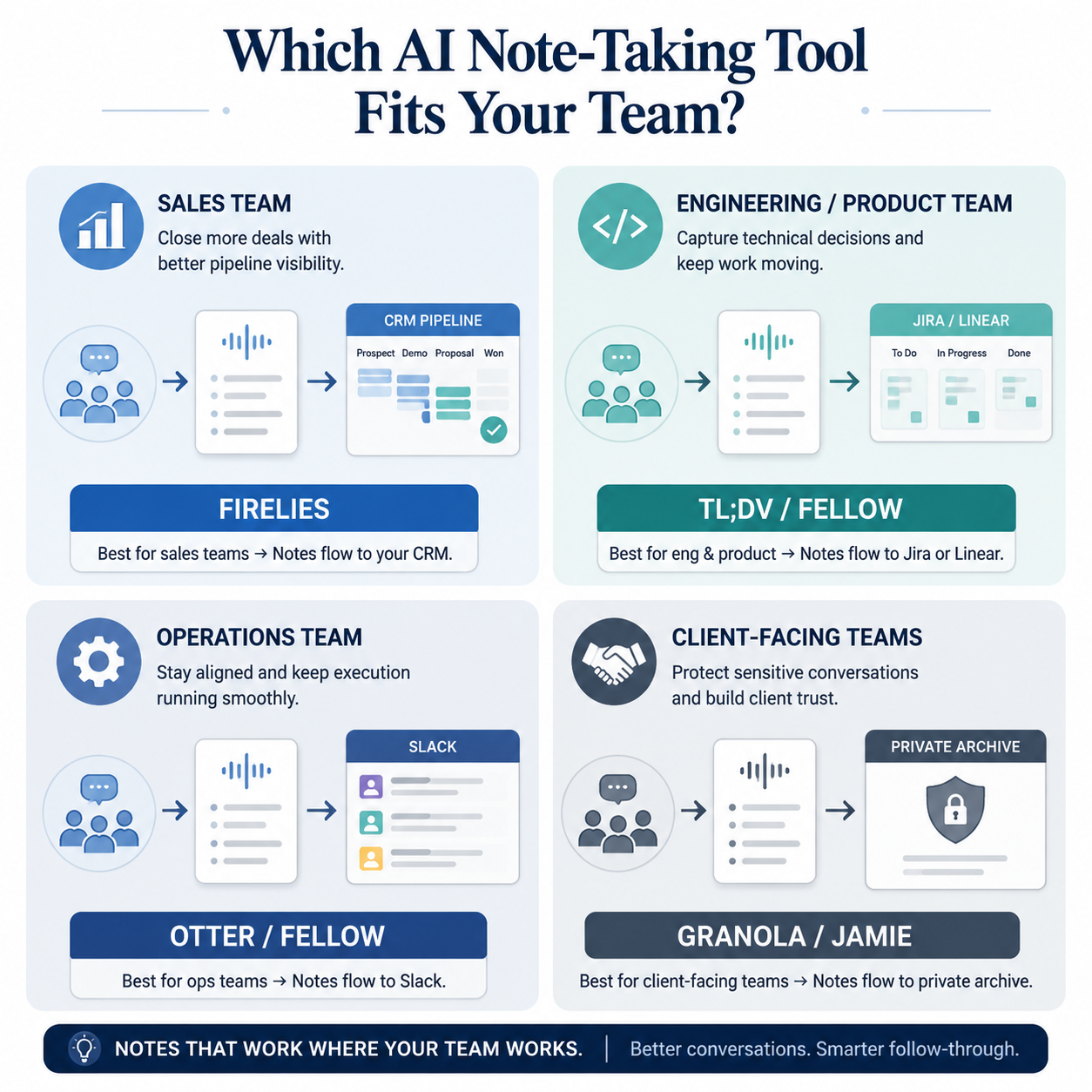
| If your team mainly runs on... | Start with... | Why it fits | Watch before rollout |
|---|---|---|---|
| CRM and sales pipeline | Fireflies.ai | 50+ native integrations, CRM auto-logging, Salesforce and HubSpot support, Slack push | AI credit usage can inflate the real per-user cost by 30–50%; Enterprise pricing is custom or unlisted |
| Issue trackers and product follow-up | tl;dv or Fellow | tl;dv has compliance depth and Jira/Linear-oriented workflow fit; Fellow combines agendas, notes, and tasks | Verify the exact tracker sync, meeting-platform behavior, and seat limits |
| Slack and shared operational memory | Otter.ai or Fellow | Otter is strong for searchable archives and collaboration; Fellow is better when agendas and task ownership matter | Otter’s CRM features require Business plan; Fellow’s free tier is sharply limited |
| Client-facing privacy-sensitive meetings | Granola or Jamie | Bot-free capture can feel less intrusive in external meetings | Privacy and invisibility do not guarantee deep workflow automation |
The sales test: does the note reach the CRM without another admin step?
Sales teams have the least patience for an AI note-taking app that creates a second source of truth. The call record has to land where pipeline reviews, handoffs, and forecasts already happen. That is why Fireflies.ai deserves serious consideration for CRM-first teams: it offers 50+ native integrations, including Salesforce, HubSpot, Slack, and Asana, and supports CRM auto-logging rather than leaving the rep or RevOps lead to paste notes manually after the call.[1][2]
That is not a small convenience. If a discovery call summary sits only in the note-taking app, the account executive still has to update the opportunity, the customer success manager may not see the risk signal, and the sales manager may review a pipeline record that looks cleaner than the actual conversation. CRM auto-logging changes the operational path of the meeting note: it moves from a personal recap to a record the revenue team can act on.
The tradeoff is cost predictability. Reviews and comparisons from March–June 2026 describe Fireflies’ AI credit model as a source of hidden cost, with the true per-user cost potentially rising by 30–50% depending on usage.[1][2] For a small sales team, that may still be acceptable if CRM logging removes enough manual work. For a fast-growing team, it is a procurement problem waiting to happen unless someone models realistic meeting volume before renewal.
Fireflies is therefore not simply “best overall.” It is best positioned when the CRM is the place where meeting residue must land. If your team mostly needs internal decisions converted into engineering tickets, or if client discretion matters more than automation depth, the Fireflies integration count is less decisive.
Engineering and product teams need fewer recaps and better follow-through
In product and engineering meetings, the expensive failure is rarely that no one remembers what was said. The expensive failure is that a decision never becomes a ticket, an owner, or a visible follow-up. For those teams, tl;dv and Fellow are more natural starting points than a CRM-first tool.
tl;dv has a strong case for teams that need notes to survive internal review before they are allowed anywhere near customer, product, or employee conversations. It is described in 2026 sources as offering SOC 2, HIPAA, and GDPR coverage, more than 50 integrations, and both bot and botless options.[3][4] Those details sound like procurement boilerplate until a security review blocks a rollout because the tool can only join meetings as a visible bot or cannot satisfy the organization’s compliance requirements.
The bot/botless distinction also matters operationally. A visible meeting bot may be fine for internal sprint planning. It may be awkward in a partner escalation, a hiring debrief, or a customer call where the team does not want another participant in the room. Public information does not settle every reliability question here, especially across meeting platforms. Microsoft Teams support, in particular, varies by tool from a fuller native app experience to simpler bot-join behavior, so Teams-heavy organizations should test actual meetings rather than trust a feature grid.
Fellow is a different kind of fit. It is not just trying to capture what happened; it is built around the meeting system itself: agendas, notes, and tasks. Its paid entry point is listed at $7 per user per month, and sources also describe SOC 2 and HIPAA support.[3][5] That makes it attractive for product managers, engineering managers, and operations leads who want the pre-meeting agenda and post-meeting follow-up in the same place.
The low entry price needs two caveats. Fellow’s free tier is severely limited at 5 lifetime AI notes per user, and its Enterprise plan has a 10-seat minimum.[5] For a tiny team testing AI notes casually, the free tier may run out before the trial teaches much. For a small but regulated team, the Enterprise seat minimum may matter as much as the advertised per-user price.
Operations teams should ask how the summary gets distributed
General operations teams often do not have one perfect destination for every meeting. Some notes belong in Slack. Some belong in a shared archive. Some become follow-up tasks. The tool has to reduce coordination work without forcing the admin to become the meeting librarian.
Otter.ai remains strong when the team needs a searchable meeting memory with collaborative features. Its product materials and third-party coverage point to shared archives, comments, reactions, and Channels as core strengths.[3][6] That makes it useful for teams that need people to revisit conversations, annotate them, and find prior decisions without asking the same person to forward notes again.
The limitations are not minor for some teams. Otter is described as limited to 6 languages, and CRM features require the Business plan at $30 per user per month.[3][6] A multilingual team or a revenue team expecting lower-tier CRM automation should treat those as fit questions, not footnotes.
Fellow becomes the better operations candidate when the meeting itself needs more structure. If weekly staff meetings, project check-ins, or cross-functional reviews suffer from vague agendas and floating action items, Fellow’s agenda-to-task path may be more valuable than a larger archive. If the organization already has a strong meeting process and mainly needs searchable recall, Otter may feel lighter.
Bot-free tools solve a different problem
Granola and Jamie belong in the comparison, but not because they beat CRM-first or issue-tracker-first tools at workflow automation. Their value is different: they are better candidates for privacy-sensitive, client-facing, or advisory settings where a visible meeting bot changes the room.
Granola is described as bot-free with 8+ integrations, while Jamie is described as bot-free with 10+ integrations.[2][7] That shallower integration ecosystem is the point to inspect closely. A client services team may gladly accept fewer downstream automations if the note-taking experience feels less intrusive. A product operations team that needs every decision reflected in Linear or Jira may find that same restraint frustrating.
The bot-free label also hides technical differences. Public coverage groups tools with different capture mechanisms, including device-audio capture for Granola and Jamie and Chrome-extension capture in adjacent tools such as Bluedot. Those differences can affect reliability by meeting platform, browser, permissions, and local device setup. Treat bot-free as a buying requirement, not as proof that the capture path will work identically everywhere.
Pricing is a trust layer, not a spreadsheet contest
The pricing picture here reflects March–June 2026 source material, and that matters because several tools use custom or unlisted enterprise pricing. Fireflies Enterprise and tl;dv Enterprise are not fully settled by public pricing alone.[1][3] A buyer who only compares visible per-seat prices can miss credit usage, seat minimums, feature gates, and compliance packaging.
- Model meeting volume before buying a credit-based plan, especially for sales teams with frequent external calls.
- Check which plan unlocks the integration you actually need, not just whether the integration logo appears on the site.
- Confirm seat minimums before assuming a low per-user price works for a small team.
- Ask whether compliance features, admin controls, and data-retention settings are available on the plan you intend to buy.
- Run a real meeting-platform test if your team relies heavily on Microsoft Teams or mixed Zoom, Google Meet, and Teams usage.
How to choose without pretending there is one winner
Start with the workflow that creates the most cleanup today. If sales reps are failing to log calls, start with Fireflies and test CRM auto-logging under realistic usage. If product decisions disappear after meetings, compare tl;dv and Fellow around Jira, Linear, agendas, owners, and compliance review. If operations needs a shared memory and Slack-friendly distribution, compare Otter and Fellow. If client visibility is the constraint, look at Granola or Jamie and accept that privacy-forward capture may come with shallower automation.
Then verify the parts public comparisons cannot settle for every organization: pricing model, compliance requirements, meeting-platform reliability, language coverage, seat limits, and whether the note lands in the system where work actually happens. The best AI note-taking app for teams in 2026 is the one that closes your team’s most expensive meeting loop, not the one with the prettiest standalone transcript.
References
- Laxis review, Laxis
- Simular comparison, Simular
- Zapier source, Zapier
- AssemblyAI source, AssemblyAI
- Fellow page, Fellow.app
- Otter page, Otter.ai
- YouCanBookMe reviews, YouCanBookMe