

The AI Writing App Tier Guide: Which Tool Actually Fits Your Workflow in 2026
A practical guide for marketers, content creators, and knowledge workers to choose the right AI writing tool by workflow tier — general chatbots, grammar and polish tools, voice-to-text apps, and marketing content platforms — with honest tradeoffs and a decision matrix.
Category: AI Writing Tools
Pricing model: Freemium
Free plan: Yes
Best for: Knowledge Workers, Marketers, Content Creators
Pricing last verified: 2026-06-16
- AI-tools
- writing
- content-creation
- marketers
- knowledge-workers

Why the AI Writing Tool Market Has Split Into Four Distinct Tiers
The AI writing assistant market has moved past the era of one-size-fits-all grammar checkers. In 2026, the landscape has fractured into four distinct tiers, each optimized for a fundamentally different writing task. A general-purpose chatbot like ChatGPT is excellent for research and brainstorming but terrible for maintaining a brand voice across a hundred product descriptions. A tool like Grammarly catches typos and adjusts tone but cannot generate a first draft from scratch. Wisprflow solves the speed bottleneck of typing but demands a quiet room and a different mental workflow. Jasper produces marketing copy at volume but is overkill for someone who just needs cleaner emails.
The problem is not a lack of capable tools — it is a mismatch between tool design and user workflow. A 2025 McKinsey survey found that 88% of companies report using AI in at least one business function, and 92% of workers say AI boosts their productivity. Yet 58% of workers still spend three or more hours per week revising or completely redoing AI outputs. That friction often comes from using the wrong tier of tool for the task at hand.
Tier 1: General-Purpose Chatbots for Research and Brainstorming
ChatGPT and Claude are the heavy lifters of the AI writing world. They are not writing tools in the traditional sense — they are reasoning engines that happen to produce text. Their strength lies in exploration: generating multiple angles on a topic, summarizing research, drafting outlines, and iterating on ideas. For knowledge workers who need to think through a problem before committing words to a document, these tools are indispensable.
The scale of adoption is staggering. ChatGPT mobile app revenue alone grew from $174 million in 2024 to $1.35 billion in 2025, according to TechCrunch data. OpenAI reported that 10% of the global adult population uses ChatGPT weekly as of July 2025. Claude, meanwhile, has carved out a loyal following among developers and researchers who value its longer context windows and Artifacts feature, which lets users generate and edit documents, code, or designs within the chat interface.
Pricing and Plans
- ChatGPT: Free tier available. ChatGPT Plus is $20/month. ChatGPT Pro (for higher usage limits and advanced models) is also available.
- Claude: Free tier available. Claude Pro is $20/month (or $200/year) and includes extended thinking mode for complex reasoning tasks.
Best For
- Research and synthesis: Summarizing long articles, extracting key points from multiple sources, and generating alternative perspectives.
- Brainstorming and outlining: Generating topic clusters, headline variations, and structural outlines before you start drafting.
- Long-form drafting: Producing a rough first pass on a blog post, report, or essay that you will then edit heavily.
Honest Limitations
- Requires strong prompting skills. The quality of output depends almost entirely on the quality of the input. Vague prompts produce generic, unusable text.
- Needs heavy editing for brand-specific content. A chatbot does not know your company's tone, terminology, or audience without extensive context-setting in every session.
- No built-in workflow for content operations. These tools do not manage drafts, track versions, or integrate with editorial calendars.
Tier 2: Grammar and Polish Tools for Editing and Refinement
Grammar and polish tools occupy a different niche entirely. They do not generate content from scratch — they improve what you have already written. For professionals who write a lot of emails, reports, and internal communications, these tools offer the highest day-to-day return on investment because they operate in the flow of existing work.
Grammarly remains the dominant player in this tier. Its free tier covers basic grammar and spelling corrections across browsers, desktop apps, and mobile keyboards. Grammarly Premium, at $12/month when billed annually (or $30/month month-to-month), adds advanced tone recommendations, full-sentence rewrites, clarity improvements, and plagiarism detection. For professionals who need to maintain a consistent tone across hundreds of daily communications, the premium tier pays for itself quickly.
Wordtune is the primary alternative, focusing more on rewriting and rephrasing existing sentences rather than catching errors. It is particularly useful for writers who know their content is structurally sound but want to experiment with different tones or levels of formality. Wordtune's strength is in offering multiple rewrite options for a single sentence, which can help break out of repetitive phrasing patterns.
Pricing Comparison: Grammar and Polish Tools
| Tool | Free Tier | Premium Pricing | Key Premium Features |
|---|---|---|---|
| Grammarly | Basic grammar and spelling | $12/month (annual) or $30/month (monthly) | Tone detection, full-sentence rewrites, clarity improvements, plagiarism detection |
| Wordtune | Limited rewrites per day | Pricing varies by plan | Multiple rewrite options, tone adjustment, length control |
Best For
- Professionals who write a high volume of external communications — emails, proposals, client updates — and need consistent tone and error-free output.
- Non-native English speakers who want real-time grammar and style suggestions as they write.
- Teams that need to enforce a brand voice across multiple writers without manual review of every piece.
Honest Limitations
- Cannot generate original content. If you are staring at a blank page, Grammarly and Wordtune will not help you start.
- Over-reliance can flatten your writing voice. Aggressive application of tone and clarity suggestions can make all text sound like it was written by the same cautious editor.
- Browser extension performance varies. Heavy extensions can slow down page load times and occasionally conflict with web-based editors.
Tier 3: Voice-to-Text Tools for Speed and Dictation
The most overlooked bottleneck in writing is not quality — it is speed. Most people type at around 40 words per minute, but they speak at 120 to 140 words per minute. Voice-to-text tools like Wisprflow aim to close that gap by letting you dictate your first draft and then cleaning up the inevitable verbal mess.
Wisprflow is the standout in this category. It is designed to work across devices and applications, capturing dictation and converting it to clean text in real time. The key differentiator is its ability to understand meaning, not just words. If you say, "Let's meet at 7 — no wait — 9:30. Starbucks — actually no — Nagarjuna in Bengaluru," Wisprflow outputs the final clean version: "Let's meet at 9:30 at Nagarjuna in Bengaluru." It strips out the false starts, corrections, and filler without requiring manual editing.
For writers who produce a high volume of first-draft content — journalists, researchers, consultants — this speed advantage is transformative. A 2,000-word article that might take an hour to type can be dictated in 15 to 20 minutes, leaving more time for the actual value-add work of editing and refining.
Best For
- Writers who produce long first drafts regularly and want to cut drafting time by 60-70%.
- Professionals who think faster than they type — dictation captures the natural rhythm of spoken thought.
- Anyone with repetitive strain injuries or conditions that make extended typing uncomfortable.
Honest Limitations
- Requires a quiet environment. Open-plan offices, coffee shops, and shared workspaces make dictation impractical without a good microphone and noise cancellation.
- Demands a different mental workflow. Dictating requires thinking in complete sentences aloud, which is a skill that takes practice. Many writers find it mentally exhausting at first.
- Not ideal for highly technical or code-heavy writing. Voice-to-text struggles with specialized terminology, punctuation, and syntax.
Tier 4: Marketing Content Platforms for Branded Content at Scale
Marketing content platforms like Jasper and Copy.ai are the most specialized tools in this landscape. They are not designed for general writing — they are built for marketing teams that need to produce a high volume of brand-consistent content across blog posts, social media, email campaigns, landing pages, and ad copy.
Jasper starts at $49/month and bundles templates for dozens of content types, internet search integration for fact-checking, and image generation capabilities. Its strength is in maintaining a consistent brand voice across multiple pieces of content and multiple writers. A marketing team can set tone guidelines once and generate drafts that adhere to those guidelines without manual prompting each time.
Copy.ai offers a similar feature set with a focus on workflow automation — it can generate content sequences for entire campaigns, not just individual pieces. Both tools integrate with common marketing platforms like HubSpot, WordPress, and Salesforce, allowing generated content to flow directly into publishing pipelines.
Best For
- Marketing teams producing 10+ pieces of content per week who need consistent brand voice across multiple channels.
- Agencies managing content for multiple clients with distinct brand guidelines.
- E-commerce teams generating product descriptions, category pages, and email campaigns at scale.
Honest Limitations
- Overkill for solo writers or casual users. If you write one blog post per week and a handful of emails, $49/month is hard to justify.
- Output still requires human editing. Generated content often needs fact-checking, structural adjustments, and a final polish pass to sound natural.
- Brand voice setup is not a one-time task. Maintaining consistency requires ongoing refinement of tone guidelines as campaigns and audiences evolve.
Pricing Comparison and Last-Verified Dates
AI tool pricing changes rapidly. The table below reflects data last verified in June 2026 from official sources and pre-crawled articles. Always check the tool's official pricing page before making a purchase decision.
| Tier | Tool | Free Tier | Paid Pricing | Last Verified |
|---|---|---|---|---|
| General Chatbots | ChatGPT | Yes | Plus: $20/month | June 2026 |
| General Chatbots | Claude | Yes | Pro: $20/month or $200/year | June 2026 |
| Grammar & Polish | Grammarly | Yes (basic) | Premium: $12/month (annual) or $30/month (monthly) | June 2026 |
| Grammar & Polish | Wordtune | Yes (limited) | Varies by plan | June 2026 |
| Voice-to-Text | Wisprflow | Freemium | Pricing varies by plan | June 2026 |
| Marketing Platforms | Jasper | No | Starts at $49/month | June 2026 |
| Marketing Platforms | Copy.ai | No | Starts at $49/month | June 2026 |
Decision Matrix: Which Tier Fits Your Writing Volume and Use Case?
The right tool depends on two variables: how much you write and what kind of writing you do. The matrix below maps writing volume (low, medium, high) against primary use case (research, editing, dictation, content marketing) to the recommended tier.
| Writing Volume | Primary Use Case | Recommended Tier | Not For You If |
|---|---|---|---|
| Low (1-5 pieces/week) | Research and brainstorming | Tier 1: General Chatbots | You need polished, publication-ready output without editing |
| Low (1-5 pieces/week) | Editing and refinement | Tier 2: Grammar & Polish | You need to generate content from scratch |
| Medium (5-15 pieces/week) | Fast first drafts | Tier 3: Voice-to-Text | You work in a noisy environment or write highly technical content |
| Medium (5-15 pieces/week) | Branded content at scale | Tier 4: Marketing Platforms | You are a solo writer without a content team or strategy |
| High (15+ pieces/week) | Any writing task | Layer multiple tiers | You expect one tool to handle everything |
Not For You If — Honest Boundaries for Each Tier
- Tier 1 (Chatbots): Not for you if you need consistent brand voice across multiple pieces, or if you expect to use output without significant editing.
- Tier 2 (Grammar & Polish): Not for you if you are staring at a blank page and need help starting. These tools refine existing text; they do not generate it.
- Tier 3 (Voice-to-Text): Not for you if you work in a shared space, write code or technical documentation, or are unwilling to invest time in learning to dictate effectively.
- Tier 4 (Marketing Platforms): Not for you if you are a solo writer producing fewer than 5 pieces per week, or if you do not have established brand guidelines and a content calendar.
How to Layer Tools Across Tiers for Maximum Impact
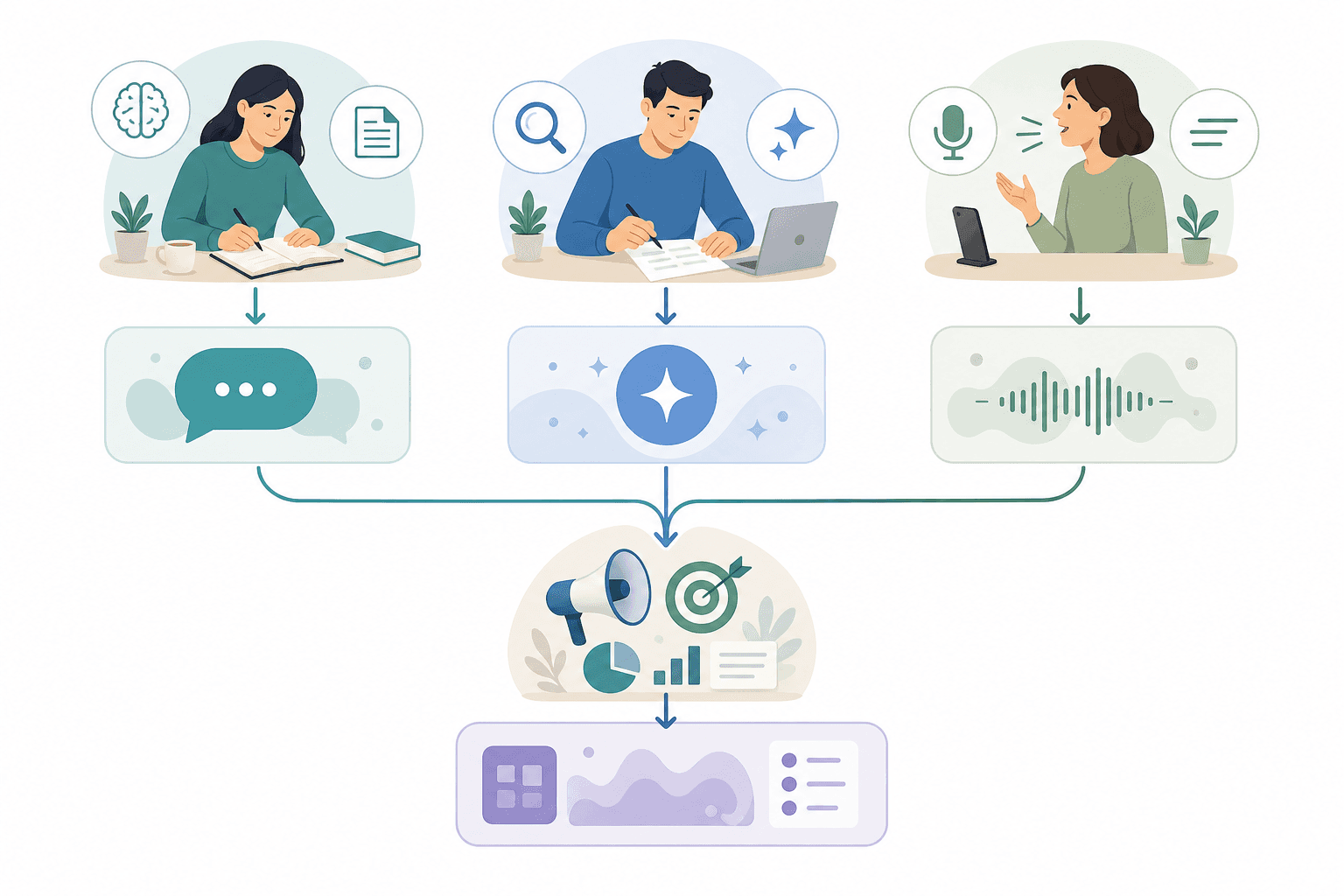
The most effective AI writing setups are not single tools — they are layered stacks that combine tools from different tiers. A knowledge worker might use ChatGPT to research and outline a blog post, dictate the first draft using Wisprflow, run the result through Grammarly for polish, and then use Jasper to generate social media snippets from the finished piece. Each tool handles the part of the workflow it is optimized for, and the combined result is faster and higher quality than any single tool could produce alone.
This layering approach is particularly powerful for teams. A marketing team might assign Jasper to handle first drafts of blog posts and email campaigns, Grammarly to enforce brand voice across all written communications, and ChatGPT for the research and strategy phase. The tools do not need to integrate directly — they just need to fit into a coherent workflow.
A Sample Layered Workflow
- Research and outline: Use ChatGPT or Claude to gather sources, generate topic angles, and produce a structural outline.
- First draft: Dictate the draft using Wisprflow at 3x typing speed. Focus on getting ideas down without worrying about polish.
- Edit and refine: Run the draft through Grammarly Premium for tone adjustment, clarity rewrites, and grammar correction.
- Repurpose and distribute: Use Jasper or Copy.ai to generate social media posts, email summaries, and newsletter snippets from the finished piece.
For a step-by-step guide on building this kind of layered AI productivity stack, see our guide on how to build an AI productivity stack layer by layer. It covers tool selection, workflow design, and common pitfalls to avoid when combining multiple AI tools.
Comments
Join the discussion with an anonymous comment.