
Note-Taking Platforms for Teams in 2026: Which Tool Actually Reduces the Search Tax?
Most teams under 150 people run 3-4 overlapping note tools and lose knowledge in the gaps. This guide evaluates the top note-taking platforms for organizational adoption, framed around the real cost of the 'search tax' and how to consolidate your stack.
Get this template ↗ (opens external source in new tab)- note-taking
- teams
- knowledge-management
- productivity
- comparison
The Search Tax: What Fragmented Note-Taking Costs Your Team
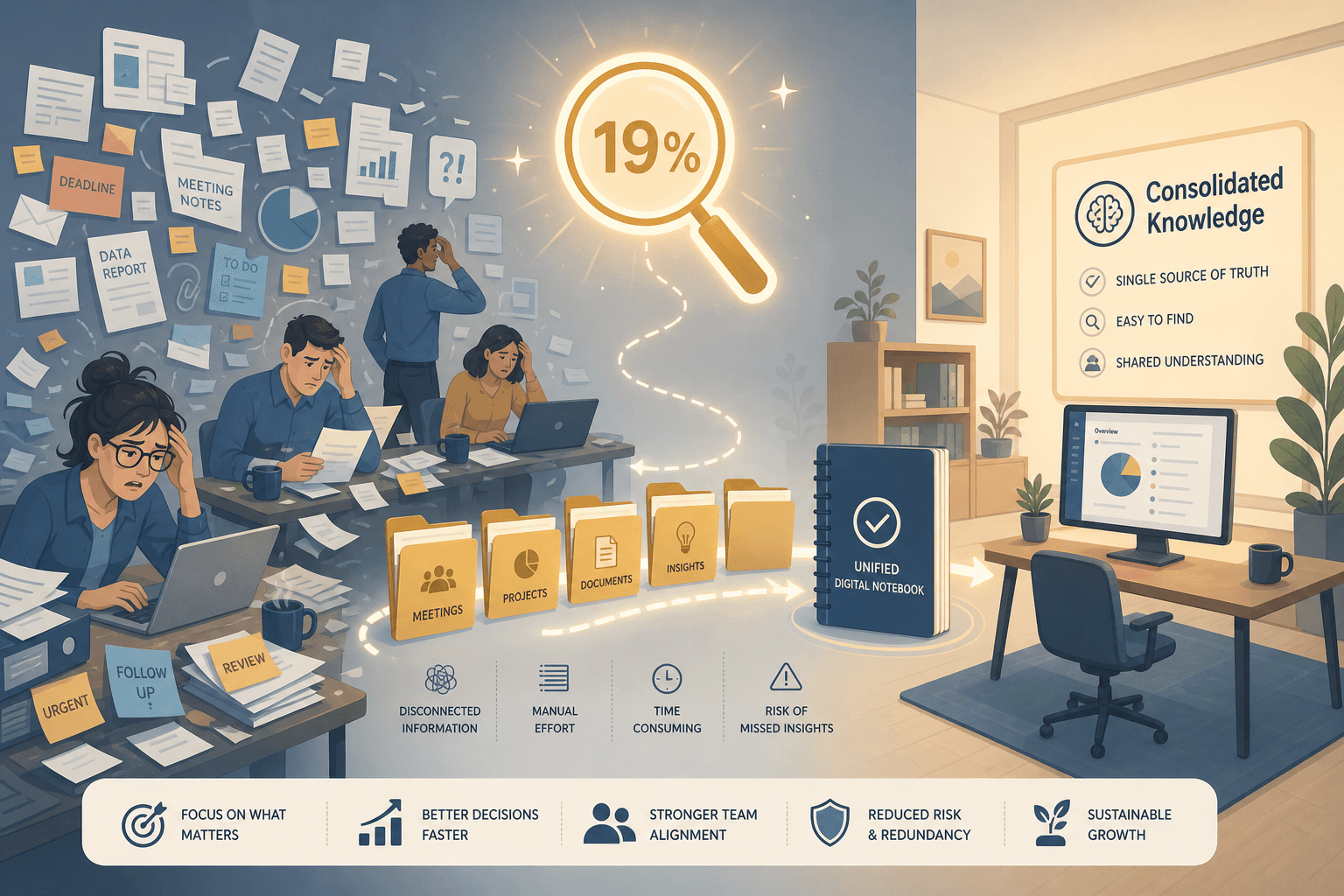
Every time a team member opens a second app to find a decision that was already documented, the organization pays a tax. Research from McKinsey has estimated that knowledge workers spend roughly 19% of their workweek searching for and gathering information. For a 50-person team with an average fully loaded annual cost of $100,000 per employee, that 19% translates to approximately $950,000 in lost productivity each year — nearly one full day per person per week spent hunting for knowledge that already exists somewhere in the organization.
This is not a problem of having too few tools. It is a problem of having too many, with no single source of truth. The note-taking platform market, which reached an estimated $13.3 billion in 2026 according to ResearchAndMarkets, has grown rapidly as teams have added more specialized apps. But the fastest-growing segment — team-oriented platforms — reflects a growing recognition that the real ROI of a note-taking tool is not its feature count, but its ability to reduce the search tax.
The goal of this guide is to help founders, team leads, and operations managers at growing companies (20–150 people) evaluate note-taking platforms through the lens of organizational adoption. We will walk through the fragmentation trap that creates the search tax, define the criteria that matter at team scale, profile the top contenders, and provide a 30-day playbook for consolidating your stack.
Why Teams Accumulate 3-4 Overlapping Note Tools (The Fragmentation Trap)
The fragmentation trap follows a predictable pattern in most growing organizations. It starts with individuals adopting personal tools that fit their immediate needs: a designer uses Apple Notes for quick sketches, an engineer uses a local Markdown editor for technical specs, and a product manager uses Google Keep for task reminders. These tools are free, frictionless, and perfectly adequate for one person.
As the team grows past 20 people, someone adds a shared wiki — often Notion or Confluence — to centralize onboarding docs, project plans, and meeting notes. This works for a while. But the personal tools do not go away. Team members continue to capture ideas, meeting action items, and reference links in their individual apps because the wiki feels too heavy for quick capture. A third tool emerges for a specific workflow: a dedicated meeting notes app, a project management tool with built-in docs, or a CRM that stores customer call notes.
The hidden costs of this fragmentation compound quickly:
- Lost context: A decision made in a Slack thread, captured in a personal note, and never migrated to the wiki is effectively lost to everyone except the person who wrote it.
- Duplicate work: When no one can find the existing analysis, teams re-research the same questions. A 2023 Gartner survey found that employees spend an average of 2.5 hours per day searching for information, much of which already exists.
- Onboarding friction: New hires must learn three or four tools to understand how the organization stores knowledge, and they still miss the undocumented context stored in personal notes.
- The search tax grows with headcount: A team of 10 can get away with asking "Does anyone know where the Q3 roadmap doc is?" A team of 50 cannot.
The fragmentation trap is not a failure of discipline. It is a structural consequence of tools that optimize for individual capture speed at the expense of organizational retrieval. The right platform for a team is the one that makes the capture-to-retrieval loop as short as possible for everyone, not just the person who wrote the note.
Evaluation Criteria for Team Adoption: Beyond the Feature List
Most note-taking comparisons focus on features: Does it support Markdown? Does it have a graph view? Can you embed a calendar? These questions matter for individual power users, but they miss the five criteria that determine whether a platform will actually reduce the search tax for a team.
1. Stack Fit: How It Integrates with Existing Tools
A note-taking platform that requires manual copy-paste from Slack, email, and your project management tool will not be adopted. The best platforms offer native integrations or well-maintained APIs for the tools your team already uses: Slack for capturing decisions, Google Calendar or Outlook for meeting notes, and your CRM or project management tool for linking context. Evaluate whether the platform can become a passive capture layer rather than requiring active migration.
2. Search Quality at Scale
A platform with 500 pages of team notes is useless if search returns irrelevant results or takes more than a few seconds. Test search with realistic queries: partial document titles, acronyms, dates, and names. Look for platforms that support full-text search across all content types (including PDFs and images via OCR), offer filters by workspace or tag, and provide AI-assisted search that understands natural language queries. This is the single most important feature for reducing the search tax.
3. Permission Model: Workspace, Team, and Page-Level Access
The permission model is the hidden dealbreaker. Many free tiers offer only workspace-level access — either everyone sees everything, or nothing works. For teams, you need granular control: workspace-level admins, team-level editors, and page-level view-only access for external collaborators or contractors. Without this, teams either over-share sensitive information or under-share useful knowledge, recreating the fragmentation problem inside a single tool.
4. Data Ownership and Portability
Vendor lock-in is a real risk for teams that invest heavily in a single platform. Evaluate export options before committing: Can you export all notes in a standard format (Markdown, HTML, or plain text)? Are attachments included in the export? Is there a documented migration path to other tools? Platforms that offer open export formats reduce the long-term risk of being trapped by a pricing change or feature deprecation.
5. First-Week Setup Friction
The best platform is the one your team actually uses. Evaluate how long it takes to set up a basic workspace, invite team members, and create the first shared document. If the setup process requires reading documentation, configuring permissions, or building a custom template system before anyone can write a note, the adoption friction is too high. The platform should feel usable within the first 15 minutes.
Platform Profiles: The Top Contenders for Team Note-Taking in 2026
The following profiles evaluate each platform through the five team-adoption criteria defined above. Pricing data was last verified against official vendor pages in June 2026. Note that pricing changes frequently — always confirm current tiers before making a purchasing decision.
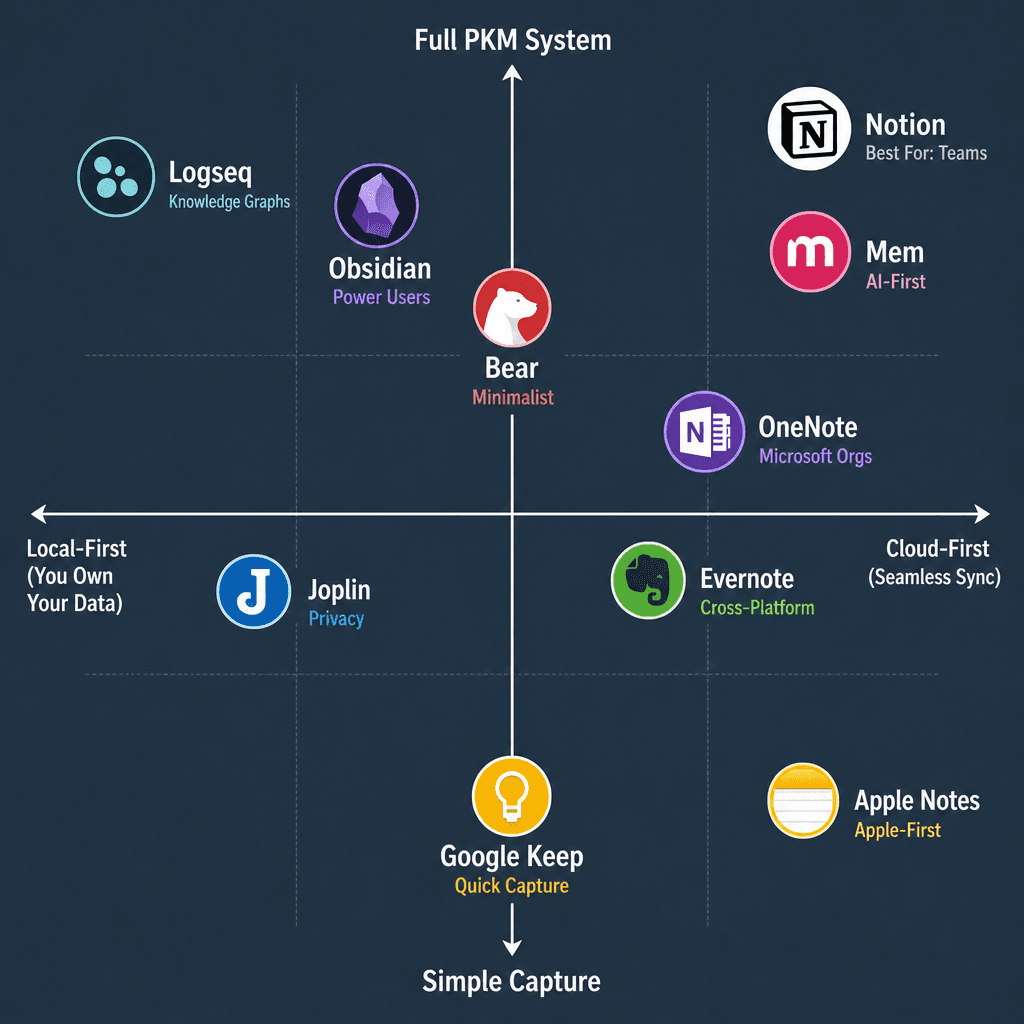
Notion: Best for Growth-Stage SaaS Teams
Notion has become the default wiki for most growing SaaS teams, with over 30 million users as of early 2025. Its strength lies in its flexibility: a single workspace can serve as a company wiki, project tracker, meeting notes repository, and knowledge base. The permission model supports workspace, team, and page-level access, making it suitable for organizations that need to share some content broadly while restricting sensitive documents.
Search quality is good but not best-in-class. Notion's full-text search covers page titles and body content, and the AI-powered search (Notion AI, available as an add-on) can answer natural language questions across your workspace. However, search performance can degrade in workspaces with thousands of pages, and the AI feature adds $10 per member per month on top of the base plan.
Pricing (verified June 2026): Free plan supports up to 10 guests and 7-day page history. Team plan is $18 per member per month (billed annually) with unlimited guests, 30-day page history, and admin tools. Enterprise plan offers advanced permissions, audit logs, and SAML SSO at custom pricing.
Not for you if: Your team is heavily invested in the Microsoft 365 ecosystem and needs deep integration with Outlook, Teams, and SharePoint. Notion's integration with Microsoft tools is limited compared to OneNote.
OneNote: Best for Microsoft 365 Orgs
Microsoft OneNote remains the strongest consolidation play for organizations already on Microsoft 365. It is included with most business subscriptions at no additional cost, supports real-time co-authoring, and integrates natively with Outlook (meeting notes), Teams (tab integration), and SharePoint (document storage). The permission model mirrors the Microsoft 365 hierarchy: notebooks can be shared at the organization, group, or individual level.
Search quality is excellent within the Microsoft ecosystem. OneNote's search indexes text in images (OCR), audio recordings, and handwritten notes — a capability that few competitors match. For teams that capture whiteboard photos, handwritten meeting notes, or audio recordings, this is a significant advantage.
Pricing (verified June 2026): OneNote desktop and mobile apps are free. Microsoft 365 Business Basic ($6 per user per month) includes OneNote, Exchange, Teams, and SharePoint. Business Standard ($12.50 per user per month) adds desktop versions of Office apps. Enterprise plans start at $22 per user per month.
Not for you if: Your team is not on Microsoft 365. OneNote's value proposition depends heavily on the broader Microsoft ecosystem. Standalone use without Outlook, Teams, and SharePoint misses most of the integration benefits.
Apple Notes: Best for Apple-First Small Teams
Apple Notes has evolved from a simple scratchpad into a surprisingly capable team tool for organizations that are fully invested in the Apple ecosystem. It supports shared folders and notes with real-time collaboration, quick capture via the Share Sheet and Control Center, and automatic syncing across iPhone, iPad, and Mac via iCloud. The permission model is simple: notes and folders can be shared with view-only or edit access, and shared folders inherit permissions for new notes added to them.
Search quality is strong within the Apple ecosystem. Apple Notes indexes text in images and scanned documents, and the system-level search (Spotlight) surfaces note content alongside other results. However, search is limited to the Apple ecosystem — there is no web-based search or API for third-party integrations.
Pricing (verified June 2026): Free with any Apple device. iCloud storage for notes is included in the free 5 GB tier; larger storage requires an iCloud+ subscription ($0.99/month for 50 GB, $2.99/month for 200 GB, $9.99/month for 2 TB).
Not for you if: Your team uses Windows, Android, or Chromebook devices. Apple Notes has no official web client or cross-platform support. Any team member on a non-Apple device is effectively locked out.
Evernote: Best for Cross-Platform Capture
Evernote remains the strongest option for teams that need reliable cross-platform capture from a wide range of sources. Its web clipper is the best in class for saving articles, emails, and web pages, and the platform supports scanning of business cards, handwritten notes, and whiteboards with OCR-based search. The permission model supports shared notebooks and spaces (Evernote's team workspace feature), with view-only and edit access levels.
Search quality is a core strength. Evernote indexes text in images, PDFs, and attachments, and the AI-powered search can recognize handwriting in scanned notes. However, the free plan is severely limited (60 MB monthly upload, syncs to only two devices), making it impractical for team use without a paid subscription.
Pricing (verified June 2026): Personal plan is $14.99 per month (or $10.83 per month billed annually) with 10 GB monthly uploads and unlimited devices. Professional plan is $17.99 per month (or $14.17 per month billed annually) with 20 GB monthly uploads, AI-powered search, and PDF annotation. Teams plan starts at $24.99 per member per month with shared spaces, admin console, and 20 GB monthly uploads per member.
Not for you if: Your team needs a modern, flexible wiki with databases, templates, and project management features. Evernote is optimized for capture and search, not for building structured knowledge bases.
Joplin: Best for Privacy-Conscious Teams
Joplin is an open-source, local-first note-taking application that appeals to teams with strict data privacy requirements. Notes are stored locally in Markdown format and can be synced via the cloud service of your choice (Nextcloud, Dropbox, OneDrive, or WebDAV) with end-to-end encryption. The permission model is not built-in — Joplin is designed for individual use, and team sharing requires a separate sync infrastructure.
Search quality is basic but functional. Joplin supports full-text search across note titles and body content, but does not index images, PDFs, or attachments. For teams that need advanced search capabilities, Joplin will require additional tooling or a hybrid approach.
Pricing (verified June 2026): Free and open source. No paid tiers. Sync infrastructure (Nextcloud, Dropbox, etc.) may have its own costs.
Not for you if: Your team needs real-time collaboration, granular permissions, or a managed cloud service. Joplin is a local-first tool designed for individual power users and small teams with technical expertise to manage their own sync infrastructure.
Quick-Reference Comparison Table
The table below summarizes the key decision factors for each platform. Use it as a starting point for narrowing your options before running a pilot.
| Platform | Best For | Pricing Range (per user/month) | Permission Model | Search Quality | Platform Availability | Data Ownership |
|---|---|---|---|---|---|---|
| Notion | Growth-stage SaaS teams | Free / $18 (Team) / Custom (Enterprise) | Workspace, team, page-level | Good (AI add-on available) | Web, Mac, Windows, iOS, Android | Export to Markdown, HTML, PDF |
| OneNote | Microsoft 365 orgs | Free / $6–$22 (M365 plans) | Notebook, section, page-level (M365 hierarchy) | Excellent (OCR, audio, handwriting) | Mac, Windows, iOS, Android, Web | Export to .one, PDF; limited Markdown |
| Apple Notes | Apple-first small teams | Free (iCloud+ storage extra) | Folder and note-level sharing | Good (Spotlight integration, OCR) | Mac, iOS, iPadOS only | Export to PDF; no bulk export |
| Evernote | Cross-platform capture | $10.83–$24.99 (Teams) | Notebook and space-level | Excellent (OCR, handwriting, PDF) | Mac, Windows, iOS, Android, Web | Export to ENEX, HTML, PDF |
| Joplin | Privacy-conscious teams | Free (open source) | None built-in (sync via third-party) | Basic (full-text only) | Mac, Windows, Linux, iOS, Android, CLI | Full Markdown export; local-first |
The 30-Day Consolidation Playbook: How to Pilot One Tool for Your Team
Choosing a platform is only half the battle. The harder part is getting the team to actually use it. The following playbook is designed to minimize disruption and maximize adoption by focusing on a single anchor workflow.
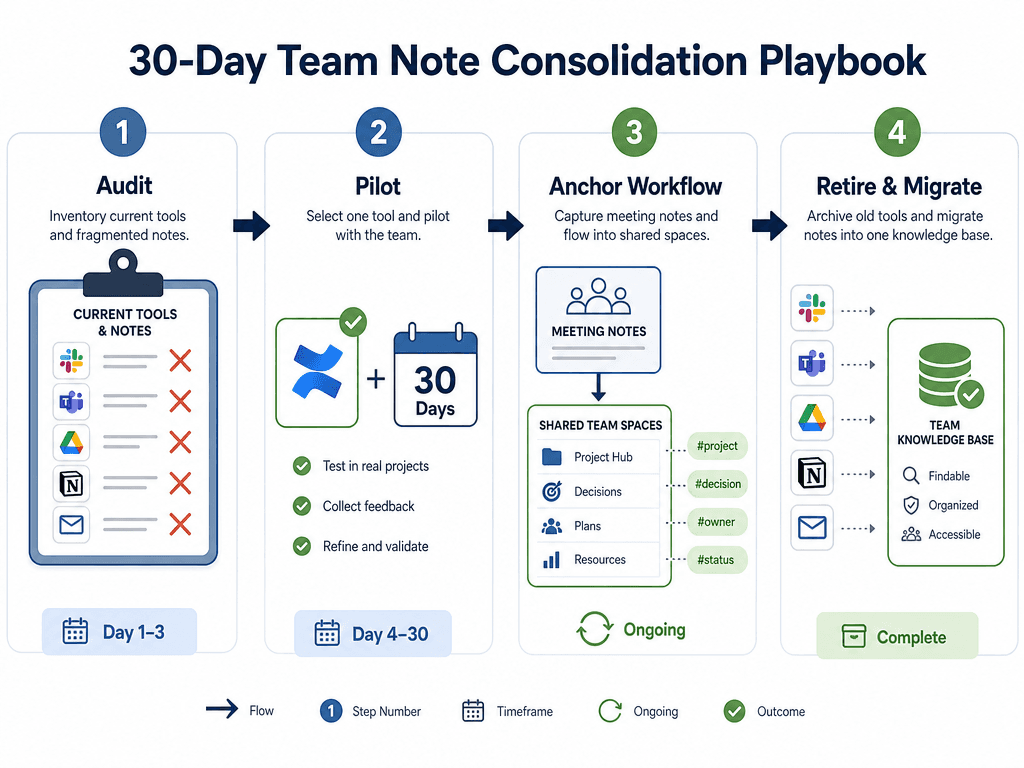
Week 1: Audit Current Tools and Identify the Anchor Workflow
Start by mapping every note-taking tool currently in use across the team. Send a short survey asking three questions: (1) Which tools do you use for capturing notes? (2) Which tool do you use most often for finding information? (3) What is the one type of note you wish were easier to find? The answers will reveal the fragmentation pattern and the most painful gap.
From the survey results, identify one anchor workflow that affects the most team members. For most teams, this is meeting notes — every team member attends meetings, and meeting notes are the most commonly searched-for type of content. Choose this as the pilot workflow.
Week 2: Set Up the Pilot Workspace and Define Success Metrics
Create a dedicated workspace in the chosen platform for the pilot. Invite 5–10 team members from different functions. Define a simple structure: one shared folder or space for each team (engineering, marketing, operations), with a consistent template for meeting notes that includes date, attendees, decisions, and action items.
Define two success metrics: (1) Adoption rate: at least 80% of pilot participants capture meeting notes in the new platform by the end of week 3. (2) Search success rate: a participant can find a specific decision from a meeting held two weeks earlier within 30 seconds.
Week 3: Run the Pilot and Collect Feedback
All pilot participants commit to capturing meeting notes exclusively in the new platform for one week. Existing notes in other tools remain untouched — the goal is not migration yet, but behavior change. At the end of the week, collect feedback via a brief survey: What was the hardest part? What was missing? Did you find it easier or harder to find information than before?
Week 4: Evaluate, Decide, and Plan Migration
Review the success metrics and feedback. If adoption is below 60%, identify the friction points — was the platform too complex, the template too rigid, or the search too slow? If the pilot is successful, create a migration plan for the remaining tools: export notes from the old platforms, archive them in the new workspace, and set a retirement date for each old tool. Communicate the timeline clearly and provide a simple reference for how to capture and find notes in the new system.
Which Platform Wins for Your Team?
There is no single best note-taking platform for every team. The right choice depends on your existing tool stack, team size, and privacy requirements. The following recommendations are starting points for your evaluation, not absolute verdicts.
- Notion is the default for most growing SaaS teams (20–150 people) that need a flexible wiki, project tracking, and knowledge base in one platform. Its permission model and template system make it suitable for organizations that are growing fast and need a scalable knowledge foundation.
- OneNote is the strongest consolidation play for Microsoft 365 orgs. If your team already uses Outlook, Teams, and SharePoint, adding OneNote costs nothing extra and integrates seamlessly. The OCR and handwriting search capabilities are unmatched for teams that capture whiteboards and handwritten notes.
- Apple Notes works well for small teams (under 20 people) that are fully invested in the Apple ecosystem. It is free, frictionless, and surprisingly capable for shared meeting notes and quick reference docs. But it is a dead end for any team that hires Windows or Android users.
- Evernote is the best choice for teams that need reliable cross-platform capture from a wide range of sources — web pages, emails, scanned documents, and handwritten notes. Its search quality is best-in-class, but the pricing is higher than competitors for team plans.
- Joplin is the right choice for privacy-conscious teams that need full control over their data. It is free, open source, and local-first. But it requires technical expertise to set up team sharing and lacks the search quality and collaboration features of commercial platforms.
The search tax is real, but it is not inevitable. By consolidating your team's note-taking into a single platform with strong search, clear permissions, and a simple capture workflow, you can recover a significant portion of the time your team currently spends hunting for information. Start with the 30-day pilot, focus on one anchor workflow, and let the results guide your decision.
Comments
Join the discussion with an anonymous comment.