
Best Free Note-Taking Apps for Students 2026: A Head-to-Head Comparison by Study Style
Choosing the right free note-taking app depends on your study style, major, and device. This guide compares six top free options and shows you how a two-app stack can outperform any single paid tool.
Get this template ↗ (opens external source in new tab)- note-taking
- students
- free-plan
- cross-platform
- best-for
TL;DR: Which Free Note-Taking App Should You Pick?
If you only have thirty seconds, here is the short version: the best free app for you depends on what devices you own and how you study. The table below gives you a quick verdict for each major free option. Use it as a starting point, then read the deep dives to confirm your choice.
| App | Free Tier Limits | Handwriting Support | Best For (Study Style) | Setup Difficulty |
|---|---|---|---|---|
| Microsoft OneNote | 5 GB OneDrive storage; all core features free | Yes (ink drawing, math equations) | Cross-platform users; STEM majors; structured notebooks | Beginner |
| Notion (with .edu email) | Unlimited blocks, file uploads, version history (Plus plan) | No native handwriting (use embedded drawing or third-party) | All-in-one workspace; project management; group collaboration | Intermediate |
| Apple Notes | 5 GB iCloud storage; included on all Apple devices | Yes (iPad + Apple Pencil) | Apple-only students; quick capture; humanities | Beginner |
| Google Keep | 15 GB shared across Google apps | No (text and voice only) | Quick capture; reminders; Android users | Beginner |
| Obsidian | Unlimited local storage; free for personal use | No (text and Markdown only; plugins may add drawing) | Power users; CS majors; local-first privacy advocates | Advanced |
| Joplin | Unlimited local storage; free and open-source | No (text and Markdown only) | Open-source enthusiasts; users who want full control | Intermediate |
Why the Best Free App Depends on Your Study Style and Major
Most note-taking app comparisons treat students as a single group. They ask "which app is best?" as if the answer were the same for a philosophy major typing lecture notes on a MacBook and a mechanical engineering student sketching diagrams on a Windows tablet. It is not.
Your study style — whether you type or handwrite, work alone or in groups, need quick capture or deep organization — determines which app will actually serve you. So does your major. A computer science student who lives in Markdown files has different needs than a pre-med student who needs to annotate PDFs and draw diagrams. And your device ecosystem matters: an Apple-only student can lean on Apple Notes for frictionless capture, while a cross-platform student needs something that syncs everywhere.
This is why the strongest strategy for most students is not a single paid tool but a free two-app stack. Pick one app for fast, low-friction capture (lecture notes, quick ideas, to-dos) and a second app for organization, review, and deep study. The combination often outperforms any single app — even a paid one — because each app does what it does best.
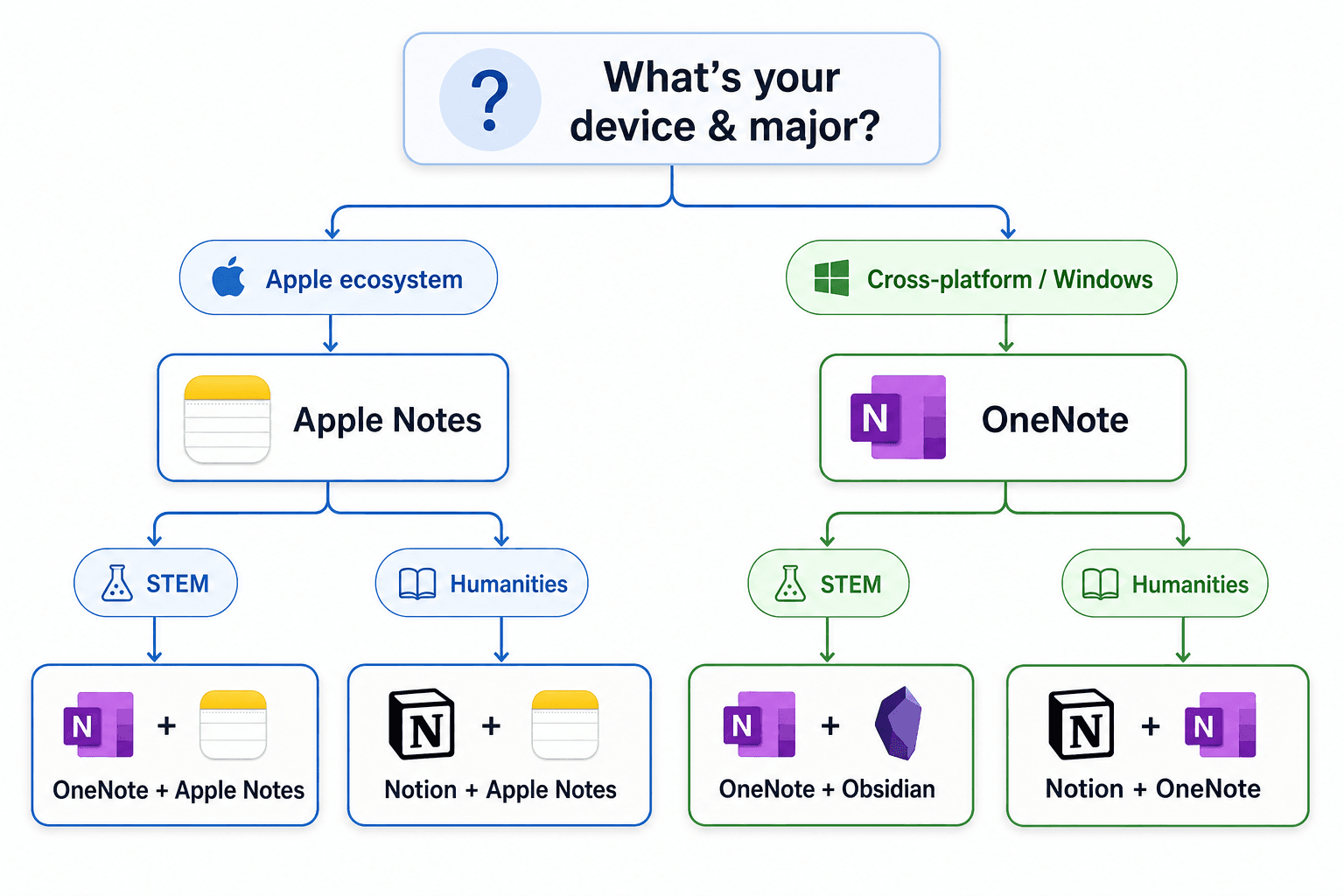
Decision Flow Chart: Find Your Free App Stack in 3 Questions
Answer these three questions to find your recommended free app stack. Each path leads to a combination of two apps that cover both quick capture and deep study.
Question 1: What device ecosystem do you use?
- Apple-only (Mac, iPad, iPhone): You can use Apple Notes for quick capture and pair it with OneNote or Notion for deep study.
- Cross-platform (Windows, Android, Chromebook, or a mix): OneNote is your best foundation. Pair it with Notion for structured project work.
Question 2: What is your major or study style?
- STEM (engineering, math, physics, chemistry, pre-med): You need handwriting support for equations and diagrams. OneNote is your primary app. Pair with Notion for lab reports and project tracking.
- Humanities (philosophy, history, literature, languages): Typing is usually fine. Apple Notes or Google Keep for capture, Notion for organizing essays and research.
- Computer Science / Programming: You likely prefer Markdown and local files. Obsidian or Joplin for deep notes, Google Keep for quick capture.
Question 3: Do you need handwriting support?
- Yes: OneNote or Apple Notes (if you have an iPad and Apple Pencil).
- No: Notion, Google Keep, Obsidian, or Joplin — all are text-first.
Deep Dive: 6 Free and Student-Free Apps Compared
Here is a detailed look at each app, covering what the free tier actually includes, key strengths and weaknesses for students, and the ideal study style or major fit.
Microsoft OneNote — Best Truly Free Cross-Platform Option
PCMag gives OneNote a 4.5/5 rating and calls it "Best Overall," noting that even as a free app it "has every feature you could want" including organizational structure, cross-platform syncing, voice notes, and OCR. Zapier confirms it is "free for up to 5GB of notes" with a "great free plan that's widely available on every platform." Drawboard adds that OneNote is "fully free" with "full access to core features across all platforms."
For students, the key advantage is that nothing is locked behind a paywall. You get notebooks, sections, pages, ink drawing, math equation support, audio recording, and cross-device sync — all at $0. The 5GB storage limit is enough for several semesters of text notes; if you need more, 100GB costs $1.99/month.
Best for: STEM majors who need handwriting support, cross-platform users, and anyone who wants a structured notebook system without paying.
Notion — Effectively Free with a .edu Email
Atlas reports that "Notion is the most-installed note-taking app among college students in 2026." The reason is simple: with a .edu email, students get the Plus plan free, which includes unlimited blocks, file uploads, and version history. Drawboard confirms the "Student Pro: Free Personal Pro upgrade with a .edu email."
Notion is not a traditional note-taking app — it is a workspace that combines notes, databases, task management, and wikis. This makes it powerful for students who want to organize their entire academic life in one place. However, it has no native handwriting support, and the initial setup can feel overwhelming. Atlas's 14-day study found that Notion had an average daily-capture friction of 2.4 seconds per note, significantly higher than Apple Notes (0.4s) or OneNote (0.6s).
Best for: Students who want an all-in-one workspace for notes, assignments, and project management. Ideal for group projects and humanities majors who type their notes.
Apple Notes — Best for Apple-Only Students
Apple Notes is "free, fast, and integrated everywhere on Apple devices," according to Atlas. Zapier describes it as "as convenient, easy to use, and as useful for most people as any of the premium picks." It is included on every iPhone, iPad, and Mac, with 5GB of free iCloud storage shared across all Apple services.
The app excels at quick capture: Atlas's study measured average capture friction at just 0.4 seconds, the fastest of any app tested. It also supports handwriting on iPad with Apple Pencil, making it a solid choice for students who want to sketch diagrams or annotate PDFs. The downside is that it is limited to Apple devices — there is no Windows or Android app, and the web version is basic.
Best for: Students who own only Apple devices and want a zero-setup, fast, reliable note-taking app for both typed and handwritten notes.
Google Keep — Best for Quick Capture
Google Keep is "free for 15GB of storage across all of Google apps" and integrates with Gmail and Docs, according to Zapier. It is designed for speed: you can create a note, a list, or a reminder in seconds. PrimeTech Insights calls it "best for quick capture across Android and web."
Keep is not a deep note-taking tool. It lacks folders, notebooks, handwriting support, and rich formatting. But it excels as a capture tool for ideas, to-dos, and quick references. The 15GB storage is shared with Google Drive and Gmail, which is generous but can fill up fast if you store a lot of images or files.
Best for: Students who want a lightweight, fast way to capture ideas on the go. Pairs well with Notion or OneNote for deeper organization.
Obsidian — Best for Power Users
PCMag rates Obsidian 4.0/5 as "Best for Power Users," noting it is "entirely free for personal use" but "difficult to get started with." Zapier confirms it is "free for personal use" with premium add-ons like Sync at $5/month. Obsidian stores all notes as local Markdown files, giving you full ownership and control over your data.
Obsidian's strength is its plugin ecosystem and bidirectional linking, which lets you build a connected knowledge base over time. This is powerful for students who want to connect ideas across courses. However, the learning curve is steep: you need to understand Markdown, folder structures, and plugins to get the most out of it. It also has no native handwriting support.
Best for: Computer science majors, power users, and students who want a local-first, private, and highly customizable note-taking system.
Joplin — Best Open-Source Option
PCMag gives Joplin a 4.5/5 rating, calling it "Best Open-Source App" and describing it as "as close to a perfect note-taking app as you can get if you're looking for something relatively simple." It is free and open-source, with unlimited local storage. Optional Joplin Cloud sync starts at around €2.99/month.
Joplin supports Markdown, notebooks, tags, and synchronization with various cloud services. It is less feature-rich than Obsidian but easier to set up. It also lacks handwriting support and has a smaller plugin ecosystem. For students who want a free, open-source, cross-platform app without the complexity of Obsidian, Joplin is a solid choice.
Best for: Students who want a free, open-source, cross-platform note-taking app with Markdown support and basic organization features.
The Pricing Truth Table: What 'Free' Really Means for Each App
"Free" means different things across these apps. Some give you all features with a storage cap. Others gate key features behind a paywall. The table below shows what you actually get at $0.
| App | Free Storage | Feature Gating | Device Limit | .edu Discount |
|---|---|---|---|---|
| Microsoft OneNote | 5 GB (OneDrive) | None — all core features free | Unlimited devices | Often included with school M365 licensing |
| Notion | Unlimited (with .edu Plus plan) | Free plan: 7-day page history, 5 MB file uploads. .edu Plus: unlimited | Unlimited devices | Free Plus plan with .edu email |
| Apple Notes | 5 GB (iCloud, shared) | None — all features free | Apple devices only | N/A |
| Google Keep | 15 GB (shared across Google apps) | None — all features free | Unlimited devices | N/A |
| Obsidian | Unlimited (local storage) | Sync ($5/mo), Publish ($10/mo) are paid add-ons | Unlimited devices (local) | N/A |
| Joplin | Unlimited (local storage) | Joplin Cloud sync (~€2.99/mo) is optional | Unlimited devices (local) | N/A |
Comments
Join the discussion with an anonymous comment.