
 Framework
How to Choose Your First PKM Framework (When Every Method Claims to Be the Best)
Feeling paralyzed by the endless options in personal knowledge management? This article cuts through the noise with a simple decision tree and a 30-day starter workflow that works for PARA, Zettelkasten, or CODE/BASB — so you stop researching and start writing your first note today.
Origin: Tiago Forte (PARA, CODE/BASB); Niklas Luhmann (Zettelkasten); dsebastien (PKM mistakes)
By Editorial Team
- PKM
- PARA
- Zettelkasten
- second-brain
- beginner-friendly
Three weeks, fifteen articles, five communities, zero notes
That is not an exaggeration — it is a direct quote from dsebastien, who catalogues common PKM mistakes. One of them, the Overthinker, spends three weeks watching YouTube videos about note-taking methods, reads fifteen articles comparing tools, joins five Discord communities — and has not written a single note yet. If that describes you, you are not alone. You are not suffering from a lack of good methods. You are suffering from the paradox of choice. For every workflow pattern, someone wrote a glowing testimonial. PARA, Zettelkasten, CODE, GTD-light, Johnny Decimal, Second Brain — each claims to be the answer. When everything claims to be the best, the rational response is paralysis.
The fastest way out is not to find the perfect method. It is to pick any method and stick with it long enough to learn what your actual friction points are. I have seen this work dozens of times. This article gives you a simple decision tree to choose a starting point, then a 30-day workflow that has a track record of producing roughly 100 notes and a working habit. The goal is not to build a perfect system in a month. The goal is to have something you actually use, so that after 30 days you can make an informed decision about what to tweak — instead of starting over from zero.
One question cuts the research phase
Forget the feature tables, the note-taking app comparisons, the "best for developers" lists. None of that matters until you answer this question:
Am I managing projects, ideas, or both?
The answer determines which framework will feel natural to you. Here is the decision tree.
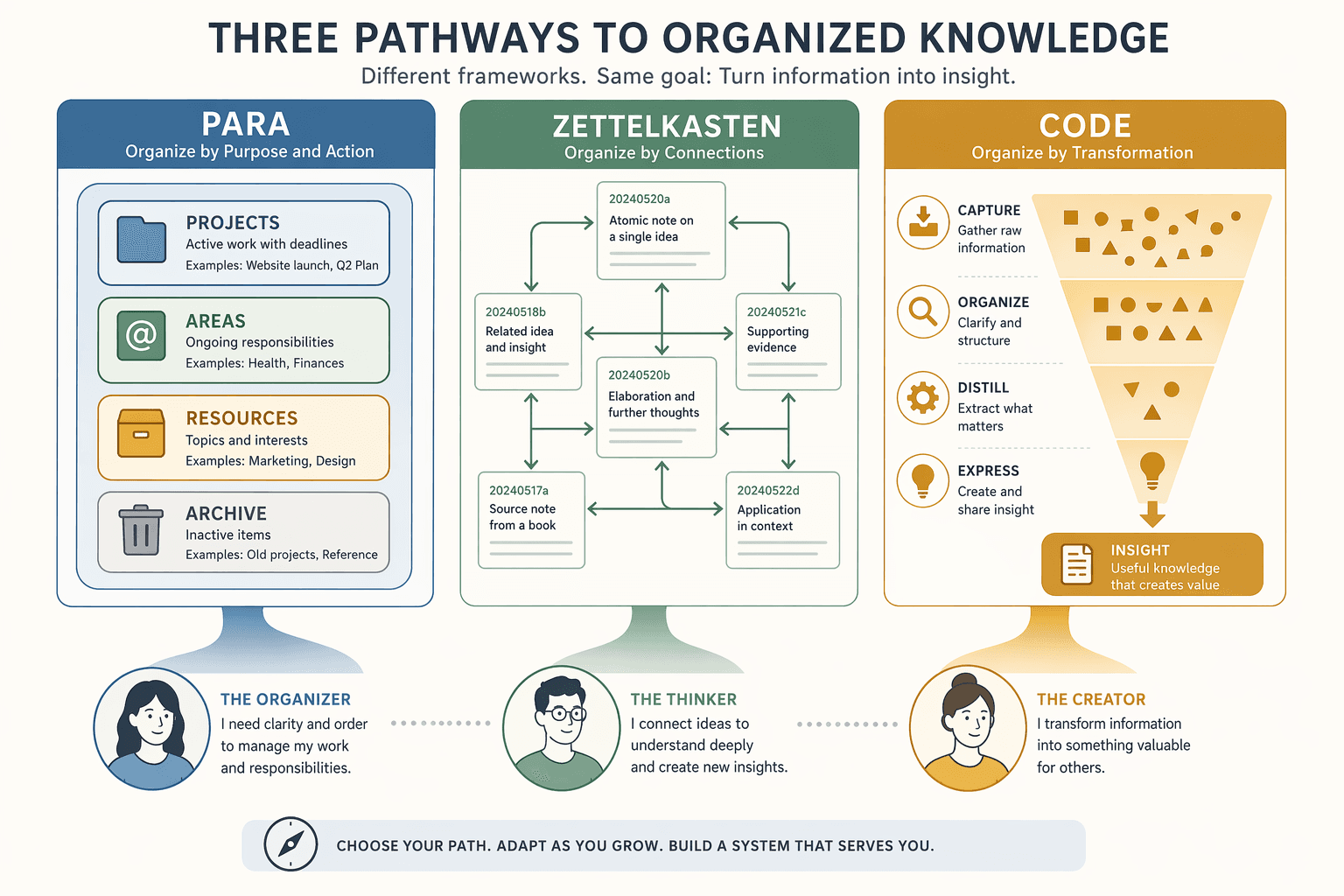
If you mainly juggle deadlines, deliverables, and ongoing responsibilities — projects — start with PARA. If you mainly collect ideas, make connections, and write — start with a simplified Zettelkasten. If you consume a high volume of content and want to synthesize it into outputs — start with CODE (Capture, Organize, Distill, Express), the engine behind the Building a Second Brain method. I will walk through each briefly. The point is not to give you an exhaustive comparison — we already have articles that do that. The point is to get you to a starting line.
PARA organizes all digital information into four top-level categories, as defined by Tiago Forte: Projects (short-term efforts with a defined goal), Areas (ongoing responsibilities), Resources (topics of interest), and Archives (inactive items). That is it. Four folders. The reason this is the safest default for beginners is simple: it is hard to mis-file something across only four categories. You do not need a deep taxonomy, tags, or a folder hierarchy. You drop a note into one of four buckets and move on. According to the Atlas Workspace guide, PARA is the method most likely to survive a busy quarter. When life gets messy — and it always does — you do not want a system that requires daily maintenance. PARA lets you archive projects and forget them. The overhead stays near zero. Project-driven readers: start here. Set up four folders in any tool — Notion, Obsidian, Apple Notes, a physical binder — and start filing.
The ambition is real: Niklas Luhmann produced 70+ books and 400+ academic articles out of a slip-box of roughly 90,000 notes over 30 years. A Zettelkasten done well can power decades of creative work.
But if you try to replicate the full system on day one — atomic notes, elaborate linking, structure notes, hub notes — you will burn out before you write your tenth note. The Zettelkasten has the highest ceiling but steepest setup of any method. For beginners who are idea-driven — researchers, writers, curious people who want to connect concepts — I recommend a simplified version:
- Write one atomic note per idea. One thought, one note.
- When you write a new note, link it to at least one existing note that relates.
- Do not worry about folders or tags. Just write and link.
That is enough for the first 30 days. The full Zettelkasten complexity — structure notes, index notes, careful classification — can wait until month three, if you discover your real need is creative synthesis.
If your days are spent reading long articles, listening to podcasts, clipping newsletters, and you want to turn that into tangible outputs — a blog post, a report, a presentation — then the Building a Second Brain methodology offers a natural pipeline. The Forte Labs guide describes the four-step CODE method: Capture, Organize, Distill, Express. The key differentiator is progressive summarization. You read a 5,000-word article, highlight 500 words, bold 100, summarize the gist in 20. The next time you visit, the 20 words carry the cognitive load. You do not need to reread the full piece. This branch suits content creators, researchers who write papers, or anyone who needs to synthesize a large volume of input into regular output. It is more structured than a simplified Zettelkasten but less rigid than PARA. One note: CODE works best when you already have a steady stream of incoming content. If you are starting from scratch with no existing reading habit, try PARA first — the capture phase can feel empty.
The 30-day starter workflow
Whichever branch you chose, the next 30 days look the same. The method differences matter less than the practice. Here is the blueprint, adapted from Atlas Workspace and tested with several beginner groups.

| Phase | Days | What to do | Goal |
|---|---|---|---|
| Volume capture | 1–7 | Capture 30–50 notes without organizing them. Write anything — quotes, ideas, tasks, questions. Use any app or paper. | Build the capture habit. Volume beats structure. |
| Pick a filing method | 8–14 | Apply your chosen framework (default: PARA). Revisit your captured notes and file each into Projects, Areas, Resources, or Archives. | Learn where notes go. The act of filing teaches the system. |
| Daily capture | 15–21 | Capture at least three things every day: one from what you read, one from what you did, one from what you thought. | Embed the daily habit. Three is trivially doable. |
| Weekly review | 22–30 | Spend 30 minutes once a week: re-file anything that drifted, link related notes, archive old items, and surface one idea worth writing about. | Close the loop. See the system working. |
When temptation strikes: stick with it
Around day 25, a feeling will creep in. The initial excitement has faded. You may start browsing YouTube for "best PKM method 2026" again. A shiny new app just launched. Someone in your favorite community swears by Method X. Resist it.
The rule: commit to one tool and one method for 90 days minimum before evaluating. The system compounds, and compounding requires time. According to dsebastien, a Tool Hopper migrates notes 4 times in 2 years, each migration taking 2-3 weeks. That is 2-3 months of the PKM journey spent moving data instead of creating value. Do not become a Tool Hopper.
There is exactly one legitimate reason to switch before 90 days: retrieval is failing. You cannot find notes when you need them. If your filing system produces zero recall, then yes, change. Otherwise, stay the course. I have seen too many beginners restart every six weeks, carrying nothing forward. They end up with the same 90-day outcome as someone who stuck with one method: still at zero. Do not let the search for the perfect method become a substitute for actually taking notes.
If you want to understand why most people quit PKM apps altogether, read this analysis — it covers the exact trap we are talking about.
Now go write your first note.
Comments
Join the discussion with an anonymous comment.