
Android has plenty of good note-taking apps. What it still lacks in 2026 is the boring, obvious default that iPhone users often get from Apple Notes: quick capture, decent organization, handwriting, attachments, sync, and enough polish that many people never have to shop around. On Android, Google Keep is fast but shallow, OneNote is broad but not Android-native in feel, Samsung Notes is excellent with an S Pen but tied to Galaxy devices, Obsidian gives you durable local files, and AI-native study apps are racing ahead in a different lane entirely.
So the useful question is not “What are the best note taking apps for Android?” in the abstract. It is: what job do you need the app to do every week, and what compromise will annoy you least after the novelty wears off?
Last verified: June 27, 2026. Pricing, AI limits, storage caps, and platform availability can change quickly, especially for newer AI tools. Treat any free-plan decision as something to re-check before moving a semester’s worth of notes or a client archive.
The quick answer: choose by constraint, not by feature count
| If your real priority is… | Start with | Why it fits | Main catch |
|---|---|---|---|
| A free all-rounder for school, work, and personal notes | Microsoft OneNote | Strong free tier, cross-platform sync, freeform pages, handwriting, attachments, and enough structure for most people | The interface can feel heavy, and organization takes discipline |
| Handwriting on a Galaxy Tab or Galaxy phone with S Pen | Samsung Notes | The most convincing Android handwriting experience when you are inside Samsung’s hardware ecosystem | No iOS or Mac app, and migration can become painful |
| Long-term ownership and portable notes | Obsidian | Local Markdown files are easy to back up, inspect, and move | No native AI transcription or summaries, and setup can feel unfriendly |
| Lecture-to-study automation | Notelyn, Storyflow, or another AI-native study app | The appeal is the full workflow: record, transcribe, summarize, generate flashcards, then quiz yourself | Vendor comparisons are promotional, and free AI limits may be tighter than they look |
| Fast capture for lists, reminders, and stray thoughts | Google Keep | Instant, familiar, and widely available on Android | No folder hierarchy, serious study workflow, AI summarization, or strong handwriting-to-text path |
| Reliable use across Android, Windows, Mac, Chromebook, and sometimes iOS | OneNote first; then compare Notion, Evernote, UpNote, and Obsidian | Cross-device access matters more than any one Android feature if you switch screens all day | Parity varies: the Android app may not match the desktop app |
If you already know you need Android plus Chromebook, start with the dedicated Chromebook note-taking comparison. If your main worry is whether the same app behaves properly across several operating systems, the broader cross-platform sync and parity comparison is the better companion.
Best free default for most Android users: OneNote
OneNote is the Android recommendation that sounds least exciting and often survives the longest. Its free tier is unusually practical because it combines broad storage availability, sync across major platforms, typed notes, handwriting, attachments, and a freeform canvas instead of forcing everything into a narrow document column. Zapier’s 2026 roundup and TechRadar’s Android note-taking coverage both place OneNote among the strongest options for Android users, with its free availability and cross-platform reach doing much of the work.[1][2]
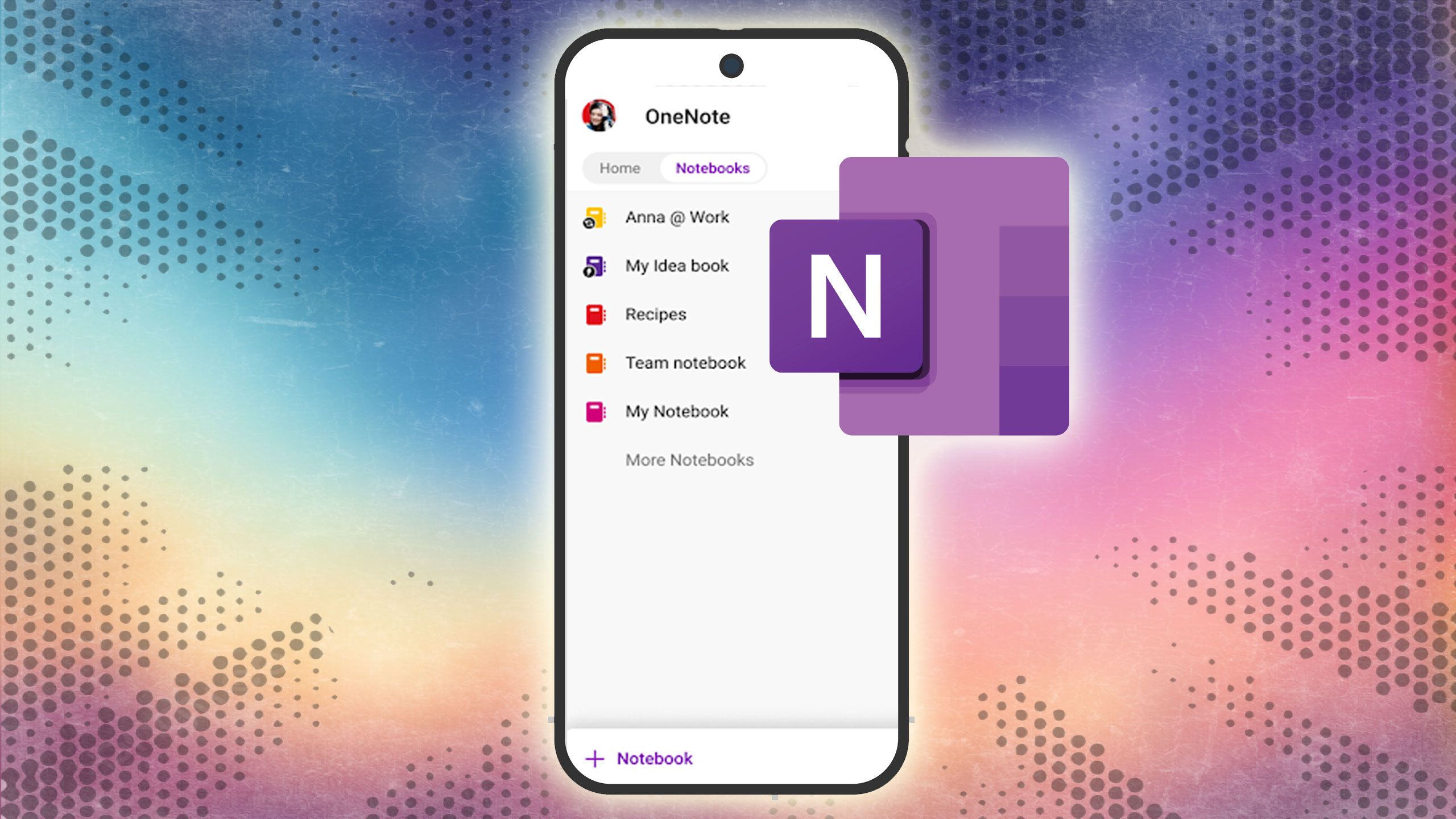
The freeform page matters more than spec tables usually admit. A student can drop a lecture slide beside handwritten margin notes. A project manager can keep meeting bullets, pasted screenshots, and follow-up lists in one messy but readable space. A freelancer can make one notebook for clients, one for templates, and one for personal admin without immediately running into a paid wall.
The weakness is not that OneNote lacks features. It is that it gives you enough room to create a junk drawer. Sections, pages, and notebooks need a simple naming habit or search becomes the only way back. On Android tablets, it is capable; on Windows, it is often more comfortable. That imbalance is worth knowing before you decide your Android tablet will be the main place you maintain the whole system.
Choose OneNote if you want one free app that can plausibly handle class notes, work notes, household planning, PDF markup, and cross-device sync. Skip it if what you actually want is a lightweight capture tray or a local-first writing system you can understand by opening a folder.
Best Galaxy handwriting choice: Samsung Notes
Samsung Notes is the easiest app in this list to both praise and warn people about. On a Galaxy Tab with an S Pen, it can feel like the Android tablet experience other apps are still trying to imitate: low-friction handwriting, clean PDF annotation, quick pen tools, and the kind of hardware-software fit that makes you stop thinking about the app.
The lock-in is the price of that comfort. Samsung Notes is strongest inside Samsung’s own ecosystem, and comparison coverage has repeatedly flagged the lack of iOS and Mac support and the difficulty of moving a serious archive away from Galaxy devices.[3] That is not a minor footnote if your notes are not disposable.
For handwritten math, design sketches, meeting markup, or PDF-heavy classes on a Galaxy Tab, Samsung Notes is a fair recommendation. For a multi-year knowledge archive that you expect to carry from Android to Mac to iPad to Windows, it needs a second thought. The same feature that makes it feel so good—the tight Samsung fit—is also the reason it is not a neutral home for everything.
If handwriting is the deciding factor and you are comparing devices, the platform-by-platform stylus note-taking guide is worth reading before you commit to an app that is really an ecosystem decision.
Best for local ownership: Obsidian
Obsidian is the app to consider when the phrase “my notes” means files you can see, back up, and move. Its notes live as local Markdown files, and PCMag’s 2026 note-taking coverage highlights Obsidian as a strong choice for users who want ownership and extensibility rather than a conventional cloud notebook.[4]
That file model is not just a philosophical preference. It changes the exit plan. If Obsidian stops fitting you, your notes are still plain-text Markdown files. You can open them elsewhere, back them up with your own tools, or store them in a folder structure that does not depend on one company’s export screen.
The trade-off is convenience. Obsidian is not the app I would hand to someone who wants instant audio transcription, AI summaries, or a polished classroom workflow out of the box. Storyflow’s 2026 comparison treats Obsidian’s learning curve and lack of native AI study features as meaningful drawbacks, even while acknowledging its strength for local-first note ownership.[5]
Choose Obsidian if you are building a long-term personal knowledge base, writing system, research vault, or Markdown archive. Do not choose it because someone made a beautiful graph view on YouTube. The graph is decoration unless your actual habit is writing, linking, reviewing, and maintaining notes.
Best for AI study workflows: Notelyn, Storyflow, and the new study-first apps
The most interesting Android note-taking change in 2026 is not another prettier notebook. It is the study workflow that used to require several tools: record a lecture, generate a transcript, turn it into a summary, build flashcards, then quiz yourself before the exam. Notelyn and Storyflow both promote this AI-native path in their note-taking comparisons, especially for students and lecture-heavy use cases.[3][5]
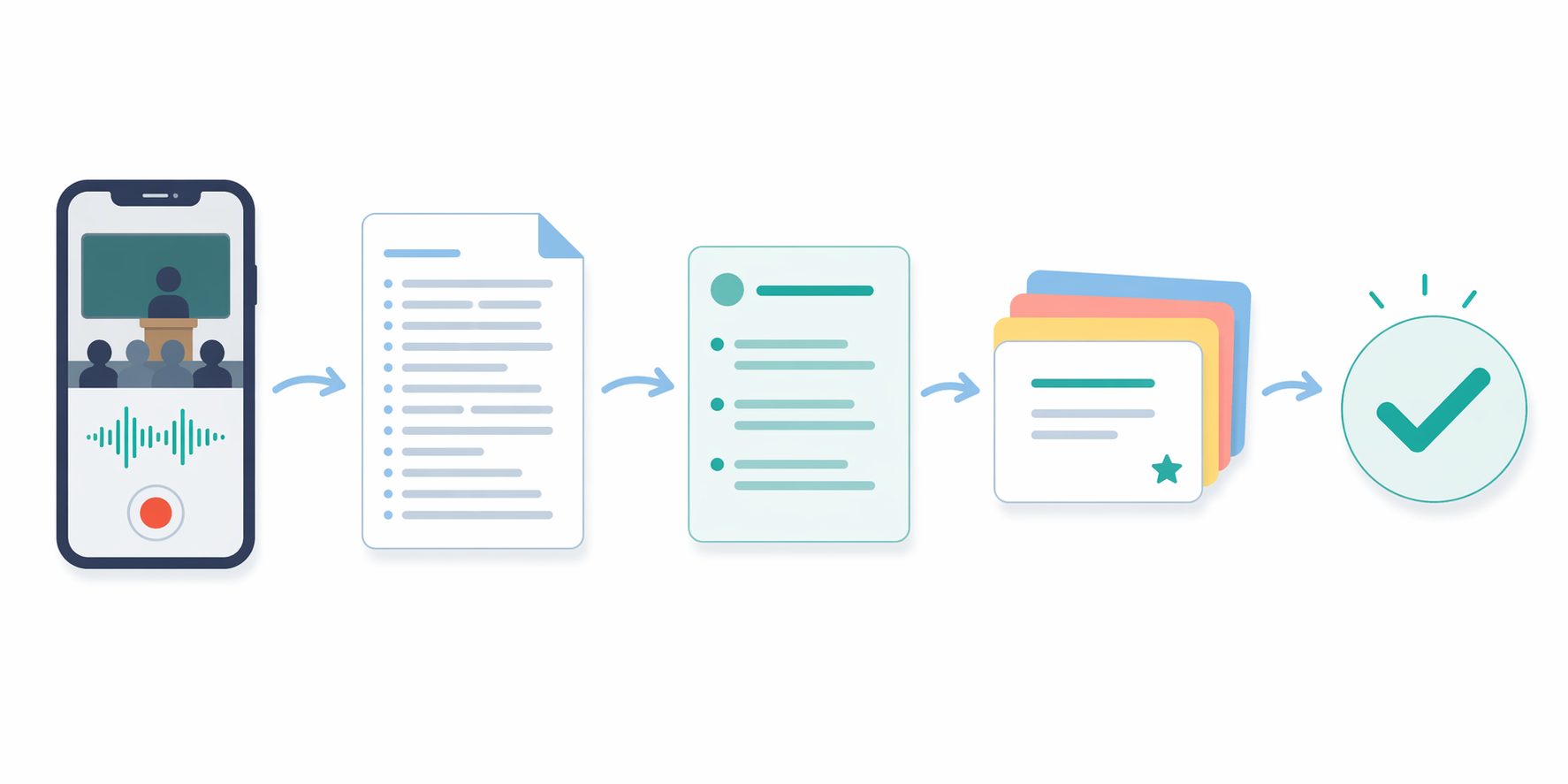
This is one place where “has AI” is too vague to be useful. A chatbot box inside a notes app is not the same as a study pipeline. For a student, the valuable part is not the label; it is the reduction in handoffs. If the app can capture the lecture, produce a usable transcript, extract the main points, create a flashcard deck, and test recall inside the same workspace, the app is doing a different job from OneNote or Keep.
There are two cautions. First, the sources that describe these newer AI apps often have promotional incentives; their comparison tables are useful signals, not neutral lab tests. Second, AI limits tend to hide inside free plans: minutes of transcription, number of generated summaries, storage for recordings, export access, or the ability to sync across devices may be restricted. That does not make the apps bad. It means a student should test one real week of classes before trusting the free tier for a whole term.
A practical trial is simple: record one lecture with permission, check whether the transcript is readable, compare the summary against your own understanding, review the generated flashcards, and see whether the quiz actually exposes what you forgot. If the app saves time at that full-cycle level, it may justify weaker portability. If it only produces a pretty summary you never revisit, it is not a study system.
Students comparing free options by device and major may also want the separate free note-taking apps for students guide, because a nursing student recording lectures and a design student marking up diagrams are not shopping for the same tool.
Best for quick capture: Google Keep, with clear limits
Google Keep is not a failed OneNote. It is a fast capture tool, and that is enough for many people. Grocery lists, parking locations, short reminders, quick meeting bullets, and random ideas do not need a knowledge graph or an AI tutor. They need to open quickly and sync without drama.
The trouble starts when Keep becomes the place for everything. Android-focused comparisons point out that Keep lacks a folder hierarchy, audio transcription, AI summarization, and meaningful handwriting-to-text for larger note systems.[3][6] Labels can stretch farther than people expect, but they do not become a real notebook structure just because you are patient.
Keep is the right answer when notes are temporary, lightweight, or action-oriented. It is the wrong answer when you need semester organization, PDF markup, searchable handwritten notes, structured project records, or an archive you expect to navigate two years from now.
Free versus paid: where the catches usually appear
Free note-taking apps rarely fail on day one. They fail after you have enough notes that moving becomes annoying. The free plan may let you write unlimited text but restrict sync, upload size, device count, AI actions, export formats, collaboration, or offline access. That is why the free tier matters less as a label than as a set of daily permissions.
| App or category | Free-tier reality to check | Who should be cautious |
|---|---|---|
| OneNote | Often the strongest free baseline for Android because storage, sync, canvas notes, and attachments are broadly usable | People who dislike Microsoft account dependency or heavier notebook structure |
| Samsung Notes | Very strong if you already own Galaxy hardware | Anyone who may switch to iPhone, iPad, Mac, or non-Samsung Android devices |
| Obsidian | Free for personal use, with local files as the main advantage | People who expect built-in cloud sync, transcription, or AI study tools without setup |
| Google Keep | Generous for lightweight capture because the product is simple | Users who need folders, deep organization, transcription, or serious export workflows |
| AI-native study apps | May reserve transcription minutes, AI summaries, flashcards, quizzes, storage, or exports for paid plans | Students planning to rely on the app for every lecture |
| Cross-platform productivity apps | May look free until device limits, upload limits, team features, or history limits matter | Freelancers and office workers with client or project archives |
For a deeper cost breakdown, use the 2026 note-taking app pricing comparison. It is the better place to think about one-year and three-year costs after you have narrowed the field by use case.
Platform fit matters more on Android than people expect
Android is not one device story. A Pixel phone, Galaxy Tab, Chromebook, Windows laptop, and work-issued Mac can all sit in the same person’s week. A notes app that feels perfect on one screen can become a nuisance if the desktop version is weaker, the web app is cramped, or the export path assumes you will never leave.
| Your device mix | Safer starting point | Reason |
|---|---|---|
| Android phone + Windows PC | OneNote | Microsoft’s ecosystem fit is useful, and the desktop app gives the notebook room to breathe |
| Galaxy Tab + Galaxy phone | Samsung Notes | The S Pen experience is the main reason to stay inside Samsung’s lane |
| Android phone + Chromebook | OneNote, Keep, Obsidian, or a web-first app depending on the job | Chromebook support depends heavily on web quality and Android app behavior |
| Android + Mac or iPad | OneNote, Obsidian, Notion, Evernote, UpNote, or another parity-focused app | Avoid Galaxy-only archives unless the notes are temporary |
| Mostly offline or privacy-sensitive work | Obsidian | Local Markdown files reduce dependence on one cloud service |
| Lecture-heavy school setup | AI-native study app plus a backup/export plan | The workflow may matter more than traditional notebook polish |
Also remember that Android fragmentation is real. Handwriting latency, offline sync behavior, microphone handling, background uploads, and stylus support can vary by Android version, manufacturer skin, tablet model, and stylus protocol. Any app you are considering for daily use deserves a short test on your actual device, not just a decision made from screenshots.
Why AI is getting so much space in 2026
The AI push is not only marketing noise. Industry reporting estimates the note-taking app market at $11.02 billion in 2025 and projects it to reach $13.3 billion in 2026, with growth attributed to smartphone proliferation and AI feature adoption.[7] That kind of market number should not decide which app you install, but it does explain why every comparison page suddenly seems to care about transcription, summaries, and generated study materials.
The useful distinction is adoption versus fit. More apps adding AI does not mean every user needs AI notes. A consultant who writes short client follow-ups may benefit more from reliable export and search. A Galaxy Tab user annotating PDFs may care more about pen feel. A student in lecture halls three days a week is the person most likely to feel the difference between a traditional note app and an AI study workflow.
A practical way to decide in five minutes
- Name the main input: typing, handwriting, voice recording, PDFs, web clips, or quick lists.
- Name the main retrieval method: search, folders, tags, backlinks, calendar context, or generated study materials.
- List the devices you actually use each week, not the ones you might buy later.
- Check the exit path: Markdown files, PDF export, web export, notebook export, or no comfortable migration route.
- Test the free tier with real notes for one week before importing an archive.
If that quick pass points in two directions, pick the app that protects the higher-cost activity. Losing a grocery list is annoying. Losing a semester of lecture notes, a client knowledge base, or years of handwritten research is a different category of problem.
Final verdicts by user type
| User type | Best starting app | Why |
|---|---|---|
| Most Android users who want one free notebook | OneNote | It gives the broadest free combination of structure, canvas space, attachments, sync, and platform reach |
| Galaxy Tab students who handwrite everything | Samsung Notes | The S Pen experience is strong enough to justify the ecosystem trade-off for handwriting-first work |
| Students who record lectures | Notelyn, Storyflow, or another AI-native study app | The recording-to-quiz workflow can save real time if the transcript and review tools are good |
| Writers, researchers, and PKM users | Obsidian | Local Markdown files and backlinks support a durable knowledge base |
| People who only need lists and quick reminders | Google Keep | It opens fast and stays out of the way |
| Users moving between Android, Windows, Mac, Chromebook, and iOS | Start with OneNote, then compare cross-platform apps | The best Android app is not enough if the rest of your week happens elsewhere |
Android users do not need one universal winner. They need to choose the constraint that matters most before choosing the app: handwriting quality, AI study automation, local ownership, free storage, fast capture, or cross-platform reliability. Once that constraint is honest, the right shortlist becomes much smaller.
References
- The 7 best note taking apps in 2026, Zapier, Dec. 2025.
- Best note-taking app for Android of 2025, TechRadar.
- Best Note-Taking Apps for Android, Notelyn.
- The Best Note-Taking Apps for 2026, PCMag.
- The 12 Best Note-Taking Apps in 2026, Storyflow.
- Google Keep coverage, Android Police.
- Note Taking App Market Report 2026, The Business Research Company.